

Bible Home - Read & Pray
- 72.00
- 4.4
- Installs
- 50.00K
- Price
- Free

Screenshots

Analysis by Reviewed
I approached Bible Home - Read & Pray as a quiet reading companion rather than a full study suite, and that distinction matters. Its purpose is straightforward: help me open the Bible, spend time with the text, and listen to the Lord’s teachings without turning every session into a complicated research project. For people who want a simple place for daily reading, that focus can be refreshing.
This is a free Books & Reference app from Luxi Liu, available for everyone to use on devices running Android 6.0 or later. It has reached over 50 thousand installs and holds a 4.4 average from around 286 ratings, which suggests that its uncomplicated approach has found an audience. I would not choose it because of those figures alone, but they do make it feel like an established option rather than an experiment with no user history.
How Bible Home fits into a real reading routine
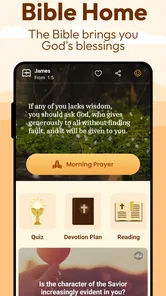
My most natural use for the app was a short reading session at a predictable point in the day. I would open it when I wanted to read a passage without first deciding which study tool, commentary, or search method to use. That reduced the small amount of friction that often stops a good intention from becoming a habit.
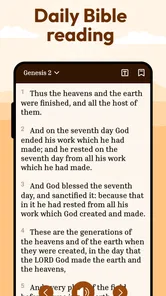
The baseline workflow is easy to understand: launch the app, move into the Bible content, read at a comfortable pace, and return later when I want another session. The experience suits someone who prefers a direct path from opening the app to engaging with scripture. It does not feel designed to compete with large reference libraries or academic Bible platforms; it works better as a focused doorway into reading and prayer.
That simplicity is particularly useful in everyday situations. Imagine having ten quiet minutes before work, during a lunch break, or before bed. With a more elaborate study app, I might spend that time adjusting a plan, comparing translations, opening notes, or navigating a crowded dashboard. Here, the value is in keeping the first step small. I can begin reading before my attention drifts elsewhere.
I also found the app more suitable for reflective reading than for rapid information gathering. If I already know the passage I want to revisit, the experience feels calm. If I am trying to investigate a theme across several books, compare wording, or build a detailed study archive, the straightforward design becomes less of an advantage.
The best way to use Bible Home is to make it the starting point of a repeatable habit, not to treat it as an all-purpose theological workstation. That expectation makes the app easier to appreciate and prevents disappointment when it does not behave like a specialist reference tool.
More From Our News Desk

 Gmail
GmailGmail in a Busy Inbox: Who Benefits Most?
From first account to crowded workday, Gmail earns its place through dependable search and flexible sorting—but its best fit depends on how much inbox maintenance you can tolerate.

 Prime Video
Switching to Prime Video: What Changes in Your Viewing Routine
Prime Video can make a compelling second home for streaming, but switching means learning a different catalog, rental layer, and route from browsing to playback.

 Universal TV Remote Control
Universal TV Remote Control Works Best as a Reliable Backup
A phone remote earns its place through quick setup and reliable habits. Here is how to get more from Universal TV Remote Control—and where its limits show.

 Weather - By Xiaomi
Weather by Xiaomi Review: Clear at a Glance, Less Clear Up Close
Xiaomi’s weather app makes everyday forecasts quick to scan, but its calm surface can leave useful details and recovery paths harder to find than they should be.

 X
XX Under Pressure: Can It Recover When Posting Goes Wrong?
A resilience-focused review of X, examining setup, mistaken posts, interruptions, weak connections, and the gaps that matter when recovery needs to be dependable.

 Clash of Clans
Clash of Clans Is Won Between the Battles
Its raids are quick; its community is a long-term project of coordination, teaching, rivalry, and shared responsibility—with all the friction that entails.
Latest News



Who will get the most from the simple approach?
I would recommend it first to readers who want a dedicated Bible app without a steep learning curve. It can suit someone returning to regular reading, a person who prefers a clean spiritual routine, or a reader who wants something less distracting than a general web browser. Its Everyone content rating also makes it approachable for households looking for an uncomplicated reading option.
It may also work well for people who are trying to separate devotional time from ordinary phone use. Opening a focused Bible app creates a different mental cue from opening a browser and searching for a passage. That small separation can help protect a few minutes of attention, especially when notifications and unrelated recommendations are competing for it.
I would be more cautious about recommending it to a student, pastor, or serious Bible researcher who needs extensive cross-references, original-language tools, detailed commentary, or a large collection of study resources. Those users may be better served by a more feature-heavy reference app, even if that alternative takes longer to learn.
Settings that deserve a deliberate check
Experienced users should resist the temptation to open the app and immediately read without considering how the session will work for them. The most useful settings are the ones that reduce visual and practical friction. I would begin by checking the reading presentation, including text size and any available display preferences, because comfortable typography matters more over repeated sessions than it does during a quick first impression.
A useful adjustment is one that makes the app easier to read in the environment where it will actually be used. Someone reading at night may prefer a gentler display, while someone reading outdoors may need stronger contrast or larger text. I would test these choices during a real session rather than selecting them quickly and forgetting them. A setting that looks fine on a bright setup can feel tiring after several pages.
I would also review any available audio controls before relying on listening as part of a routine. The store summary presents the app as a way to read the Bible and listen to the Lord’s teachings, so users who prefer audio should spend a moment learning how playback behaves. Check whether starting and stopping feels obvious, whether the current position is easy to recognize, and whether the controls remain convenient when the phone is not being held directly in front of you.
That last point is more important than it sounds. Listening while preparing breakfast, walking around the house, or taking a quiet break requires a different workflow from reading. If the controls demand frequent attention, the audio option becomes less useful. If they are easy to understand, it can turn a short household task into time for listening without pretending that multitasking provides the same focus as reading.
I would make one more practical check: how the app behaves when I leave and return later. A good routine depends on being able to pause without feeling that I have lost my place. Before building a daily habit around it, I would close the app after a brief session and reopen it later to see how naturally I can continue. This is a small test, but it reveals whether the app fits real interruptions such as calls, messages, or a change of task.
Faster patterns for daily reading and listening
The quickest improvement is to decide the goal before opening the app. There are three different intentions that can look similar from the outside: reading a known passage, browsing for a quiet devotional moment, and listening while doing something else. Choosing one in advance keeps me from wandering through the interface and makes a short session feel complete.
For a known passage, I would prepare the reference mentally or keep a simple note outside the app. That is faster than opening the app without a destination and hoping the right section appears quickly. For browsing, I would give myself a modest time boundary and read the first suitable passage rather than endlessly searching for the perfect one. For listening, I would set up the session before starting the household task, so I am not handling the phone repeatedly while moving around.
Another effective pattern is to use the same place and approximate time each day. The app does not need to provide an elaborate motivational system for this to work. A repeatable context does much of the job: the same chair, the same quiet part of the evening, or the same pause after waking. Bible Home then becomes associated with that moment, which is more dependable than waiting for inspiration.
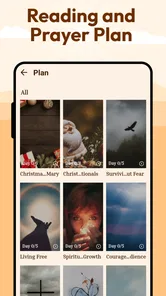
I also prefer short, intentional sessions over ambitious targets that I cannot maintain. Reading a manageable passage and returning the next day is more useful than starting with a demanding plan and abandoning it after a busy week. The app’s simple character supports this approach because it does not pressure me to turn every opening into a major study event.
For listening, I would use a two-stage habit. First, I would listen to a passage without trying to do anything else intellectually. Later, if a particular idea stays with me, I would return to the text and read it more slowly. This separates reception from analysis. It is a practical way to use the app’s reading and listening purpose without expecting one mode to replace the other.
One non-obvious trade-off is that a focused app can make me more consistent while giving me fewer reasons to linger. That is helpful when my problem is procrastination, but limiting when my goal is detailed exploration. I would therefore keep the app for the first, regular reading session and use a broader reference tool only when I have a specific research question. That division prevents heavy features from crowding out the habit.
Where the straightforward design reaches its limits
The same simplicity that makes Bible Home approachable also defines its boundaries. Readers who expect a complete study environment may find the experience too narrow. A focused Bible reader is not automatically a replacement for translation comparison, scholarly notes, topical indexing, memorization systems, or church-study collaboration.
This matters especially when a question arises during reading. If I want to investigate a word, compare several interpretations, or follow a chain of related passages, I may need to leave the app and use another resource. That interruption is not a flaw for every reader, but it changes the ideal workflow. Bible Home is strongest when I already know that my main task is reading or listening.
I would also avoid treating the app as a substitute for personal discernment or community. An app can make scripture more accessible, but it cannot provide the context of a trusted teacher, a thoughtful discussion, or a lived prayer practice. Its role is practical: it puts the reading experience within reach. The depth still comes from how I engage with the text and what I do beyond the screen.
There is a similar limitation for users who want a highly personalized productivity system. Some readers enjoy tagging, exporting, building elaborate notes, and tracking every completed session. If those tools are central to your motivation, a more specialized platform may suit you better. I would not force Bible Home into that role simply because it is convenient for reading.
The release is dated January 27, 2026, and the current version is 1.2.4. I see that as a reason to keep expectations sensible: the app is useful for its stated purpose, but I would judge it by the quality of its reading and listening experience rather than by assuming it offers every mature feature found in larger platforms. Its free price removes the financial barrier, though the real cost for some users may be the need to switch apps when study needs become more demanding.
Small habits that make the app more effective
My first tip is to create a clear beginning and ending for each session. Before reading, I decide what I am there to do. At the end, I pause briefly instead of immediately switching to another app. This makes the experience feel less like consuming another piece of phone content and more like a deliberate practice.
My second tip is to adjust the display once, then revisit it after several days rather than changing it constantly. Frequent tinkering can become its own distraction. The goal is not to create a perfect visual setup; it is to make the words comfortable enough that I stop thinking about the interface.
My third tip is to reserve listening for situations where it genuinely helps. Audio can be valuable during a walk or a quiet chore, but it should not become background noise by default. If I notice that I am missing the meaning because I am concentrating on something else, I switch back to reading. That is a better use of the app than treating playback as a box to tick.
A fourth useful pattern is to keep a separate, very short reflection note if the app does not provide the kind of journaling system I want. I might write one sentence about what stood out and one sentence about how I want to respond. This keeps the reading app uncluttered while still giving the session a memory. It also avoids spending more time designing a note system than engaging with the passage.
These habits reveal an important strength: the app can stay in the background of the routine. It does not need to become the center of a complicated system. For many readers, that is exactly the point. The less energy I spend managing the tool, the more energy I can give to the reading itself.
My verdict after using it as a focused companion
Bible Home - Read & Pray is a sensible choice for someone who wants a free, approachable way to read the Bible and listen to its teachings. I like its clear identity and the fact that it does not require me to become an expert in the app before beginning. The developer, Luxi Liu, has presented it as a focused reading option rather than something I need to manage like a large digital library.
I would choose it for a daily baseline workflow: open it at a regular time, read a manageable passage, listen when that mode fits the moment, and return the next day. I would not choose it as my only tool for serious study, detailed comparison, or extensive personal archiving. In those situations, a broader Bible reference app is likely the better companion, even if it feels busier.
The deciding question is simple: do you need a calm entry point into scripture, or do you need a complete research environment? If the first answer is yes, this app deserves a place on your shortlist. If the second answer is yes, its limits will appear quickly and you may spend too much time moving between tools.
For me, the strongest recommendation is conditional but genuine. Bible Home works best when simplicity is not a compromise but the feature you are actively looking for. Used with a repeatable reading habit, sensible display choices, and realistic expectations about advanced study, it can make regular engagement easier without adding unnecessary complexity.
Bible Home - Read & Pray Frequently Asked Questions
What devices can run Bible Home - Read & Pray?
Bible Home - Read & Pray is available for Android devices running Android 6.0 or later. It is a Books & Reference app from developer Luxi Liu, so check that your device meets the minimum system requirement before downloading. The app is free, and its age rating is Everyone, making it suitable for a broad audience.
Who publishes Bible Home - Read & Pray, and is it a well-used app?
Bible Home - Read & Pray is published by Luxi Liu and focuses on reading the Bible and listening to the Lord's teachings. It has more than 50,000 installs and an average rating of 4.4 from 286 ratings, with 72 written reviews. Those figures offer a quick sense of its reach, though individual experiences can vary depending on what someone wants from a Bible app.
What is Bible Home - Read & Pray?
Bible Home - Read & Pray is a mobile app designed to combine Bible reading, prayer, and daily spiritual reflection in one place. It typically offers access to Scripture passages, devotional content, prayer-focused features, and reminders that encourage consistent use. The app may suit both new readers and experienced Bible users who want a convenient way to maintain a faith-based routine from an Android or iOS device.
Can I read the Bible offline with Bible Home - Read & Pray?
Offline availability can depend on the Bible translation, device, and content downloaded within the app. Some versions or reading materials may be accessible without an internet connection after setup, while other features—such as synchronized progress, fresh devotional content, advertisements, or online resources—may require connectivity. Before relying on it for travel or limited-service areas, check the app’s download options and test the selected Bible content offline.
Does Bible Home - Read & Pray include prayer and devotional features?
Yes, prayer and devotional reflection are central parts of the app’s concept. In addition to Bible reading, users may find guided prayer content, daily inspirational messages, prayer reminders, or tools for organizing personal prayer intentions. The exact selection can vary by version and subscription status, so users should review the available sections after installation to see which features are free and which may require additional access.
Pros
- Simple interface makes daily Bible reading easy to start.
- Prayer features encourage a consistent personal routine.
- Useful for quiet reflection
- devotionals
- and spiritual study.
- Suitable for both beginners and experienced Bible readers.
- Convenient access to faith-based content while traveling.
Cons
- Some content or features may require an internet connection.
- The selection of Bible versions may be limited by region.
- Personalization options may feel basic for advanced users.
- Notifications can become distracting if enabled too frequently.
- Ads or premium prompts may interrupt the reading experience.











