Best Western To Go
- 2.79K
- 4.6
- Installs
- 1.00M
- Price
- Free

Screenshots


Analysis by Reviewed
Ever found yourself on a road trip, desperately searching for a decent place to crash for the night? Well, let me introduce you to the Best Western To Go app. This nifty little tool is your ultimate travel companion, making hotel bookings as easy as pie. But hey, don't just take my word for it; let me walk you through my experience with it.
Finding the Perfect Stay
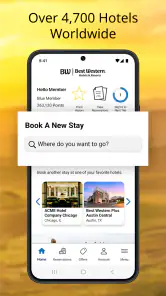
Picture this: You're cruising down the highway, music blaring, when suddenly you realize you need to find a place to rest. Enter the Best Western To Go app. With its intuitive interface, I was able to search for hotels faster than you can say "vacation." The app provides a list of nearby Best Western hotels, complete with reviews, photos, and all the amenities you could ever want. It's like having a personal travel agent in your pocket!
Booking Made a Breeze
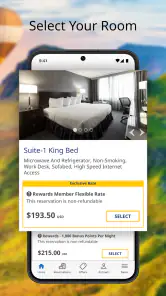
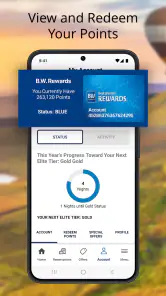
Once you've found the hotel that tickles your fancy, booking a room is a walk in the park. The app guides you through the process with ease, allowing you to select room types, check availability, and even nab some sweet deals. I was particularly impressed by how smoothly everything worked. No glitches, no fuss, just a straightforward booking experience. Plus, if you're a Best Western Rewards member, you can rack up points with every stay, which is a total win in my book.
Your Travel Organizer
One of my favorite features of this app is the travel planner. It lets you store your travel plans, including hotel reservations, all in one place. I can't tell you how handy this was during my trip. It even syncs with your calendar, so you never miss a check-in or check-out time. Talk about convenience!
Oh, and did I mention the app works offline? That's right, even if you're in a no-signal zone, you can still access your bookings. It's like having a lifeline when you're out in the boonies with no Wi-Fi in sight.
Final Thoughts
All in all, the Best Western To Go app is a game-changer for anyone who loves to travel. It's user-friendly, efficient, and packed with features that make hotel bookings a breeze. Whether you're a frequent traveler or just looking for a weekend getaway, this app has got you covered. So next time you hit the road, make sure you've got this app handy. Trust me, your future self will thank you!
Pros
- User-friendly interface for easy navigation.
- Offline access to reservations and itineraries.
- Loyalty program integration for rewards.
- Real-time updates on booking status.
- Comprehensive hotel search and filter options.
Cons
- Limited customization for travel preferences.
- Occasional app crashes reported by users.
- Some features require stable internet.
- Limited language support in app.
- Booking modifications can be cumbersome.

- Category
- Travel & Local
- Version
- 7.4.7