

BelongAI Dave - Cancer Mentor
- 33.00
- 4.4
- Installs
- 10.00K
- Price
- Free

Screenshots
Analysis by Reviewed
Living with cancer often means managing a stream of questions between appointments: a new symptom, an unfamiliar term, a treatment-related worry, or a practical issue that feels too small for an urgent call but too important to ignore. BelongAI Dave - Cancer Mentor is a free medical app from BelongTail that aims to make those moments easier by placing an AI cancer-focused companion on the phone. I approached it as a support tool rather than a replacement for a medical team, and that distinction matters throughout the experience.
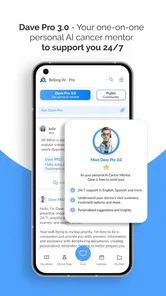
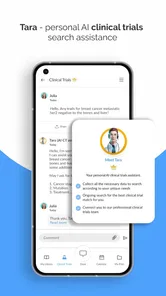
The app is built around conversation and proactive guidance. Its store summary describes it as an AI for every cancer patient, while the shorter store description simply identifies it as BelongAI Dave. In practice, that positioning makes the app most interesting for people who want help organizing concerns and understanding cancer-related information in everyday language. It is less suitable for anyone looking for diagnosis, emergency triage, or a definitive treatment decision from a phone.
My overall impression is that the concept is more useful than a generic health chatbot because the focus is deliberately narrow. Cancer care has its own vocabulary, emotional pressure, and day-to-day uncertainty. A specialized mentor can be easier to approach than a broad medical search tool, especially when the user does not know which medical phrase to type into a search engine. The app’s value, however, depends heavily on how carefully the user frames questions and how responsibly they verify important answers.
How the app feels during ordinary use
I’d use this section to focus on the small decisions that shape an ordinary session: whether I can turn a vague worry into a clear question, and whether the answer helps me decide what to discuss with my care team. The most useful habit is to leave each conversation with one practical next step rather than a growing list of concerns. That everyday rhythm also makes it easier to judge which information deserves extra caution.
Speed expectations when a question feels urgent
The first thing I would consider before installing any AI health app is not whether every answer arrives instantly, but whether the interaction feels practical enough to use when I am tired or worried. BelongAI Dave is designed for direct questions, so the expected rhythm is simple: open the app, describe what is happening, and read the response. That is a more approachable starting point than searching through long hospital pages or trying to interpret a technical leaflet without context.
Still, speed should not be confused with medical quality. A quick response can be useful for explaining a word or helping prepare a question for an oncologist, but it should not encourage rushed decisions. If I were asking about a sudden severe symptom, breathing difficulty, chest pain, confusion, or a possible emergency, I would contact emergency services or my care team instead of waiting for an AI reply. The app belongs in the space between appointments and routine information gathering, not in place of urgent care.
One practical strength is that conversational tools can reduce the friction of asking an imperfect question. Someone may not know the exact name of a drug or the difference between a scan and a biopsy. I can start with plain language, then use the response to identify what needs clarification. That makes it potentially helpful for a newly diagnosed patient, a family member attending appointments, or a caregiver trying to build a sensible list of questions.
More From Our News Desk

 Gmail
GmailGmail in a Busy Inbox: Who Benefits Most?
From first account to crowded workday, Gmail earns its place through dependable search and flexible sorting—but its best fit depends on how much inbox maintenance you can tolerate.

 Prime Video
Switching to Prime Video: What Changes in Your Viewing Routine
Prime Video can make a compelling second home for streaming, but switching means learning a different catalog, rental layer, and route from browsing to playback.

 Universal TV Remote Control
Universal TV Remote Control Works Best as a Reliable Backup
A phone remote earns its place through quick setup and reliable habits. Here is how to get more from Universal TV Remote Control—and where its limits show.

 Weather - By Xiaomi
Weather by Xiaomi Review: Clear at a Glance, Less Clear Up Close
Xiaomi’s weather app makes everyday forecasts quick to scan, but its calm surface can leave useful details and recovery paths harder to find than they should be.

 X
XX Under Pressure: Can It Recover When Posting Goes Wrong?
A resilience-focused review of X, examining setup, mistaken posts, interruptions, weak connections, and the gaps that matter when recovery needs to be dependable.

 Clash of Clans
Clash of Clans Is Won Between the Battles
Its raids are quick; its community is a long-term project of coordination, teaching, rivalry, and shared responsibility—with all the friction that entails.
Latest News



I would also avoid sending a long, unstructured story and expecting a perfect answer. The better approach is to separate the issue into parts: what happened, when it started, what treatment is involved, and what I want to understand. This is one of the most useful ways to work with the app. It may not make the underlying medical situation simpler, but it can make the conversation more organized.
What happens during heavier use
Heavier use is likely to happen during treatment changes, scan periods, or a difficult week when several concerns arrive at once. In those moments, the app’s conversational format may be more comfortable than repeatedly opening unrelated websites. I could use it to turn a confusing set of thoughts into a short appointment checklist, then keep the questions focused rather than trying to solve everything at once.
That workflow is more valuable than treating the app as an answer machine. For example, after reading about a possible side effect, I would ask it to explain the term in everyday language, identify what information I should record, and suggest what to ask my clinical team. I would then compare the result with my treatment instructions and contact the appropriate professional. The app can support preparation; it should not become the final authority.
A second useful scenario is caregiver support. A relative may want to understand a phrase heard during an appointment or prepare respectful questions before a discussion. The app can provide a starting point without requiring the caregiver to know the correct medical vocabulary. However, I would be careful about entering private details, especially when the phone is shared or when the conversation includes another person’s health information.
The main trade-off during intense use is cognitive overload. AI replies can create the impression that every concern deserves a long explanation. When someone is exhausted, a wall of information is not necessarily helpful. I would ask one question at a time, request a short explanation when needed, and write down only the action that genuinely matters. This keeps the tool from adding another layer of work to an already demanding routine.
Reliability matters more than an impressive answer
For a cancer app, reliability has two meanings. The first is technical: whether the application opens and remains usable. The second is informational: whether its replies are careful, consistent, and appropriately limited. The public listing shows an average rating of 4.4 from around 81 ratings, which suggests a generally positive reception, but that figure cannot guarantee that every answer will fit every diagnosis or treatment plan.
I would treat each response as a draft for discussion, not as a prescription. Cancer care differs according to cancer type, stage, medication, previous treatment, age, other conditions, and personal circumstances. Even a well-written answer can become misleading if one of those details is missing. A good habit is to ask the app to distinguish general information from questions that require a doctor, then take that distinction seriously.
Reliability also improves when the user supplies context without exposing unnecessary personal information. Instead of typing a full name, hospital, or identifying details, I would describe the relevant treatment and symptom in general terms. I would also check the date and wording of any instructions from the care team before acting. If the app’s response conflicts with a clinician’s advice, the clinician’s advice takes priority unless the team revises it.
Another limitation is emotional reliability. A chatbot may respond calmly, but calm wording is not the same as emotional care from a person who knows the patient. Someone dealing with fear, grief, or a major treatment decision may need a nurse, counselor, support group, or trusted relative. BelongAI Dave can be a private first step for forming thoughts, but I would not use it as my only source of reassurance.
Device constraints and practical setup
The Android version requires Android 8.0 or later, so it should fit many older phones while excluding devices that have not been updated to that level. That requirement is worth checking before planning to use it on an older backup handset. The app is free to install, but it includes in-app purchases ranging from 49 cents to 179 dollars and 99 cents per item. I would pay close attention to any purchase screen and avoid assuming that every capability is included at no cost.
The current version is 2.8.6, and the app is rated for teens. That age classification does not make it appropriate for unsupervised medical decision-making by a younger user. A teenager with cancer may find the conversational format less intimidating than a formal medical portal, but an adult caregiver or clinical professional should still be involved in important health decisions.
Because this is an AI-focused medical app, the quality of the experience may depend on the phone’s connection and the service behind the conversation, even though I would not treat either as guaranteed in every setting. I would not rely on it as the only resource in a hospital basement, on a flight, or anywhere connectivity is uncertain. Before a long trip or treatment visit, I would save essential instructions from the medical team separately rather than assuming the app will always be available.
Resource demands are difficult to judge from the listing alone, and I would not choose the app based on imagined battery or storage performance. The sensible test is personal: install it on the intended phone, see whether it opens comfortably, and notice whether switching between the app and other medical resources feels manageable. If the device is old or nearly full, keeping the official hospital materials available offline may be more important than adding another tool.
Where it fits beside usual medical alternatives
The usual alternatives are a hospital portal, a nurse advice line, a printed treatment guide, a search engine, or a general-purpose AI assistant. BelongAI Dave’s clearest advantage over a search engine is the conversational starting point. Instead of sorting through pages of mixed quality, I can ask for an explanation in ordinary language and use follow-up questions to narrow the topic.
A hospital portal remains better for personal records, appointment details, laboratory results, and instructions from the actual care team. A nurse line is better when I need professional judgment about a symptom or need to know whether to seek care. A printed guide may be better when internet access is unreliable. A broad AI assistant may be more flexible for unrelated tasks, but it lacks the same deliberate cancer-specific focus implied by this app’s purpose.
That comparison clarifies who should use it. I think it is a good fit for a patient or caregiver who wants a cancer-centered place to prepare questions, translate confusing language, and think through everyday concerns before contacting a professional. It is not the right choice for someone who wants confirmed diagnosis, personalized medication changes, emergency instructions, or a complete record of their care.
I would also skip it if I know I tend to follow confident-sounding online answers without checking them. The app’s conversational tone may feel personal, but it does not create a doctor-patient relationship. Users who prefer verified institutional material may be more comfortable with a hospital portal or cancer organization’s educational resources, even if those tools feel less interactive.
Three workflows that make the app more useful
The first workflow is a question funnel. I would begin with a broad concern, ask for a plain-language explanation, then request a short list of points to raise with my oncologist. Before the appointment, I would remove anything that is already answered by the treatment instructions and keep the questions that depend on my personal case. This prevents the app from replacing the consultation and makes the consultation more efficient.
The second workflow is a symptom note, not a symptom diagnosis. I would record when a symptom began, how it changed, what treatment or activity preceded it, and whether it affected eating, sleeping, movement, or daily tasks. I could then ask the app to help organize that description. The important benefit is better communication with the care team, not a label generated by the app.
The third workflow is translation for family conversations. Medical language can make relatives feel excluded, while overly simplified explanations can become inaccurate. I would use the app to identify unfamiliar terms, then explain them in my own words and confirm important details with the patient or clinician. This is especially useful when a caregiver wants to be supportive without pretending to know more than the medical team.
There is also a privacy trade-off in all three workflows. The more personal the prompt, the more useful the reply might appear, but the more carefully I would need to consider what I am sharing. I would leave out names, addresses, hospital identifiers, and unnecessary details. I would also avoid treating a conversation as a permanent medical record unless the app explicitly provides that function and I understand how it works.
Stability, recovery, and the limits of confidence
Recovery is important in a medical app because users may return after a stressful appointment, a disrupted night, or a period away from the phone. I would want to reopen the app and continue thinking without losing the practical notes I need. Since I would not rely on an AI conversation as my sole record, I would keep appointment questions and clinician instructions in a separate, dependable place as well.
If the app becomes unavailable, the recovery plan is straightforward: use the hospital’s contact route, the relevant treatment paperwork, or an established medical advice service. That may sound obvious, but it is essential for cancer care. A useful companion should fit into a broader support system rather than becoming a single point of failure.
The app’s free entry point makes it easy to try, but the possible purchase range deserves attention before extended use. I would explore the free experience first, read each purchase description carefully, and involve the person responsible for payment if the phone belongs to a family member. A medical context can make users more vulnerable to paying for reassurance, so clear boundaries are sensible.
My performance verdict
BelongAI Dave - Cancer Mentor is most convincing as a focused conversation aid. Its cancer-specific identity gives it a clearer purpose than a general chatbot, and its free availability lowers the barrier for patients and caregivers who need a starting point. The developer, BelongTail, has positioned it in the medical category, and the app has passed the ten-thousand-install mark, giving it a modest but meaningful presence among health tools.
I would recommend trying it if you want help turning vague worries into organized questions, understanding cancer terminology, or preparing for a conversation with your care team. I would use it calmly, avoid unnecessary personal information, and verify every important answer with a qualified professional. I would also keep emergency contacts and official treatment instructions accessible outside the app.
My final judgment is positive but deliberately cautious: use it to prepare, understand, and communicate—not to diagnose, prescribe, or decide alone. For the right user, that boundary makes the app genuinely useful. For someone seeking personalized clinical authority or guaranteed answers, a doctor, nurse line, or hospital portal remains the better choice.
With a 4.4 average and a Teen content rating, it appears approachable to a broad audience, but those details should not replace personal judgment about medical suitability. The app is free to begin with, while optional purchases can reach 179 dollars and 99 cents per item, so I would review costs before committing to anything beyond the basic experience. Used as one carefully chosen layer in a larger care plan, it can make difficult questions easier to express without pretending that technology can replace the people responsible for treatment.
BelongAI Dave - Cancer Mentor Frequently Asked Questions
Is BelongAI Dave - Cancer Mentor free to download, and are there in-app purchases?
BelongAI Dave is free to download, so you can try the app without paying an upfront purchase price. It also offers in-app purchases, with listed items ranging from $0.49 to $179.99 each, so check the purchase details in the app before confirming anything. If you are downloading it for a family member, it may be helpful to review device purchase controls first.
Which devices can run BelongAI Dave - Cancer Mentor?
The app is available for Android devices running version 8.0 or later. Check your device’s operating-system version before downloading, particularly if you use an older phone or tablet. Compatibility is only one consideration: the app is a medical information and support tool, so make sure it is suitable for the person who will use it and keep their healthcare team involved in medical decisions.
Who develops BelongAI Dave, and what should I know about its age rating?
BelongTail develops BelongAI Dave - Cancer Mentor, and the app has a Teen age rating. Its focus on cancer information may make it relevant to patients and people supporting them, but the rating does not mean it is a substitute for age-appropriate guidance from a healthcare professional or trusted adult. Consider the user’s needs and comfort before installing it, especially when a young person is dealing with a serious diagnosis.
What is BelongAI Dave - Cancer Mentor designed to do?
BelongAI Dave - Cancer Mentor is an AI-powered support and information tool intended to help people affected by cancer understand common topics, prepare questions, and navigate parts of the cancer journey. It may provide general educational guidance, explanations, and conversational support. It should be viewed as a companion for information and organization, not as a replacement for an oncologist, nurse, physician, or other qualified healthcare professional.
Can BelongAI Dave provide a cancer diagnosis or recommend treatment?
No. The app should not be used to diagnose cancer, interpret symptoms with certainty, choose a treatment plan, or replace medical advice. AI-generated responses can be incomplete, outdated, or unsuitable for an individual’s specific condition. Always discuss test results, medication decisions, side effects, urgent symptoms, and treatment alternatives with your healthcare team. If you experience a medical emergency, contact local emergency services rather than relying on the app.
Pros
- Offers supportive
- cancer-focused guidance in a conversational format.
- Can help users prepare questions before speaking with their care team.
- Available privately on a phone
- making support easy to access.
- May simplify complex cancer information into more understandable language.
- Useful for tracking concerns and organizing thoughts between appointments.
Cons
- AI responses should not replace advice from an oncologist or medical professional.
- Information quality may vary depending on the question and cancer type.
- Users may need to verify medical details with trusted clinical sources.
- Discussing sensitive health information raises privacy concerns for some users.
- The app may feel less helpful during urgent or highly personal situations.











