Beauty Make Up Photo Editor
- 182.00
- 3.7
- Installs
- 1.00M
- Price
- Free
Screenshots
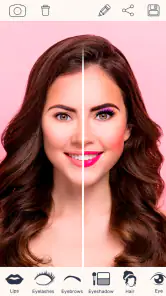
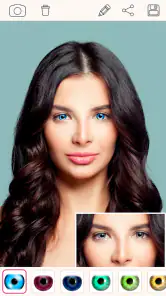
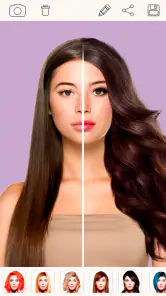
Analysis by Reviewed
When I want to see whether a lipstick shade suits a particular selfie, I’d rather test the idea on a photo than guess from memory. That is the simple appeal of Beauty Make Up Photo Editor: it turns a familiar portrait into a low-stakes place to experiment with makeup and appearance. I see it as a playful beauty editor, not a substitute for a professional retouching workflow or a promise that every edit will look natural.
What to expect from a quick portrait editor
The app makes most sense when I have one portrait in mind and a specific change I want to preview. It is not the kind of editor I would open to organize a whole photo library or build a complicated image from scratch. Instead, I’d use it to answer small questions: does a warmer lip color suit this picture, would a little blush brighten it, or does the photo look better untouched? Having that limited goal helps keep the editing focused and makes it easier to judge whether the result is useful.
I’d start with a photo that resembles the kind of image I actually plan to use. A bright, carefully posed selfie can make almost any effect look more polished than it will on a rushed indoor photo. If I am choosing a look for a casual social post, I would test it on a casual photo too. That simple choice makes the preview more relevant and reduces the temptation to keep adjusting a picture until it no longer resembles the moment it came from.
A quick way to try a different look
The app is free to download, with optional in-app purchases listed at $1.99 per item, so it is easy to try before deciding whether it suits your routine. It is a beauty app from Hairstyle Photo Apps, rated for Teen users, and it has been available since June 2, 2017. Its average rating is 3.7 from around 8,200 ratings, with more than a million installs. Those figures suggest it has found an audience, though they do not tell me whether its particular editing style will match yours.
For a useful first test, choose a clear, front-facing photo with even light and a relaxed expression. Makeup effects are easier to judge when the face is not partly hidden by hair or shadow. I’d also save an untouched copy before editing. That gives me a clean comparison and makes it easier to spot when smoothing or reshaping has gone further than I intended.
Transform Your Selfies
So, let's dive in. The first thing I noticed when I fired up the Beauty Make Up Photo Editor was how user-friendly it is. Seriously, even if you're not tech-savvy, this app makes it super easy to navigate. The interface is clean and intuitive, making the editing process feel like a breeze. You can quickly touch up your photos with just a few taps, which is perfect for those of us who are always on the go.
Testing makeup without changing the whole photo
When I am using makeup effects to make a decision, I prefer to change one thing at a time. If I add a lipstick, alter the skin, and apply a filter together, I cannot tell which adjustment actually improved the picture. A more useful sequence is to preview one color, compare it with the original, and only then try another. Once I have a favorite, I can decide whether a small additional touch helps or whether it makes the result feel overdone.
More From Our News Desk

Clash of Clans Is Won Between the Battles

Android Auto Makes the Case for Quieter Car Software

MobiOffice: Transforming Mobile Productivity with Seamless Integration

EA SPORTS FC™ Mobile Soccer: Redefining Mobile Sports Gaming

How Microsoft OneDrive Became a Mobile Productivity Giant

How Google Translate Breaks Language Barriers Effortlessly
This is also a practical way to avoid confusing a flattering effect with a good match. A shade can look attractive on a screen without being a reliable guide to how a real cosmetic will appear in daylight. I would use the app to narrow down a mood—soft, bright, or dramatic—rather than to select a precise product color. For an exact purchase decision, trying the makeup in person or using a tool built around accurate color preview is the safer route.
The Magic of Makeup
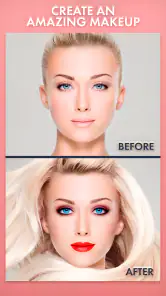
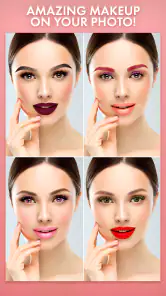
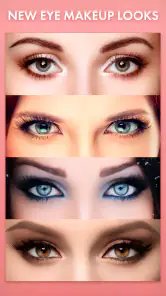
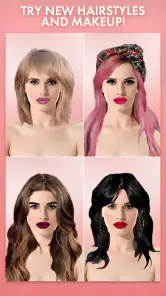
Now, one of the standout features has to be the virtual makeup tools. It’s like playing with makeup but without the mess. You can try on different lipstick shades, experiment with eyeshadows, or even add a bit of blush. The best part? It looks incredibly realistic. I had so much fun switching up my look and trying out styles I’d never dare to in real life. It’s a game-changer for anyone who loves makeup or wants to experiment with different styles.
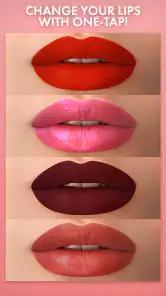
There’s a practical way to get more out of that play: compare two or three lip colors on the same photo before changing anything else. Keeping the photo and lighting constant makes the difference between shades easier to see. I’d use this as a rough preview rather than a perfect match for real-life cosmetics, since screen color and the light in the original photo can affect how a shade appears. It is especially handy when I’m deciding whether a bold color fits a profile picture or a casual post.
Small adjustments need a careful eye
Beauty editing can be surprisingly sensitive to the source image. A face turned slightly away, hair crossing the cheek, or strong shadows can make an effect less convincing than it looks on a straightforward selfie. When an edit seems to sit awkwardly, I would first try a clearer photo rather than piling on more adjustments. That is a useful distinction: sometimes the limitation is the image being edited, not the idea behind the look.
I also recommend checking the picture at the size people will actually see it. A detail that seems minor while zoomed in may become conspicuous as a small profile image, while a subtle change may disappear in a full-screen view. Switching between the original and edited versions gives me a better sense of whether an effect supports the portrait or simply attracts attention to itself.
Beyond the Basics
But wait, there’s more! The app doesn't just stop at makeup. It offers a bunch of other cool editing features. You can whiten your teeth, smooth out your skin, and even reshape certain areas if you’re feeling adventurous. Plus, the app’s filters are on point. Whether you’re feeling a vintage vibe or something more modern, there’s a filter for every mood.
These tools are most convincing when I treat them as small finishing touches rather than a full makeover. For example, I’d check teeth whitening at the image’s normal viewing size, not only zoomed in; an edit that looks subtle close up can become stark once the photo is viewed on a phone screen. I’d be even more cautious with reshaping, because a tiny adjustment can change the balance of a face more than expected. If I want a faithful portrait for a work profile, I’d keep those edits minimal or skip them.
Keeping the result believable
A simple workflow helps me avoid editing in circles. I make a copy of the original, choose the one feature I want to test, and pause before adding anything else. Then I look at both versions side by side and ask whether the edited portrait still feels like the person in the photo. If I cannot tell what changed except that the face looks less like itself, I undo the adjustment. This is especially useful with smoothing and reshaping, where repeated small tweaks can add up without feeling dramatic at each step.
Filters deserve the same restraint. They can change the overall mood of an image, but a strong filter may also shift the apparent color of makeup and skin. I would settle the portrait edits first, then preview a filter as a separate choice. That order makes it easier to keep a lip color from looking different simply because the whole image has taken on a new tint.
Beauty Make Up Photo Editor also respects your individuality. It has a feature that lets you enhance your natural beauty without making you look like a completely different person. It’s all about subtle enhancements that make your photos pop while still looking like you. Love that!
For an everyday example, imagine taking a quick selfie before meeting friends and wanting a little color without redoing your makeup. I’d use the photo editor to test a lip shade, add only a light touch elsewhere, then compare the result against the original before sharing. That workflow is less about hiding every line and more about deciding what feels like you. If the image is important or needs precise color control, a more advanced photo editor may offer finer adjustment and a clearer editing workflow.
Making it part of a real routine
For a quick decision before heading out, I would keep the edit short: choose a recent selfie in similar lighting, try a couple of makeup options, and save only the version that looks right at ordinary screen size. The point is not to create a perfect portrait; it is to make a small choice with less guesswork. If I am editing a picture for a special event, I would take a few minutes to compare the result with an unedited copy and avoid making the preview stand in for how makeup will look in person.
For someone who enjoys experimenting with appearance but does not want to learn a complex editor, that directness is a real advantage. It also makes the app less suited to users who want detailed control over every part of an image. If the job involves a carefully retouched portfolio photo, consistent edits across several portraits, or exact color work, I would start with a more comprehensive photo editor instead.
Where it fits—and where it doesn’t
Compared with a general photo editor, this app puts beauty changes front and center, which makes casual portrait tweaks feel direct rather than buried among unrelated tools. That focus is useful if I mainly want makeup and face edits. On the other hand, people who need detailed layers, carefully controlled color correction, or a consistent look across a batch of photos may be better served by a broader editing app. The trade-off is convenience over precision.
The app’s listing shows a minimum Android requirement of version 5.1. It has a long presence in the beauty-app category, but that history alone does not tell me how its tools have changed over time. I would check the current store page and the app’s behavior on my own device before building it into a regular workflow. For existing users, the practical question is whether the editor still handles the kinds of portraits they like to make, not simply how long it has been around.
What its history can—and cannot—tell you
Because it first appeared in 2017, this is an established beauty editor rather than a newly introduced idea. That gives potential users a sense of its place in the category, but it should not be mistaken for evidence of a particular redesign or recent feature change. I would judge the current experience by opening the app and trying the exact edits I care about. If I already use it, I would keep a copy of important originals and check that the tools I rely on still suit my preferred photo style before changing my routine.
The Android requirement also matters in a practical way: a device that meets the minimum may still feel different from a newer phone, especially when working with large photos or switching between several edits. I would test it with an ordinary selfie first rather than assuming that a minimum requirement guarantees the same comfort on every device. If the controls feel cramped or the process is slower than I want, a simpler built-in photo editor may be the more pleasant choice.
Who will enjoy it
I’d recommend it to someone who wants a quick, approachable way to play with makeup on selfies, especially when the goal is a casual profile photo or a fun style experiment. It is also useful for comparing a few possible looks before getting ready. I’d skip it if I wanted natural-light product matching, extensive retouching controls, or dependable professional consistency; those needs call for a different kind of tool. Teen users should also keep in mind that face-editing features can make filtered images feel like an unfair standard, so I’d treat the results as creative play rather than a measure of how anyone should look.
Cost, expectations, and the right alternative
Since the app is free to try and has optional purchases, I would first see whether the basic editing experience covers my needs before spending anything. An in-app purchase makes sense only if it gives me something I genuinely plan to use; I would not buy an item simply because I am trying to solve a problem that really needs more precise editing. This is a portrait-play tool, so the best value comes when its straightforward approach is exactly what I want.
If I mainly want to crop, brighten, or adjust a landscape, my phone’s ordinary photo tools are likely a more natural starting point. If I want makeup previews and quick facial touches, this app’s beauty-first focus is more convenient. For repeatable client work, advanced retouching, or a controlled sequence of edits, a full-featured editor is the stronger choice. The useful question is not which category is best in general, but whether I want a quick experiment or a dependable, detailed workflow.
Final Thoughts
At the end of the day, the Beauty Make Up Photo Editor is a fantastic tool for anyone looking to up their selfie game. It’s easy to use, packed with features, and best of all, it’s fun. Whether you’re a beauty guru or just someone who loves taking photos, this app has something for everyone. So why not give it a try and see for yourself? Trust me, you won't be disappointed.
Beauty Make Up Photo Editor Frequently Asked Questions
What devices and operating systems can run Beauty Make Up Photo Editor?
Beauty Make Up Photo Editor is a beauty app for Android, with a minimum operating system requirement of Android 5.1. Before downloading, check your device’s Android version and available storage so you can install and use the app comfortably. It is intended for editing photos with makeup and hairstyle effects, rather than for applying makeup in real life.
Is Beauty Make Up Photo Editor suitable for younger users?
The app has a Teen content rating, so it may be appropriate for teenagers, depending on a family’s preferences and the way the app is used. Its focus is virtual makeup, hairstyles, and photo editing. Parents or guardians may wish to review the app together with younger users and consider any in-app purchases before allowing a download.
What features does the Beauty Make Up Photo Editor offer?
The Beauty Make Up Photo Editor offers a wide range of features including virtual makeup application, skin smoothing, blemish removal, teeth whitening, and hair color changing. Users can also access various filters and effects to enhance their photos. The app is designed to be user-friendly with easy navigation and quick editing tools.
Is the Beauty Make Up Photo Editor free to use?
Yes, the Beauty Make Up Photo Editor is free to download and use. However, it offers in-app purchases for premium features and additional makeup tools. Users can enjoy basic editing tools at no cost, but may choose to buy premium features for a more enhanced experience. In-app purchases are listed at $1.99 per item, so it is worth checking purchase options before confirming any transaction.
How user-friendly is the Beauty Make Up Photo Editor for beginners?
The Beauty Make Up Photo Editor is highly user-friendly, even for beginners. It features an intuitive interface with step-by-step instructions for each tool. The app provides tutorials and tips to help users navigate through different features easily, making it accessible for those who are new to photo editing.
Pros
- Wide range of makeup tools available.
- User-friendly interface for beginners.
- Real-time makeup effects preview.
- High-quality photo output.
- Variety of filters to enhance photos.
Cons
- Contains in-app purchases.
- Frequent ads can be disruptive.
- Limited free features.
- Requires internet for full functionality.
- Consumes significant battery power.
- Category
- Beauty
- Version
- Varies with device












