

Beautiful Wallpapers 4K
- 1.69K
- 4.5
- Installs
- 10.00M
- Price
- Free
Screenshots
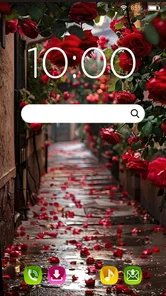
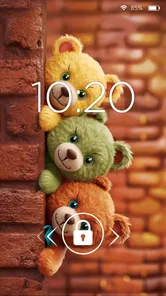
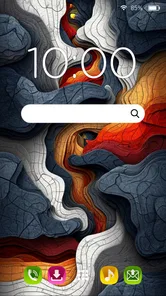
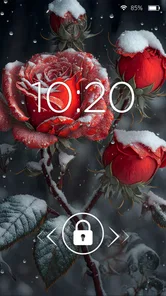
Analysis by Reviewed
I like a wallpaper app best when it makes changing my screen feel easy rather than turning the choice into another chore. Beautiful Wallpapers 4K is a free personalization app from Pro Wallpapers 4K, and its appeal is simple: it gives me a way to refresh a phone’s look with high-resolution imagery. I’d treat it as a focused option for people who enjoy changing their background, not as a general photo-editing tool.
What free access means here
The app is free to install, so trying it does not require an upfront purchase. That makes the decision fairly low-commitment if you want to browse before settling on a regular wallpaper source. The app is rated for Everyone, and it has an average rating of 4.5 from around 121,000 ratings, which suggests that many users have found it worthwhile, though popularity alone cannot tell you whether its style suits your taste.
Picking a wallpaper that works beyond the preview
A wallpaper is part of the phone’s interface, not just a picture to admire on its own. I’d check whether its light and dark areas leave icons and text easy to distinguish, and whether the main subject stays visible behind widgets. This matters most with high-contrast artwork: a striking preview can become visually noisy once the home screen is full of shortcuts.
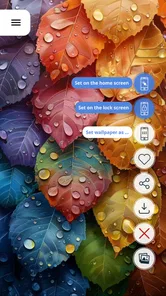
For a practical test, I’d save a favorite and look at it on both the lock screen and home screen before deciding it is a keeper. Those screens can have different crops and overlays, so an image that looks balanced in the app may feel cramped in actual use. If I’m choosing a landscape, I’d favor open space where the clock or icons sit; if I’m choosing abstract art, I’d check that the pattern does not make labels harder to read.
A Visual Feast at Your Fingertips
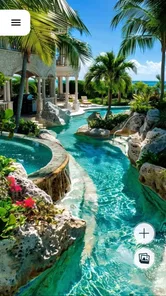
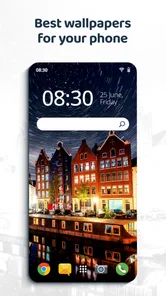
So, let’s dive right in. The first thing that hits you when you open Beautiful Wallpapers 4K is the sheer variety of wallpapers available. Whether you’re into serene landscapes, abstract art, or even funky geometric patterns, this app has got you covered. What I really appreciate here is the attention to detail. The images are crisp, vibrant, and, as the name suggests, all in glorious 4K resolution.
Easy Peasy Navigation
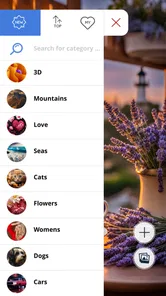
Now, you might be thinking, with all these wallpapers, finding the one that suits your mood could be a chore. But nope, the app’s user interface is as smooth as butter. With categories neatly organized and a search function that actually works, browsing through is a breeze. Plus, the app’s performance is snappy — no lagging or frustrating wait times here!
Even with convenient browsing, I would avoid treating every appealing result as an automatic choice. A quick shortlist makes the app more useful: keep a few options that fit different moods, then compare them against the icons, widgets, and color scheme on your actual phone. This is especially helpful if I’m changing my background because the current one feels cluttered; choosing another image with the same busy composition may not solve the problem.
More From Our News Desk

 Gmail
GmailGmail in a Busy Inbox: Who Benefits Most?
From first account to crowded workday, Gmail earns its place through dependable search and flexible sorting—but its best fit depends on how much inbox maintenance you can tolerate.

 Prime Video
Switching to Prime Video: What Changes in Your Viewing Routine
Prime Video can make a compelling second home for streaming, but switching means learning a different catalog, rental layer, and route from browsing to playback.

 Universal TV Remote Control
Universal TV Remote Control Works Best as a Reliable Backup
A phone remote earns its place through quick setup and reliable habits. Here is how to get more from Universal TV Remote Control—and where its limits show.

 Weather - By Xiaomi
Weather by Xiaomi Review: Clear at a Glance, Less Clear Up Close
Xiaomi’s weather app makes everyday forecasts quick to scan, but its calm surface can leave useful details and recovery paths harder to find than they should be.

 X
XX Under Pressure: Can It Recover When Posting Goes Wrong?
A resilience-focused review of X, examining setup, mistaken posts, interruptions, weak connections, and the gaps that matter when recovery needs to be dependable.

 Clash of Clans
Clash of Clans Is Won Between the Battles
Its raids are quick; its community is a long-term project of coordination, teaching, rivalry, and shared responsibility—with all the friction that entails.
Latest News



Personalization Galore
One of the standout features of this app is the level of personalization it offers. Not only can you set your wallpaper with a couple of taps, but you can also tweak it to your heart’s content. Want to adjust the brightness or add a blur effect? Go for it. It's like having a mini photo editor bundled with your wallpaper app, which is a nice touch.
I’d use those adjustments with restraint. A small brightness change can help a background sit more comfortably beneath interface elements, while blur can make a detailed image less distracting. The trade-off is that editing changes the character of the original picture, so I’d compare the adjusted result with the untouched version before applying it. For anyone who wants layers, precise masking, or a carefully composed design, these simple presentation tweaks should not be mistaken for a full editing workspace.
And hey, for those who love to keep things fresh, there’s even an option to auto-change your wallpaper at intervals you set. It’s a nifty feature that keeps your device looking lively without lifting a finger.
Keeping a rotation useful rather than random
Scheduled rotation is most helpful when I treat it as a small, considered set rather than a reason to cycle through every image I like. I’d pick backgrounds with a similar level of contrast and enough uncluttered space for the phone interface. That way, a change feels refreshing without making the screen suddenly harder to use. If a particular image is important for a presentation, travel day, or work routine, I’d switch to it manually rather than leave the result to an automatic change.
There is also a simple way to decide whether rotation suits you: try it during an ordinary stretch of days, then notice whether you enjoy seeing a different background or keep wanting to restore the previous one. If the change becomes something you monitor, automation has added another small distraction instead of removing one. A single carefully chosen wallpaper is a perfectly sensible choice; the app does not need to become a daily habit to be useful.
When a changing background makes sense
I get the most from scheduled changes when I choose a small set of images that work in different lighting and don’t compete with app icons. A busy picture can look great in a preview but make the home screen harder to scan, so I’d check the layout with icons in place before settling on it. If automatic rotation feels distracting, keeping one dependable lock-screen image and changing the home screen manually is a calmer routine.
For example, I might pick a quiet landscape before a busy week, then let the background change occasionally so the phone feels fresh without making me stop to browse every morning. The useful trade-off is that automation saves a few decisions, but it also means I give up some control over which image appears at a particular moment.
How it fits beside other wallpaper options
Compared with choosing a personal photo or using whatever backgrounds are already on a phone, this app is aimed at people who want a dedicated collection rather than a memory or a plain default. That can be a better fit when I want the screen to feel deliberately styled. On the other hand, someone who wants to use their own pictures, make detailed edits, or keep strict control over every visual choice may be happier with a photo app or a simpler manual wallpaper workflow.
One practical tip is to judge images at the size and crop your device actually uses, not only in the browsing view. A high-resolution source is appealing, but the final framing matters more: a subject near the edge can be covered or cut off once icons and screen proportions come into play. I’d preview a favorite before committing, especially if the image has a central detail I want to preserve.
The comparison is less about one source being universally better and more about the kind of choice you want to make. A personal photo gives the screen meaning that a curated background may not, while built-in options can be quicker if you only want a plain, dependable look. This app makes more sense when browsing itself is part of the appeal and I want a ready-made visual choice without having to edit or organize my own pictures first.
A realistic way to use it during the week
Imagine I notice on Monday morning that my home screen feels stale, but I do not want to spend time designing anything. I could browse for a calm image, check how it looks beneath the clock and icons, and apply it before heading out. Later, I might set a small rotation for the less demanding days of the week, while keeping a more neutral background for work calls or tasks where I need to spot apps quickly. That is a modest use, but it captures the app’s best practical role: reducing the effort of changing the phone’s appearance.
If I’m sharing the phone with someone or setting it up for a less confident user, I’d keep the process equally simple: choose one readable background together and leave automatic changes off unless they actually want them. Familiarity can matter more than variety, especially for someone who relies on consistent screen layouts. The app is for personalization, but a personalized setup does not have to mean frequent changes.
Who is likely to get the most from it
I’d recommend it to someone who enjoys changing the look of a phone, likes browsing visual choices, and would rather start with ready-made backgrounds than build a design from scratch. It also suits anyone who wants an easy, no-upfront-cost way to try a different style. With more than 10 million installs, it is clearly a widely used option, but the useful question is still whether its collection feels right for you.
I’d skip it if I rarely change my wallpaper, prefer a personal image, or need precise editing beyond simple presentation tweaks. The app is on version 5.4.1, was released on February 22, 2019, and supports Android 7.0 and later, so those details matter if you’re checking compatibility before installing. Its collection and convenience are the main draw; they are not a substitute for a full image editor.
It is also a weaker match if your priority is complete control over the source and arrangement of every screen element. In that case, a dedicated design tool or your own image library may give you a more predictable result. By contrast, someone who wants to browse, pick a ready-made image, make a modest adjustment, and move on is much closer to the audience I think this app serves well.
What to expect from the free choice
Because it costs nothing to install, I see little reason to decide from the description alone whether its visual style will suit you. Trying it can be a low-risk way to see whether the available images match your taste and whether its browsing approach fits how you personalize a phone. The value is practical rather than complicated: a collection to choose from, straightforward wallpaper setting, and options to adjust or rotate images.
Free access does not automatically make it the right choice for everyone. If you already have a folder of favorite photos or never change your background, installing another app may add little. I’d judge the value by whether I find a few images I genuinely want to keep using, not by how long I spend scrolling or how many choices appear on screen.
No More Battery Drains
Now, let’s address the elephant in the room — battery life. We all know how demanding high-res images can be, but surprisingly, this app doesn’t suck your battery dry. The developers have done a great job optimizing it, so you get all the eye-candy without worrying about your phone dying halfway through the day. Kudos to them for that!
For my own decision, I’d separate the app’s role from assumptions about how every phone handles backgrounds. The part I can judge here is whether changing the image adds enough visual enjoyment to be worthwhile. If I prefer a stable screen and do not notice the background once I open an app, the app’s central benefit may simply not matter much to me.
My buy-or-skip verdict
All in all, Beautiful Wallpapers 4K is a solid pick for anyone wanting to spruce up their device’s display. With its extensive collection and user-friendly interface, it’s hard not to love. So go ahead, give it a whirl, and let your screen dazzle!
My recommendation is to try it if you enjoy browsing for visual ideas and want an easy way to change a phone’s look without paying to install it. Start with one image, check the crop and readability on your actual screen, and only then decide whether adjustments or rotation add anything for you. Skip it if your own photos already do the job or if you need advanced editing controls. For the right person, it is a convenient source of ready-to-use backgrounds; for everyone else, the phone’s existing options may be enough.
Beautiful Wallpapers 4K Frequently Asked Questions
How much storage space should I have before installing Beautiful Wallpapers 4K?
Beautiful Wallpapers 4K is a wallpaper app, so the images you browse or choose may be more relevant to available storage than the app’s basic purpose. If your device is nearly full, it is sensible to make room before downloading and to avoid keeping more wallpaper files than you need. This helps you manage your device comfortably while exploring the collection.
Can I change my wallpaper whenever I want?
The app is intended for personalizing your device with wallpaper images, so it may suit you if you like changing the look of your screen from time to time. Its summary describes unique wallpapers waiting every day, with 12 different high-quality options. You can explore the available designs and decide which one best matches your preferences and screen.
Is Beautiful Wallpapers 4K suitable for all ages?
Beautiful Wallpapers 4K has an Everyone content rating, so it is presented as suitable for a general audience. The app focuses on personalizing a device with wallpaper images, making it a straightforward choice for people who want to change the look of their screen. As with any app, parents can review it together with younger users and decide whether it fits their preferences.
What devices and operating system version do I need to use the app?
Beautiful Wallpapers 4K is an Android personalization app. It requires Android 7.0 or later, so it is worth checking your device’s software version before downloading. If your phone or tablet meets that requirement, you can install the app and browse its wallpaper collection. The app is available for Android devices, and the minimum system requirement helps you judge compatibility in advance.
How popular is Beautiful Wallpapers 4K, and who develops it?
Beautiful Wallpapers 4K is developed by Pro Wallpapers 4K and has reached over 10 million installs. It has a 4.5 average rating from around 121,000 ratings, with about 1,500 written reviews. Those figures suggest that many Android users have tried the app, although the best way to decide whether it suits you is to consider the features and browsing experience you want from a wallpaper app.
Pros
- High-quality 4K wallpapers
- Regular updates with new content
- Easy to navigate interface
- Variety of categories available
- Optimized for battery efficiency
Cons
- Contains ads in free version
- Limited features without premium
- Occasional loading issues
- Requires internet for new content
- No wallpaper editing features











