

Beacon Game Launcher
- 170.00
- 4.3
- Installs
- 10.00K
- Price
- $2.99

Screenshots
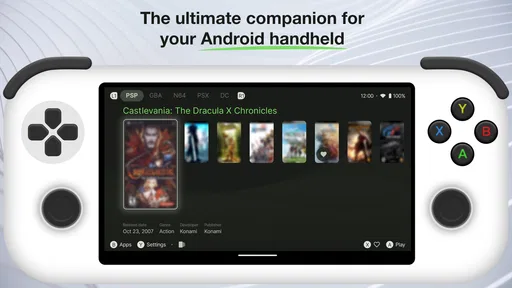
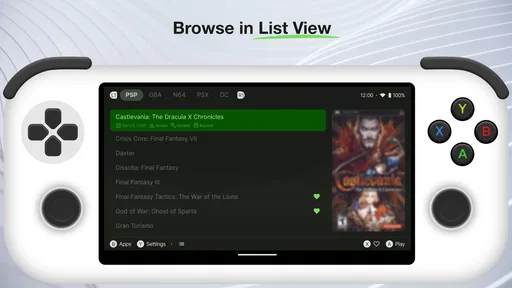
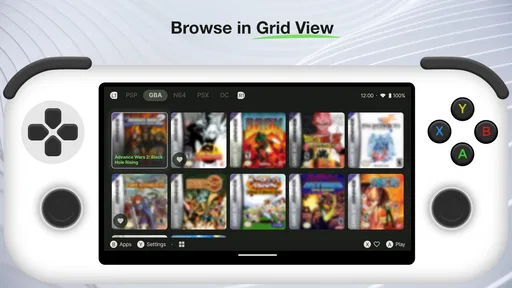
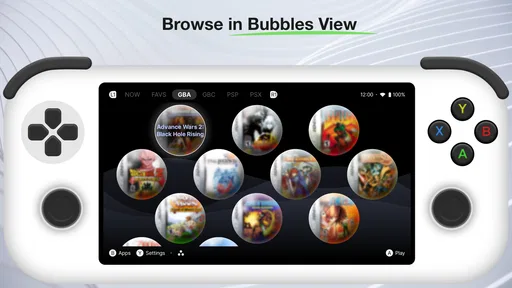
Analysis by Reviewed
I approached Beacon Game Launcher as a personalization app rather than as another game to play. Its purpose is to reshape the way an Android device presents and organizes games, making the phone feel more like a dedicated console. That idea sounds simple, but it changes the daily routine: instead of searching through a general app drawer, I can open one focused space and treat gaming as the main activity.
After spending time with it, my impression is that Beacon is most appealing to people who want their gaming library to feel separate from the rest of their phone. It is not trying to replace a game store, add a new game, or turn an ordinary handset into a different piece of hardware. Its value comes from presentation, access, and focus. The experience is more deliberate than opening games one by one from the standard launcher.
The app is made by NERDS TAKE OVER and sits in the personalization category. It costs $2.99, carries an Everyone age rating, and has reached over ten thousand installs. Its average sits at 4.3 from around one thousand ratings, which suggests a generally positive reception while still leaving room for the kind of personal differences that matter with launcher apps.
How Beacon feels in everyday use
I find Beacon’s everyday appeal easiest to judge by watching how a shared phone moves between ordinary tasks and play. The useful question is whether a dedicated gaming entrance makes that handoff feel clearer for the person holding the device, rather than merely adding another screen to navigate. That distinction becomes especially important when deciding how far to make the launcher part of the phone’s routine.
A gaming-first home for an Android device
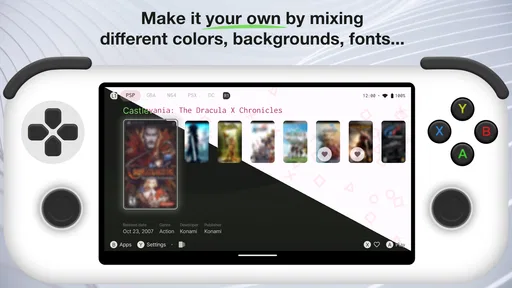
The central appeal is the change in context. A normal Android home screen is built around communication, work, browsing, media, and utilities. Games are usually mixed into that collection, surrounded by notifications and unrelated shortcuts. Beacon gives gaming its own front door. When I want to play, the launcher concept encourages me to think in terms of a library rather than a list of scattered icons.
That distinction is especially useful on a phone shared between different kinds of use. I might spend the morning answering messages, checking a calendar, and reading news, then want a clean transition into a game in the evening. A gaming-oriented launcher helps create that boundary without requiring a second device. For someone who treats an Android phone as a serious handheld, that change can feel more meaningful than a decorative wallpaper or icon pack.
There is also a practical benefit for people with many installed games. Standard launchers often make game discovery depend on folders, search, or whichever icons happen to be placed on the first screen. A dedicated launcher gives the collection a clearer purpose. The result is less about saving seconds and more about reducing the mental clutter that comes from treating every app as equally important.
More From Our News Desk

 Gmail
GmailGmail in a Busy Inbox: Who Benefits Most?
From first account to crowded workday, Gmail earns its place through dependable search and flexible sorting—but its best fit depends on how much inbox maintenance you can tolerate.

 Prime Video
Switching to Prime Video: What Changes in Your Viewing Routine
Prime Video can make a compelling second home for streaming, but switching means learning a different catalog, rental layer, and route from browsing to playback.

 Universal TV Remote Control
Universal TV Remote Control Works Best as a Reliable Backup
A phone remote earns its place through quick setup and reliable habits. Here is how to get more from Universal TV Remote Control—and where its limits show.

 Weather - By Xiaomi
Weather by Xiaomi Review: Clear at a Glance, Less Clear Up Close
Xiaomi’s weather app makes everyday forecasts quick to scan, but its calm surface can leave useful details and recovery paths harder to find than they should be.

 X
XX Under Pressure: Can It Recover When Posting Goes Wrong?
A resilience-focused review of X, examining setup, mistaken posts, interruptions, weak connections, and the gaps that matter when recovery needs to be dependable.

 Clash of Clans
Clash of Clans Is Won Between the Battles
Its raids are quick; its community is a long-term project of coordination, teaching, rivalry, and shared responsibility—with all the friction that entails.
Latest News



Who gets the most from it
I would recommend Beacon to a player who regularly uses an Android phone for gaming and wants a console-like starting point. It makes sense for someone who keeps several games installed, prefers a focused interface, or wants gaming to feel like a distinct activity instead of an accidental tap between social apps.
It is also a sensible choice for a secondary Android device used mainly for games. On a spare phone or handheld-style setup, a game launcher can give the device a clearer identity. Rather than maintaining a general-purpose home screen that is mostly irrelevant, the owner can make the gaming library the center of the experience.
On the other hand, I would skip it if you only play one or two games and already reach them comfortably from your current home screen. The $2.99 purchase is modest, but a launcher still adds another layer to the way you use the phone. If you do not care about a dedicated gaming presentation, that layer may feel unnecessary rather than helpful.
A realistic evening workflow
Imagine finishing work and wanting a short session before dinner. With a conventional setup, I might unlock the phone, swipe through pages, notice a message, open a notification, and lose the original intention. A gaming launcher creates a more direct route: unlock, enter the game-focused space, choose a title, and start playing. The important improvement is not a dramatic technical boost; it is the reduction of distractions between deciding to play and actually launching something.
That workflow can be useful for families too, especially when one device is configured for a younger player. The Everyone rating makes the app broadly suitable from an age-classification perspective, although the games accessed through it can naturally have their own ratings. Beacon organizes the device; it does not make every game appropriate for every person.
What the current version tells me
The current version is 1.9.0, and the app was released on August 24, 2023. Those details place the review in a useful middle ground: Beacon is established enough to have accumulated real user feedback, but it is still a focused product rather than a familiar default on every Android phone.
I see the version number as evidence of ongoing maintenance rather than proof of a particular feature set. It is fair to say that the app has progressed beyond its first release, but I would not treat the number alone as a promise of major redesigns or hardware-level improvements. What matters in practice is whether the current launcher fits the way you already manage games.
The difference between a launcher and a game hub
One point worth understanding before buying is the distinction between a launcher and a game hub. A hub may emphasize news, recommendations, social activity, downloads, or a store. Beacon’s stated identity is closer to changing the device’s entry point for gaming. That makes it attractive if your priority is a clean, game-first environment, but less compelling if you want a large discovery service or a community layer.
This is also why it should not be judged by the same standards as a performance utility. A launcher can make access feel smoother and more intentional, but it does not automatically make a game run faster, improve a weak internet connection, or turn a budget phone into a premium console. If raw performance is your main concern, the better investment may be a stronger device, a controller, or a stable network rather than a new home screen.
What has changed and what still matters
When I think about Beacon’s place on a device, I separate the steady purpose of a game-first launcher from assumptions about what an update must have added. That keeps expectations practical: the value is in the current experience and how it fits the owner’s habits, not in a version number by itself. With that in mind, it helps to consider how household routines and different users affect the choice.
Reading the product’s evolution carefully
Beacon’s move from its release to version 1.9.0 suggests that NERDS TAKE OVER has continued refining the product. For existing users, that is encouraging because launcher software has to remain compatible with the changing Android environment. A launcher is not a one-time visual theme; it sits close to the daily operating experience, so continued version work matters more here than it might for a novelty customization app.
At the same time, I would separate confirmed product history from expectations. The release date and current version show a maintained app, but they do not by themselves explain every change between versions. I would not claim that a particular menu, filtering system, performance mode, or controller feature arrived in a specific update unless I had that change documented directly. For a buyer, the practical lesson is to evaluate the current build rather than assuming that every hoped-for feature is included because the version number has increased.
That cautious reading is important with personalization software. A small interface adjustment can improve daily use, while a large-looking update may change very little for someone with a simple library. The meaningful question is not “How many updates has it had?” but “Does the current experience solve my particular problem better than the launcher I already use?”
What existing users should expect after updating
If you already use Beacon, the safest expectation from a newer version is a more current build of the same basic idea, not a completely different category of product. Your reason for using it remains the same: putting games at the center of the device. I would approach updates with the usual launcher awareness, checking whether the app still behaves as expected after Android changes and whether your preferred home-screen arrangement remains comfortable.
People who depend on a phone for work should also think about switching friction. A gaming launcher can be excellent when gaming is the priority, but it may feel inconvenient when you need quick access to banking, email, navigation, or productivity tools. Before making it the permanent default, I would test how easily I can return to ordinary phone tasks. That trial is more valuable than judging the app from screenshots because the real question is how the launcher affects transitions throughout the day.
For a dedicated gaming device, the trade-off is easier. The fewer non-gaming tasks the phone has, the more natural Beacon’s focus becomes. For a primary phone, I would be more selective. The best setup may be to use it when gaming is the main purpose and retain a conventional launcher if frequent switching becomes irritating.
Three practical ways to get more value from it
First, I would treat Beacon as an intentional “play mode” rather than merely another place to store icons. Put the device into that mode when you want to play, and judge it by how quickly it helps you begin and stop a session. This makes the app’s strongest quality—focus—easier to notice.
Second, I would use it to separate games by how I actually play them, not just by genre labels. A short-session game, an offline title, and a game that needs a strong connection serve different moments. If the launcher lets your library be arranged or navigated in a way that matches those habits, that is more useful than copying the same categories found in a store. The insight is to organize around real situations: commuting, waiting, relaxing at home, or playing with a controller.
Third, I would test Beacon on the device where gaming matters most before making it the default everywhere. A launcher that feels excellent on a secondary gaming phone may be less comfortable on a work phone filled with communication tools. This trial also reveals whether the visual focus helps you or simply hides the shortcuts you use most often. Paying attention to that difference prevents a small purchase from becoming a daily annoyance.
Remaining gaps and honest trade-offs
The biggest limitation is inherent to the concept: Beacon changes organization and presentation, not the games themselves. If your frustration comes from stuttering graphics, long loading times, touch controls, battery drain, or unreliable multiplayer, a launcher cannot solve the underlying issue. It may make the path to a game cleaner, but it cannot compensate for hardware or software problems inside that game.
There is also a possible tension between focus and flexibility. A console-like interface is appealing precisely because it removes some of the general-purpose clutter of Android. Yet that same focus can be restrictive for someone who wants every tool visible at once. I prefer a dedicated gaming environment when I am settling in for a session, but I would not assume every user wants that environment to replace their normal phone experience.
The paid model is another consideration. At $2.99, the decision is not financially heavy for most users, but free alternatives are common in the launcher category. Android’s default launcher may already provide folders, search, and game shortcuts, while other customization tools may offer broader visual control. Beacon needs to earn its price through the quality of its gaming workflow, not through the mere ability to place apps on a screen.
That makes the purchase easiest to justify for regular players. If gaming is an occasional activity, the free tools already on the phone may be enough. If gaming is one of the main reasons you own the device, the focused experience has a clearer chance of feeling worthwhile.
Compatibility and the questions I would ask first
The minimum operating-system requirement is Android 7.0, so the app is aimed at a broad range of Android devices rather than only the newest phones. Still, operating-system compatibility is only the first check. I would also consider how the phone handles default launchers, whether its manufacturer adds its own home-screen behavior, and whether switching between launchers feels comfortable on that specific model.
I would ask myself four questions before installing it. Do I have enough games to benefit from a dedicated library? Do I want gaming to be the first thing I see? Am I comfortable paying for a focused launcher instead of using folders? And will I use the phone mainly for games, or will I constantly need to jump back to work and communication tools?
The answers point to the right choice more reliably than the rating alone. A 4.3 average from around one thousand ratings indicates that many people find the concept worthwhile, but launcher satisfaction is unusually personal. Two users can install the same app and reach opposite conclusions because one wants a console feel while the other wants maximum access to every Android function.
What I would watch going forward
For Beacon’s future, I would watch how NERDS TAKE OVER balances its focused identity with the practical needs of a modern Android user. The most valuable improvements would be the ones that make a gaming session easier to start without making ordinary phone tasks harder to reach. I would also pay attention to how consistently the app adapts to newer Android versions and different device layouts.
I would not expect a launcher to become a complete gaming ecosystem unless its direction clearly expands that way. Its strength is narrower and, in my view, more believable: giving a phone a dedicated gaming entrance. Future changes should preserve that simplicity rather than burying it under features that compete with game stores, social networks, or performance tools.
My final view is positive but specific. Beacon Game Launcher is worth considering if you want your Android device to behave more like a personal gaming console and you will genuinely use that focused space. I like the way the idea creates a boundary between gaming and the rest of the phone, and the current version shows that the project has continued beyond its initial release.
I would not recommend it automatically to every Android player. Casual users, people with only a couple of games, and anyone mainly seeking faster performance will probably gain more from staying with the default launcher or improving their hardware and accessories. But for a regular mobile gamer who wants a cleaner, more deliberate route into a growing library, Beacon offers a clear purpose at a reasonable one-time price.
My recommendation: install it when you want the phone’s identity to shift toward gaming, test it during a normal day of switching between play and other tasks, and keep it only if that change makes your routine feel simpler rather than more complicated.
Beacon Game Launcher Frequently Asked Questions
Is Beacon Game Launcher free, and what should I know about its cost?
Beacon Game Launcher is a paid personalization app, priced at $2.99. Before purchasing, consider whether a centralized way to organize and launch your games fits how you use your device. The launcher is most useful when you already have compatible games and platforms to manage, so it is worth thinking about your setup before deciding whether the purchase makes sense for you.
Which devices and operating systems can run Beacon Game Launcher?
Beacon Game Launcher is an Android app that requires Android 7.0 or later. Check your device’s Android version before downloading, since an older operating system may not meet the minimum requirement. The app is listed in the Personalization category, and its focus is helping turn your device into a game console by bringing compatible games together in a launcher.
What is Beacon Game Launcher, and what does it do?
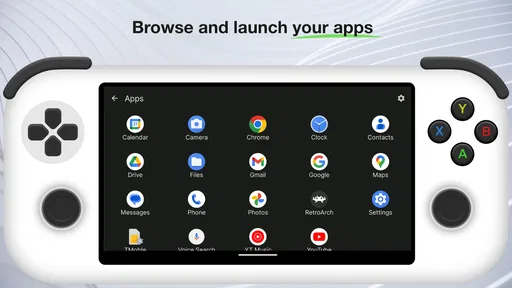
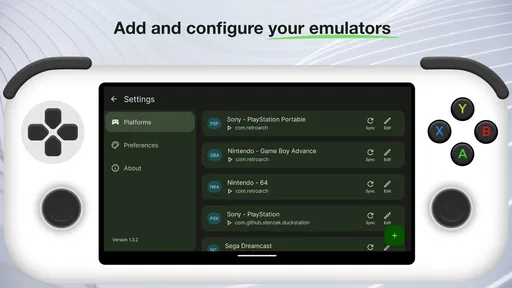
Beacon Game Launcher is a front-end application designed to organize and launch games from different platforms in one place. Instead of opening several separate apps, you can browse your library through a unified interface, view cover artwork and game information, and start compatible titles from the launcher. Its usefulness depends on the platforms, emulators, storefronts, and game files configured on your device.
Is Beacon Game Launcher available for Android and iOS?
Before downloading, check the official distribution source and the current device requirements, because availability and features may differ between Android, iOS, desktop systems, or supported companion platforms. A launcher may also require additional setup, permissions, or platform-specific applications to function correctly. Avoid unofficial downloads, and confirm that your operating system version is supported before installing.
Does Beacon Game Launcher include games, ROMs, or emulators?
Beacon Game Launcher should generally be understood as a library management and launching tool rather than a service that provides games. It may help organize titles you already own or applications and emulators you have installed, but it does not automatically grant legal access to copyrighted games. Users are responsible for obtaining games, ROMs, BIOS files, and other content through legitimate sources and following applicable laws.
Pros
- Centralizes installed games in one convenient launcher.
- Offers a cleaner alternative to searching through multiple app folders.
- Makes discovering and opening games faster.
- Can help organize a growing mobile game library.
- Useful for players who prefer a dedicated gaming interface.
Cons
- May require extra permissions depending on device and launcher features.
- Performance can vary across different Android devices.
- Adds another app layer instead of launching games directly.
- Limited benefit for users with only a few installed games.
- Some features may depend on compatibility with specific games.











