Bayyinah TV
- 104.00
- 4.6
- Installs
- 100.00K
- Price
- Free

Screenshots
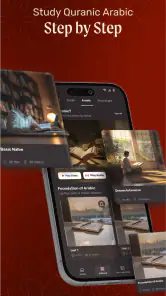

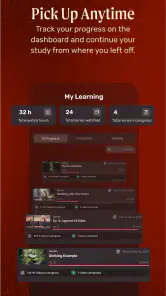
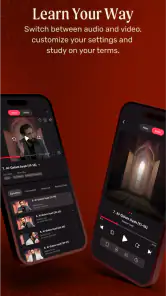
Analysis by Reviewed
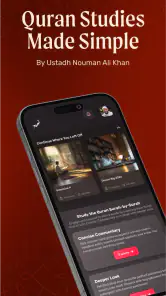
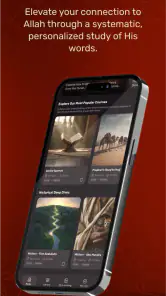
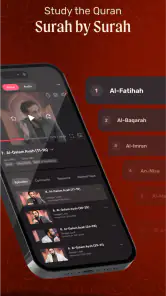
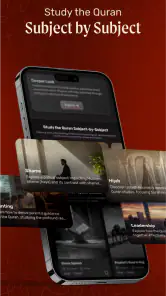
I approached Bayyinah TV as an education app for people who want to study Islamic content through a phone or tablet rather than depend on a desktop browser. Developed by Bayyinah LLC, it brings the service’s mobile access into a compact format, and the main appeal is straightforward: lessons and other available content can be reached from one place while you are away from a computer.
That simplicity is useful, but it also means the experience depends heavily on how comfortably you can browse, read, listen, and keep track of what you want to study. In my view, the app works best for learners who already know why they are using Bayyinah and want a convenient way to continue. It is less convincing as a completely self-explanatory learning system for someone who expects a carefully guided course path from the first screen.
How clearly the app supports different learners
Readability and navigation in everyday study
The first thing I look for in an education app is whether I can get to useful material without fighting the interface. Bayyinah TV has a focused purpose, which helps: you are not entering a general social network, a game, or a crowded marketplace. The app is centered on access to Bayyinah TV content, so the learning objective remains clearer than it would be in a broad video platform.
That focus is particularly helpful when I am studying in short sessions. I can open the app with a specific intention, such as continuing a lesson or looking for a talk on a familiar subject, instead of beginning with an endless feed of unrelated recommendations. This makes it a better fit for deliberate study than for casual scrolling.
At the same time, a content library can still feel demanding when it becomes large. A new user may need to spend time understanding how material is organized before developing a reliable routine. My practical advice is to decide on a study goal before opening the app: choose one series, topic, or lesson type and stay with it long enough to learn the app’s browsing pattern. That small habit reduces the mental effort of repeatedly deciding what to watch next.
For readers who rely on larger text or strong visual separation, the real test is not simply whether words appear on screen. It is whether titles, controls, and content groupings remain easy to distinguish while moving through the app. I would use the phone’s own display and text settings where available, but I would not assume that every screen will become equally comfortable after increasing text size. Larger system text can sometimes make compact layouts feel crowded, so checking the main browsing and playback screens is worthwhile before committing to long sessions.
I also prefer using the app in portrait orientation when scanning content and switching to a wider view when concentrating on video, provided the device and screen layout make that comfortable. A tablet can be especially useful for learners who find a phone’s smaller text tiring. The benefit is not only visual scale; a larger screen gives the surrounding controls and titles more breathing room, which can make returning to a chosen lesson less frustrating.
More From Our News Desk

Clash of Clans Is Won Between the Battles

Android Auto Makes the Case for Quieter Car Software

MobiOffice: Transforming Mobile Productivity with Seamless Integration

EA SPORTS FC™ Mobile Soccer: Redefining Mobile Sports Gaming

How Microsoft OneDrive Became a Mobile Productivity Giant

How Google Translate Breaks Language Barriers Effortlessly
One useful workflow is to treat the app as a library rather than as a replacement for personal study notes. When I finish a meaningful segment, I would record the title and the point I want to revisit in a separate notes app or notebook. That creates an external map of my learning and avoids relying entirely on memory or on finding the same item again through browsing. For students who are easily distracted, this also creates a clear stopping point.
Motor and sensory considerations
Bayyinah TV can suit people who prefer learning by listening or watching rather than reading long passages. That matters for users who become tired when reading on a small screen, for those who absorb explanations more naturally through spoken teaching, and for anyone who wants to study while seated away from a desk. The app’s value in these situations comes from making educational content available through a mobile device, not from turning study into a text-heavy task.
However, video-based learning is not automatically accessible to everyone. A person with hearing loss may need dependable captions or another text alternative, while a person with limited vision may need clearly labeled controls and a layout that works well with assistive technology. I would not choose Bayyinah TV on the assumption that every lesson provides the same level of support for those needs. Anyone for whom captions, transcripts, or screen-reader clarity are essential should test a sample lesson and the surrounding navigation before paying for extended access.
Motor comfort also depends on the device and the setting. Repeated tapping, scrolling, or searching can be tiring for someone with limited dexterity, especially during a long study session. I would place the phone on a stable surface rather than hold it continuously, and I would use a larger device if small controls require too much precision. This is a modest change, but it can turn an awkward session into a manageable one.
People sensitive to sound or visual stimulation may prefer a quieter setup and a lower screen brightness. A lesson can be educational without needing to run at maximum volume or brightness, and reducing those demands may help when studying at night or in a shared room. The app itself cannot solve every sensory issue; the surrounding environment and device settings still matter.
Another practical point is fatigue. Mobile learning encourages the idea that every spare moment should become study time, but that is not always a strength. Watching while walking, cooking, or commuting may sound convenient, yet divided attention reduces comprehension and makes it harder to reflect on complex explanations. I get more from the app when I use it for a defined period, pause when concentration drops, and return later instead of treating background listening as equivalent to focused learning.
Situational access beyond the ideal study desk
The strongest use case is a learner who wants Bayyinah TV content available during ordinary parts of the day. I can imagine listening during a quiet commute, watching a lesson during a lunch break, or continuing study from a different room without opening a computer. This flexibility is valuable for parents, shift workers, students, and anyone whose schedule does not leave a large uninterrupted block for education.
A realistic routine might look like this: I choose a single lesson before leaving home, listen to the main explanation during travel, and later revisit the important section in a quiet room. The first session gives me exposure, while the second gives me a chance to concentrate and take notes. That two-stage approach is better than expecting one distracted viewing to produce lasting understanding.
Shared spaces create a different set of needs. If I am using the app in a library, office, or family room, headphones can make the experience more private, but they may not be comfortable for everyone. A speaker can disturb others, and a small phone speaker may not provide a pleasant listening experience. This is where a tablet, external audio setup, or a quieter time of day can make a bigger difference than any in-app setting.
Travel also changes the calculation. Mobile access is convenient, but I would not plan an important study session around an unreliable connection without first checking how the app behaves in that situation. If a lesson depends on continuous streaming, interruptions can break concentration. A cautious user should open the intended material before leaving a dependable connection and avoid assuming that every desired item will be available in an offline form.
Data use and battery life are also part of situational accessibility, even when they are not visible in the lesson itself. Long video sessions can be inconvenient on a limited mobile plan or an older phone with a tired battery. I would reserve substantial viewing for Wi-Fi when possible, lower screen brightness, and keep a charger nearby for extended sessions. These habits do not improve the content, but they make the mobile format more realistic.
The app is available at no upfront cost, which makes trying it easier for people who are unsure whether its teaching style suits them. That does not mean every part of the experience is cost-free: in-app purchases range from about eleven dollars to around one hundred ten dollars per item. I would therefore explore the free portion carefully, identify the exact material I want, and consider the purchase structure before treating the app as a long-term study subscription or library.
Where the experience may still create barriers
The biggest limitation is that mobile access alone does not guarantee an inclusive learning path. A person may be able to open the app but still struggle to locate an appropriate lesson, understand the organization, or maintain continuity across sessions. This is especially relevant for beginners who need clear sequencing and reassurance about what to study first. Bayyinah TV is more appealing to users with a defined interest than to someone looking for a fully scaffolded introduction.
There is also a difference between content availability and learning support. A library can offer valuable teaching, yet it may not provide the same structure as a dedicated course platform with visible progress, exercises, quizzes, or teacher feedback. I would choose Bayyinah TV for access to lessons and talks, but I would pair it with my own notes, a study group, or a qualified teacher when I need accountability, correction, or a formal curriculum.
Compared with general video services, the advantage is concentration: Bayyinah TV is designed around Bayyinah content rather than an enormous mixture of entertainment and unrelated education. General platforms may be easier for discovering many viewpoints, using familiar search tools, or finding automatic caption options, but they can also encourage distraction and inconsistent quality. The better choice depends on whether I value a focused source or a broad, mixed library.
Compared with text-first religious study apps, this app is better suited to people who learn through spoken explanation and visual presentation. A text-based alternative may be preferable for someone who needs quick quotation search, quiet reading, adjustable typography, or study without sound. I would not replace a reference tool with Bayyinah TV if my main task were checking a passage rapidly; I would use the app when explanation and sustained teaching are the priority.
Age suitability is broad because the app is marked for Everyone, but that label should not be confused with a guarantee that every lesson will match every learner’s maturity, background, or prior knowledge. Families should still choose material together when younger users are involved. Adults beginning serious study may also need help selecting content that matches their level rather than assuming that the first appealing title is the best starting point.
Version 4.2.1 is the current version I would expect a new user to encounter, and the app requires Android 7.0 or later. That makes device compatibility an important first check for anyone using an older Android phone or tablet. The requirement is not especially demanding for many current devices, but a person keeping an older handset for accessibility reasons should verify compatibility before planning around the app.
The service has reached over one hundred thousand installs and holds an average rating of 4.6 from around four and a half thousand ratings. Those figures suggest that many users find the mobile experience worthwhile, but they do not replace personal testing. Accessibility is individual: a layout that feels clear to one person may be tiring or difficult for another, particularly when hearing, vision, motor control, attention, or connectivity are involved.
Who should use it, and who may be better served elsewhere?
I would recommend Bayyinah TV to someone who already wants Bayyinah’s educational material and needs a mobile way to reach it. It is also a sensible option for learners who prefer video or audio explanation, study in changing locations, and are willing to create their own notes and schedule. The free entry point makes it practical to explore before deciding whether paid content fits the budget.
I would be more cautious if I needed guaranteed captions, transcripts, advanced visual customization, or a very explicit step-by-step curriculum. I would also look elsewhere if my main goal were fast reference lookup, interactive testing, or direct feedback on assignments. In those cases, a specialized reference app, text-centered resource, course platform, or human teacher may serve me better.
For a user with accessibility needs, my recommendation is to test the complete journey rather than only opening the home screen. Browse to a lesson, adjust device text and display settings, try the controls with the input method you normally use, listen in your usual environment, and see whether you can return to the same material later. If captions or assistive technology are essential, make that test before purchasing anything. This is a more reliable decision than judging accessibility from the app’s category or rating alone.
I would also avoid buying a large amount of content immediately. Since individual in-app purchases can be substantial, start with the material most closely connected to your current goal. Give yourself enough time to judge not only the teaching but also the practical routine: Can you find the next lesson? Can you study without discomfort? Can you keep track of what you learned? If the answer is yes, the app is earning its place on your device.
My inclusive verdict
Bayyinah TV succeeds when I treat it as a focused mobile doorway to Bayyinah’s educational content, not as a complete answer to every learning or accessibility need. Its free availability, mobile convenience, and education-first purpose make it approachable for many people, while the Everyone age rating keeps the intended audience broad. Bayyinah LLC has created something useful for learners who want to watch or listen on their own schedule.
Its limits are just as important. The app does not remove the need for a suitable screen, comfortable audio, dependable connectivity, personal organization, or content that matches the learner’s level. People who need robust text alternatives, highly structured progression, or interactive assessment should compare it with more specialized tools before committing.
My final recommendation is positive but deliberate: try it for a specific study purpose, use device settings and a larger screen when they improve comfort, keep an external record of lessons and notes, and judge paid access only after the basic workflow feels manageable. The best reason to choose Bayyinah TV is focused access to Bayyinah teaching in a mobile setting; the best reason to pause is whether that format genuinely fits your way of seeing, hearing, moving, and learning.
Bayyinah TV Frequently Asked Questions
Is Bayyinah TV suitable for children and families?
Bayyinah TV is listed for everyone, so its content rating does not restrict the app to adults. Its focus is Islamic education, which may make it useful for families interested in studying Quran-related subjects together. As with any educational video library, parents can preview lessons and choose material that fits a child’s age, interests, and level of understanding.
Who develops Bayyinah TV, and what is the app intended to provide?
Bayyinah TV is an education app developed by Bayyinah LLC. Its mobile app is designed to give users access to Bayyinah TV content, making it a convenient option for people who want to explore the platform from a phone or tablet. The app is most relevant to users seeking Islamic learning rather than a general-purpose video service.
What is Bayyinah TV, and what type of content does it offer?
Bayyinah TV is an Islamic learning and video-streaming platform associated with Bayyinah Institute. Its library generally focuses on Quran study, Arabic language, tafsir, lectures, reflections, and structured educational series. Before downloading, users should understand that it is designed primarily for people seeking in-depth religious education rather than general entertainment. The available catalog, presentation, and language options may vary by platform and subscription status.
Is Bayyinah TV free to use, or does it require a subscription?
Bayyinah TV is free to download, while in-app purchases range from around $11 to $110 per item. Access to paid content may require a purchase, so it is worth checking the price and terms shown in the app before committing. Users should also review any billing details carefully, especially if a purchase involves recurring payments, so they know what they are agreeing to.
Can I watch Bayyinah TV offline or without an internet connection?
Offline viewing depends on the features available in the current version of Bayyinah TV and may be limited to selected videos, supported devices, or active subscribers. If downloads are offered, content may remain accessible only through the app and could require periodic internet verification. Users who plan to study while traveling should test the download function first and confirm how long saved lessons remain available offline.
Pros
- Clear
- high-quality lessons from experienced Islamic teachers.
- Covers Quran
- Arabic
- tafsir
- and Islamic studies in one platform.
- Useful for both beginners and learners seeking deeper study.
- Video library supports flexible learning at your own pace.
- Content is generally calm
- structured
- and easy to follow.
Cons
- Most valuable content requires a paid subscription.
- The large library can feel difficult to navigate at first.
- Lessons may not suit users seeking multiple scholarly viewpoints.
- Some courses demand consistent time and study commitment.
- Availability and features may vary between app platforms.
- Category
- Education
- Version
- 4.2.1











