

Basic Root Checker Pro- Unroot
- 22.00
- 4.3
- Installs
- 100.00K
- Price
- Free

Screenshots
Analysis by Reviewed
When several people use the same Android phone or tablet, root status can become an awkward mystery. One person may have changed the device while another is trying to install an app or troubleshoot a problem. I see Basic Root Checker Pro- Unroot as a small, practical way to check that one detail before anyone makes assumptions. It is a free utility from Royal Games Boosters in the Libraries & Demo category, aimed at people who want a simple root check rather than a deep toolkit.
A quick check before the next person uses the device
A realistic example: a relative hands me a phone and says an app has stopped working, but they are unsure whether someone rooted it while experimenting. I can check the device’s root status before blaming the app, changing settings, or advising them to reset anything. That makes this tool useful in a household where a device gets passed around, even though it is not a family-management app and does not coordinate users for you.
The distinction matters: checking root status is not the same as diagnosing every app problem. A result can help narrow down one possible cause, but it cannot tell me why a particular service behaves differently. I would use it as an initial check, then consider the app’s own troubleshooting steps rather than treating a root result as a complete diagnosis.
Keep the decision with the device owner
Rooting and unrooting can affect how a device works, so I would not use an unroot option casually on a shared phone. Before changing anything, I’d ask who rooted it and why, and whether they rely on a feature or setup that depends on root access. A quick status check is a low-commitment first step; changing root state is a separate decision that should belong to the person responsible for the device.
That is also where the app’s limits become important. Its appeal is simplicity, but people expecting a full maintenance suite, detailed technical explanations, or a universal fix for app compatibility may need a more specialized tool or guidance from someone familiar with their device. I would avoid promising that unrooting will make every banking or other sensitive app work: app checks vary, and root status is only one possible factor.
Age, trust, and sensible expectations
The app is rated for Everyone, and its straightforward purpose makes it approachable for a general audience. Still, an age rating is not a substitute for supervision or shared-device rules. I’d explain that checking is different from changing the phone, and I would keep account passwords, payment details, and other private information out of any troubleshooting conversation. The app is best treated as a utility for the device, not a way to inspect another person’s accounts or activity.
For a household, the useful habit is simple: agree who can make system-level changes, note why a device was rooted, and check its status before attempting repairs. This avoids a common coordination problem—one person undoing a setup that another person intentionally relies on. The app can support that conversation, but it cannot replace it.
More From Our News Desk

 Gmail
GmailGmail in a Busy Inbox: Who Benefits Most?
From first account to crowded workday, Gmail earns its place through dependable search and flexible sorting—but its best fit depends on how much inbox maintenance you can tolerate.

 Prime Video
Switching to Prime Video: What Changes in Your Viewing Routine
Prime Video can make a compelling second home for streaming, but switching means learning a different catalog, rental layer, and route from browsing to playback.

 Universal TV Remote Control
Universal TV Remote Control Works Best as a Reliable Backup
A phone remote earns its place through quick setup and reliable habits. Here is how to get more from Universal TV Remote Control—and where its limits show.

 Weather - By Xiaomi
Weather by Xiaomi Review: Clear at a Glance, Less Clear Up Close
Xiaomi’s weather app makes everyday forecasts quick to scan, but its calm surface can leave useful details and recovery paths harder to find than they should be.

 X
XX Under Pressure: Can It Recover When Posting Goes Wrong?
A resilience-focused review of X, examining setup, mistaken posts, interruptions, weak connections, and the gaps that matter when recovery needs to be dependable.

 Clash of Clans
Clash of Clans Is Won Between the Battles
Its raids are quick; its community is a long-term project of coordination, teaching, rivalry, and shared responsibility—with all the friction that entails.
Latest News



Root Access at Your Fingertips
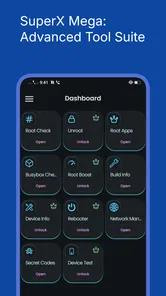
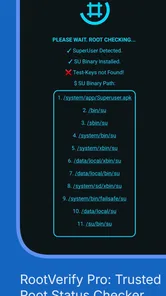
First off, let’s talk about what this app does. As the name suggests, Basic Root Checker Pro- Unroot gives you a straightforward way to check if your device is rooted. No more guesswork or fumbling through settings. With just a few taps, you can verify root status in seconds. And if you’re like me, someone who loves tinkering with their phone, this is a lifesaver. It's like having a flashlight in a dark room, giving you clarity and assurance.
Why You Need It
So, why exactly should you bother downloading an app to check root status? Well, for starters, not all apps play nice with rooted devices. Some applications, like banking apps, might refuse to work altogether if they detect root access. With this app, you can quickly toggle between rooted and unrooted states, ensuring that you have the best of both worlds. It's like having your cake and eating it too!
Moreover, for those who are new to rooting, this app acts as a gentle guide. It doesn't overwhelm you with jargon or complex settings. Instead, it offers a user-friendly interface that even the least tech-savvy among us can navigate effortlessly. And hey, who doesn’t love an app that’s easy on the eyes?
Unroot with Ease
One of the standout features has to be the unroot option. Let's say you’ve rooted your phone for a specific app or feature and now, you want to return to the safety of the unrooted world. This app makes it ridiculously easy. With a simple click, your phone is back to its factory settings, free from root. It’s hassle-free and reliable, much like a trusted friend who always has your back.
Another thing I really appreciate is the app’s efficiency. It doesn’t hog your phone’s resources or drain the battery. You know how some apps just seem to zap your phone’s energy? Not this one. It runs smoothly in the background, letting you go about your day without any hiccups.
Making the most of a basic checker
I would use a checker like this at specific decision points, not as something to keep open all day. For example, if a rooted device is being handed back after a repair or a round of experimentation, checking first gives the next user a clearer starting point. If the result surprises you, pause and ask what changes were made before trying to reverse them. That small step is more useful than repeatedly checking without a plan.
Compared with searching through system menus or installing a broad device-maintenance suite, a focused checker is easier to approach when the only question is whether root access is present. The trade-off is that a basic tool is not a substitute for advanced diagnostics. If you need to understand exactly how root was configured, resolve a boot problem, or protect a device with several system-level changes, I would seek specialist guidance rather than rely on a simple check alone.
Who will get the most from it
This app makes the most sense for Android users who already understand why root status matters, or who have a trusted person helping them manage a rooted device. It can also be handy for someone checking a second-hand or shared device before troubleshooting, provided they have permission to inspect and change it. It is less suitable for someone who expects a one-tap guarantee that every app will work, or for an owner who is unsure what unrooting could affect.
Before choosing the unroot option, I’d make a note of the device’s current behavior and confirm that the owner is ready to give up whatever depended on root. I would also treat the checker’s result as a useful clue, not a security certificate: a root check does not by itself establish that a phone is free of every risk or that private data is protected. This is the key trade-off—speed and simplicity in exchange for limited scope.
Compatibility and everyday fit
The app is rated Everyone, costs nothing to download, and is listed for Android devices running version 6.0 or later. It was released on March 4, 2022, and its current version is 25.08.22. I find those details useful when deciding whether it fits an older household phone, but I would still check the device’s own compatibility before relying on it. It has a 4.4 average from around 1,600 ratings, with over 50,000 installs, so it has found an audience without needing to be treated as a replacement for expert support.
One practical question is whether a check alone is enough before handing a phone to someone else. For a basic root-status question, it gives you a convenient starting point; for account safety, app permissions, or a broader security review, I would use the relevant Android settings and trusted security guidance too. Another is whether it suits a novice: its simple approach is approachable, but a beginner should still ask for help before making system-level changes they do not understand.
Using the result without overreading it
One useful habit is to separate three questions that often get bundled together: whether root is present, whether a particular app is reacting to it, and whether the phone is secure overall. This checker is relevant to the first question. If a service still refuses to run after a status check, I would follow that service’s own support guidance instead of repeatedly checking or making a system change just to see what happens.
On a shared device, I’d also record the result in plain language for the owner rather than turning it into a technical argument. “The checker reports root access” is a more useful handoff than “the phone is unsafe,” because the latter makes a broader claim the check cannot establish. That small distinction helps relatives coordinate a next step without confusing a diagnostic clue with a complete security assessment.
When another approach is better
If I only need to know whether root is present, this focused utility is easier to reach for than a large maintenance app with unrelated tools. If I need to identify the exact changes made to the operating system, inspect a complicated setup, or recover a device that will not start normally, a checker is the wrong level of help. In those cases, I would look for device-specific technical guidance or ask someone experienced with that model, rather than assume that a simple unroot action can safely undo every modification.
That distinction is especially important for a phone shared between family members. A person who did not make the original changes may not know what depends on them. I would let the owner decide whether to proceed and make sure they understand that restoring a preferred app’s behavior is not guaranteed just by changing root status. The tool is most valuable when it helps people ask a better next question, not when it is treated as a universal repair button.
Final Thoughts
In a world where rooting can be both a boon and a bane, having Basic Root Checker Pro- Unroot is like having an insurance policy for your phone. It’s straightforward, reliable, and incredibly easy to use. Whether you're a rooting veteran or just starting out, this app is a must-have in your digital toolkit. Trust me, once you start using it, you’ll wonder how you ever managed without it.
So, if you’re on the fence about whether or not to download this app, I say go for it. It’s a small addition to your phone that brings immense peace of mind. And in the world of tech, that’s something we could all use a little more of.
Basic Root Checker Pro- Unroot Frequently Asked Questions
Is Basic Root Checker Pro - Unroot compatible with my Android version?
Basic Root Checker Pro - Unroot is an Android app that requires Android 6.0 or later. Check your device’s Android version before downloading so you can tell whether it meets this requirement. The app is focused on checking root access and unrooting, so compatibility with your operating system is a useful first consideration.
What is Basic Root Checker Pro - Unroot?
Basic Root Checker Pro - Unroot is a mobile application designed to help users verify if their Android device has root access. It also provides a feature to unroot the device if needed. This tool is essential for users who want to ensure their device's security and functionality are intact after rooting.
How does Basic Root Checker Pro - Unroot work?
The app works by scanning your device to check for root access. It analyzes the system files and configurations to determine if the device is rooted. If root access is detected, the app can guide you through the process of unrooting, making it a handy tool for managing your device's root status.
Is Basic Root Checker Pro - Unroot safe to use?
Yes, Basic Root Checker Pro - Unroot is safe to use. It does not make any changes to your system without your consent. The app only reads system files to check for root status and, if you choose to unroot, it provides clear instructions to reverse the rooting process safely.
Can Basic Root Checker Pro - Unroot unroot all devices?
While Basic Root Checker Pro - Unroot is designed to unroot a wide range of Android devices, it may not be able to unroot every single device due to variations in device models and rooting methods. It is always recommended to check the compatibility of the app with your specific device model before proceeding.
Pros
- Simple interface for quick root status checks.
- Fast performance with minimal loading times.
- Supports a wide range of Android devices.
- No ads to interrupt the user experience.
- Provides detailed root information.
Cons
- Limited features beyond root checking.
- Doesn't support iOS devices.
- May not detect all root methods.
- No advanced tools for experienced users.
- Lacks regular updates and improvements.










