Bandana Job Search
- 50.00
- 4.7
- Installs
- 10.00K
- Price
- Free

Screenshots



Analysis by Reviewed
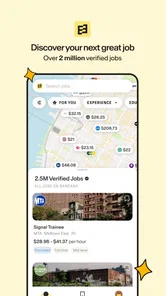
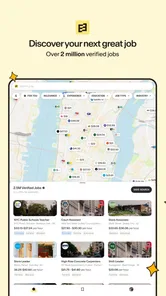
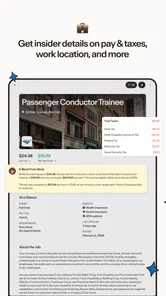
When I’m looking for work, the hardest part is often not finding another job board; it’s deciding which openings are worth my time and how far I’m willing to travel. Bandana Job Search is a business app built around that practical problem. Its map-based approach can make local opportunities easier to judge at a glance, while the emphasis on real pay gives me a reason to look beyond job titles and vague promises.
I’d treat it as a useful way to explore nearby work, not as a complete career service that replaces every other search method. The biggest benefit is the possibility of connecting location and compensation early in the process. That matters if you are balancing commute time, household responsibilities, or a tight budget. The experience is most compelling when you know the kind of work you want and need a clearer picture of what is available around you.
What the map changes about a job search
Traditional job boards often lead with a long list of results. That format is fine for comparing titles, but it can make distance feel like an afterthought. With a map-centered search, I can think geographically from the start: which openings are near home, which might be manageable by transit, and which are far enough away to change the economics of taking the job.
That shift is useful even before applying. A role with attractive pay may be less appealing after accounting for a long commute, while a nearby opening can be worth investigating even if its title is not an exact match for what I first had in mind. The map is not a substitute for reading each listing carefully, but it gives the search a more realistic frame.
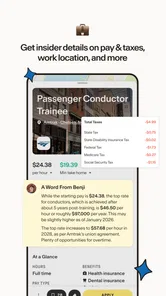
Bandana’s focus on verified jobs and real pay is also a helpful direction for applicants who are tired of spending time on unclear listings. I would still check the details of any position before making a decision: the displayed pay is only one part of whether a job suits you, and duties, schedule, location, and eligibility all matter. The app’s role is to make worthwhile leads easier to spot, not to make the decision on your behalf.
How quickly it can help you narrow the field
I would expect the app’s main value to show up early in a search session. Instead of opening result after result just to learn where a job is, a map can help me eliminate areas that are impractical and focus on places I could actually reach. That is a more useful kind of speed than simply loading a screen quickly: it can reduce wasted attention.
That said, a map is only as useful as the choices I make around it. If I search too broadly, I may see many possibilities without knowing which ones fit my experience. If I draw too narrow a boundary around my routine, I could miss a good opportunity a little farther away. I’d use the map to set a sensible first pass, then widen or adjust my search when the results look thin.
More From Our News Desk

Weather by Xiaomi Review: Clear at a Glance, Less Clear Up Close

X Under Pressure: Can It Recover When Posting Goes Wrong?

Clash of Clans Is Won Between the Battles

Android Auto Makes the Case for Quieter Car Software

MobiOffice: Transforming Mobile Productivity with Seamless Integration

EA SPORTS FC™ Mobile Soccer: Redefining Mobile Sports Gaming
A practical approach is to compare a few locations rather than judging each job in isolation. For example, someone who can work in more than one neighborhood might first identify the areas they can reliably reach, then compare the openings and pay there. This helps separate a genuinely attractive opportunity from one that only looks good until travel is considered.
For people who search in short bursts
Bandana can fit into an everyday routine without turning every break into a full job-search project. Imagine checking openings during a lunch break: I can use the location view to identify a handful of leads, note which ones seem worth pursuing, and return later to read them more carefully. That is more manageable than scrolling through a large general feed with no geographic context.
For a heavier session, I would bring a clear shortlist of priorities. Decide what kind of work you can do, what areas are realistic, and what pay would make a role worth considering. Then use the map to explore openings and inspect promising listings individually. This keeps a busy search from becoming a collection of pins that look interesting but do not match your needs.
One useful trade-off is to avoid treating proximity as the only filter. A nearby job may be convenient but not appropriate for your skills or schedule; a farther one might be a better fit if the commute is workable. I’d use location to organize the search, not to automatically rank every job. That small distinction makes the map more useful and reduces the chance of overlooking an option for the wrong reason.
Applying without losing track of your choices
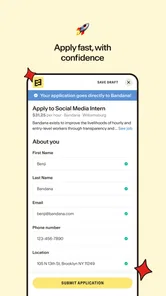
Applying is free, which removes a financial barrier when you want to pursue a promising opening. I still recommend being selective with your time. Before starting an application, I’d confirm that the role, work location, and pay make sense for me, then keep a simple record of where I applied and what I need to follow up on. That habit is especially valuable if you are searching across several neighborhoods or job types.
There is a difference between finding a listing and completing an application well. The app can help surface opportunities, but applicants still need to tailor their information to the role and answer employer questions carefully. If you are applying to many positions in one sitting, pause between applications to make sure you are not sending the same details to jobs with different requirements.
I would also use the map as a planning tool after finding a lead. Think through the actual trip at the time you might work, not just the apparent distance on screen. A short distance can still be inconvenient depending on your route or schedule. That check is not a flaw in the app; it is part of turning a promising listing into a realistic option.
Stability, busy searches, and sensible expectations
A map-based job search may feel more demanding during a broad search than when checking a few nearby openings, simply because there is more to evaluate at once. I would keep sessions focused and adjust the search area gradually rather than trying to inspect every possible location in one go. That also makes it easier to remember why a particular job caught your attention.
I would not assume that every result will be equally relevant or that a map removes the need to verify details. Job availability can change, and an appealing marker is only a starting point. Before making plans around a role, read its listing and make sure the information still matches what you are looking for. This is a sensible habit with any job-search app, especially when your decision depends on a particular pay level or commute.
On reliability, the clearest way to judge the experience is to use it for a real task: search an area you could work in, open a few listings, and see whether the results help you make a decision. If a search feels too crowded, narrow the location or refine your priorities. If it feels too limited, broaden the area. I find that this kind of deliberate adjustment is more useful than repeatedly refreshing without changing what I’m asking the app to find.
Who will get the most from it
I’d recommend Bandana to people whose job decisions depend heavily on where work is located: local applicants, people comparing nearby neighborhoods, and anyone trying to balance pay with travel. It may also suit someone who wants a free way to explore openings before deciding which employers deserve a more focused application.
It is less likely to be the right single tool for someone who needs extensive career planning, detailed company research, or a search organized mainly around remote positions and specialized professional filters. In those cases, a broader job board or a dedicated career resource may be a better companion. The sensible choice is not necessarily one app for everything; Bandana can serve the local discovery stage while other sources help with research or roles outside its strongest use case.
It may also be a poor fit if you prefer a strictly list-based workflow and do not find geographic browsing helpful. A map adds context, but it can feel like extra visual information if all you want is to scan titles in a fixed order. I’d try searching a familiar area first. If seeing the location helps you judge opportunities, the approach is likely to click; if not, a conventional results list may feel more direct.
Cost, compatibility, and who is behind it
Bandana Job Search is free to use, and applying through it is free as well. It is listed for Everyone and is developed by Bandana. Its average rating is 4.7 from around 1,100 ratings, with over 10,000 installs. Those figures suggest that people have found it useful, though I would still judge it by whether its local search approach matches the way you look for work.
The app is currently at version 1.0.29 and requires Android 7.0 or later. That minimum makes it an option for many older Android devices, but compatibility alone does not guarantee that every phone will feel equally responsive. If your device is older or has limited free space, keep expectations practical and test the basic workflow—opening the map, viewing listings, and moving between results—before relying on it for a long search session.
I would avoid making a strong claim about battery use or speed based only on the type of app. Map browsing can involve more visual movement than reading a plain list, and the feel of that experience depends on the phone and connection being used. For everyday use, the more important question is whether the app helps you narrow choices without getting in the way. A short trial in your own search area is the fairest performance check.
My verdict on Bandana’s practical value
The strongest reason to try Bandana is its location-first way of thinking about work. It encourages applicants to consider distance and pay together instead of treating a job title as the whole story. Used thoughtfully, it can help turn an overwhelming search into a manageable set of nearby leads, and the free application process makes it easier to explore without paying just to get started.
It is not a guarantee that every result will be right for you, and it should not replace careful reading, employer research, or a realistic commute check. I’d use it to discover and compare local opportunities, then slow down before applying. If your search is rooted in a particular area and you want location to matter from the beginning, Bandana is worth trying. If you need a highly specialized or mostly remote search, pair it with a service designed around those needs instead.
A practical way to test the search before committing time
On a first visit, I would not begin with the broadest possible search. I’d choose a familiar area and one realistic type of work, then check whether the map surfaces openings that make sense for my commute and experience. That small test answers a useful question quickly: does the local view help me make better choices, or does it simply add another screen to browse?
For someone between shifts or managing family responsibilities, this can be especially useful. A parent, for example, might compare openings around the places they already travel during the week rather than treating home as the only starting point. The trade-off is that a convenient location does not guarantee a workable schedule, so I’d use the map to create a shortlist and inspect the job details before rearranging a routine.
How I’d combine it with other job-search tools
I see the app working best as a discovery layer alongside, rather than instead of, a broader job-search routine. A conventional board may be more comfortable for filtering by a specialized title or scanning a long list, while Bandana’s geographic framing can help answer whether local openings are worth exploring. Using both approaches selectively can prevent a map from becoming the only lens on your options.
To keep that workflow manageable, I’d record a few essentials outside the browsing session: the employer, role, location, pay details that matter to me, and whether I have applied. This is not a claim about an in-app tracking tool; it is a simple personal habit that makes several short searches easier to pick up again. It also helps avoid sending duplicate or rushed applications when the same opportunity appears in more than one place.
What to expect from performance in daily use
Because the app puts locations at the center of the experience, I would judge speed by how efficiently I can move from an area to a useful listing, not by expecting every search to feel instant. A broad scan can require more attention than a short local check, and a map is naturally less linear than a plain list. Keeping the search focused is the easiest way to make the experience feel lighter and more purposeful.
For a device that is close to the minimum Android requirement, I would test the essential steps before depending on it during a time-sensitive search: open the search, inspect a result, return to the map, and continue. If that basic loop feels comfortable, there is little reason to overthink the device question. If it feels awkward, a browser-based or list-first alternative may be a more practical way to continue looking for work.
Overall, I would give Bandana a fair trial when the commute question is central to your job hunt. It is free, focused on nearby work, and most helpful when you use its location view to make a shortlist rather than expecting it to handle every part of a career search. For local applicants who want to compare opportunities in context, that is a clear and useful role; for people whose priorities are remote work or highly specialized filtering, another tool should lead.
Bandana Job Search Frequently Asked Questions
What is Bandana Job Search, and how does it help with finding work?
Bandana Job Search is a job-search service designed to help people discover employment opportunities and connect with employers. Its listings may include roles across different industries, locations, and experience levels. Before applying, review each posting carefully to understand its duties, qualifications, pay details, and application process. Available features and listings can vary by location and may change over time.
Is Bandana Job Search free to download and use?
Check the app’s current store listing for the latest information about download costs, subscriptions, or optional paid features. Job-search apps are often free to install, but the terms can change, and some services may require an account or offer additional features. Review any payment prompts and the app’s terms before proceeding; never assume that a job application or an offer is legitimate solely because it appears in an app.
How do I apply for a job through Bandana Job Search?
The application process depends on the individual listing. You may be asked to create a profile, provide contact details or work experience, upload a résumé, or follow a link to an employer’s application page. Read the instructions on each posting and make sure your information is accurate before submitting it. If an application redirects you outside the app, verify that the destination belongs to the employer or a trusted hiring service.
Does Bandana Job Search work in my location, and are the listings current?
Job availability depends on where you live and which employers are using the service. Search results can differ by city, industry, and the preferences or filters you select, so a limited selection in one area does not necessarily mean there are no opportunities elsewhere. Listings may also close or change after they appear. Check posting dates and application instructions, and confirm that a position is still open before investing time in an application.
Is it safe to share personal information or contact employers through Bandana Job Search?
Use the app’s privacy information to understand what data it collects, how it is used, and whether information is shared with employers or service providers. Share only details needed for a legitimate application, and be cautious of requests for payment, banking credentials, or sensitive identity information early in recruitment. Verify the employer and the role independently when something seems unusual, and use the app store’s official download page to get the genuine app.
Pros
- Search for jobs by role
- location
- or other keywords.
- Browse vacancies across a range of industries and job types.
- Save interesting listings to revisit later.
- Get job alerts to keep up with new opportunities.
- A focused interface makes job hunting straightforward.
Cons
- The number of listings may vary depending on your location.
- Some jobs may redirect you to an employer’s website to apply.
- Job details and availability can change after a listing is posted.
- Alerts may require account setup and notification permissions.
- A strong internet connection is needed to browse current vacancies.











