BambooHR
- 1.13K
- 3.8
- Installs
- 1.00M
- Price
- Free

Screenshots
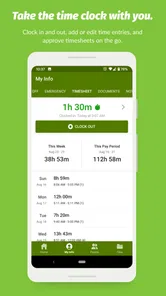
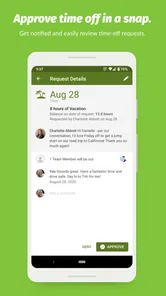
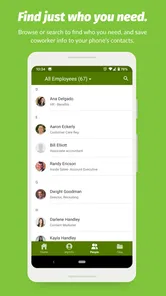
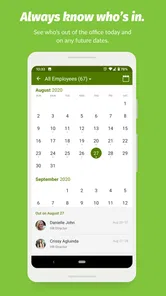
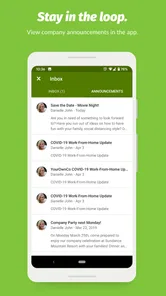
Analysis by Reviewed
When a small business owner checks an employee’s leave request while away from the office, an HR app can be useful—but only if it keeps work information within the right account. I see BambooHR as a business tool for that kind of coordination, not a general household organizer or a shared family calendar. Its value depends on whether a workplace already uses BambooHR and gives each person an appropriate way to access it.
One household device, separate work boundaries
A shared phone or tablet can make it tempting to leave a work account open for convenience. I’d treat this app as a personal work login, not something every household member should browse. Before handing a device to someone else, I’d check whether the work account is still accessible and avoid saving or displaying employee details where another person might see them. That simple habit matters more here than any household-style sharing feature.
The app is free to download, but it belongs to a business HR system rather than a standalone tool that can organize a family’s schedules. BambooHR LLC develops it, and its business focus is reflected in the tasks it is meant to support: employee information, workplace requests, and hiring workflows. If your employer does not use the service, installing it alone is unlikely to solve an everyday coordination problem.
Who benefits from mobile HR access?
I’d consider it most useful for employees who need to check work information away from a desk and for HR staff or managers who handle routine requests while moving between meetings or locations. For example, an employee could review a leave balance before asking a manager about time off, while a manager could keep a request from getting lost in a crowded inbox. The practical gain is having workplace tasks in one familiar place, rather than relying on a chain of messages and paperwork.
Still, an app cannot replace clear workplace procedures. A request may need approval, and seeing information on a phone does not mean a decision has been made. I’d use it to check or submit work items, then confirm anything time-sensitive through the process my employer expects. That distinction helps prevent a quick mobile check from being mistaken for formal approval.
Getting to Know BambooHR
So, what's the big deal about BambooHR? Imagine having a centralized hub where you can manage all your HR tasks without breaking a sweat. From tracking employee records to managing time-off requests, this app does it all. And the best part? It’s all wrapped up in a user-friendly interface that even those of us who aren’t tech-savvy can navigate with ease.
Features That Stand Out
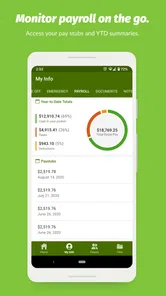
Diving deeper into the app, one feature that caught my eye was the employee self-service portal. Employees can log in and update their personal information, check their leave balances, and even download pay stubs. It's like giving employees a slice of autonomy, and it reduces the paperwork for HR managers—talk about a win-win!
More From Our News Desk

Weather by Xiaomi Review: Clear at a Glance, Less Clear Up Close

X Under Pressure: Can It Recover When Posting Goes Wrong?

Clash of Clans Is Won Between the Battles

Android Auto Makes the Case for Quieter Car Software

MobiOffice: Transforming Mobile Productivity with Seamless Integration

EA SPORTS FC™ Mobile Soccer: Redefining Mobile Sports Gaming
Another cool feature is the applicant tracking system. Hiring managers can easily post job openings, review applications, and even schedule interviews all from within the app. It’s like having a recruitment agency right at your fingertips, and it makes the whole hiring process feel like a breeze.
Where the workflow needs a human check
In a busy workplace, I’d use self-service as the first stop, not the final authority. If an employee updates personal details, HR should still follow its normal checks for changes that affect payroll or official records. Likewise, a leave balance is helpful context, but team coverage and approval rules still shape whether a particular day off works. That small distinction keeps the app useful without treating every screen as a substitute for a conversation.
For recruiting, mobile access can help a hiring manager keep applications moving between interviews, but it is not automatically a replacement for a careful review. I’d set aside time to compare candidates against the same role requirements rather than making decisions in quick gaps on a phone. The convenience is best for keeping the process organized; judgement still belongs with the people doing the hiring.
The User Experience
When it comes to user experience, BambooHR doesn’t disappoint. The app sports a clean, intuitive design that makes navigation a piece of cake. Whether you're accessing it from a desktop or mobile device, the experience remains seamless. Plus, the integration capabilities with other software make it a versatile tool for any business setup. I found myself breezing through tasks that would usually take hours, thanks to its efficiency and ease of use.
Fit, alternatives, and trust
Compared with the usual mix of email, shared spreadsheets, and paper forms, a dedicated HR system can give a team a clearer place to handle employee records and requests. That consolidation is useful when several people need to follow the same process. A very small team with only occasional HR tasks, however, may find a lightweight existing process easier than adopting a full HR platform; the app makes most sense when the company is already committed to BambooHR’s broader system.
For everyday coordination, I’d use it to look up a leave balance before discussing dates with a manager, then check the status of the request rather than assume it is approved. An HR colleague could use the same routine to spot a pending item before planning coverage. These are modest tasks, but they reduce avoidable back-and-forth when everyone knows which account and process to use.
Age context is straightforward: the app is rated for Everyone, but its purpose is workplace administration, not entertainment for children. I would not hand over an employee account as a way to keep a child occupied on a shared device. The account should remain tied to the employee or authorized work user, and household members should not treat company records as shared content.
The Android app has a 4.2 average from around 15 thousand ratings, with over a million installs, and it is free. It was released in 2012; version 4.8.1.1022 supports Android 8.0 and later. Those details make it accessible to many Android users, though the key question is still whether your organization uses the service and provides access. If you are choosing an HR system for a company, compare the full workplace setup and the tasks your team needs—not just the convenience of a mobile app.
Choosing it for the work your team actually does
Before relying on mobile HR access, I’d first ask what people need to accomplish away from their desks. If the regular needs are checking a leave balance, reviewing employee information, or keeping a hiring task moving, having a dedicated app can be more practical than searching through old emails. If the real need is only to tell colleagues who is out on a particular day, a shared calendar may be simpler and easier for everyone to understand. The choice should follow the workflow, not the assumption that every office task belongs in an app.
A useful setup conversation is about roles as much as convenience. Employees, managers, and HR staff may interact with the same workplace system for different reasons, so I’d want the employer to explain who should use which account and where to go when a request needs attention. That reduces the chance that someone mistakes access to a screen for authority to approve a change. It also helps a new employee know whether to start with self-service, a manager, or HR when a record looks wrong.
A realistic day-to-day routine
Imagine an employee checking a possible day off during a lunch break. I’d treat the displayed balance as a starting point, compare the dates with personal plans, and submit the request through the employer’s usual process. Then I’d wait for the relevant approval rather than booking around an assumption that the request has already been accepted. A manager, in turn, can use the request as a prompt to consider coverage and follow up through the expected channel. This is where a mobile tool can save a little friction without pretending to settle the team’s staffing decision by itself.
For an HR colleague, the same information can support a more orderly handoff: review what is pending, identify which item needs a response, and handle sensitive record changes with the normal care they require. I would avoid trying to resolve a complicated payroll or policy question in a rushed moment just because a phone is available. Mobile access is strongest for quick checks and routine follow-through; matters with consequences for records, pay, or staffing deserve a deliberate review.
Practical limits and account care
The convenience of employee self-service also creates a responsibility to check entries carefully. A person updating their own information should take a moment to confirm that the change is accurate, while HR should continue applying its established verification steps where appropriate. That division is a useful trade-off: employees can handle straightforward updates themselves, but the organization still needs a dependable process for changes that affect official records. I would not treat a successful save as proof that every downstream administrative step is complete.
Shared-device households need one extra habit: close or secure a work session before someone else uses the phone, and be mindful of notifications or screens visible to people nearby. This is ordinary account hygiene, not a special family feature. If a device is used by several people, a work app should not become the household’s common browsing space; employee information belongs within the intended work relationship. For someone who cannot keep a work account separate on a shared device, using an employer-approved alternative access route may be the more comfortable choice.
Another practical question is whether the app is enough on its own. I’d see it as the mobile doorway to a company’s HR process, not a substitute for the employer’s policies, conversations, or broader system decisions. A small business comparing HR options should look beyond the phone experience and consider how its staff will manage records, requests, and hiring as a whole. A team already using BambooHR has a clearer reason to install the app than a company still deciding what kind of system it needs.
Final Thoughts
If you’re in the market for an HR management tool that offers both functionality and simplicity, BambooHR is definitely worth considering. It's like having a dedicated HR team in your pocket, ready to tackle any administrative challenge you throw its way. While no app is perfect, it offers features that can transform the way you handle HR tasks. So, if you’re ready to streamline your HR processes, give this app a whirl—but first make sure its workplace workflow suits your team.
My household verdict is more cautious than that closing enthusiasm: I’d recommend it to someone whose employer already runs HR through this system, especially if they regularly need to check records or requests on the go. I would skip it as a personal planner, for a business that wants only a basic shared calendar, or when a workplace has not established who may access employee information. Used within those boundaries, it can make routine coordination easier; used as a substitute for clear approvals or account privacy, it can create confusion instead.
BambooHR Frequently Asked Questions
Can I use BambooHR if my employer does not use BambooHR?
BambooHR is a mobile companion to the company’s online HR software, so it is intended for employees and HR teams whose workplace already uses the platform. Before downloading, consider whether your organization has set up BambooHR and whether you have an account. Without workplace access, the app may not provide the HR information or tools you are looking for.
What kind of information might I need to sign in?
You will need access to your organization’s BambooHR account to use the app’s workplace features. Your employer or HR team can tell you how your organization handles account access and sign-in. Having the app installed by itself does not grant access to company information, so check with your workplace if you are unsure how to get started.
Is BambooHR free to download, and what should I know before using it?
BambooHR is a free business app from BambooHR LLC, and its content rating is Everyone. The app serves as a mobile companion to BambooHR’s online HR software, so what you can do in it depends on your organization’s setup and your account access. It is most useful for employees and HR teams whose workplace already uses BambooHR.
What is BambooHR and what does it offer?
BambooHR is a comprehensive human resources software designed for small and medium-sized businesses. It offers various features like employee self-service, time-off tracking, performance management, and applicant tracking. The platform aims to streamline HR processes by providing user-friendly tools to manage employee data effectively, thus enhancing productivity and organizational efficiency.
Is BambooHR suitable for my business size?
BambooHR is particularly suited for small to medium-sized businesses looking to simplify and automate their HR operations. It provides scalable solutions that can grow with your business needs. Larger enterprises might find some limitations, but BambooHR continues to add features and integrations that cater to growing businesses.
Pros
- User-friendly interface design.
- Comprehensive employee tracking features.
- Seamless integration with third-party apps.
- Customizable reports and analytics.
- Responsive customer support.
Cons
- Limited customization for smaller businesses.
- Mobile app lacks some desktop features.
- Higher cost for additional modules.
- Occasional slow performance.
- Limited language support.











