AxisCare Mobile
- 2.55K
- 4.8
- Installs
- 500.00K
- Price
- Free

Screenshots
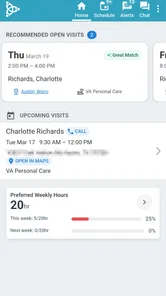
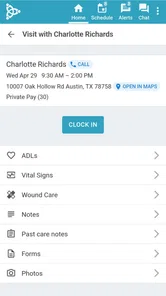
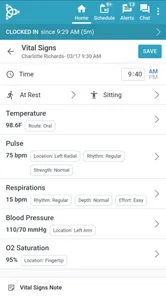
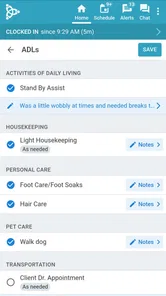

Analysis by Reviewed
When a caregiver’s day is already divided between visits, messages, schedule changes, and client needs, the last thing I want is a mobile tool that makes basic work feel slower. AxisCare Mobile is built for that specific working rhythm: it is a free business app from AxisCare for caregivers and administrative staff, rather than a general calendar or ordinary team chat. After using it as a work companion, I found its value depends less on flashy presentation and more on whether it keeps field work connected to the office without demanding too much attention.
The app has been available since May 11, 2016, and its current version is 3.49.0. It is intended for Everyone and runs on Android devices using version 9 or later. That makes it approachable for many work phones, although compatibility is only the first question. The more important one is whether your agency already works with AxisCare. This is not a standalone home-care organizer that I would install casually to manage personal appointments. Its usefulness comes from fitting into an agency’s existing AxisCare workflow.
How AxisCare Mobile feels during a working day
I judge a work app by whether it helps me regain my place after the day gets interrupted, not just by how quickly it opens. Here, a useful habit is to check the next assignment again after a meaningful change, so an earlier plan does not quietly become the one I follow. That everyday rhythm also makes the trade-offs clearer: mobile access helps, but it cannot replace a careful handoff or a larger screen for complex planning.
Speed expectations in the field
My first impression is that the app is designed around short, purposeful visits rather than long sessions. A caregiver typically needs to check what is next, review the relevant work information, record progress, and move on. That makes perceived speed more important than visual decoration. A good experience here means reaching the right task quickly, understanding what needs attention, and returning to the day without repeatedly rebuilding context.
In that role, AxisCare Mobile feels more practical than a conventional office dashboard squeezed onto a phone. The mobile format suits moments when I am standing between appointments or preparing to leave a client’s home. I do not need a broad business suite open all day; I need the workday represented in a form that can be consulted from a phone. That focused purpose is one of its strongest qualities.
There is also a useful distinction between speed and simplicity. The app can feel efficient when the agency’s information is already organized and my account is set up correctly. It is less likely to feel effortless when I am trying to understand unfamiliar agency procedures, waiting for clarification about an assignment, or dealing with a schedule that has changed several times. No mobile interface can remove those operational complications. AxisCare Mobile can present the work, but the quality of the underlying organization still matters.
I would therefore set expectations carefully. This is not an app I would choose because I want a minimal stopwatch-like utility. It is a connected work tool, and connected tools naturally have more context to handle than a simple notes app. The payoff is that the information is tied to agency activity instead of being isolated in my personal phone.
More From Our News Desk

Weather by Xiaomi Review: Clear at a Glance, Less Clear Up Close

X Under Pressure: Can It Recover When Posting Goes Wrong?

Clash of Clans Is Won Between the Battles

Android Auto Makes the Case for Quieter Car Software

MobiOffice: Transforming Mobile Productivity with Seamless Integration

EA SPORTS FC™ Mobile Soccer: Redefining Mobile Sports Gaming
What happens during heavy-use moments
The most demanding moments are not necessarily technically dramatic. They are the busy transitions: several visits close together, an urgent change from the office, a caregiver checking details while preparing to travel, or an administrator handling many updates in succession. Those are the situations in which small amounts of friction become noticeable. If I have to pause repeatedly to find the next relevant item, the app feels heavier even when each individual action is reasonable.
For caregivers, I found it helpful to treat the app as a checkpoint rather than a place to linger. Before leaving for a visit, I would review the immediate assignment and any information needed for that appointment. Afterward, I would complete the necessary work record while the details were still fresh. This habit reduces the risk of trying to reconstruct the day later from memory and makes the phone part of a repeatable routine instead of an emergency reference.
For administrative users, the trade-off is different. A mobile view can be valuable when an administrator is away from a desk, but it should not automatically replace the fuller perspective of a desktop workflow. When many clients, caregivers, and schedule details must be compared at once, a larger screen is usually easier to reason about. I see the mobile app as a way to stay responsive while moving around, not as proof that an office computer is no longer useful.
One practical tip is to separate urgent checking from deep review. I would use the phone for the information needed to act now, then reserve more involved planning for a calmer moment and a more suitable screen. That approach is especially important in home-care work, where the cost of a rushed misunderstanding can be higher than the cost of taking an extra minute to verify the right assignment.
Reliability and recovering from interruptions
Reliability in a caregiver app means more than opening successfully. I also care about whether the workday remains understandable after an interruption. A phone call, a poor connection, a battery warning, or an unexpected change can break concentration. The best recovery is not dramatic; it is being able to return to the app and quickly identify what still needs attention.
AxisCare Mobile makes the most sense when I use it as the agency’s current work reference rather than maintaining a second, competing schedule in a personal calendar. Copying every appointment into another app might feel reassuring, but it creates a new risk: two places can drift apart. If a visit changes, the personal copy may remain unchanged. Keeping the official workflow in one place is a more reliable habit, even if I use private notes for non-work reminders.
I would also avoid assuming that a mobile app removes the need for careful confirmation. When a change arrives close to a visit, I would read the updated information rather than relying on memory from an earlier check. This is not a criticism unique to AxisCare Mobile; it is a sensible rule for any scheduling tool used in care work. The app can help centralize the information, but the user still has to notice which item is current.
Recovery is easiest when the caregiver has a routine. I recommend checking the next assignment before travel, checking again after a major message or schedule change, and finishing the visit record before moving into the next task whenever the work situation allows. That three-part rhythm is more useful than simply opening the app whenever something feels uncertain.
The app’s public reception also suggests that it has earned a substantial user base: it carries an average rating of 4.8 from around 21 thousand ratings, with roughly 2.5 thousand written reviews. I treat those figures as encouraging rather than conclusive. A high average can indicate that the app fits many users’ needs, but the actual experience still depends on the agency’s configuration, the phone being used, and how consistently the team follows its process.
Device constraints that matter more than expected
AxisCare Mobile is free, which removes an obvious barrier for individual caregivers. Still, “free” does not mean cost-free in the broader sense. The phone must be suitable for regular work, the operating system must meet the Android 9 minimum, and the user needs enough battery and connectivity to consult the app during a shift. Those practical conditions can matter more than the download price.
On an older work phone, I would pay attention to available storage, background activity, and how quickly the device becomes difficult to use after a long day. I would not blame the app automatically if an aging handset struggles; a phone with limited memory, a worn battery, or an outdated system can make every work tool feel unreliable. At the same time, agencies issuing older devices should test the complete caregiver routine rather than checking only whether installation succeeds.
Screen size is another real constraint. A compact phone is convenient to carry, but it gives less room for schedules, notes, and other work context. A larger device can make review easier while adding weight and reducing one-handed comfort. I would choose the phone based on the caregiver’s actual day: frequent walking and quick checks favor portability, while dense administrative review benefits from more screen area.
Notifications and interruptions deserve a thoughtful setup as well. A phone used for care work is often also used for personal calls and messages. If work information competes with everything else, important changes can become easy to overlook. I would keep the device’s notification habits organized, but I would also avoid making the phone so noisy that every alert becomes background sound. The right balance is personal and should be tested during a normal shift.
Privacy is another reason I would not treat this as an ordinary productivity app. The work context can involve sensitive client information, so I would use the device’s normal lock and security controls and avoid leaving the screen visible in public places. That advice does not require complicated technical knowledge; it is simply good behavior for a phone used to access care-related work.
Who benefits most from the mobile workflow
The clearest audience is a caregiver who spends much of the day away from a desk and needs a direct connection to agency assignments. For that person, the app can reduce dependence on printed schedules, scattered text messages, and memory. It is particularly useful when the workday changes often enough that a static plan becomes unreliable.
Administrative staff can also benefit when they need to stay aware of operations while away from a computer. The mobile format can support quick checks and timely responses, especially when being physically present at a desk is not realistic. I would still pair it with the organization’s broader administrative tools for tasks that require comparing a large amount of information.
On the other hand, I would skip it if I am looking for a personal planner, a general time tracker, or an app for coordinating a household’s appointments. Its business purpose is a strength for AxisCare agencies, but it also makes it a poor fit for someone without that work context. Installing it without an agency workflow behind it would not provide the same value as using a normal calendar or task manager.
I would also hesitate to recommend it as the only tool for a team that has not agreed on how schedule changes, visit completion, and communication should be handled. Technology cannot compensate for unclear responsibility. Before introducing it widely, a manager should decide what caregivers are expected to check, when updates should be reviewed, and how exceptions are escalated. That preparation will influence the perceived reliability more than the app icon on the phone.
How it compares with familiar alternatives
The usual alternative for a small team is a mixture of paper schedules, phone calls, text messages, and a shared calendar. That mixture can be cheap and familiar, but it spreads the official version of the day across several places. A caregiver may receive an update in a message while the old appointment remains on paper. AxisCare Mobile is more appealing when the agency wants the workday represented in one connected business environment instead of assembled manually.
A general calendar is often easier for personal planning. It may be faster for adding a private errand or viewing a simple week, and it is usually more flexible for people who are not part of a care agency. But it does not automatically understand the agency’s caregiver-and-admin relationship. I would choose the general calendar for personal commitments and AxisCare Mobile for the official work process, rather than forcing one tool to do both jobs.
A desktop-only system may offer a better overview for office planning, especially when several schedules must be compared. Its weakness is obvious: it does not travel with the caregiver. The mobile app earns its place by closing that gap. The trade-off is that a phone is less comfortable for broad review and detailed planning. In my view, the strongest setup is not mobile versus desktop; it is mobile for field access and desktop for larger administrative decisions.
Paper still has one advantage: it works as a quick visual reference without a battery. But paper becomes stale as soon as the day changes. I would not rely on it as the primary source for a dynamic care schedule. It can be a temporary backup for personal notes, yet the official information should remain in the system the agency has chosen to maintain.
Three workflows that make the app more useful
The first workflow is a “before, during, after” check. Before traveling, I would confirm the next assignment and the information needed to begin. During the visit, I would keep attention on the client rather than constantly interacting with the phone. Afterward, I would complete the required update as soon as the situation permits. This reduces end-of-day catch-up and gives the office a clearer picture of progress.
The second is a change-control habit. When an administrator sends a revised instruction, I would treat the latest agency information as the starting point, then verify the affected visit instead of assuming only one detail changed. This is a small but important distinction: schedule changes can affect travel, timing, and preparation, not just the appointment label.
The third is a device-readiness check before a demanding shift. I would start with a charged phone, a functioning account, and enough time to resolve access problems before arriving at a client’s home. This may sound obvious, but it is a non-obvious trade-off of mobile work: convenience moves some responsibility from the office to the individual device. A two-minute check at the beginning can prevent a much longer interruption later.
These habits also clarify what the app cannot do. It cannot decide whether a caregiver has enough travel time, replace professional judgment, or make a poorly communicated change safe by itself. Its role is to keep the work information accessible and connected. The human process around it still determines whether that information is used well.
My performance verdict
After considering speed, busy-day handling, recovery, and device demands, I see AxisCare Mobile as a focused tool rather than an all-purpose mobile office. Its performance is best judged by how quickly it helps a caregiver return to the real task, not by how many unrelated functions it tries to include. That focus is valuable when the agency already uses AxisCare and expects field staff to stay aligned with administrative work.
The app has meaningful adoption, with over 500 thousand installs, and its strong average rating supports the impression that it serves many users effectively. It is free to use, rated for Everyone, and maintained through a current version that supports Android 9 and newer. Those details make it reasonably approachable, but they do not remove the need for an agency-level rollout plan or a phone capable of handling daily work comfortably.
My main reservation is contextual. A caregiver who expects a simple personal schedule may find the business-oriented workflow unnecessary, while an administrator who needs a complete large-screen planning environment may find the phone too constrained for every task. The app is strongest between those extremes: it brings agency work into the field without pretending that a phone is identical to a desktop system.
For a friend working in home care, I would recommend trying it when their agency relies on AxisCare and wants one dependable place to check assignments and keep the day moving. I would suggest pairing it with sensible device security, a clear change-checking routine, and a desktop workflow for broader planning. My honest conclusion is that AxisCare Mobile earns its place by reducing the distance between caregivers and the office, not by replacing every other work tool.
AxisCare, the developer, has positioned the app for a very specific audience, and that specificity is exactly why it can be useful. If that audience matches your work, the mobile access is practical and the free price is welcome. If it does not, a normal calendar or team communication tool may be simpler. For the right agency, though, this is a sensible field companion that turns a phone into a more organized link in the care workflow.
AxisCare Mobile Frequently Asked Questions
Do I need to work for an organization that uses AxisCare to benefit from the app?
Yes. AxisCare Mobile is designed as a work tool for caregivers and administrative staff connected to an organization using AxisCare. It is not a general home-care directory or a personal care-planning app. Before downloading, check with your agency that it uses AxisCare and that you are expected to access its services through the mobile app.
Who develops AxisCare Mobile, and what kind of app is it?
AxisCare Mobile is a business app developed by AxisCare for caregivers and administrative staff. It serves as a mobile companion to the AxisCare home-care management platform, helping staff handle work while away from a desk. Its usefulness depends on whether your agency uses AxisCare and which features and permissions it enables for your role.
Who is AxisCare Mobile designed for?
AxisCare Mobile is a business app developed by AxisCare for caregivers and administrative staff. It serves as a mobile companion to the AxisCare home-care management platform, helping staff handle work while away from a desk. Its usefulness depends on whether your agency uses AxisCare and which features and permissions it enables for your role.
What devices and operating systems can run AxisCare Mobile?
AxisCare Mobile is available for Android and iOS devices. On Android, the current version is 3.49.0, and the minimum supported operating system is Android 9. The app is free to download and has an Everyone content rating. Before installing, check that your device meets the platform’s requirements and that you can access the app store associated with your device.
What is AxisCare Mobile used for?
AxisCare Mobile is a companion app for home-care agencies and their field staff. It helps caregivers access assigned visits, review client and service details, clock in and out, document care tasks, add notes, and communicate important updates. Its exact features depend on how the agency has configured AxisCare, so some users may see different tools, permissions, or workflows after signing in.
Pros
- Quickly access client schedules
- notes
- and care details while on the go.
- Mobile visit documentation helps reduce paperwork and office follow-up.
- Supports clock-in and clock-out tracking for scheduled visits.
- Caregivers can review important client information before providing care.
- Useful communication tools help keep office staff updated during visits.
Cons
- Requires an AxisCare account provided by a participating agency.
- Some features may depend on the agency’s setup and user permissions.
- A reliable internet connection may be needed for syncing visit data.
- Frequent location access can affect battery life during work shifts.
- The interface may feel complex for new caregivers at first.











