Avigilon Alta Open
- 564.00
- 4.2
- Installs
- 1.00M
- Price
- Free

Screenshots

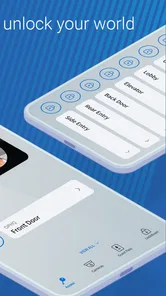
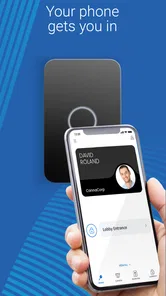
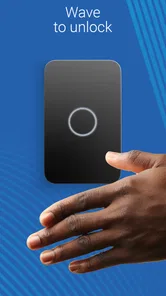
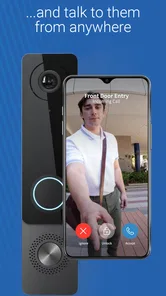
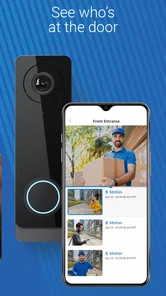

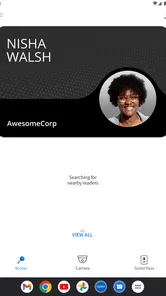
Analysis by Reviewed
I find mobile access most useful when it removes a small, repeated hassle: reaching a door while carrying a bag, arriving before a colleague, or needing to let an authorized visitor in without hunting for a separate credential. Avigilon Alta Open is a business app built around that kind of access, rather than a general-purpose home security dashboard. Its central promise makes sense for workplaces already using a compatible access setup, but the phone is only one part of the experience: the door system and a working connection matter too.
When the network becomes part of opening a door
With phone-based entry, convenience depends on the moment the request is made. If I am approaching a busy office entrance, I want the app to be ready before I reach the reader, not something I have to troubleshoot with people waiting behind me. A practical habit is to open it while walking up and keep the phone accessible. That small bit of preparation can make mobile entry feel smoother, especially when switching from another task or moving between buildings.
Connectivity is worth considering before relying on the app as your only way in. A weak mobile signal, a crowded network, or a phone that has just resumed from a long idle period can add friction to any connected access workflow. I would keep whatever entry method the organization has authorized as a backup, and ask the site administrator what to do if the app or network is unavailable. That is not a criticism unique to this app; it is sensible planning whenever a door depends on connected technology.
A better fit for routine workplace movement
The clearest everyday scenario is an employee arriving for a shift with hands full, using a phone instead of searching for a badge. It can also suit a shared office where staff move in and out during the day and want access to feel straightforward. For facilities teams, the value is less about novelty and more about giving people a familiar device for a routine task. The experience will still depend on how the organization has configured access and whether each person has been granted the right credentials.
That makes it different from a typical smart-home app. Home products often combine cameras, lights, alarms, and locks for one household; a business access app is most relevant when an employer or building operator has set up a supported entry system. It is not a universal key for arbitrary doors, nor a substitute for an organization’s access policies. If you only need to unlock your own front door, a consumer smart-lock app made for that lock is likely the more direct choice.
What to check before depending on it
Before a first workday, I would sign in and confirm that the correct building access appears while I still have time to ask for help. I would also check that the phone is charged and that I know whom to contact if entry fails. These are modest steps, but they prevent the awkward assumption that installing an app automatically grants access. The organization controls the underlying permissions, so an employee should not expect to add doors or invite people independently unless their role allows it.
Another useful trade-off is phone dependence. Carrying a phone is already routine for many people, but a dead battery, a forgotten device, or a damaged screen can turn a convenient credential into a problem. If you work in a place with strict arrival times or limited reception, ask whether a badge or another authorized method is available. People who prefer not to use a personal phone for work access may also be better served by a conventional credential, if their organization offers one.
More From Our News Desk

Weather by Xiaomi Review: Clear at a Glance, Less Clear Up Close

X Under Pressure: Can It Recover When Posting Goes Wrong?

Clash of Clans Is Won Between the Battles

Android Auto Makes the Case for Quieter Car Software

MobiOffice: Transforming Mobile Productivity with Seamless Integration

EA SPORTS FC™ Mobile Soccer: Redefining Mobile Sports Gaming
What is Avigilon Alta Open all about?
The Avigilon Alta Open app is like having a personal security guard right in the palm of your hand. Designed for both Android and iOS, this app promises to revolutionize the way we think about security. It offers real-time alerts, video surveillance, and seamless integration with various devices, making it a top contender for anyone serious about their safety.
Getting Started with Avigilon Alta Open
Setting up the app was a breeze. After downloading it from the App Store (or Google Play for you Android folks), I was greeted with a user-friendly interface that guided me through every step. The app walks you through the process of connecting your security devices, and before I knew it, I had my cameras linked and ready to go. If you're someone who's not particularly tech-savvy, fear not! The app's intuitive design ensures that even beginners won't feel overwhelmed.
Features that Stand Out
What really sets Avigilon Alta Open apart from the crowd is its range of features. One of my favorites is the real-time alert system. Imagine getting a notification the moment something unusual is detected around your property. It's like having a watchdog that never sleeps. Plus, the video surveillance feature allows you to keep an eye on things, whether you're at home or halfway across the globe.
Another noteworthy feature is the app's ability to integrate with other smart devices. From smart locks to lights, Avigilon Alta Open creates a holistic security ecosystem that's both reliable and efficient. The app's developers have truly thought of everything to ensure your peace of mind.
Using the App Daily
In my day-to-day use, the app proved to be incredibly reliable. The alerts were timely, and the video quality was impressive, even in low-light conditions. I also appreciated the app's regular updates, which not only provided new features but also enhanced security. It's clear that the developers are committed to keeping the app at the forefront of security technology.
Final Thoughts
In a world where security is a top priority, the Avigilon Alta Open app is a game-changer. It combines ease of use with advanced features, making it a must-have for anyone looking to enhance their security setup. Whether you're a tech guru or someone just dipping their toes into the world of smart security, this app has something for everyone. So why not give it a try and experience the future of security today?
Who should install it—and who should not
Openpath Security, Inc. develops this free business app, which is rated for Everyone and has an average rating of 4.3 from around 2.8 thousand ratings. It has passed 500 thousand installs, and its current version is 3.4.4 for devices running Android 10 or later. Those figures suggest an established product, but they do not change the key question: does your workplace use the access system it is designed to accompany? If not, installing it alone will not make a door available to you.
I would recommend it to staff, visitors, and building operators who have been told their site uses Avigilon Alta Open and who want phone-based access as part of their normal routine. I would skip it if I needed a standalone lock controller, a general-purpose home alarm, or a way to manage security hardware without an organization’s setup. In those cases, a dedicated lock app or the employer’s existing badge system is a more dependable match.
Small habits that make connected access easier
For a smoother arrival, I would test the app at a quiet time rather than discovering a login or permission issue during the morning rush. If a door does not respond, pause and check the simple causes first: confirm the phone is online, make sure you are using the account associated with your workplace, and contact the site administrator rather than repeatedly trying the same action. Repeated attempts will not fix missing authorization, and an administrator can distinguish an account issue from a door or network problem.
For a team, it is also worth agreeing on a clear fallback before anyone needs one. A front desk contact, an approved badge, or a known procedure for a temporary outage can prevent a connectivity hiccup from becoming a security shortcut, such as holding a controlled door open for an unknown person. I see this as an important trade-off: the app can make legitimate entry convenient, but staff still need to follow the building’s normal visitor and access rules.
Permissions, privacy, and practical limits
Because this is tied to workplace entry, I would treat account access carefully: use the account issued for the site, keep the phone protected, and report a lost device promptly so the organization can advise on access. The app’s convenience does not replace sensible handling of credentials. If your employer has rules about personal devices, notifications, or work accounts, those rules should guide how you use it.
The app is free to install, but the useful part depends on the organization’s compatible access setup and the permissions it assigns. That distinction matters when deciding whether to try it: downloading it is easy, while access itself is managed at the building level. Released on January 3, 2018, and categorized as a business app, it has a focused role rather than trying to replace every part of a security system.
My connectivity verdict
For a workplace already set up for it, I can see the appeal: a familiar phone can make everyday entry less fiddly, and the business context gives the app a clear purpose. I would still keep an approved alternative in mind, because mobile access relies on the phone, the account, and the connected door all being ready at the same time. If you have that setup and value convenience, it is worth considering; if you need a self-contained home-security tool or dislike phone-based credentials, a different option will suit you better.
Plan around the parts you control
One useful way to judge whether this setup will suit your routine is to separate personal preparation from building-side support. I can keep my phone charged, use the workplace account, and arrive with enough time to deal calmly with a snag. I cannot grant myself access to another entrance or repair a reader from the app. Knowing that boundary helps set realistic expectations: the app is a credential interface, not a replacement for the people who manage access.
For someone starting a new job, I would ask the administrator to walk through the first entry in person if possible. That simple check can clarify which entrance is intended, whether the account is active, and who can help when the normal route is blocked. It is especially useful for employees who move between buildings, because a successful entry at one location should not be taken as proof that every site or door is included in their permissions.
Make the phone fit the workday
A phone used for access is also the phone used for calls, messages, and navigation, so its everyday state matters. If I am heading into a building while wearing gloves or carrying equipment, I would make sure I can reach and operate it before I arrive at the door. Keeping the device in an accessible pocket is a small adjustment, but it avoids fumbling in a crowded entrance and makes the interaction more considerate of people waiting behind me.
There is a privacy trade-off here too. Some employees are comfortable using a personal device for a work credential; others would rather keep work access separate. I would ask whether the organization supports an alternative before deciding, rather than assuming that a business app means personal-phone use is required. The right choice depends on workplace policy and the access options the organization has approved.
When a badge is still the better tool
Compared with a physical badge, phone access can reduce the need to carry one more item, but it puts more responsibility on the device and its account. A badge may be the simpler choice for someone who does not carry a smartphone at work, shares duties across a team, or wants access to remain separate from personal technology. The app makes most sense when the organization supports it and the employee actually values having a phone-based credential.
I would also avoid treating mobile entry as a reason to relax basic door etiquette. Wait for the door to close, do not pass a credential to someone else, and direct visitors through the approved process. Those habits matter regardless of whether access is granted by phone or badge; convenience should make legitimate entry easier, not blur who is authorized to enter.
A grounded choice for connected workplaces
As a business app, Avigilon Alta Open is most compelling when it fits a system the workplace already uses and when phone access solves a real daily annoyance. It is less persuasive as an app to install speculatively: without organizational setup and assigned permission, there is no useful shortcut to unlock. That makes checking with the building administrator the best first step, ahead of downloading it or changing how you plan to enter.
My practical recommendation is to treat it as one part of an access routine, not the whole routine. Confirm your account before a busy day, learn the site’s fallback procedure, and use the authorized method that works best for your circumstances. For the right employee and a supported location, that balance can make arriving at work smoother without pretending that connectivity, battery life, or building policies stop mattering.
Avigilon Alta Open Frequently Asked Questions
Is Avigilon Alta Open free to download, and who is it intended for?
Avigilon Alta Open is a free business app developed by Openpath Security, Inc. Its purpose is reflected in the store summary, “Open doors with your phone!”, so it is most relevant to people who need mobile access to a compatible entry system. It is rated for Everyone, but practical usefulness depends on whether your organization uses a system that works with the app.
What is Avigilon Alta Open and what are its main features?
Avigilon Alta Open is a sophisticated security management application designed to integrate with Avigilon's advanced surveillance systems. The app offers features such as real-time video monitoring, advanced analytics, and remote access to security camera feeds. Users can manage and configure surveillance settings directly from their mobile device, ensuring comprehensive security oversight. It's particularly beneficial for businesses looking to enhance their security infrastructure.
Is Avigilon Alta Open compatible with all devices?
Avigilon Alta Open is primarily designed for use with Android and iOS devices, ensuring broad accessibility for mobile users. However, compatibility may vary based on the device's operating system version. The current version is 3.4.4 and requires Android 10 or later, so check your device’s system version before downloading to avoid compatibility problems. Availability on iOS does not mean every device or operating-system version will provide the same experience.
How secure is Avigilon Alta Open for managing surveillance systems?
Security is a top priority for Avigilon Alta Open. The app employs robust encryption protocols to protect user data and ensure secure communication between devices and the surveillance system. It also includes multiple authentication layers to prevent unauthorized access. Users can feel confident that their surveillance management is secure, providing peace of mind for both personal and business use.
Do I need an Avigilon account or compatible equipment to use Avigilon Alta Open?
Avigilon Alta Open is intended to work with a compatible access or security setup rather than act as a stand-alone door-opening tool. Before downloading, check with your organization or system administrator that your site supports the app and that you have the appropriate access configured. Having the app installed alone does not provide access to a building or connect it to equipment automatically.
Pros
- User-friendly interface for easy navigation.
- High-quality video streaming without lags.
- Customizable alerts for specific events.
- Seamless integration with existing systems.
- Robust security features protecting data.
Cons
- Limited compatibility with older devices.
- Requires strong internet connection.
- High subscription cost for premium features.
- Complex initial setup for beginners.
- Limited offline functionality.











