

avianca
- 2.02K
- 4.7
- Installs
- 5.00M
- Price
- Free

Screenshots



Analysis by Reviewed
I find an airline app most useful when it helps me handle the small tasks that can become stressful on travel day: buying a ticket, checking in, and seeing what is happening with a flight. That is the practical appeal of Avianca. It is a free travel and local app from Avianca, and I would consider it if I were flying with the airline and wanted a direct place to manage the journey rather than juggling several sources.
Where the journey can snag
The main trade-off is that an airline app is most useful for travel tied to that airline. If I am comparing a broad mix of carriers or planning an itinerary across several companies, a general flight-search or trip-planning service may be a better starting point. Once I have chosen Avianca, though, having the booking and flight-status tasks together is a sensible convenience.
Travel-day information can also feel less straightforward when a page takes time to load or a detail is not immediately where I expect it. I would avoid relying on one screen alone for a time-sensitive decision: check the latest information again before leaving for the airport, and pay attention to airport announcements and staff instructions once there.
Your Travel Companion
First off, the Avianca app is like having a personal travel assistant in your pocket. From the moment you open it, you're greeted with a sleek, intuitive interface that practically whispers, "Where to next?" I mean, I could almost hear the call of distant beaches and bustling cityscapes just by scrolling through the flight options.
Booking Made Easy
Booking a flight has never been easier. Seriously, all it takes is a few taps and swipes. You can search for flights, compare prices, and book your ticket all within minutes. And if you're anything like me, who tends to do everything last minute, this feature is a lifesaver. Plus, you can manage your bookings and even choose your seat preference. It's like having the VIP treatment without the extra cost.
For a more dependable booking workflow, I would slow down at the final review: check the travel dates, passenger details, and selected options before confirming. Keep the booking information somewhere accessible as well. That gives you a reference if you need to reopen the app, switch devices, or ask for help later, without having to reconstruct what you selected from memory.
Stay Updated on the Go
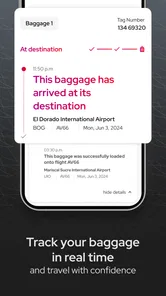
One of my favorite features is the real-time flight updates. You know how nerve-racking it can be to keep checking if your flight is delayed or on time. Well, this app takes that worry off your shoulders. You'll get notifications about any changes to your flight schedule, gate numbers, and more. It's like having an insider at the airport keeping you in the loop.
More From Our News Desk

 Weather - By Xiaomi
Weather by Xiaomi Review: Clear at a Glance, Less Clear Up Close
Xiaomi’s weather app makes everyday forecasts quick to scan, but its calm surface can leave useful details and recovery paths harder to find than they should be.

 X
X Under Pressure: Can It Recover When Posting Goes Wrong?
A resilience-focused review of X, examining setup, mistaken posts, interruptions, weak connections, and the gaps that matter when recovery needs to be dependable.

 Clash of Clans
 Is Won Between the Battles
Its raids are quick; its community is a long-term project of coordination, teaching, rivalry, and shared responsibility—with all the friction that entails.

 Android Auto
 Makes the Case for Quieter Car Software
The car interface is no longer judged by how much it can do, but by how quietly it helps. Android Auto shows what drivers now expect—and what still gets in the way.

 MobiOffice: Word, Sheets, PDF
MobiOffice: Transforming Mobile Productivity with Seamless Integration
MobiOffice: Word, Sheets, PDF is redefining mobile productivity with a surprising blend of functionality and innovation.

 EA SPORTS FC Soccer Mobile 26
EA SPORTS FC™ Mobile Soccer: Redefining Mobile Sports Gaming
Dive into EA SPORTS FC™ Mobile Soccer, where immersive gameplay and strategic depth transform mobile sports gaming.
Latest News



I still treat alerts as a prompt to verify, not as a reason to stop checking. If a notification seems delayed or the app is slow, reopen the flight details when you have a connection and compare them with the airport display. This is especially useful when plans change while you are in transit: a quick refresh can help distinguish an old screen from current information.
Frequent Flyer Perks
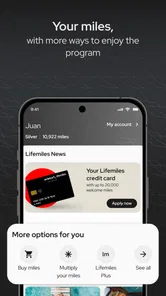
For those of you who are loyal to Avianca, the app has a neat way to track your frequent flyer miles. You can check your points balance, see how far you are from your next reward, and even discover special offers. It's a pretty sweet deal if you ask me.
If you do not fly with Avianca often, this part may matter less than booking and check-in. I would use the app for the trip itself rather than install it expecting a broad travel-planning service; travelers who prefer one account to organize multiple airlines may find a general travel app more convenient for that wider job.
A Few Quirks
Of course, no app is perfect. While the Avianca app is generally smooth, I did encounter a couple of hiccups. There were a few times when the app took a bit longer to load than I'd like, especially when checking flight details. But honestly, it's nothing a little patience can't fix.
If something does not appear to work, I would first check the basics: confirm the phone has a usable internet connection, close and reopen the app, and make sure the booking details are being entered consistently. If the issue persists, trying again later or using Avianca's other available customer-service channels is more practical than repeatedly tapping the same screen. For check-in, I would leave enough time to fall back to airport assistance if the app does not complete the process.
Not every confusing change is necessarily an app problem. Airport operations, schedule adjustments, and connectivity can affect what you see and when you see it. For example, if I were heading to the airport after work, I would check the flight status before leaving, then verify it again on arrival rather than assuming an earlier view is still current. The app can keep the airline-related details close at hand, but it cannot replace checking the airport’s live information or asking staff when instructions conflict.
Who will get the most from it
I think this is a good fit for someone who already has an Avianca trip in mind and wants a convenient route from purchase to check-in and status checks. It may also suit a frequent Avianca flyer who likes keeping an eye on loyalty points. If you are only browsing destinations, comparing several airlines, or organizing a complicated multi-carrier itinerary, I would begin with a broader travel service and use this app for the Avianca portion.
The app has a 4.7 average from around 102,000 ratings, and it has been downloaded over 5 million times. It is rated for Everyone, with version 8.39.2 listed for devices running Android 10 or later. Those details make it easy to judge basic fit, but they do not remove the usual practical checks: confirm your device meets the requirement and keep another way to access travel details for a day when your connection or the app is uncooperative.
Before travel day
I would set up the app while I still have time and a reliable connection, rather than waiting until I am in a queue or rushing to leave home. First, check that the device is running a compatible Android version if you are using Android. Then open the app, sign in or follow its booking flow, and make sure you can find the trip you expect to manage. A calm test run is useful because it separates a login or booking-entry problem from a genuine airport-day issue.
One practical habit is to compare the itinerary details you enter with the confirmation you already have, especially the passenger name and travel date. A small mismatch can make a booking harder to locate, so I would avoid trying several slightly different versions in a hurry. If the reservation does not appear, I would recheck the information carefully before assuming the trip is missing, then seek airline help if the details still do not line up.
I would also decide in advance where I can retrieve essential travel information if my phone battery runs low or the app is unavailable. Keeping the booking confirmation accessible outside the app is a simple backup, not a sign that the app is unreliable. It is just sensible preparation for any travel tool that depends on a working phone and connection.
A useful routine for a changing itinerary
Imagine I have an Avianca flight after a workday and my ride to the airport depends on the departure time. I would check the trip before leaving, but I would not treat that first look as final. If a notification arrives during the journey, I would reopen the flight information when possible, note what changed, and confirm the latest instruction on an airport display. That sequence keeps me from acting on a message preview or a screen I opened earlier.
If the app fails to refresh, I would avoid repeatedly submitting a booking action or making the same change again without knowing whether the first attempt went through. Instead, I would pause, check for a confirmation or updated itinerary, and use another airline contact route if the result remains unclear. This is a useful distinction: a slow page is annoying, but duplicate actions can create extra confusion when you are already managing a tight schedule.
For check-in, I would do the task when I have enough time to read each screen rather than leaving it to the last stressful moment. Once it is complete, I would verify that the trip reflects the expected status and keep the relevant information easy to retrieve. If the app does not finish the process, airport assistance is a better fallback than assuming that an unfinished screen means check-in has succeeded.
What this app does better than a general travel tool
A broad travel app is often more useful at the research stage: it can help someone compare different carriers or bring a mixed itinerary into one planning space. Avianca’s app has a narrower job, and that focus is its practical advantage when the airline is already part of the plan. I would rather use an airline’s own app for its booking-related tasks than expect a third-party planner to be the sole place I check airline updates.
The trade-off is that this is not the best single organizer for every trip. If my journey involved several airlines, hotels, and ground transport, I would use a wider itinerary tool for the overall picture and keep Avianca’s app for the part it handles directly. That division avoids asking one airline app to manage parts of a holiday that have nothing to do with Avianca.
It is also worth being clear about what “convenient” means here. Bringing purchase, check-in, and flight information close together can reduce switching between sources, but it does not remove the need to review choices carefully or respond to airport instructions. I see the app as a useful airline-specific workspace, not as a promise that every travel decision will happen automatically.
When another option is the better choice
If I have not decided which airline to fly, I would start with a comparison service instead of beginning inside an airline app. That lets me think about the whole route before committing. Once Avianca is selected, the app becomes more relevant for handling the airline portion. Likewise, someone who rarely flies with Avianca and does not need to manage a current booking may have little reason to keep it installed between trips.
For a traveler who needs help with a complicated change, a missing reservation, or conflicting instructions, the app may be a starting point rather than the final answer. I would gather the booking details, explain the issue through an available customer-service route, and follow staff guidance when at the airport. An app can make information easier to reach, but a person is often the more appropriate resource when a case needs interpretation or a decision.
That distinction matters for people who expect one tool to cover every airline and every travel problem. If that is the priority, a general trip organizer may be a better everyday home for plans. If the priority is managing an Avianca flight directly, using both tools for their separate strengths is more sensible than choosing one and expecting it to do everything.
My practical verdict
Overall, the Avianca app is a must-have for travelers, whether you're a frequent flyer or just planning your annual vacation. With its user-friendly interface and comprehensive features, it’s designed to make your travel experience as seamless as possible. So next time you're planning a trip, give it a shot. Who knows? It might just become your favorite travel buddy.
My recommendation is narrower and more useful: install it when Avianca is part of your plans, complete booking tasks carefully, and use it as one source for travel-day updates rather than your only source. That balance lets the app do its most relevant work without asking it to replace airport displays, broader itinerary tools, or human help when a situation needs clarification.
avianca Frequently Asked Questions
Can I use the Avianca app without creating an account?
The app is intended to support travel tasks such as purchasing tickets, checking in and finding out the status of a flight. Booking and managing travel usually involve entering details connected to your trip, so have your reservation information handy when you open the app. You can explore the app’s available options to see which services are accessible before signing in.
What should I check before installing the Avianca app on my phone?
Check that your phone’s operating system is compatible with the app and that you are downloading the Avianca app published by Avianca. The Android version requires Android 10 or later. The app is free to download and is listed for users of all ages, making it a practical option to consider if you want airline travel tasks available on your phone.
Is the Avianca app free, and what devices can install it?
The Avianca app is free to download and is listed for users of all ages. It is available for Android and iOS, and the Android version requires Android 10 or later. Before downloading, check that your device meets the operating system requirement so you can install and use the app comfortably.
What is Avianca, and what does the app offer?
Avianca is a popular airline in Latin America, and its app is designed to enhance your travel experience. It allows users to purchase tickets, check in, manage bookings, and find out the status of their flights. The app also provides options for selecting seats and receiving travel updates, all from the convenience of your mobile device. Avianca is the app’s developer, and it belongs to the Travel & Local category.
How do I book a flight using the Avianca app?
To book a flight with the Avianca app, start by downloading it from your device’s app store. Sign in or create an account, then enter your travel details, such as departure and arrival cities, dates, and the number of passengers. Browse through available flights, select your preferred option, and proceed to payment. The app guides you through each step to make the booking process straightforward.
Pros
- User-friendly interface for easy navigation.
- Comprehensive flight tracking features.
- Multiple language support for global users.
- Efficient booking and check-in processes.
- Access to exclusive promotions and discounts.
Cons
- Occasional app crashes reported.
- Limited offline functionality.
- In-app ads can be intrusive.
- Requires frequent updates for smooth operation.
- Customer service response can be slow.











