Avia Weather - METAR & TAF
- 2.85K
- 4.9
- Installs
- 500.00K
- Price
- Free

Screenshots
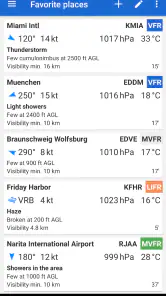
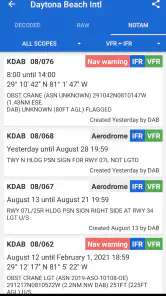
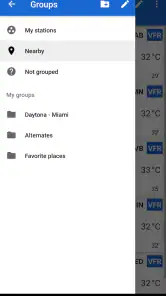
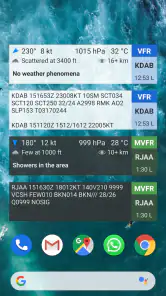
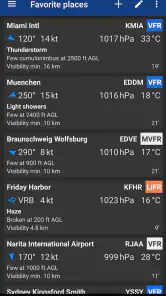
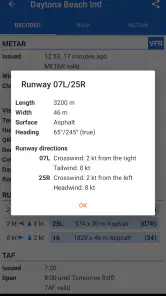
Analysis by Reviewed
When I need weather information for flying rather than a general forecast for a weekend walk, I want the wording to be precise and the presentation to stay focused. Avia Weather - METAR & TAF is built around that need. It is a weather app for pilots from Remy Webservices UG, and its main job is to make aviation weather reports easier to read without turning the screen into a broad consumer forecast dashboard.
That narrow purpose is its biggest strength. I would not install it as my only weather app for planning a picnic, checking rain later tonight, or watching a storm system move across a whole region. I would consider it when I need airport weather information, especially METAR and TAF reports, in a format that helps me quickly understand what is happening now and what conditions are expected next.
The app is free to install, rated for Everyone, and has built a strong audience with an average rating of 4.9 from around 28 thousand ratings. It has passed half a million installs, which gives me some confidence that it is not an abandoned niche tool. Still, popularity is not a substitute for checking official briefing sources before a flight. I see this app as a practical reader and quick reference, not as permission to skip proper flight planning.
How the current version fits into a pilot’s routine
A focused reader instead of a general weather dashboard
The current version, 3.10.1, keeps the product identity clear: this is an airport-weather reader first. That matters because many weather apps bury useful aviation information under maps, lifestyle forecasts, advertising panels, and hourly charts. Here, the relevant question is more direct: what is the latest report for the airport I care about, and what does the forecast say about the upcoming period?
In my experience, that focus makes the app most useful at the points where pilots tend to make quick checks. Before leaving home, I can use it to review a destination or alternate. At the airport, I can use it as a readable second look at current conditions. After landing, it can help me compare the forecast with what I actually encountered. The value is less about visual spectacle and more about reducing the time spent decoding a report.
That also explains why it may feel limited to someone coming from a mainstream weather app. A normal forecast application usually emphasizes temperature, precipitation, radar, severe-weather alerts, and a friendly daily summary. Avia Weather is aimed at a different layer of information. If you want a simple answer such as “Will I need an umbrella at lunch?”, this is probably the wrong tool. If you already understand aviation weather and want a compact way to inspect airport reports, its restraint is useful.
METAR and TAF are valuable only when read in context
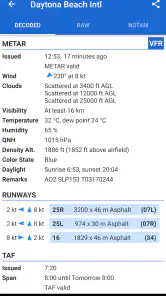
A METAR gives a snapshot of observed airport conditions, while a TAF describes the expected conditions over a forecast period. The distinction is important, and the app is most helpful when I use the two together rather than treating either one as a complete answer. A current observation can look acceptable while the forecast points toward worsening visibility, stronger wind, or a change in ceiling later. Conversely, a forecast can sound concerning while the latest observation shows that conditions have not yet deteriorated.
More From Our News Desk

Clash of Clans Is Won Between the Battles

Android Auto Makes the Case for Quieter Car Software

MobiOffice: Transforming Mobile Productivity with Seamless Integration

EA SPORTS FC™ Mobile Soccer: Redefining Mobile Sports Gaming

How Microsoft OneDrive Became a Mobile Productivity Giant

How Google Translate Breaks Language Barriers Effortlessly
One practical habit is to read the report twice: first for the immediate operational picture, then again for the elements that could change the decision. I pay particular attention to wind direction and speed, visibility, cloud or ceiling information, and any remarks or temporary groups that alter the basic forecast. The app can make the text accessible, but it cannot replace the pilot’s judgement about aircraft limitations, runway selection, terrain, alternates, or personal minimums.
This is one of the app’s less obvious strengths: it encourages me to work from aviation reports rather than from a simplified weather icon. That is helpful for students learning how reports are structured, but it also creates a responsibility. A readable interface can make technical information feel easier than it really is. I would use the app to support understanding, not to pretend that a decoded line removes the need for training.
A realistic airport-check workflow
Imagine that I am preparing for a short flight to a nearby airport. I first select the destination and inspect the latest METAR, looking for the current wind, visibility, and ceiling. Then I check the TAF to see whether the expected conditions remain stable during the period that matters to my arrival. If the forecast includes a temporary change, I do not average it away mentally; I treat it as a reason to examine the timing and my alternatives more carefully.
Next, I repeat the process for the departure airport and a possible alternate. This is where a focused aviation app can be more useful than a general weather screen. I am not just asking whether the day is sunny. I am comparing airport-specific observations and forecasts, which is much closer to the way a pilot actually evaluates a route.
I would still cross-check the information against the official briefing material required for the flight. That is not a criticism of this app; it is simply the correct boundary for a convenient reader. A quick mobile view is excellent for orientation and follow-up checks, but operational decisions should be based on authoritative sources and the complete briefing picture.
What the product’s long life suggests
Avia Weather has been available since January 21, 2014, and the current release number shows an application that has continued through multiple stages rather than appearing as a short-lived experiment. The fact that the developer is still presenting a current version is encouraging for existing users who want a maintained tool instead of a forgotten download.
At the same time, a long-running app can bring expectations from different generations of Android users. Someone who first used it years ago may value familiarity, while a new user may expect the visual polish and automation found in newer forecast products. I see the app’s evolution as most successful when it preserves the fast aviation workflow instead of adding features merely to look busy. For this kind of utility, stability and legibility are more important than decorative redesigns.
What version 3.10.1 means for someone already using it
The current version is the one I would evaluate today, but I would avoid assuming that a version number alone guarantees a particular feature set or a specific change history. What I can say from the product’s current position is that it remains centered on METAR and TAF reading, and that its identity has not drifted into a generic weather portal.
For an existing user, that continuity is probably the main benefit. A pilot who has already arranged a familiar airport-check routine does not need to relearn the entire product simply because the app has moved forward over time. The trade-off is that continuity can make the experience feel less adventurous than a modern forecast app. If you are looking for a constantly expanding collection of maps, widgets, radar layers, or social weather functions, this focused approach may seem conservative.
I also appreciate that the app’s free entry point lowers the barrier to testing it. The presence of optional in-app purchases, ranging from 99 cents to 20 dollars per item, means I would inspect the purchase screen carefully before committing to anything. The free availability is useful for deciding whether the workflow suits me, but I would not assume that every convenience or advanced option is included without checking inside the app.
Where it helps new pilots most
For a student pilot, the app can serve as a practical companion during lessons about aviation weather. Instead of reading a METAR only in a textbook, I can look at current airport reports and try to identify the elements I have learned. That makes the symbols and abbreviations feel less abstract. I would use it as a study aid by predicting what the decoded report should say before checking my interpretation.
A useful exercise is to compare a current METAR with the corresponding TAF and write down the differences before making any conclusion. This exposes a common mistake: confusing what is happening now with what is expected later. The app’s value here is not that it makes weather simple, but that it puts the two report types close enough for deliberate comparison.
There is a limit, however. A beginner who has never learned METAR and TAF conventions may still find the information intimidating. This is not a replacement for instruction, and I would not recommend treating a decoded display as a complete course in aviation meteorology. It works best when the user already has a teacher, manual, or training background to provide the meaning behind the abbreviations.
Where experienced pilots may save time
Experienced pilots often do not need a long explanation of every code. They need a dependable way to check a known airport, compare a few locations, and return to the information without unnecessary navigation. That is the audience for whom the app’s straightforward design makes the most sense.
My preferred workflow would be to keep a small group of regularly used airports in mind and check them in a consistent order: departure, destination, then alternate. Consistency reduces the chance of overlooking an airport when I am busy. I would also check the report time rather than relying on the fact that the screen looks current. Aviation weather is time-sensitive, and a neat presentation cannot make an old observation fresh.
Another useful habit is to use the app for trend awareness rather than a single yes-or-no decision. If successive observations show a meaningful change in wind, visibility, or cloud conditions, that trend deserves more attention than a single reassuring glance. This is a subtle advantage of returning to the same airport reports over time: the app can become part of a disciplined monitoring routine instead of a one-time lookup.
The friction points I would keep in mind
The first limitation is scope. Avia Weather is not the best choice for someone who wants a full weather ecosystem. I would choose a broader service when I need radar, satellite imagery, long-range planning, detailed precipitation timing, or general outdoor forecasts. The app’s specialization is valuable, but it means I may need another source beside it.
The second limitation is interpretation. Aviation reports contain compact information, and even a clear reader cannot decide what is safe for a particular aircraft, route, pilot, or runway. A user who is unfamiliar with the difference between visibility and ceiling, or who overlooks temporary forecast groups, can still draw the wrong conclusion. The interface may reduce friction, but it does not remove the technical responsibility.
The third limitation is the possibility of a less satisfying experience for users who judge weather apps by visual richness. If animated maps and colorful forecast cards are central to your routine, this product may feel plain. I would not call that a defect in isolation; it is a trade-off. The simpler presentation is precisely why I can focus on the report, but it also means the app will not replace every tool in a pilot’s kit.
Finally, optional purchases deserve a moment of attention. Because the app is free while also offering items priced from 99 cents up to 20 dollars, I would review what each purchase changes before paying. That is especially important for a niche utility, where a feature that is essential to one pilot may be irrelevant to another. Testing the basic workflow first is the sensible approach.
Who should use it and who should skip it
I would recommend this app to student pilots who want repeated exposure to real METAR and TAF reports, private pilots who regularly check a familiar set of airports, and experienced users who prefer a direct aviation-weather reader over a general forecast application. It is also a reasonable secondary tool for anyone who wants a quick mobile check before opening a more complete official briefing source.
I would skip it if my main goal were household weather. Families looking for rain alerts, pollen information, hourly temperatures, or an attractive seven-day forecast will probably be happier with a conventional weather service. I would also skip relying on it alone for complex or high-consequence planning. The more demanding the flight, the more important it becomes to combine airport reports with official briefings, charts, notices, aircraft performance information, and sound judgement.
The app is free and suitable for Everyone, but that age rating says little about the complexity of the subject. A young user can open it, yet understanding aviation weather still requires appropriate education. In other words, the download is accessible while the responsible use of the information remains a pilot skill.
What I would watch as the app continues
For future updates, I would pay attention to whether the developer keeps the current balance between speed and clarity. The most valuable improvements would be the ones that make airport comparison, report timing, and interpretation easier without burying METAR and TAF under unrelated weather features. I would also want existing workflows to remain predictable, because pilots often value a familiar sequence when checking conditions under time pressure.
I would watch the treatment of optional purchases as well. A free starting point is attractive, but users should be able to understand which parts of the experience are included and which are extras before building the app into a regular routine. Clear value is particularly important here because pilots may use the app alongside other paid or official resources.
Most importantly, I would judge future changes by whether they improve confidence without encouraging overconfidence. A better reader should help me notice the report time, distinguish observation from forecast, and spot meaningful changes. It should never give the impression that one phone screen can answer every operational question.
My final take on Avia Weather
After looking at the app as a pilot-focused weather tool, I see a clear and useful product rather than an all-purpose forecast replacement. Its appeal comes from concentration: it puts METAR and TAF information at the center and avoids asking the user to search through a general weather interface for aviation details.
The best reason to use it is disciplined convenience, not blind confidence. I can use it to check departure, destination, and alternate airports; compare current observations with forecasts; practice reading aviation reports; and notice changes during the day. Those are meaningful everyday uses, especially when I already understand the information and know when to verify it through official channels.
Its limitations are equally clear. It is not the right choice for broad consumer forecasts, visual radar work, or replacing a complete preflight briefing. Optional purchases mean I would test the free experience and examine the value of extras before spending money. Even with its high average rating and established install base, the app remains a specialized instrument, and specialized instruments work best when matched to the right task.
For me, that makes Avia Weather a sensible recommendation to a pilot friend who wants a straightforward airport-weather reader on Android. I would describe it as a focused companion: useful before and during routine weather checks, helpful for learning through repetition, and most trustworthy when used as one part of a careful process. If that is exactly what you need, the current release is worth trying. If you want a complete weather service in one colorful package, I would point you toward a broader alternative instead.
Avia Weather - METAR & TAF Frequently Asked Questions
Can I use Avia Weather for general local weather, or is it mainly for aviation?
Avia Weather is focused on aviation weather rather than everyday forecasts for planning activities such as a walk or commute. Its purpose is to help pilots and other aviation users check airport METAR observations and TAF forecasts. If you mainly want a conventional local forecast, a general weather app may be a better fit; this one is geared toward interpreting conditions relevant to flying.
What information do METAR and TAF reports provide in Avia Weather?
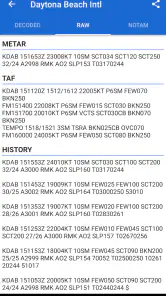
METAR reports describe observed weather at an airport, while TAF reports provide an airport forecast. In Avia Weather, these reports can be viewed in their original coded form and as decoded text. They bring together aviation weather details such as wind, visibility, cloud, temperature, and pressure, helping users review conditions and forecasts in an airport-focused format.
Is Avia Weather suitable for someone who is just learning aviation weather?
Avia Weather can be useful for aviation students and flight enthusiasts who want to become more familiar with airport weather reports. It shows METAR and TAF information in coded and decoded formats, helping users connect the abbreviations with plain-language details. Beginners should still learn how to interpret reports correctly and treat the decoded view as a reading aid, not a substitute for instruction.
What does Avia Weather - METAR & TAF cost, and are there in-app purchases?
Avia Weather is free to download, with optional in-app purchases available. This gives users a chance to explore the app before deciding whether any paid options suit their needs. The app is rated for everyone, and its straightforward focus on aviation weather makes it relevant to pilots, students, and other flight enthusiasts. Check the purchase details in your app store before confirming any transaction.
What is Avia Weather - METAR & TAF used for?
Avia Weather - METAR & TAF is designed to help pilots, aviation students, and flight enthusiasts check current airport weather information. It provides METAR observations and TAF forecasts in a format that can be read as raw aviation weather data or decoded into easier language. The app is particularly useful before a flight because it brings essential visibility, wind, cloud, temperature, pressure, and forecast details together in one place.
Pros
- Clear METAR and TAF displays for quick flight planning.
- Supports airports worldwide with searchable ICAO identifiers.
- Offers useful aviation weather details beyond basic forecasts.
- Frequent weather updates help pilots monitor changing conditions.
- Compact interface works well for checking information on the go.
Cons
- Some advanced features may require a paid subscription.
- Weather data can be difficult for beginners to interpret.
- Forecast accuracy depends on the quality of available airport reports.
- Notifications and background updates may increase battery usage.
- The interface may feel dated compared with modern weather apps.
- Category
- Weather
- Version
- 3.10.1











