

Avera MyChart
- 43.00
- 4.2
- Installs
- 10.00K
- Price
- Free

Screenshots
Analysis by Reviewed
When I need to deal with a medical question, the hardest part is often not the appointment itself. It is finding the right record, remembering what was discussed, checking an insurance detail, or sending information to the right place without making another phone call. Avera MyChart is built for that part of healthcare. I found it most useful as a secure front door to Avera medical records and health insurance information, rather than as a replacement for direct medical care.
After spending time with the app, my overall impression is practical rather than flashy. It is a medical app from Avera Mobile Apps, and its value depends on whether you already use Avera services. If you do, having health information in one place can remove several small obstacles from an ordinary week. If you do not, there is little reason to choose it over the patient portal connected to your own healthcare provider.
The app is free and suitable for everyone, which makes it easy to recommend as a first step for an Avera patient who wants mobile access. Its average rating is 4.2 from around 73 ratings, while the wider install base is over 10K. Those figures suggest a modest but established user community, not a universal health platform. I would treat it as a focused tool for Avera patients, families, and people who regularly need to check both care information and coverage details.
From a health question to a useful answer
I find that a health portal is most helpful when it turns a vague concern into a question I can act on, rather than tempting me to draw conclusions from a record alone. In this section, I look at how I would move from locating relevant Avera information to preparing a focused conversation, while keeping the boundary between access and medical advice clear.
Starting with the situation that sends you to the app
A realistic use case is a follow-up after a clinic visit. You leave with several things to remember: a test may have been ordered, a medication list may need checking, an insurance question may affect the next step, and a family member may ask what the clinician said. Instead of searching through paper notes or calling the clinic immediately, I would open Avera MyChart and begin by looking for the relevant part of the record.
That starting point matters because medical information is rarely needed in isolation. A test result may only make sense alongside the visit that led to it. An insurance detail may become important when scheduling the next appointment. A medication question may require a current list rather than an old bottle label. The app’s main strength is bringing those kinds of Avera-related information into a single mobile workflow.
I also see value before an appointment. Checking available information in advance can help me prepare a concise question instead of trying to reconstruct everything in the waiting room. For example, I might review a previous result, note the name of a medication, and then ask the clinician about the exact issue that still concerns me. That is a small change, but it can make a short appointment feel more focused.
More From Our News Desk

 Gmail
GmailGmail in a Busy Inbox: Who Benefits Most?
From first account to crowded workday, Gmail earns its place through dependable search and flexible sorting—but its best fit depends on how much inbox maintenance you can tolerate.

 Prime Video
Switching to Prime Video: What Changes in Your Viewing Routine
Prime Video can make a compelling second home for streaming, but switching means learning a different catalog, rental layer, and route from browsing to playback.

 Universal TV Remote Control
Universal TV Remote Control Works Best as a Reliable Backup
A phone remote earns its place through quick setup and reliable habits. Here is how to get more from Universal TV Remote Control—and where its limits show.

 Weather - By Xiaomi
Weather by Xiaomi Review: Clear at a Glance, Less Clear Up Close
Xiaomi’s weather app makes everyday forecasts quick to scan, but its calm surface can leave useful details and recovery paths harder to find than they should be.

 X
XX Under Pressure: Can It Recover When Posting Goes Wrong?
A resilience-focused review of X, examining setup, mistaken posts, interruptions, weak connections, and the gaps that matter when recovery needs to be dependable.

 Clash of Clans
Clash of Clans Is Won Between the Battles
Its raids are quick; its community is a long-term project of coordination, teaching, rivalry, and shared responsibility—with all the friction that entails.
Latest News



The important distinction is that access is not the same as interpretation. A record can show that information exists, but the app should not become the place where I diagnose myself from a single result. I would use it to find the document, understand the context I already know, and decide what to ask a qualified professional.
A step-by-step routine that keeps the task manageable
My preferred workflow starts with one purpose. I do not open the app and browse aimlessly through health information. I first decide whether I am looking for a record, an insurance detail, or something connected with an upcoming interaction with Avera. That simple choice reduces the chance of confusing a clinical question with a coverage question.
Next, I look for the most recent relevant information rather than assuming the newest item is automatically the answer. A recent entry may relate to an unrelated visit, while an older result may be the one I actually need. This is one of the less obvious habits that makes a patient portal more useful: search by the event or concern, not only by date.
When I find the right record, I read it together with its surrounding context. A result without the visit background can be easy to misunderstand. If I am preparing for a conversation with a clinician, I note the exact wording that confused me and keep the question narrow. That gives the next handoff a clear starting point.
For insurance information, I use a different approach. I check the details before an appointment, referral discussion, or billing conversation, but I would still keep any relevant physical card or official correspondence available. A mobile view is convenient when I am away from home, yet healthcare administration sometimes involves information from more than one source. The app can reduce searching, but it cannot remove every administrative step.
One practical tip is to avoid doing this kind of review while rushed. If I am standing at a reception desk trying to remember a date or identify a previous result, I am more likely to open the wrong item or overlook an important detail. Looking through the relevant record earlier gives me time to write down a question and makes the eventual handoff smoother.
Where the handoffs become important
The app sits between several people and systems: the patient, Avera clinical staff, administrative teams, and sometimes an insurer. That means the quality of the outcome depends on what happens after I read the information. A record may help me explain the issue, but a clinician still needs to provide medical guidance. An insurance detail may point me in the right direction, but a coverage decision can involve administrative review.
I found this handoff model more realistic than treating the app as a complete healthcare service. It is a communication and access layer. Its best contribution is helping me arrive at the next conversation with fewer missing pieces. If I contact a clinic about a result, I can refer to the relevant visit or document instead of saying only that “something looked unusual.” If I am asking about insurance, I can begin with the information already visible to me.
That preparation can also help when a family member is involved. A person supporting an older relative, for instance, may need to help organize questions before an appointment. The app can be part of that preparation, but I would be careful about privacy and account access. I would not casually share login details or leave a signed-in device unattended. Convenience is valuable, but healthcare records deserve the same caution as financial information.
Another useful handoff occurs when moving from digital information to an in-person visit. I would not assume that showing a screen is always enough. If a clinician needs a specific detail, it helps to know what the record says and when it appeared. The app makes that information easier to consult, while the appointment remains the place for examination, explanation, and decisions.
The outcome: less searching, better preparation
The best result I get from Avera MyChart is not excitement; it is reduced friction. I can approach an Avera-related healthcare task with a clearer idea of what I already know and what still needs an answer. That is especially helpful when several small tasks are connected, such as reviewing a previous visit before discussing insurance or checking a record before contacting a clinic.
For someone who often forgets the names of medications, dates of visits, or the wording of a result, the app can act as a dependable reference point. I would still verify important details during a clinical conversation, but I would no longer have to rely entirely on memory. That makes the app useful for people who are organized in principle but busy in practice.
It can also make routine healthcare feel more continuous. Instead of treating every appointment as a separate event, I can look back at the information associated with earlier care and prepare for the next step. This is where a dedicated patient portal has an advantage over a general notes app or a collection of screenshots: the information is connected to the Avera relationship rather than stored as isolated personal reminders.
Compared with calling a clinic for every basic question, the app offers more control over timing. I can review information when it suits me and decide whether my question is urgent, administrative, or appropriate for the next appointment. Compared with keeping paper folders, it is easier to consult when I am away from home. Compared with a general health tracker, it is more relevant for Avera records and insurance information, although it is not intended to replace a broad wellness or symptom-tracking tool.
That comparison also shows the trade-off. A phone call can sometimes resolve uncertainty faster because a staff member can explain the situation immediately. A general health app may offer more personal tracking features. Avera MyChart is strongest in the middle: it helps me access and organize Avera-related information, then prepares me for the human interaction that may still be necessary.
Where the workflow breaks down
The first limitation is provider dependence. This is not a universal medical record app that becomes equally useful for every clinic I visit. Its value is tied to Avera care and the information available through that relationship. If most of my healthcare happens elsewhere, I would probably prefer the portal used by that provider, even if it has a similar set of functions.
The second limitation is that a digital record can create a false sense of completeness. Information may be present but not immediately understandable, especially when medical language is unfamiliar. I would not use a result in the app to make a medication change, dismiss a symptom, or decide that a concern can wait. The correct next step may still be a call or an appointment.
There is also ordinary mobile friction. Reading a detailed medical document on a phone is less comfortable than reviewing it on a larger screen or discussing it with a professional. Small displays encourage quick scanning, which is not always appropriate for health information. I would use the phone for locating and checking a record, then slow down when the detail affects a decision.
Access problems can be particularly frustrating when the information is needed at a reception desk or during an appointment. For that reason, I would prepare before leaving home, keep my device charged, and avoid making the app my only way to retrieve an important detail. This is not a criticism unique to Avera MyChart; it is a general weakness of relying on a phone for essential documents. Still, it matters because healthcare tasks often happen under time pressure.
The release currently identified for the app is version 11.7.3, and it requires iOS or Android 11 or newer. That requirement is reasonable for many current phones, but anyone using an older device should check compatibility before planning to depend on the app. An upgrade may not be practical for every patient, so the conventional alternatives—calling the provider or using another available access method—remain important.
Who should use it, and who should choose something else?
I would recommend Avera MyChart to an Avera patient who wants a convenient way to consult medical records and health insurance information between interactions with the healthcare system. It is particularly suitable for people preparing for follow-ups, keeping track of questions, supporting a family member, or trying to replace scattered paper notes with one Avera-focused reference point.
I would also consider it useful for someone who dislikes making administrative calls for information that can be checked independently. The app gives that person a better starting point before contacting staff. It can help separate “I need to find this detail” from “I need a professional to explain or act on this detail,” which saves time and leads to clearer conversations.
I would skip it if I am not connected with Avera care, if my main goal is fitness tracking, or if I expect an app to interpret medical results for me. I would also choose a different option if my healthcare is spread across providers whose records are not centered on Avera. In that situation, a broader health-record solution or the portal used most often by my primary provider may be more convenient.
For urgent symptoms, I would not wait for the app to provide an answer. A patient portal is useful for access and preparation, not emergency response. That boundary is easy to overlook when a phone is always nearby, so I consider it part of using the app responsibly.
My final take on the everyday value
Avera MyChart succeeds when the task is concrete: find an Avera record, check health insurance information, prepare a question, and carry that information into the next conversation. I like it less as a place to browse and more as a tool I open with a specific purpose. That focused use makes the experience feel calmer and more reliable.
The app is free, carries an Everyone age rating, and comes from Avera Mobile Apps, so it is an accessible choice for eligible patients who want mobile access. Its current reach is still relatively focused, with over 10K installs, but that is not a weakness for the people it serves. A dedicated portal does not need to be useful to everyone; it needs to be useful at the moment an Avera patient needs a record or coverage detail.
My recommendation is straightforward: use it as a preparation and access tool, keep your questions specific, and treat professional guidance as the next step when the information is unclear. Avera MyChart is most valuable when it turns a vague healthcare task into a clear handoff. It will not replace clinicians, phone support, or urgent care, but for ordinary record and insurance checks, it can make the path from “I need to know something” to “I am ready for the next conversation” noticeably easier.
Avera MyChart Frequently Asked Questions
What devices and operating systems can run Avera MyChart?
Avera MyChart is a medical app for accessing Avera health information on a mobile device. It requires iOS 11 or later, so check your device’s operating system before downloading and update it if needed. Keeping the app and your device software current can also help the experience run smoothly and maintain access to the app’s available features.
Who makes Avera MyChart, and is it suitable for all ages?
Avera MyChart is developed by Avera Mobile Apps and is intended for managing healthcare information and services. Its content rating is Everyone, although children and dependents may need an adult or legally authorized representative to manage access according to Avera’s procedures. The app has a 4.2 average from around 73 ratings, which offers a useful snapshot of user feedback but does not guarantee the same experience for every patient.
What is Avera MyChart, and what can I use it for?
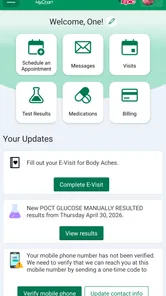
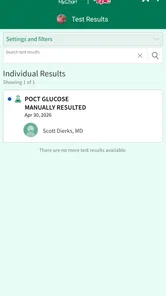
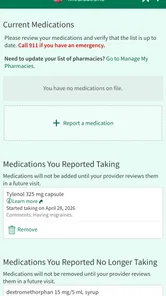
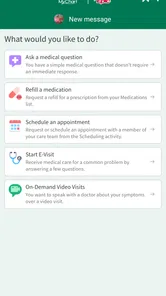
Avera MyChart is Avera Health’s patient portal app for managing healthcare from a mobile device. After signing in, you can review medical records, test results, medications, allergies, visit summaries, and upcoming appointments. The app also supports secure messaging with participating care teams, appointment requests, prescription refill requests, bill-related services, and video visits when those options are available for your account and location.
How do I sign up for Avera MyChart or recover access to my account?
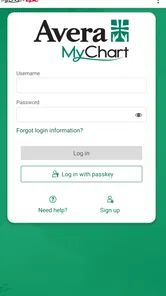
You generally need an Avera MyChart activation code, an eligible Avera patient record, or the registration method provided by Avera. During setup, the app asks you to verify personal information and create login credentials. If you forget your username or password, use the recovery links on the sign-in screen. For unresolved access problems, contact Avera support rather than creating multiple accounts.
Can I use Avera MyChart to schedule appointments and communicate with my doctor?
Yes, Avera MyChart can make routine healthcare communication more convenient, although the exact features depend on your clinic, provider, and account permissions. You may be able to request or schedule certain appointments, view existing visits, and send secure messages to participating providers. Messaging is not intended for emergencies, and replies may not be immediate, so urgent symptoms should be handled through appropriate emergency or medical services.
Pros
- Secure access to personal health records
- test results
- and visit summaries.
- Prescription refill requests can be submitted without calling the clinic.
- Appointment reminders help reduce the chance of missing scheduled visits.
- Easy access to billing details and online payment options in supported systems.
- Proxy access lets approved users help manage a child’s or relative’s care.
Cons
- Features and availability vary significantly between participating healthcare providers.
- Some test results may appear before a doctor has reviewed or explained them.
- The interface can feel confusing when several clinics use the same account.
- Messaging response times depend on the medical office and are not always immediate.
- A stable internet connection is needed for most records and communication features.











