Art pic editor
- 30.00
- 4.5
- Installs
- 1.00M
- Price
- Free

Screenshots
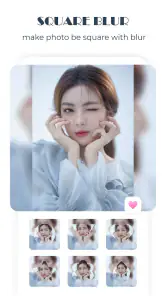
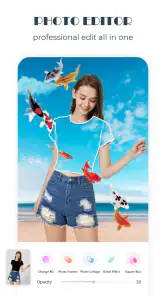
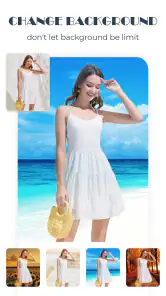
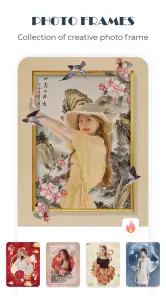
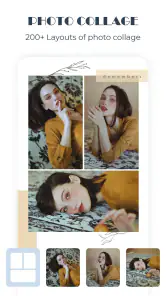
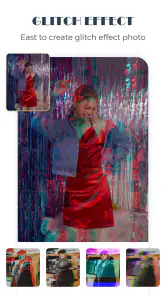
Analysis by Reviewed
When I choose a photo editor, I first ask what I want to do after taking the picture. If I only need to crop and brighten a shot, a basic editor is usually quicker. If I want to give a snapshot a more personal, illustrated feel, I’m more interested in filters, drawing and text in the same place. That is the kind of creative job Art Pic Editor is aimed at, rather than a strict professional retouching workflow.
A quick choice for creative edits
That distinction matters in everyday use. For example, after taking a photo of a friend’s new café, I might want to soften the contrast, try a warmer-looking filter, and add a short caption before sharing it. An art-focused editor can make that sequence feel more natural than moving between several narrowly focused tools. I’d still keep the original photo untouched and compare the edited version with it before saving or sharing; it is easy for a filter or a few decorative marks to overwhelm the subject.
I also find it useful to decide what the picture is for before editing. A photo meant for a quick message can handle a more playful treatment than one I want to keep as a clear record of an event. With a café image, for instance, I’d let the food or storefront remain the focal point and use a filter only if it helps the atmosphere. That small decision keeps creative tools from becoming the point of the picture.
Who will get the most from it
I’d recommend this app to casual creators who like experimenting directly on photos, making a quick personalized image, or adding a hand-drawn touch to a post. It is also a reasonable fit if you enjoy trying several visual directions before settling on one. If your priority is precise portrait cleanup, detailed color control, or a repeatable workflow for a large batch of images, a more specialized photo editor may suit you better. The appeal here is creative flexibility, not a promise that every editing task will be handled equally well.
It is especially suited to someone who wants to make a picture feel personally made without learning a complicated editing system. A parent preparing a birthday greeting, a student making a casual post, or a pet owner adding a small doodle to a favorite shot can get more value from this style of editing than someone who only wants flawless skin retouching. I would skip it as my main tool if I needed the same precise look across a whole set of product photos or portraits.
Everyday workflow and useful restraint
A practical tip is to make one change at a time: adjust the image, preview a filter, then decide whether drawing or text adds anything. That makes it easier to spot which edit improved the photo and which one merely made it busier. For a small social image, a short caption with clear contrast is often more readable than a decorative phrase placed over a detailed background. I’d also avoid adding text until I know where the main subject sits, so the words do not compete with a face or an important detail.
For a quick birthday post, I’d start by choosing a photo with some open space rather than trying to squeeze a message over a crowded scene. I’d test the words at the size they will be viewed, because text that seems legible while editing may become hard to read when the image is shown smaller. A few intentional marks usually look more personal than drawing over every empty patch.
More From Our News Desk

Clash of Clans Is Won Between the Battles

Android Auto Makes the Case for Quieter Car Software

MobiOffice: Transforming Mobile Productivity with Seamless Integration

EA SPORTS FC™ Mobile Soccer: Redefining Mobile Sports Gaming

How Microsoft OneDrive Became a Mobile Productivity Giant

How Google Translate Breaks Language Barriers Effortlessly
For a family snapshot, a birthday greeting, or a playful picture of a pet, the combination of editing and simple creative additions can save the hassle of switching apps. For work that depends on subtle, natural-looking corrections, though, I’d start with a conventional editor and use an art app only if I wanted a more expressive finish. That is the real trade-off: speed and personality versus finer control.
Getting Started: Ease of Use
So, I’ve been playing around with this nifty app called Art Pic Editor for a while now, and honestly, it’s been quite the creative ride! You know those apps that promise to turn your average photos into masterpieces? Well, this one actually delivers on that promise. Let me walk you through my experience with it.
First things first, the installation process was a breeze. Just a few taps and Art Pic Editor was ready to go. The interface is super intuitive. I didn’t have to spend hours figuring out where everything was. Everything’s pretty much laid out in a user-friendly manner, which is a huge plus for someone like me who just wants to dive in and start editing.
For a first session, I’d keep the goal small: take one ordinary picture and try a single visual direction, rather than testing every option at once. That gives me a clearer sense of whether the app’s creative approach suits my taste. If I like the result, I can explore more; if not, I have not spent time polishing an image that was never right for the style.
Features That Stand Out
Now, let’s talk about the features. This app offers a plethora of editing tools that let you tweak your images to perfection. From basic adjustments like brightness and contrast to more advanced features like layering and blending, it’s got it all. One of my favorite aspects is the wide range of filters. Whether you’re going for a vintage look or something more modern, there’s something for every style.
The useful question is not how many effects I can apply, but whether a particular one improves the story of the photo. When I compare filters, I look for changes in the subject’s visibility as well as the overall mood. A dramatic treatment can be fun on a casual post, but it may obscure the details that made me take the picture in the first place. Keeping a copy of the unedited image makes that choice easy to revisit.
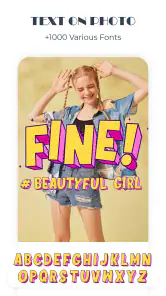
Another cool feature is the drawing tool. It allows you to add artistic elements to your images, making them truly unique. I spent hours just doodling and adding little details to my photos. And let’s not forget the text feature. You can add captions or quotes with a variety of font styles, which really helps in personalizing your images.
Drawing and text are also where restraint pays off. I’d use a doodle to point attention toward a small detail or add a little character, not to cover an area that needs to stay clear. A caption works best when it has a job, such as setting the occasion or giving a picture a personal note. If the image already communicates everything, leaving it clean can be the stronger edit.
Performance and Reliability
Performance-wise, the app runs smoothly without any annoying lag, which is something I always appreciate. It’s compatible with both Android and iOS, so you’re covered no matter what device you’re using. Plus, the updates come regularly, keeping the app fresh and bug-free.
For people who edit on a phone between other tasks, a straightforward creative workflow matters as much as the effects themselves. I’d still check the final image before sharing rather than assume that the preview tells the whole story. A caption can be clipped by a crop, and a filter can make a face or a small detail less clear. Those are simple checks, but they prevent a finished image from feeling rushed.
Choosing it over familiar alternatives
Compared with a basic photo tool, this app makes more sense when the goal is to decorate or personalize an image, not merely correct it. A basic editor is often the better first stop for a quick crop, a modest brightness change, or a natural-looking adjustment. Art Pic Editor is the more appealing choice when I want the picture to show a bit of my own style through filters, drawing, or words.
At the other end, a professional-oriented editor is a better match when I need exact control or a repeatable finish across many pictures. That difference matters for more than advanced users: anyone preparing several images for a small business page may prefer consistency over playful variation. I would not choose a creative editor simply because it offers more visible options; the right tool depends on whether I want correction, consistency, or expression.
There is also a middle ground. I can make a clean adjustment elsewhere and bring the photo into an art-focused workflow only when I want a caption or decorative detail. That approach avoids forcing every image into the same look. It is a sensible option for someone who likes this app’s creative touches but does not want them on every family or travel photo.
Cost, expectations, and switching
It helps to set expectations before installing it. This is a free photography app from Ringtones Pro, with optional in-app purchases priced at $2.49 per item; the age rating is Everyone. It launched on May 9, 2021, and version 15.0 supports Android 6.0 and later. The app has a 4.5 average from around 6,200 ratings, with over a million installs. Those figures suggest it has found an audience, but I’d treat popularity as context, not proof that its particular editing style will suit you.
Since the app is free to start, I’d use a replaceable image to see whether I like the results before making it part of a regular routine. I’d also think about the purpose of any optional purchase: it should address something I actually want to do, rather than feel like a necessary step just because I have already edited a picture. The developer is Ringtones Pro, and the current version is 15.0.
Switching from another editor is low-risk if you are only experimenting with a few pictures, but it can be inconvenient if you have built a consistent look or rely on careful edits. I would keep the source photo and any finished versions organized separately, then compare the results before moving more of my editing over. If you want artistic additions, filters and a casual way to personalize pictures, this is an approachable option to explore. If accuracy, consistency and detailed control matter most, I’d stay with a dedicated editor and use this one only when I want a more playful result.
A useful way to judge the switch is to compare the same photo in both tools, using the result for its intended purpose. For example, if I am making a greeting, I would check whether the words are easy to read and whether the image still feels like the person or moment I wanted to share. If I am correcting a dim picture for a family album, I would judge naturalness instead. This small side-by-side test tells me more than trying to decide from a list of tools.
When another approach is the better fit
I would not make this my default for every image. A clean, documentary-style picture usually benefits from minimal interference, while a work image may need uniform color and careful detail. If I am editing a group of photos, switching between different creative treatments can make them feel inconsistent. In those cases, a conventional or more specialized editor is the safer choice, and I would bring in art effects only for a specific image that calls for them.
Likewise, someone who dislikes captions, filters, and hand-drawn accents may find the app’s central appeal unnecessary. There is no benefit in adding decoration just because it is available. If all I need is a quick crop before sending a photo, the simplest editor already on my device may be faster. The best reason to try this app is wanting a personal, expressive finish, not feeling that every picture needs to be transformed.
A considered recommendation
In conclusion, if you’re looking to jazz up your photos with some creative flair, Art Pic Editor is definitely worth checking out. It’s packed with features that cater to both amateur photographers and seasoned pros. The ease of use combined with its powerful tools makes it a standout in the crowded market of photo editing apps. So why not give it a try? You might just find your new favorite editing tool!
My recommendation is more specific: try it if you enjoy turning a photo into a small creative project, especially when a filter, doodle, or caption can make an everyday moment feel more personal. Keep the original, compare the result at its actual sharing size, and use a different editor when careful correction or consistency matters more than expression. That is the clearest way to find out whether this style belongs in your own photo routine.
Art pic editor Frequently Asked Questions
How much does Art Pic Editor cost to download, and are purchases required?
Art Pic Editor is free to download, so you can try the app without paying upfront. It also offers in-app purchases, priced at $2.49 per item, for users who want to buy available extras. The app can therefore be explored at no cost, while any optional purchase is a separate decision. Check the purchase details before confirming a transaction.
What is Art Pic Editor, and who develops it?
Art Pic Editor is a photography app from Ringtones Pro, presented as a tool for working with pictures. Its short description is “Art pic,” while its store summary describes it as “the photo editors.” The app has an Everyone content rating, making it suitable for a general audience. Its simple photography focus may appeal to people looking for a mobile way to edit images.
What features does Art Pic Editor offer for photo editing?
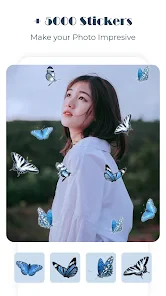
Art Pic Editor provides a wide array of features for photo editing, including filters, effects, cropping tools, and enhancement options. Users can apply artistic filters that transform photos into paintings, adjust brightness and contrast, and add text or stickers to their images. The app also supports advanced editing tools like layers and masks for more detailed work.
Is Art Pic Editor suitable for beginners or only for professional editors?
Art Pic Editor is designed to cater to both beginners and professional editors. The user interface is intuitive and easy to navigate, making it accessible for new users, while offering advanced features that professionals can appreciate. Tutorials and tips within the app help beginners get started quickly and effectively with their editing projects.
Does Art Pic Editor offer any sharing capabilities?
Yes, Art Pic Editor includes robust sharing capabilities. Users can easily share their edited images directly to social media platforms such as Instagram, Facebook, and Twitter. The app also allows exporting images in high resolution, ensuring that the quality of the photos is maintained when they are shared across different platforms.
Pros
- User-friendly interface for easy navigation.
- Wide range of editing tools available.
- High-quality filters enhance photos.
- Supports multiple image formats.
- Fast processing speed for edits.
Cons
- Contains ads that can be intrusive.
- Some features require in-app purchases.
- Occasional app crashes reported.
- Limited cloud storage options.
- Requires internet for full functionality.
- Category
- Photography
- Version
- 15.0











