

Arizona State Fair
- 14.00
- 3.8
- Installs
- 10.00K
- Price
- Free

Screenshots

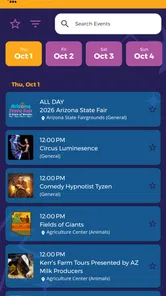
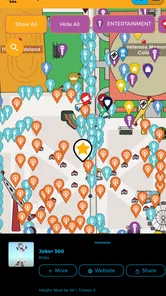

Analysis by Reviewed
Arizona State Fair is the kind of event companion I would install shortly before visiting rather than keep open every day of the year. Its job is practical: bring schedules, maps, discounts, games, and other fair-related information into one place. Developed by Arizona State Fair, it turns a large, busy outing into something easier to plan, especially when several people want to see different things. After using it, my view is that it earns a temporary place on your phone during fair season, but its lasting value depends almost entirely on whether you return to the event.
The app is free, aimed at everyone, and available for devices running Android 6.0 or later. It has reached over ten thousand installs, with a 3.8 average from a few dozen ratings. Those figures suggest a useful but specialized tool rather than a polished, essential app for a broad audience. That is not a criticism by itself. A fair companion does not need to become a daily habit; it needs to be dependable when you are standing at the entrance, deciding what to do next.
What the first visit feels like
The strongest part of the experience is the way it gathers several planning tasks in one location. Without a dedicated companion, I would normally move between a general search engine, a saved screenshot, a paper map, and messages from friends. That approach works until plans change. An event app is more useful because the information is arranged around the visit itself, rather than around separate searches.
I found the schedule especially valuable as a starting point. A fair can feel overwhelming when you arrive without a plan, because attractions, performances, food stops, and shopping compete for attention. I would use the schedule before leaving home to identify the things I care about most, then keep a little flexibility for wandering. That balance matters: planning every minute can make the outing tiring, while having no plan can mean missing the one activity everyone wanted.
The map serves a different purpose. It is less about browsing from a sofa and more about reducing hesitation once you are on site. When a group splits up, even a basic map can help everyone agree on a meeting area or understand which direction to take next. I would check it before entering, not wait until I was already surrounded by crowds and trying to make decisions while walking.
The practical advantage is not any single feature; it is the reduced switching between tools. That becomes noticeable during a family visit. One person can check the schedule, another can look at the map, and someone else can review discounts without passing around several screenshots. The app does not remove the need for judgment, but it makes the small decisions less scattered.
How I would use it during a real day
Imagine arriving with two children and another adult. Before leaving, I would look through the schedule and mark the activities that have a fixed time. I would then use the map to understand where those activities sit in relation to food and rest stops. Once inside, I would avoid repeatedly opening the app just to browse everything. Instead, I would use it at natural decision points: after arriving, before a scheduled activity, and when the group needs a new plan.
More From Our News Desk

 Gmail
GmailGmail in a Busy Inbox: Who Benefits Most?
From first account to crowded workday, Gmail earns its place through dependable search and flexible sorting—but its best fit depends on how much inbox maintenance you can tolerate.

 Prime Video
Switching to Prime Video: What Changes in Your Viewing Routine
Prime Video can make a compelling second home for streaming, but switching means learning a different catalog, rental layer, and route from browsing to playback.

 Universal TV Remote Control
Universal TV Remote Control Works Best as a Reliable Backup
A phone remote earns its place through quick setup and reliable habits. Here is how to get more from Universal TV Remote Control—and where its limits show.

 Weather - By Xiaomi
Weather by Xiaomi Review: Clear at a Glance, Less Clear Up Close
Xiaomi’s weather app makes everyday forecasts quick to scan, but its calm surface can leave useful details and recovery paths harder to find than they should be.

 X
XX Under Pressure: Can It Recover When Posting Goes Wrong?
A resilience-focused review of X, examining setup, mistaken posts, interruptions, weak connections, and the gaps that matter when recovery needs to be dependable.

 Clash of Clans
Clash of Clans Is Won Between the Battles
Its raids are quick; its community is a long-term project of coordination, teaching, rivalry, and shared responsibility—with all the friction that entails.
Latest News



That workflow is better than treating the app as a complete itinerary builder. It gives me reference material, but I remain responsible for choosing how long to stay in each area. The useful trick is to plan around immovable moments and leave unscheduled space between them. This prevents a late start or a long queue from ruining the rest of the day.
The discounts can also influence the order of a visit. Rather than seeing them as an afterthought, I would review them before deciding where to eat or shop. A discount is only helpful if it matches something I was already considering; changing the whole day to chase a small saving can create more walking and frustration than it is worth. The app is therefore most useful when discounts support an existing plan instead of controlling it.
The games add a lighter layer for moments when the group is waiting or needs a break from planning. I would not install the app primarily for that reason, but casual extras can make a companion feel less like a digital noticeboard. Their value is situational: children may enjoy them while adults organize the next stop, while other visitors may ignore them completely.
Where it compares well with ordinary alternatives
A printed map is easy to hand to someone else and does not depend on a phone battery, but it is less convenient to carry around and harder to combine with schedules or discounts. A general web search is flexible, yet it often produces scattered results and requires more effort to separate fair information from unrelated pages. Social media can show what people are discussing, but it is not the clearest tool for building a personal plan.
This app sits between those options. It is more focused than a search engine and more interactive than a leaflet, while remaining narrower than a general event platform. That focus is its main strength and its main limitation. If I am attending the Arizona State Fair, the dedicated context is helpful. If I want one application to manage many unrelated events throughout the year, a broader event-planning tool would make more sense.
What remains useful after the novelty fades
The first-week appeal is easy to understand: install it, explore the schedule, check the map, and see what discounts or games are available. The harder question is whether it deserves space on the phone after that initial curiosity. For me, the answer is tied to the rhythm of the event. It is not a general-purpose utility, so its value does not grow through daily use. It becomes relevant again when I am preparing for another fair visit.
That seasonal pattern is not a flaw, but it changes how I judge the app. I would not expect to open it every week. Instead, I would keep it installed while planning the outing, use it actively during the visit, and then decide whether I need it until the next occasion. People who attend with different groups may find more recurring value because each visit creates a new planning problem. A person who goes once and has a straightforward route may use it for only a few hours.
The app’s current version is 3.0.0, which gives it a clear sense of being a maintained edition rather than an abandoned one. Still, maintenance is not only about a version number. The real test is whether the content remains useful when the event returns: schedules need to be relevant to the current visit, maps need to match the venue, and discounts need to be worth checking. Those are the parts I would pay attention to before relying on it heavily.
I would also avoid building a plan entirely inside the app until I had opened it close to the visit. Event information can affect decisions right up to arrival, and an old plan saved too early may not reflect what I actually want to do that day. My preferred habit would be to revisit the app shortly before leaving, note the fixed-time activities, and keep a backup mental plan in case the phone becomes inconvenient.
The maintenance burden is low, but not zero
For a short-term event companion, the maintenance burden is fairly light. The app is free, and the minimum operating-system requirement of Android 6.0 or later makes it accessible to many older Android devices. I would still install or update it before the visit rather than at the entrance, where weak connectivity, low battery, or a crowded environment can turn a simple download into an annoyance.
My main maintenance habit would be checking the app before each planned outing, not constantly. I would confirm that the schedule is the one I need, review the map while I still have time to think, and look at discounts before deciding whether they affect my budget. This takes less effort than assembling the same information manually, but it is still an extra step that a visitor with a simple plan may not need.
Battery management is another practical consideration. I would avoid leaving the map open continuously while walking. Instead, I would inspect it, close the app, and reopen it when I needed a new direction. That approach is useful with any event companion, but it matters especially when the phone is also being used for photos, messages, tickets, and calls.
For groups, I would share the plan verbally rather than assume everyone will install the app. One person can act as the reference point while the others enjoy the day. This reduces setup time and avoids a situation where several people are looking at different screens instead of paying attention to where they are going. The app supports coordination, but it does not replace a clear meeting point.
Where fatigue can set in
The biggest source of fatigue is repetition. Once I have checked the schedule and map, there may be little reason to keep exploring the interface. Games and discounts can extend the first impression, but they do not automatically create long-term usefulness. A visitor who expects a rich, constantly changing entertainment app may find the experience narrower than expected.
Another possible frustration is the tension between digital planning and the spontaneous nature of a fair. I like knowing what is available, but I do not want to spend the whole outing staring at a phone. The app works best as a quick reference. If I use it to micromanage every movement, it can make the day feel like a checklist and increase disappointment when real-world timing changes.
The map may also be most helpful to people who prefer visual orientation. Someone comfortable asking staff or following signs may find it unnecessary. Likewise, visitors who already have a reliable printed guide may see little benefit in duplicating that information on a screen. The dedicated app is not automatically better than familiar alternatives; it is better when the combination of schedule, map, discounts, and extras saves enough effort to justify another installation.
I would skip it if my visit were extremely short and focused on one known activity. In that situation, a quick search or a direct message to the group may be faster. I would also hesitate if I strongly prefer offline planning and do not want to depend on a phone during the day. The app is a good fit for people who expect to make several decisions while visiting, not for someone who already knows exactly where to go.
Who gets the most value from it
Families and groups are the clearest audience because they have more coordination problems to solve. A parent can prepare a rough route, friends can agree on priorities, and visitors can use the map when they need to reconnect. The app is also useful for first-time attendees who do not yet know how the fair is arranged. It gives them a starting framework without requiring them to research every detail separately.
Repeat visitors may appreciate it differently. They may not need help discovering the venue, but they can use the schedule to notice activities they would otherwise overlook and the discounts to make a familiar visit feel slightly more organized. The benefit is incremental rather than transformative. It helps refine a return visit; it does not reinvent the event.
People who attend alone can still use the app, especially if they like planning around scheduled activities. However, the map and coordination advantages are less important when there is no group to reunite. For solo visitors, the decision comes down to whether the schedule and discounts are enough to justify installing a dedicated companion.
My long-term verdict
After the novelty fades, Arizona State Fair remains useful as a seasonal tool, not as a permanent daily app. I would recommend it to anyone planning a visit who wants one place to check the schedule, understand the layout, and look for discounts before making choices. The games are a pleasant extra, but they are not the reason I would keep it.
The app earns its place when it prevents avoidable friction: missing a timed activity, wandering without knowing the layout, or overlooking a discount that fits the plan. It does not earn that place through constant engagement, and I would not pretend otherwise. Its value comes from being available at the right moment, then becoming less important once the outing is over.
Overall, I see it as a sensible free companion for fair season, particularly for families, first-time visitors, and groups with different priorities. I would install it before going, review it calmly at home, use it sparingly on site, and remove it later if I had no reason to return. That temporary usefulness is not a weakness when the app does its focused job well. For a one-stop event visit, it is more convenient than piecing together scattered alternatives; for year-round event management, I would choose a broader app instead.
Arizona State Fair Frequently Asked Questions
Is the Arizona State Fair app suitable for first-time visitors?
Yes. The app is aimed at helping visitors plan their fair experience, and its summary highlights schedules, maps, discounts, games, and more. First-time visitors can use it to get familiar with the event and find useful information in one place. It is an Events app, so it can be helpful to install it before heading out and explore the available features ahead of your visit.
What is the Arizona State Fair, and what can visitors do there?
The Arizona State Fair is a large annual event in Phoenix featuring carnival rides, live entertainment, food vendors, competitions, exhibitions, shopping, and family activities. Visitors can usually enjoy concerts, rodeo-style events, agricultural displays, arts and crafts, and attractions for different age groups. The exact schedule, performers, attractions, and admission details may change each year, so checking the latest information before visiting is recommended.
Does the Arizona State Fair app provide official schedules, maps, and event information?
The Arizona State Fair app or related digital guide is designed to help visitors plan their experience by providing useful information such as event schedules, attraction details, maps, food options, ticket information, and announcements. Its summary also highlights schedules and maps. Depending on the edition and platform, some features may vary. After installing it, allow updates and review the event listings carefully because performance times and locations can change.
Can I buy Arizona State Fair tickets through the app?
In many cases, the official Arizona State Fair digital experience may provide access to ticket information, purchasing options, promotions, or links to the fair’s official ticketing website. However, availability can depend on the current fair season and the app version. Before paying, confirm that you are using an official source, review ticket restrictions, and check whether parking, rides, concerts, or special events require separate fees.
Does the Arizona State Fair app work without an internet connection?
Some basic information, such as previously loaded schedules or saved details, may remain available when your phone is offline, but full functionality generally requires an internet connection. Live updates, ticket purchasing, announcements, maps with current information, and certain interactive features may not work without mobile data or Wi-Fi. It is a good idea to save important tickets, directions, and event details before arriving.
Pros
- Event schedules and venue details are easy to check before visiting.
- Offers a wide variety of food
- rides
- shows
- and family activities.
- Live entertainment adds value beyond the carnival attractions.
- Useful for planning visits around concerts and special events.
- Provides a central source for fair-related updates and announcements.
Cons
- Some features may be less useful outside the annual fair dates.
- Large event crowds can make navigation and planning more difficult.
- Mobile information may depend on a reliable internet connection.
- Ride and food costs can add up quickly during a visit.
- Not every attraction or event may appeal to all age groups.











