

Animal Ringtones
- 488.00
- 4.5
- Installs
- 10.00M
- Price
- Free

Screenshots
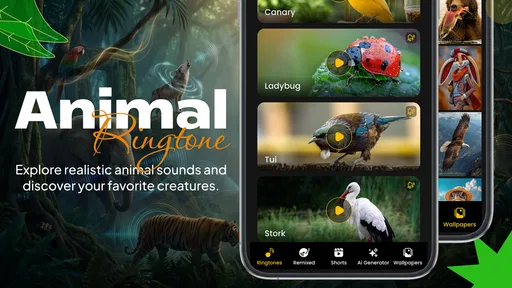
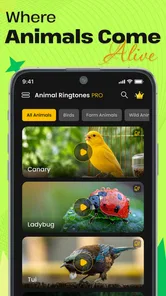
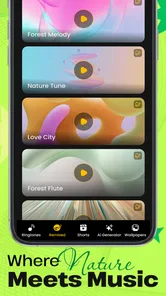
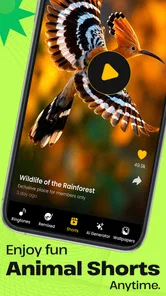



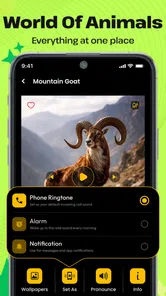
Analysis by Reviewed
Before choosing an animal sound for every alert, I’d decide what I actually want to change: the ringtone I hear for calls, the smaller notifications that interrupt the day, or the look of the screen as well. Animal Ringtones is a personalization app from Airnet Information Technology Est. built around animal and bird audio, with AI-made animal wallpapers also part of its appeal. It is free to install, though in-app purchases range from $0.99 to $29.99 per item, so I’d treat paid extras as optional rather than assume every part of the experience is free.
Choose sounds for the moments you need to recognize
The useful test is not whether a sound is amusing once, but whether it stays recognizable after repeated use. I’d pick a short, distinct call for incoming calls and reserve more unusual sounds for contacts whose calls I can answer comfortably. A bird song can feel pleasant in a quiet room, but a dramatic animal call may be awkward in a shared office or on public transport. Before setting anything, I’d preview it at the volume I normally use and consider whether it will be clear over everyday background noise.
That practical approach matters because animal sounds do not behave like familiar musical ringtones. A melody may be easy to identify after a few notes; a sound effect can be startling, brief, or easy to confuse with something happening nearby. I’d use a distinctive sound for one important contact first, then live with it for a day before changing several alerts. That small trial helps avoid turning a playful idea into an interruption I regret.
Why the animal theme stands out
The first thing that struck me about Animal Ringtones was its extensive library of animal sounds. From domestic pets like dogs and cats to exotic creatures such as elephants and tigers, the app offers a diverse range of sounds. I spent a good chunk of time just exploring these sounds and trying to decide which one would best suit my notification tones. Needless to say, it was a delightfully amusing task.
That browsing is where the app makes most sense compared with the usual ringtone alternatives. A music-based library is better if I want a song, a beat, or a familiar tune; a system’s built-in alert tones are better if I want restrained sounds that blend into work or school. This app suits someone who specifically wants nature-inspired alerts and is happy to choose from that theme rather than search for every possible kind of audio. Its animal focus gives the phone a more personal character, but it is not a replacement for a broad sound editor or a general-purpose ringtone collection.
The Call of the Wild
The app has a straightforward design, which I appreciated. It’s not cluttered with unnecessary features, making it easy for anyone to navigate. You can browse through categories or use the search function to find a specific animal sound. The simplicity of the interface ensures that even the least tech-savvy person can operate it without a hitch.
How I’d fit it into a real day
Imagine I’m expecting a call from a family member while finishing errands. I could give that contact a recognizable animal sound, keep less important alerts quieter, and know who is calling without immediately checking the screen. At home, I might choose a lighter bird sound for a familiar contact; in a shared workspace, I’d switch to a subtle option or use the phone’s regular alert instead. The best setup is selective: a few meaningful assignments are easier to identify than a different novelty sound for every message.
More From Our News Desk

 Gmail
GmailGmail in a Busy Inbox: Who Benefits Most?
From first account to crowded workday, Gmail earns its place through dependable search and flexible sorting—but its best fit depends on how much inbox maintenance you can tolerate.

 Prime Video
Switching to Prime Video: What Changes in Your Viewing Routine
Prime Video can make a compelling second home for streaming, but switching means learning a different catalog, rental layer, and route from browsing to playback.

 Universal TV Remote Control
Universal TV Remote Control Works Best as a Reliable Backup
A phone remote earns its place through quick setup and reliable habits. Here is how to get more from Universal TV Remote Control—and where its limits show.

 Weather - By Xiaomi
Weather by Xiaomi Review: Clear at a Glance, Less Clear Up Close
Xiaomi’s weather app makes everyday forecasts quick to scan, but its calm surface can leave useful details and recovery paths harder to find than they should be.

 X
XX Under Pressure: Can It Recover When Posting Goes Wrong?
A resilience-focused review of X, examining setup, mistaken posts, interruptions, weak connections, and the gaps that matter when recovery needs to be dependable.

 Clash of Clans
Clash of Clans Is Won Between the Battles
Its raids are quick; its community is a long-term project of coordination, teaching, rivalry, and shared responsibility—with all the friction that entails.
Latest News



One useful habit is to keep a simple mental map: one sound for a close contact, another for a household reminder, and ordinary tones for everything else. If several contacts get similar-sounding calls, the personalization stops helping. I’d also test notification sounds separately from calls, since an alert that is funny once may become tiring when repeated through a busy day. The app’s appeal is strongest when the sound adds recognition, not when it competes for attention.
Sound quality and everyday trade-offs
One of the highlights of the app is the sound quality. The animal sounds are crisp and clear, making them instantly recognizable. I was pleasantly surprised by how realistic they were. Whether it’s the gentle purring of a cat or the mighty roar of a lion, each sound is captured with impressive precision. It’s like having a tiny zoo right in your phone!
Even a clear recording has to work in context. A soft purr may be pleasant close up but easy to miss outdoors, while a loud roar can draw attention when I least want it. I’d favor a sound with a distinct opening rather than one that takes time to build, particularly for calls I need to notice quickly. If I rely on my phone for urgent alerts, I would keep those on a dependable, familiar tone rather than make novelty the priority.
Personal touches, without overdoing them
What I love about Animal Ringtones is the level of personalization it offers. You can assign different animal sounds to specific contacts or notifications. Imagine your boss calling and hearing an authoritative lion roar, or a friend’s text arriving with a playful monkey chatter. It adds a fun twist to your daily routine and keeps things from getting monotonous.
I’d use that flexibility with a little restraint. Assigning a distinctive sound to a few people can make calls easier to spot, but giving every app or contact its own animal noise risks creating a jumble that is harder to interpret than the default setup. It is also worth checking how the result behaves with the phone’s existing sound settings: silent mode, vibration, and notification controls still shape what I hear. If an alert does not behave as expected, I’d first check those system settings rather than assume the sound choice itself is wrong.
A useful choice for animal-themed customization
Because it combines audio with animal-themed visual customization, the app can suit someone who wants a more coherent personal touch than a new ringtone alone. I’d decide which part matters most before installing: if I’m mainly looking for a new background, a wallpaper-focused option may make more sense; if I want both a matching visual mood and playful sounds, this app has a clearer fit. I would still judge the two independently rather than assume that liking the audio means I’ll want to change my screen as well.
There is also a practical difference between choosing a sound for fun and choosing one to identify an alert reliably. A familiar animal call can help distinguish a particular person’s call in a pocket or bag, but it cannot tell me whether a message needs an immediate response. I’d avoid assigning novelty sounds to alerts I depend on for work deadlines, travel changes, or other time-sensitive information. For those, the phone’s familiar tones and vibration patterns are easier to interpret consistently.
Who will enjoy it, and who may prefer another option
For someone who likes animals, playful alerts, or a small change to a familiar phone, the idea is easy to understand and fun to explore. The app has a 4.6 average from around 96,000 ratings and over 10 million installs, which suggests it has found a broad audience. It is rated for Everyone, and its current version is 3.225; the minimum operating system requirement is Android 7.0. I’d check compatibility on my own device before getting attached to a particular setup.
On the other hand, I would skip it if I want a quiet, conventional phone, need a large catalogue of music clips, or dislike novelty sounds repeating throughout the day. Someone who mainly wants to customize how the home screen looks may be better served by a wallpaper-focused option; this app’s distinctive angle is audio, even though animal wallpapers are also part of its offer. The trade-off is straightforward: choose it for animal-themed personalization, not because it promises every kind of phone customization.
I’d also think about the environment where the phone spends most of its time. A person working from home or using a phone mostly in private can enjoy a more noticeable animal call without worrying much about distracting others. Someone in a quiet classroom, a shared office, or a customer-facing role may prefer to keep the phone on vibration or use a standard tone during those hours. The app can provide a playful option, but the considerate choice may be to leave it inactive in some settings.
What to consider before changing over
Switching from familiar alerts is low effort, but there is a small cost in attention: I need to remember which sound means what and notice whether it works in the places I spend time. I’d change one or two assignments first, keep a reliable default for important alerts, and give the new setup a few ordinary days. If the sounds become distracting, reverting to a standard tone is a sensible choice rather than a failure of the app.
Before committing to a setup, I’d make a quick note of the original ringtone and any contact-specific choices I already rely on. That gives me an easy way back if a new sound is hard to hear or if I decide it does not suit a particular person. I’d also make changes when I have a moment to test them, not just before leaving home: a quiet preview does not always reveal how a sound will feel in a busy place. This simple check makes experimenting less disruptive.
The app was released on December 10, 2020, and remains a free download with optional in-app purchases. I’d explore the available choices before spending anything, especially if I only want a couple of ringtones. For people who like the animal theme, that lets the app prove its value in everyday use; for anyone who wants a completely free, no-extras experience, it is worth keeping the optional purchase range in mind.
For a cautious first try, I’d choose one sound, assign it to a contact I recognize easily, and leave all other alerts unchanged. That test answers the questions that matter in practice: whether I like hearing it repeatedly, whether it stands out at my usual volume, and whether it feels appropriate around other people. If I enjoy that limited setup, I can explore more. If not, I have changed very little and can return to my usual ringtone without having to rebuild the whole phone’s sound scheme.
While some might find it a tad unconventional, I believe that's the charm of this app. It brings a sense of joy and unpredictability to something as mundane as a ringtone. Plus, it’s a great conversation starter! Just be prepared for some curious looks when a rooster crows during your morning commute.
In conclusion, Animal Ringtones is a delightful app for anyone looking to spice up their phone's auditory alerts. It’s easy to use, offers a wide variety of sounds, and most importantly, it's entertaining. Who knew that a phone app could bring the wild into your everyday life? If you’re an animal lover or just someone who enjoys a bit of whimsy, I highly recommend giving this app a try. You might just find your new favorite ringtone among the animal kingdom.
Animal Ringtones Frequently Asked Questions
What is Animal Ringtones, and what can I use it for?
Animal Ringtones is a personalization app for phones focused on animal sounds and bird songs. You can use those sounds as phone ringtones, and the app also offers a way to make AI animal wallpapers. It may suit you if you want your phone’s audio or appearance to have an animal theme rather than relying only on its standard options.
Is Animal Ringtones appropriate for children?
Animal Ringtones has an Everyone content rating, so it is presented as suitable for a broad audience. Its focus is animal sounds, bird songs, and AI animal wallpapers, which may appeal to children as well as adults. If a child will use the app, it is still worth reviewing the optional in-app purchases and managing purchase settings on the device.
What should I know about compatibility before downloading Animal Ringtones?
Animal Ringtones is a personalization app for phones, and its listed minimum operating-system requirement is version 7.0. Check your device’s system version before downloading so you can tell whether it meets that requirement. The app is free to download, though it also offers optional in-app purchases. Those points can help you decide whether it suits your device and how you want to use it.
Who develops Animal Ringtones, and how popular is it?
Animal Ringtones is developed by Airnet Information Technology Est. It has an average rating of 4.6 from around 96,000 ratings, along with roughly 384 written reviews and over 10 million installs. These figures suggest that many people have tried the app, while the written reviews can offer additional perspectives on the experience. As with any personalization app, your own impression will depend on the sounds and features you want.
What types of animal sounds are available in Animal Ringtones?
Animal Ringtones offers a diverse collection of animal sounds ranging from domestic pets like cats and dogs to wild animals such as lions, elephants, and birds. The app includes high-quality recordings that capture the unique sounds of each animal, allowing users to set these as ringtones, alarms, or notifications. There are also seasonal updates that introduce new sounds regularly.
Pros
- Wide variety of animal sounds.
- Easy-to-use interface.
- High-quality audio.
- Customizable ringtone settings.
- Frequent updates with new sounds.
Cons
- Limited to animal sounds only.
- Ads can be intrusive.
- No offline mode available.
- Initial setup can be confusing.
- Limited customer support.











