

Android Ringtone Songs
- 2.80K
- 4.7
- Installs
- 10.00M
- Price
- Free

Screenshots



Analysis by Reviewed
I usually notice a ringtone app’s value at the least convenient moment: when I need to change a sound quickly and can’t remember where the phone keeps that setting. Android Ringtone Songs is aimed at people who want more choice than the tones already on their Android phone, but a big collection only helps if finding and applying a sound is straightforward. I’d treat it as a way to explore music-style ringtones, then take a moment to check that the one I choose is actually set where I want it.
Where ringtone changes can get confusing
A common snag with ringtone apps is mixing up the sound preview with the sound that the phone will use for incoming calls. I’d listen to a candidate first, then confirm the change in the phone’s sound settings rather than assuming that browsing or downloading has completed the whole job. Android menus can differ between devices, so the final selection may involve a separate system screen.
It also helps to decide what the sound needs to do before browsing. A song clip that feels fun while testing it may be too long or too subtle when a call comes in during a noisy commute. I’d favor a recognizable, clear section over a slow intro, and keep a short, dependable tone available for situations where I need to notice calls quickly.
That practical focus matters for an app in the personalization category. The appeal is not only having a different sound; it is choosing one that suits how and where you use your phone. If you share a room, work in a quiet setting, or often leave the phone in a bag, the right choice may be quite different from a ringtone you would pick just for fun.
Unleashing a World of Sound
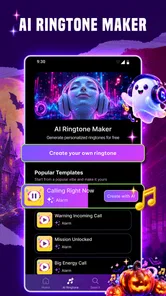
From the moment you open Android Ringtone Songs, you’re greeted with a sleek, user-friendly interface that screams simplicity and functionality. The app offers a vast library of ringtones spanning various genres. Whether you’re into pop, rock, classical, or even niche genres like lo-fi, there’s something for everyone. It’s like having a DJ in your pocket!
Customization Galore
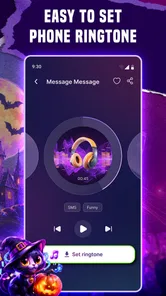
One of the standout features is the customization options. You don’t just download and set a ringtone; you can trim, cut, and edit any track to your liking. This feature is a gem for those who love to personalize every aspect of their smartphone experience. Imagine having the chorus of your favorite song as your ringtone – perfect, right?
For a useful workflow, I’d start by finding a sound that has a clear beginning, then adjust the selected portion so it doesn’t rely on a long buildup. Before settling on it, listen to the chosen segment again rather than judging the whole track: a passage that sounds great in context can feel abrupt when it repeats as a call alert. I’d also keep the original tone in mind as a fallback in case I later want a more restrained option.
More From Our News Desk

 Gmail
GmailGmail in a Busy Inbox: Who Benefits Most?
From first account to crowded workday, Gmail earns its place through dependable search and flexible sorting—but its best fit depends on how much inbox maintenance you can tolerate.

 Prime Video
Switching to Prime Video: What Changes in Your Viewing Routine
Prime Video can make a compelling second home for streaming, but switching means learning a different catalog, rental layer, and route from browsing to playback.

 Universal TV Remote Control
Universal TV Remote Control Works Best as a Reliable Backup
A phone remote earns its place through quick setup and reliable habits. Here is how to get more from Universal TV Remote Control—and where its limits show.

 Weather - By Xiaomi
Weather by Xiaomi Review: Clear at a Glance, Less Clear Up Close
Xiaomi’s weather app makes everyday forecasts quick to scan, but its calm surface can leave useful details and recovery paths harder to find than they should be.

 X
XX Under Pressure: Can It Recover When Posting Goes Wrong?
A resilience-focused review of X, examining setup, mistaken posts, interruptions, weak connections, and the gaps that matter when recovery needs to be dependable.

 Clash of Clans
Clash of Clans Is Won Between the Battles
Its raids are quick; its community is a long-term project of coordination, teaching, rivalry, and shared responsibility—with all the friction that entails.
Latest News



Easy to Navigate
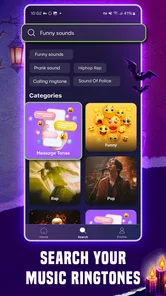
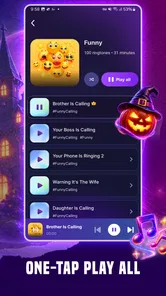
Navigation is a breeze with this app. The developers have ensured that even the least tech-savvy users can find their way around without a hitch. Categories are neatly organized, allowing you to browse through new releases, trending tones, and even a section dedicated to user-uploaded content. It’s intuitive and makes the whole process of finding the perfect ringtone a delightful journey.
In everyday use, browsing is most helpful when I have a specific mood or style in mind; otherwise, it is easy to spend longer scrolling than actually choosing. I’d audition a few options at a time and compare them at a sensible volume. User-uploaded sounds can add variety, but I would listen carefully before applying one, since a title or category alone cannot tell me how its opening will sound as a real alert.
Setup checks and recovery
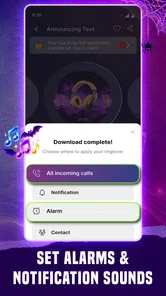
If a selected sound does not seem to take effect, I would retrace the process calmly: reopen the app, check that the intended tone is selected, and then look in the phone’s ringtone settings. If the change still does not appear, restarting the selection process is a reasonable next step. The important distinction is whether the sound is available to preview or has been chosen as the phone’s active ringtone.
For a realistic example, imagine choosing a lively song before heading out, then realizing that its opening is too quiet to hear on a busy street. I’d return to the edit, pick a more immediately recognizable passage, and test it at the volume I normally use. For a meeting or shared space, I’d switch back to a less intrusive tone or silence the phone; personalization should make calls easier to identify, not create an avoidable distraction.
High-Quality Audio
Another highlight is the audio quality. Unlike other apps that compromise on sound clarity, Android Ringtone Songs ensures every track is crisp and clear. You won’t have to worry about distorted sounds ruining your favorite tunes. It’s all about delivering the best listening experience, one ringtone at a time.
Sound can still come across differently through a phone speaker than it does through headphones, and the room around you makes a difference too. I would preview a choice on the device itself before relying on it. If calls are hard to hear even with a clear tone, the issue may be the phone’s volume, sound mode, or environment rather than the ringtone selection; checking those basics is more useful than repeatedly changing tracks.
Choosing a ringtone for real routines
I find it useful to think of a ringtone as a small signal with a job, not just a song I happen to like. A distinct tone can help separate calls from other sounds in a busy day, while a gentler choice may be more considerate when I work near other people. If I often miss calls because the phone is in a coat pocket or bag, I would prioritize a strong opening and a pattern I can recognize quickly rather than a subtle musical detail.
There is also a practical difference between a personal ringtone and one that works in every setting. A lively clip might suit a weekend, but it can feel awkward in a quiet office or during a class. I would choose something I can comfortably leave enabled most of the time, then use the phone’s sound controls when silence is more appropriate. That avoids expecting one customized tone to solve situations that are really about volume or whether the phone should ring at all.
Making the editing choice pay off
Trimming is most valuable when it solves a specific listening problem. I would use it to remove a slow lead-in, avoid a sudden or unpleasant start, or focus on a distinctive few seconds that remain recognizable when heard out of context. The trade-off is that a very short or abrupt segment may become irritating when repeated, so I would listen to the selection more than once before making it the default.
A helpful test is to imagine hearing the clip while doing something else rather than staring at the screen. Does it announce itself quickly? Is it easy to distinguish from nearby sounds? Does it still feel acceptable after several repeats? This quick mental check is more useful than choosing solely by genre. If a clip passes those tests but seems too loud or quiet, I would adjust the phone’s sound level before abandoning the selection.
Browsing without losing time
The app’s collection is best approached with a small target in mind: perhaps a particular mood, a familiar musical style, or a tone that stands out from notifications. Without that anchor, a large choice can turn into endless auditioning. I would listen to a handful of candidates, keep track of the one that works best on the phone speaker, and stop once I find a sound that meets the need. The goal is a useful call alert, not to review the entire catalog.
When a candidate comes from user-uploaded content, I would judge the sound itself rather than relying on its label. The title may suggest a mood, but the opening, loudness, and clarity are what matter once the tone is used. This is a small but worthwhile habit: previewing before setting helps avoid a surprise later, especially if the phone is usually kept out of sight.
When another option makes more sense
Compared with the built-in ringtone controls, this app is more appealing when I want to browse music-led choices and shape a section to suit me. The built-in options remain the simpler route if I only want to pick a standard tone and be done. Someone who already keeps personal audio organized may also prefer selecting from their own files, since that avoids browsing a separate collection. I would choose this app for discovery and customization, not because every Android user needs a replacement for the system sound menu.
It may also be the wrong fit for someone who wants a completely quiet phone, dislikes music as an alert, or rarely changes their ringtone. In those cases, the phone’s standard settings or a vibration and silent routine are likely more practical. For anyone who does enjoy rotating sounds, though, the ability to explore and edit makes the app more interesting than simply accepting the first default option.
Setup checks and recovery
If a chosen tone does not seem to take effect, I would first confirm that I selected it as the active ringtone rather than only previewing it. Then I would open the phone’s sound settings and check what is currently selected. If the menus look different from the instructions I have in mind, I would follow the labels on my own device rather than assume every Android phone uses the same layout. Starting the selection again can help clarify where the process stopped.
If the sound is set but calls still seem quiet, I would check the phone’s ring volume and sound mode, then test in a place where I can hear the speaker clearly. A ringtone can be perfectly suitable and still be masked by street noise, a bag, or a low volume setting. Replacing the clip repeatedly is unlikely to fix those conditions. For a missed call during a noisy commute, a clearer opening and a suitable volume are a better combination than a longer, more elaborate song segment.
Who will enjoy it, and who may prefer another route
The app makes the most sense for someone who likes browsing music-based options and wants to shape a sound to fit a particular moment. Android users who are happy with the built-in tones, want a very minimal setup, or prefer to use only audio they already have may find the phone’s existing sound controls simpler. Compared with choosing a default tone, this app offers a more exploratory route; compared with manually managing personal audio, it may feel more convenient for browsing, though that convenience depends on finding a tone that suits your taste.
Android Ringtone Songs is free to install, with in-app purchases ranging from $1.49 to $59.99 per item, so I’d check the price shown for anything I choose to buy before proceeding. It is rated Teen, and the app is from Ringtone Phone App. Its 4.7 average across 154K ratings and more than 5M installs suggest that many people have tried it, but I would still judge it by whether its selection and editing fit my own routine. Version 1.9.0 requires Android 7.0 or later.
What to expect before settling in
For a first session, I would keep the goal modest: find one tone I would genuinely use, test it from the phone speaker, and make sure it is selected in the system settings. That gives a clearer impression of whether the app suits me than spending the whole session sampling sounds without applying one. If I do not like the result in daily use, changing back to a familiar tone is a sensible fallback, not a reason to keep tweaking endlessly.
The free install makes it easy to try the browsing experience, but I would treat any optional purchase as a separate decision and check its displayed cost before confirming. I would not assume that paying is necessary to make a ringtone choice; first I would see whether the available selection and editing meet my needs. The app’s Teen content rating is another detail families may want to consider when deciding whether it is appropriate for a particular user.
Practical verdict
My overall view is that Android Ringtone Songs is most useful as a discovery tool for people who want their calls to sound less like everyone else’s. Its music-oriented selection and editing can make the process enjoyable, but the final result still depends on choosing a clear, well-timed passage and confirming it through Android’s own sound controls. The app cannot make a quiet setting audible or turn a distracting song into a good everyday alert just by offering it as an option.
For me, the best reason to try it is the chance to find a tone that is both personal and practical: recognizable enough to notice, restrained enough to keep enabled, and easy to replace when circumstances change. If that balance sounds appealing, it is worth exploring. If you only need a standard alert or prefer to manage your own audio directly, the built-in settings may be the cleaner choice.
In conclusion, Android Ringtone Songs is not just an app; it’s an experience. It transforms the mundane task of setting a ringtone into something exciting and personal. So, if you’re looking to inject some personality into your phone and make it truly yours, this app is the way to go. Download it now and let your phone ring with style!
Android Ringtone Songs Frequently Asked Questions
Does Android Ringtone Songs work on iPhone or only on Android?
Android Ringtone Songs is made for Android devices, so it is not an iPhone ringtone app. Its stated minimum requirement is Android 7.0, which makes checking your phone’s operating system a useful first step. If you use an iPhone, look for a ringtone app designed for iOS instead; this app’s focus is personalizing Android devices with music ringtones.
What kind of content can I expect to find in Android Ringtone Songs?
The app focuses on music ringtones, with a selection intended for people who want to personalize the sounds on an Android device. Its short store description is Android Ringtone Songs, while its summary highlights discovering thousands of music ringtones. If you are looking for a full music-streaming service or a general audio editor, this app is not presented as either of those.
Is Android Ringtone Songs suitable for younger users?
Android Ringtone Songs has a Teen content rating. Parents and guardians should consider that rating when deciding whether it is appropriate for a younger user, and can review the app together before installation. The rating is useful context, but families should also consider their own preferences around personalization apps and ringtone content.
Who develops Android Ringtone Songs, and who is it intended for?
Android Ringtone Songs is a personalization app developed by Ringtone Phone App. It is intended for people who want to choose music ringtones for an Android device, rather than a general music player or ringtone editor. The app has a Teen content rating, so users and families should take that rating into account before downloading.
What Android version do I need to use Android Ringtone Songs?
The app requires Android 7.0 or later, so check your device’s Android version before downloading. If your phone meets that requirement, you can consider it for personalizing your ringtone choices. Android Ringtone Songs is currently at version 1.9.0, and keeping apps updated can help you use the latest version available for your device.
Pros
- Wide variety of ringtones to choose from.
- Easy to navigate user interface.
- High-quality audio tracks.
- Regularly updated with new ringtones.
- Allows customization of ringtone settings.
Cons
- Contains ads in free version.
- Limited features without premium.
- Some ringtones require in-app purchase.
- Occasional app crashes reported.
- Not all ringtones available offline.











