

Amtrak
- 17.44K
- 4.3
- Installs
- 5.00M
- Price
- Free

Screenshots
Analysis by Reviewed
If you’re new to rail travel, the most useful way to think about the Amtrak app is as a place to plan and manage Amtrak trips, rather than a general travel planner. I’d use it to look up a journey, keep the booking close at hand, and check trip information while making my way to the station. That focused role makes it easier to get started: you don’t need to learn a complicated system before you can do something useful.
What to expect from a rail-focused app
Amtrak is a free travel app from Amtrak, with an Everyone age rating. Its 4.3 average from around 45,000 ratings and more than 5 million installs suggest that it has become a familiar tool for many travelers, though popularity alone cannot tell you whether it fits your particular route. It was released in 2012, and version 6.0.8 is the current version; the app requires Android 8.0 or later.
The main distinction from a broad travel-search app is that this is centered on Amtrak journeys. That can be helpful when you already know you want to take an Amtrak train and want to handle the trip in one place. If you’re still comparing trains with flights, buses, or other operators, a general travel search may be a better first stop; once you’ve chosen Amtrak, this app is the more direct place to manage that choice.
Getting ready for your first search
If you’re installing it for a specific trip, have your origin, destination, and likely travel date in mind before you open the booking flow. That gives you a clear first task and makes it easier to compare the options the app presents. I’d also take a moment to check that you can sign in and access your booking before travel day, rather than discovering a login problem while you’re hurrying through a station.
A useful habit is to treat the app as a travel aid, not your only source of preparation. Save the important trip details somewhere you can find them, and allow time to check your station and departure information before leaving home. That extra step is especially sensible if you’re unfamiliar with the station or have a tight connection after the train.
Your first useful result
A good first success is finding a journey that fits your plans and completing the booking. The app is designed to let you search routes, compare prices, and choose a class of service; those choices matter more than simply picking the first result. I’d compare the options against your real needs, such as when you have to arrive and how much flexibility you want, rather than treating the lowest fare as automatically best.
After booking, check that the trip appears in the trip manager and that you can bring up the information you’ll need at the station. This simple check turns the app from something you installed into a practical part of your travel routine. If you’re booking for someone else or coordinating with a companion, make sure everyone knows where the booking details and boarding pass can be found.
More From Our News Desk

 Weather - By Xiaomi
Weather by Xiaomi Review: Clear at a Glance, Less Clear Up Close
Xiaomi’s weather app makes everyday forecasts quick to scan, but its calm surface can leave useful details and recovery paths harder to find than they should be.

 X
X Under Pressure: Can It Recover When Posting Goes Wrong?
A resilience-focused review of X, examining setup, mistaken posts, interruptions, weak connections, and the gaps that matter when recovery needs to be dependable.

 Clash of Clans
 Is Won Between the Battles
Its raids are quick; its community is a long-term project of coordination, teaching, rivalry, and shared responsibility—with all the friction that entails.

 Android Auto
 Makes the Case for Quieter Car Software
The car interface is no longer judged by how much it can do, but by how quietly it helps. Android Auto shows what drivers now expect—and what still gets in the way.

 MobiOffice: Word, Sheets, PDF
MobiOffice: Transforming Mobile Productivity with Seamless Integration
MobiOffice: Word, Sheets, PDF is redefining mobile productivity with a surprising blend of functionality and innovation.

 EA SPORTS FC Soccer Mobile 26
EA SPORTS FC™ Mobile Soccer: Redefining Mobile Sports Gaming
Dive into EA SPORTS FC™ Mobile Soccer, where immersive gameplay and strategic depth transform mobile sports gaming.
Latest News



Using Amtrak from planning to the station
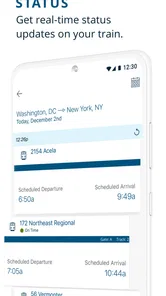
For an ordinary travel day, I’d check the trip before setting out, then look again while heading to the station. Real-time schedule and delay updates can help you adjust your timing, but they don’t remove the need to leave a sensible buffer. A train update is useful context, not a reason to cut your arrival time close, especially when you don’t know the station layout.
Getting Started with Ease
First things first, downloading the Amtrak app is as easy as pie. Available on both Android and iOS, it only takes a few moments to install. When you open it up, you're greeted with a sleek, user-friendly interface that's intuitive and straightforward. Even if you're not a tech whiz, navigating through the app is a breeze.
Booking Your Journey
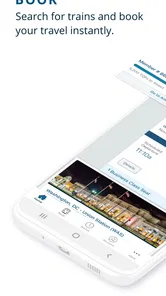
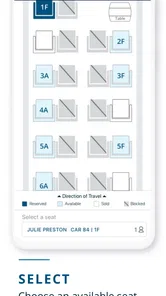
The app's main feature is, of course, booking train tickets. It streamlines the process with a simple booking system where you can search for routes, compare prices, and choose your preferred class of service. I found it incredibly convenient that it saves your details for future bookings, making the whole process quicker the next time around.
What's more, the app provides real-time updates on train schedules and delays. I can't stress enough how useful this is when you're planning your day around a train journey. No more unexpected surprises when you show up at the station!
On the Go Features
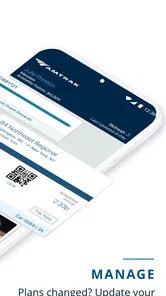
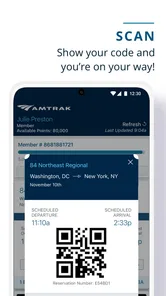
Beyond booking, the app offers features like mobile boarding passes, which means you can skip the ticket machines at the station. Just scan your phone and hop on board. This feature alone makes the Amtrak app worth having.
Additionally, the app includes a trip manager that lets you keep track of your upcoming journeys. This is particularly handy if you're a frequent traveler. You can view your travel history, modify bookings, and even request refunds directly through the app.
Making the trip easier to manage
One practical advantage of keeping the booking and boarding pass on your phone is that you can check the details without searching through email or paper tickets. I’d open the pass before joining the boarding line, rather than waiting until the last moment; it’s a small habit that can make a busy departure feel less rushed. If your phone battery is low, plan ahead and keep another way to access your essential trip information.
The trip manager is most useful when a journey changes after booking. Before making a change, review the itinerary and the options shown for that reservation so you understand what you’re altering. For a simple one-way trip, it may be all you need; for a more complicated itinerary or a route with a regional segment, I’d double-check the details rather than assuming every part is handled identically.
Planning around a real travel day
For example, imagine I’m taking a morning train to a city for an appointment. I’d use the app first to compare departures against the time I need to arrive, then book the option that leaves room for getting to the station and finding the boarding area. On the day, I’d check the trip information before leaving home and again on the way, then open the boarding pass before I reach the line. This sequence makes the app useful at each decision point without asking it to solve unrelated parts of the day.
That workflow is especially helpful when plans involve another person. I’d settle who is responsible for keeping the booking accessible and make sure the traveler who will board can retrieve the pass themselves. Forwarding a screenshot may seem convenient, but it can become stale if trip details change; checking the current booking is a safer routine. When someone else made the reservation, confirm access well before departure instead of assuming the booking will appear automatically.
Where it can cause confusion
The app’s biggest practical limitation is that it’s tied to Amtrak’s coverage. If your route depends on a regional line that isn’t fully integrated, you may need to plan that part separately. That doesn’t make the app useless, but it does mean I wouldn’t rely on one search to settle every leg of a mixed-operator journey. Check the full route, including transfers, before you commit.
Account access is another point to prepare for. The app can occasionally log you out, which is inconvenient when you’re trying to retrieve a ticket quickly. I’d sign in and confirm that the trip is available before travel day, and avoid waiting until the station entrance to resolve account access. If you’re traveling with someone who needs their own ticket details, make sure they can access those details too.
Travelers sometimes expect one app to answer every station question as well as manage a ticket. I’d use this one primarily for the Amtrak booking and trip information it provides, while checking unfamiliar station arrangements separately as part of planning. That distinction is particularly helpful for first-time riders: the app can simplify the rail portion without replacing basic preparation for getting to and through the station.
What to check before relying on the booking
A useful detail to verify is whether the itinerary shown in the app covers the whole trip you intend to take, not just the Amtrak segment. If your plan includes a separate local train or another carrier, treat that as its own leg and check its timing and ticketing arrangements independently. This is not just a matter of finding a departure: a transfer that looks simple on a broad map can still require separate planning on the day.
I’d also distinguish between a schedule update and a complete travel plan. A delay notice helps you understand what is happening to the train, but you still need to decide how much time you need to reach the station and what to do if a connection is affected. For an unfamiliar route, I’d keep the station name and the key itinerary details easy to find rather than relying on memory or a quick glance at the departure time.
A Few Downsides
No app is perfect, and this one is no exception. One thing I noticed is that the app occasionally logs you out, which can be a bit annoying when you're trying to check your ticket or train status quickly. Also, while the app covers most routes, there are still a few regional lines that aren't fully integrated, which might require a bit of extra planning.
When another planning tool is better
Compared with a general travel search app, Amtrak’s focus is both its advantage and its boundary. A broad planner is usually more useful at the beginning of a trip decision, when you want to compare rail with bus or air travel across providers. This app makes more sense once Amtrak is the choice and you want to keep the booking and trip information close together. I wouldn’t use it as the sole source for a journey that crosses several operators.
Paper tickets or a saved confirmation can also serve as a fallback for someone who prefers not to depend on a phone at the station. The mobile pass is convenient, but it does not remove ordinary phone risks such as a flat battery or trouble signing in. My practical approach is to use the app as the main way to manage the trip while keeping essential details accessible in another form when the journey matters.
Who will get the most from it
I’d recommend it most to people who already expect to travel with Amtrak, especially regular riders who want bookings and upcoming journeys easy to find. It also makes sense for a first-time passenger who has settled on a route and wants a straightforward way to book and keep trip details together. A realistic use is a traveler checking a delay during the commute to the station, then bringing up the boarding pass before boarding rather than switching between messages and printed paperwork.
It’s less suitable as your only planning tool if you’re comparing several transport companies, building a trip with multiple regional operators, or looking for a broad itinerary across different kinds of travel. In those cases, compare the whole journey elsewhere first, then use the Amtrak app for the Amtrak portion. That division of labor is more reliable than expecting a single operator’s app to cover every leg.
Who may want a different approach
If you take trains only occasionally, you can still get value from the app for a single booking; you don’t need to be a frequent passenger to justify installing it. The main question is whether your trip is actually an Amtrak journey and whether you are comfortable managing the ticket on your phone. If you prefer printed documents, or know you’ll have limited access to your device, plan a dependable alternative for the details you need at boarding.
I’d also choose a broader search first if the destination matters more than the mode of transport. That is common when dates are flexible or when the journey involves several cities: comparing providers before committing can reveal a better fit for the whole itinerary. Once you decide on Amtrak, the app becomes the more focused tool for the reservation rather than a substitute for that initial comparison.
The Verdict
All in all, the Amtrak app is a fantastic tool for anyone traveling by train in the United States. It's convenient, user-friendly, and packed with features that make train travel smoother and more enjoyable. If you're a regular rail rider or planning your next train adventure, give this app a try. You won't regret it!
For a first-time user, I’d keep the first session simple: search a route you’re considering, compare the available choices, and make sure you can return to the trip details afterward. Then, before travel day, confirm the booking is accessible and give yourself time to reach the station. Used that way, it’s a practical companion for Amtrak travel, with clear limits when a journey extends beyond the operator’s network.
Amtrak Frequently Asked Questions
Can I use the Amtrak app to check whether my train is running on time?
The app is intended to help travelers keep track of their trips, including checking train status and receiving updates. This can be useful before leaving for the station or while traveling, especially when plans change. You can also access station information and push notifications about schedule changes, helping you stay informed through the app.
Can I keep my Amtrak ticket on my phone instead of printing it?
The Amtrak app supports eTickets, allowing travelers to access tickets from a mobile device rather than relying on a printed copy. Keeping an eTicket in the app can make it easier to find your travel information while on the go. It also brings reservation management and ticket access together in one place.
Does the Amtrak app support Amtrak Guest Rewards accounts?
Yes, the app includes access to an Amtrak Guest Rewards account, along with travel history and promotions. These options may be useful if you want to keep account-related travel details close to your reservations. The app is focused on managing Amtrak travel, so its account features are intended for use alongside your journeys with the company.
Can I change or cancel an Amtrak reservation in the app?
The app is designed to let travelers manage reservations after booking, including making changes or canceling when needed. You can also search schedules, choose travel dates, and book tickets directly in the app. Having those options available on your phone can make it more convenient to handle trip arrangements while away from a computer.
Do I need an Amtrak account to use the app?
The app provides access to Amtrak Guest Rewards accounts, as well as reservations, eTickets, travel history, and other trip-management features. These tools are useful for travelers who want their Amtrak information available on a mobile device. The app is centered on managing travel with Amtrak, so its main purpose is to support that journey rather than general travel planning.
Pros
- User-friendly interface for easy navigation.
- Real-time train status updates.
- Mobile ticketing for convenience.
- Integration with rewards program.
- Accessible customer support.
Cons
- Limited route coverage.
- Occasional app crashes reported.
- Slow loading times for some users.
- No offline access to schedules.
- Limited payment options.











