

Amenify Resident
- 778.00
- 4.0
- Installs
- 50.00K
- Price
- Free
Screenshots
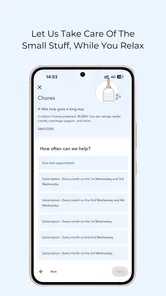
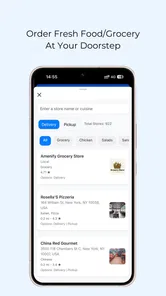
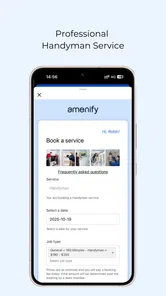
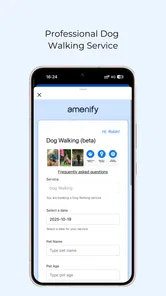
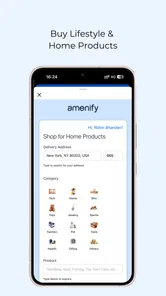
Analysis by Reviewed
Moving into a building with resident services can be convenient, but convenience depends on knowing where to request help and how to follow the request afterward. Amenify Resident is designed for that part of apartment living. It is a free House & Home app from Amenify that brings supported in-home services into one resident-facing place. I found its value less in entertainment or clever extras and more in reducing the small amount of coordination normally involved in arranging help at home.
The important word is “supported.” This is not a universal marketplace for every service in every location. It is technology used for residents across the United States, so the experience is closely tied to the building and services connected to a resident’s community. If your property participates, the app can be a practical starting point. If it does not, installing it alone will not turn it into a general-purpose home-services directory.
What to expect before you begin
The app sits in the House & Home category, but I would think of it more specifically as a resident-service doorway. The useful question is not “What can this app do for everyone?” but “What services can my building make available through it?” That distinction helps set expectations before you spend time looking for options that may not apply to your address.
Amenify Resident is free to install and carries an Everyone content rating. It has been available since October 16, 2019, and the current version is 2.1.2. It supports devices running Android 7.0 or later, which makes it accessible to many older Android phones as well as newer models. On the store, it has an average rating of 4.0 from around 1.2 thousand ratings, with more than 50 thousand installs. Those figures suggest a real resident audience, although they should not be treated as a guarantee that your own property will offer the same experience.
My first practical recommendation is to install it with your building information nearby. Have the property name, unit details, and any resident account information available if your community gave you those details during move-in. This avoids the frustrating situation of starting setup while standing in a hallway or trying to remember which version of your name appears on the lease.
The app is most appealing to people who prefer a single resident channel instead of calling a front desk, searching through an email thread, or keeping separate contacts for each available service. It can also suit residents who are away from home during the day and want to make a request without waiting for office hours. Someone looking for a broad comparison of independent cleaners, repair professionals, or delivery providers will probably be better served by a general marketplace app.
How the building connection changes the experience
Unlike a normal shopping app, this experience depends on your relationship with a property. The building is not just background information; it determines whether the app is useful to you at all. That is why the first screen or setup step matters so much. If the app asks you to identify a community, choose carefully rather than selecting the first similar name you see.
More From Our News Desk

 Gmail
GmailGmail in a Busy Inbox: Who Benefits Most?
From first account to crowded workday, Gmail earns its place through dependable search and flexible sorting—but its best fit depends on how much inbox maintenance you can tolerate.

 Prime Video
Switching to Prime Video: What Changes in Your Viewing Routine
Prime Video can make a compelling second home for streaming, but switching means learning a different catalog, rental layer, and route from browsing to playback.

 Universal TV Remote Control
Universal TV Remote Control Works Best as a Reliable Backup
A phone remote earns its place through quick setup and reliable habits. Here is how to get more from Universal TV Remote Control—and where its limits show.

 Weather - By Xiaomi
Weather by Xiaomi Review: Clear at a Glance, Less Clear Up Close
Xiaomi’s weather app makes everyday forecasts quick to scan, but its calm surface can leave useful details and recovery paths harder to find than they should be.

 X
XX Under Pressure: Can It Recover When Posting Goes Wrong?
A resilience-focused review of X, examining setup, mistaken posts, interruptions, weak connections, and the gaps that matter when recovery needs to be dependable.

 Clash of Clans
Clash of Clans Is Won Between the Battles
Its raids are quick; its community is a long-term project of coordination, teaching, rivalry, and shared responsibility—with all the friction that entails.
Latest News



A useful way to approach the app is to separate three questions. First, can I access the resident area? Second, what services are available to my community? Third, what information does a request require before it can be completed? Answering them in that order keeps the process simple and prevents you from assuming that a service shown in general promotional material is necessarily available in your building.
I also recommend checking the service details before committing to a request. Look for the timing, location, and any instructions shown in the flow. A request that sounds simple may still depend on access arrangements, the condition of the space, or whether someone needs to be present. The app can organize the request, but it cannot remove the real-world details that affect whether a service goes smoothly.
Getting through first setup without guesswork
After installation, I would begin by identifying the resident or community path rather than browsing randomly. Use the information associated with your home and read each prompt before moving on. The goal is to make sure the app recognizes the correct property and resident context. If the app does not appear to connect you with your building, check the spelling of the property and the account details you were given before assuming there is a technical problem.
This is one of the less obvious trade-offs of a property-linked app: the setup is usually more meaningful than a simple sign-up, but it may feel less immediate than opening a general service marketplace. That extra context is what makes resident-specific requests possible, yet it also means the app cannot be evaluated independently from the management setup behind it.
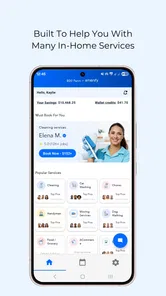
Once you reach the resident area, take a quiet minute to inspect the available service categories. Do not request something simply to test the button. Instead, note which options are actually relevant to your routine. For example, a resident who works long shifts may prioritize a recurring home task, while someone preparing for guests may need a one-time service. The best first use is the smallest genuine task that has a clear outcome.
Keep your first request uncomplicated. Avoid combining several needs into one description unless the app clearly supports that workflow. A narrowly described request is easier to review, easier to explain if there is a follow-up, and less likely to create confusion about what you expected. This is especially helpful when you are learning how your building handles communication around resident services.
The best first successful action
For a first meaningful result, I would choose a service with a defined location and a straightforward purpose. Before submitting anything, read the summary as if you were the person receiving the request. Is the unit or relevant area clear? Is the timing understandable? Have you included the detail that would prevent a needless message back to you?
That short review is more valuable than rushing through the form. In my experience with resident-service tools, the biggest source of friction is often not finding the service but leaving out a practical detail. A concise note can be better than a long explanation: identify the task, mention the relevant area, and add the one condition that could affect access or completion.
After sending the request, keep the app available so you can revisit its status or any follow-up. Do not assume that submitting a request means the service has already happened. Treat the first submission as the start of coordination. If the app provides a confirmation or request record, compare it with what you intended before closing it.
A realistic example would be a resident returning late from work who wants to arrange an available in-home service without calling the leasing office. I would open the app, confirm the community, select the relevant service, check the timing and instructions, and submit a focused request. Later, I would reopen the request to verify that the details still match my plan. That workflow is modest, but it is exactly where the app can save effort: the request is kept in the resident channel rather than scattered across texts, calls, and notes.
Small habits that make requests easier
- Start with one clearly defined task. A simple first request teaches you how the property’s service flow works without creating several moving parts at once.
- Review the address or unit context before sending. Resident platforms can feel automatic once you are signed in, but the correct community remains essential to the request.
- Use the request history as your reference point. Rather than relying on memory or an old email, return to the app to see what you actually submitted.
- Plan around access. If an in-home service requires entry or a particular time window, resolve that practical issue before submitting rather than after a provider is ready to act.
These habits are not flashy features, but they are where I see the strongest practical benefit. Amenify Resident works best when it becomes a tidy record of resident-service arrangements, not merely an icon you open when something goes wrong.
Common confusion and where the app feels limited
The first likely confusion is expecting a nationwide catalog that behaves the same for every user. The app supports services for residents across the United States, but your actual choices are connected to your property. Two residents in different communities may see different options or different request processes. That is not necessarily a fault, but it means reviews from another building may not predict your own experience perfectly.
A second point is the difference between app access and service availability. Being able to install the app does not by itself tell you what your community offers. If an option is missing, the reason may be the building’s arrangement rather than your phone. In that situation, repeatedly reinstalling the app is unlikely to help. I would first confirm that you are connected to the right resident community and then contact the property’s normal resident-support channel if the issue remains.
Another possible source of uncertainty is responsibility. The app can provide the digital route for a request, but residents still need to read instructions, provide accurate details, and be realistic about timing. It is not a substitute for checking whether a room is ready, whether access is possible, or whether the requested work needs clarification. The smoother experience comes from combining the app’s organization with ordinary preparation.
I also would not choose this app as my main solution if I wanted to compare multiple independent providers on price, reviews, availability, or service scope. A general marketplace is usually better for that kind of open-ended research. Amenify Resident has a different strength: it is closer to a building-specific resident portal than a broad shopping platform. That focus can save time when the right service is already available, but it reduces flexibility when you want to shop around.
The 4.0 average rating gives me a balanced impression rather than a reason to download blindly. It indicates that many residents find the app useful, while also leaving room for account setup issues, property-level differences, or uneven expectations. I would judge it mainly by whether it connects cleanly to my building and whether the available request flow matches how I actually manage home services.
Who should use it, and who should skip it
I would recommend trying it if you live in a participating property, prefer digital requests, and want a central place for resident-related services. It is particularly suitable for people who dislike phone calls, residents with busy schedules, and anyone who wants a record of what they asked for rather than relying on informal conversations.
I would be more cautious if you are not associated with a participating community, if you need a service that your building does not provide, or if your main goal is to compare outside vendors. In those cases, a general home-services platform, a direct provider, or the property’s own office may be more effective. The app’s focused design is useful precisely because it is not trying to be every kind of home-services tool.
It is also not the right answer for an urgent problem that needs immediate human attention unless your community explicitly directs residents to use it for emergencies. For a serious leak, safety issue, or time-critical building problem, I would follow the property’s emergency instructions instead of assuming that a normal service request will be seen immediately.
What to do after the first request
Once the first request is complete, use the experience to decide whether the app deserves a regular place in your routine. Did you find the correct service quickly? Were the instructions clear? Could you tell what happened after submission? Did the process reduce calls and repeated explanations? Those answers matter more than the number of buttons on the screen.
If the first request went well, save a simple personal checklist for future use: confirm the community, select the exact service, check timing and access, review the summary, and revisit the request afterward. This turns the app from something you experiment with into a dependable part of managing your home. It also makes it easier to spot whether a later problem comes from your request details or from the property-side process.
If the first attempt fails, avoid changing several things at once. Confirm the resident connection, check the app version, and try the same basic path again only if the issue is clearly a setup mistake. The current Android version is 2.1.2, and the minimum Android requirement is 7.0, so an older unsupported device can be a factor. If your phone meets that requirement and the community still does not appear correctly, the next sensible step is property support rather than endless troubleshooting inside the app.
One useful long-term approach is to use Amenify Resident for repeatable, building-supported needs while keeping a separate option for unusual or specialized jobs. That division avoids forcing one tool to handle everything. The resident app can remain your first stop for services tied to your community, while a direct provider or broader marketplace can cover work outside that arrangement.
Overall, I see Amenify Resident as a practical connector between residents and the in-home services their communities support. It is free, accessible to a wide range of Android users, and most valuable when it replaces scattered coordination with a clear resident workflow. Its limitations are just as important: the property determines much of the experience, the service list is not universal, and it is not designed primarily for open vendor comparison.
My advice to a first-time user is simple: install it, connect it carefully to the correct community, inspect the available services, and begin with one small request you genuinely need. If that request is easy to submit and easy to follow afterward, the app has earned its place. If your building is not connected or you need broader choice, skip the extra layer and use the channel that actually reaches the service you want.
Amenify Resident Frequently Asked Questions
Can I browse Amenify Resident before creating an account?
Amenify Resident is built around services connected to a resident’s property, so access to useful features generally begins with registration and signing in. You may be asked to verify your address or provide information associated with your community. If you are considering a move, ask the leasing office whether the property uses Amenify and what residents can access before setting up an account.
What is Amenify Resident, and what can I use it for?
Amenify Resident is a resident-services app designed for people living in participating apartment communities and residential buildings. After signing in, residents may be able to request services such as housekeeping, laundry, pet care, maintenance-related assistance, package support, or community amenities, depending on what their property offers. The exact services, prices, availability, and booking options can vary by building and location. Its focus is making participating in-home services available through a resident-facing app.
Do I need to live in a participating property to use Amenify Resident?
Yes, Amenify Resident is generally intended for residents whose apartment community or property management company works with Amenify. You may need to verify your address, use an invitation or registration code, or sign in with information connected to your lease. If your property is not supported, some features may be unavailable. Contact your leasing office or Amenify support if you cannot complete registration.
How do I book services through Amenify Resident?
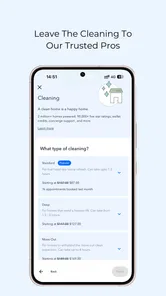
Once your account and property are verified, open the available service categories and select the service you want. You can usually choose a date and time, review the estimated cost, add instructions, and confirm the booking inside the app. Availability may depend on local providers and building rules. Review the final details carefully, including cancellation terms, before submitting a request.
How much do Amenify Resident services cost?
Amenify Resident does not have one universal price list because costs depend on the service, apartment size, location, provider availability, and any promotions offered by your property. The app should display pricing or an estimate before you confirm a booking. Additional charges, tips, recurring-service fees, or cancellation costs may apply, so check the order summary and property-specific terms before payment.
Pros
- Easy way to request and manage home services from one app.
- Service bookings can save residents time on everyday household tasks.
- Useful for checking available amenities and community offerings.
- Digital communication can reduce the need for phone calls or office visits.
- Convenient access to resident-focused services in supported properties.
Cons
- Availability depends heavily on your property and local Amenify coverage.
- Some services may involve extra fees beyond regular rent or amenities.
- Booking times can be limited during busy periods or high-demand days.
- App usefulness may be restricted if your community does not support all features.
- Service quality and response times can vary by local providers.







