Amazon Kids Parent Dashboard
- 606.00
- 4.1
- Installs
- 1.00M
- Price
- Free

Screenshots


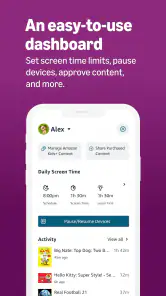
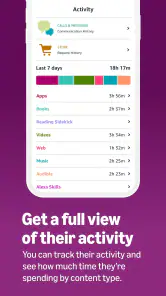
Analysis by Reviewed
I like the idea of handling a child’s digital routine from my own phone rather than turning every screen-time decision into a negotiation beside the device. That is the practical appeal of Amazon Kids Parent Dashboard: it gives parents a place to manage a child’s Amazon Kids experience and make routine choices without having to take over the child’s screen. I’d consider it most useful when a family already relies on Amazon Kids, rather than as a general control panel for every device a child might use.
When a focused control panel makes sense
This entertainment app is developed by Amazon Mobile LLC, and its focus is narrower than a broad family-safety toolkit. If your child uses Amazon Kids and you want to shape what they can access or establish clearer routines, the dashboard has a straightforward purpose. If your family uses a mix of platforms and needs one place to supervise all of them, a platform-wide parental-control option may be a better fit; this app is centered on the Amazon Kids experience.
A useful way to approach it is to set expectations together before changing controls. I’d explain which choices are about safety, which are about bedtime or homework, and which are simply family preferences. That conversation matters because controls can structure access, but they can’t replace a child understanding why the rules exist. The dashboard works best as a tool for consistent boundaries, not as a substitute for talking about online habits.
Making the rules fit an ordinary day
Picture a school evening: a child has finished homework and wants to use a tablet, while a parent is preparing dinner in another room. Instead of making a decision in the moment, I’d use the dashboard to set a predictable routine in advance, then review the child’s activity later when there is time to discuss it. The benefit is less about watching every tap and more about making household expectations easier to apply consistently.
One practical tip is to adjust settings in small steps. If a child suddenly loses access to a favorite app or has a sharply reduced screen allowance, the change can feel arbitrary and prompt avoidable arguments. I’d start with the boundary that matters most, see how it fits the family’s actual day, and then refine it. This also helps distinguish a settings problem from a routine problem: a rule that looks sensible in an app may not work around school, meals, or shared-device use.
Getting to Know Amazon Kids Parent Dashboard
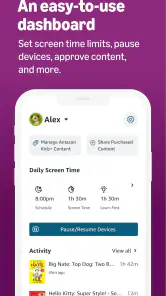
So, what’s the deal with the Amazon Kids Parent Dashboard? Essentially, it’s a tool that lets you keep an eye on what your kids are up to on their devices. Think of it as your parental superpower! You can monitor and manage the content your kids are accessing, set educational goals, and even limit screen time. It’s like having a digital nanny that doesn’t ask for coffee breaks.
Starting with the right setup
Getting started with the app is a breeze. First off, you’ll need to set it up on your child’s device. The interface is pretty intuitive—no tech degree required here. Once installed, you can log in from your own device to start managing your kid’s digital world. The dashboard is user-friendly, with all the controls you need neatly organized on your screen. You’ll be customizing settings in no time!
More From Our News Desk

Clash of Clans Is Won Between the Battles

Android Auto Makes the Case for Quieter Car Software

MobiOffice: Transforming Mobile Productivity with Seamless Integration

EA SPORTS FC™ Mobile Soccer: Redefining Mobile Sports Gaming

How Microsoft OneDrive Became a Mobile Productivity Giant

How Google Translate Breaks Language Barriers Effortlessly
Before relying on a new rule, I’d check it from the child’s side as well as the parent’s. A setting only helps if it applies to the child’s intended Amazon Kids experience and is understood by the adult managing it. This is especially useful in a household where more than one adult helps with routines: agreeing on the same boundary first can prevent one person from making a change that another later reverses.
What the controls are useful for
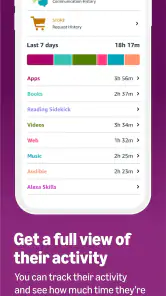
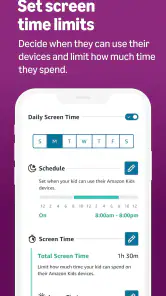
The app is packed with features that make parenting in the digital age a tad bit easier. You get to see what apps your kids are using and how much time they’re spending on each. The Amazon Kids Parent Dashboard also allows you to set daily time limits and educational targets. Want your child to read for 30 minutes before diving into games? You got it! This app lets you fine-tune their screen time to match your family’s needs.
Content choices and learning goals
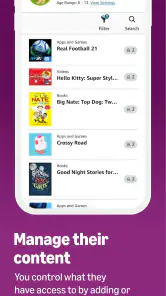
One of the coolest features is content control. You can block specific apps or restrict access based on age-appropriateness. No more worrying about your child stumbling onto something they shouldn’t see. Plus, you can review the books, videos, and apps they’re interacting with, making sure everything aligns with your family values. It’s like being able to peek over their shoulder without actually doing it.
And let’s not forget the learning benefits. The app encourages kids to engage with educational content, which is a huge plus. With curated content that’s both fun and educational, you might just find your little one learning while they play. Who knew screen time could be so productive?
A less obvious way to use these controls is to treat activity review as a conversation starter, not a scorecard. If a child spends time with a particular book or app, I’d ask what they liked about it before changing access. That makes it easier to tell the difference between a content choice that genuinely concerns you and one that is simply unfamiliar. It also helps keep monitoring proportionate: the point is to guide, not to turn every session into an inspection.
For families with shared tablets, I’d also make the child profile and the household routine part of the same check. A parent can have a sensible rule in mind, but a device passed between siblings can make that rule feel inconsistent if each child’s access is not being managed as intended. I’d confirm who is using the device before drawing conclusions from activity, and avoid changing several controls at once when the real issue may be that siblings have different needs.
What version information can—and cannot—tell you
The current release is version 1.11.1.3733. That tells me which build a new user can look for, but a version number alone doesn’t reveal what changed between releases, so I wouldn’t treat it as proof of a particular new feature or a different experience for existing families. The app was released on June 12, 2024, and I’d judge future changes by whether they make routine controls clearer and easier to manage, rather than by assuming an update has changed how every family’s setup works.
For someone already using Amazon Kids, the sensible first step is to check that the dashboard and the child’s device are both set up for the same family experience, then review the controls before relying on them for a busy day. If an expected restriction does not seem to match what the child can access, I’d revisit the relevant settings and the child’s routine rather than assume the app covers every device or service in the home. That distinction is important: a control center is only useful within the experience it is designed to manage.
How it differs from broader alternatives
Compared with the parental controls built into a phone’s operating system, this dashboard is a more targeted choice: its purpose is to manage a child’s Amazon Kids experience rather than serve as a universal family-management layer. That focus can be a real advantage if Amazon Kids is where your child spends their screen time, because you can think about content, limits, and learning goals in the context of that experience. If your main concern is a consistent set of rules across several kinds of devices and services, the built-in controls on each platform or a broader family tool may be more practical.
I wouldn’t choose between them as though one must replace the other. A parent might use a platform’s own controls for device-level boundaries and this app for the Amazon Kids environment, provided the arrangement stays simple enough to maintain. The trade-off is extra administration: every additional control point means another place to review when a rule changes. If you find yourself unsure which setting is responsible for a restriction, simplify the setup rather than layering on more rules.
Limits worth keeping in view
Parental controls can reduce the need for constant supervision, but I wouldn’t treat them as a guarantee that a child will never encounter something unsuitable or that a time limit will resolve disagreements about screens. They work best alongside occasional check-ins and age-appropriate conversations. Also, a parent who wants a unified view across a child’s phone, console, and other platforms should compare broader family-control tools before committing to this Amazon-focused approach.
The app is free, rated for Everyone, and has an average rating of 4.1 from around 10,000 ratings, with more than 1 million installs. Those figures suggest it has found a substantial audience, but they don’t tell me whether its controls suit a particular household. I’d use the free access to judge that fit against your own setup and habits. It requires Android 8.0 or later, so check the parent’s phone before planning to use it there; the child’s device also needs to be configured for the Amazon Kids experience the dashboard is meant to manage.
In practice, the first question I’d ask is whether the child’s everyday screen use actually happens inside Amazon Kids. If it does, the dashboard has a clear job: help a parent make decisions about that experience without hovering beside the device. If the child mainly uses other apps, a different device, or services outside that environment, this may only cover one corner of the routine. That doesn’t make it ineffective; it means the household should be clear about the boundary of what it manages.
It is also worth thinking about who will maintain the settings. A family with one adult making occasional adjustments may find a focused dashboard easy to keep straight. In a household where caregivers alternate, I’d agree on a small number of shared rules and explain how to handle exceptions, such as a school-related activity taking longer than usual. Consistency matters more than having a long list of restrictions that nobody remembers to revisit.
What to watch as your family’s needs change
As children grow, the rules that once felt helpful can become unnecessarily restrictive, while new interests may call for a closer look at content choices. I’d use the dashboard as part of a periodic review rather than set everything once and forget it. Check whether the limits still fit school days, weekends, and the child’s level of independence, then talk through adjustments before they become a source of conflict. The useful sign of progress is not simply tighter control; it is a routine the child understands and the parent can realistically maintain.
For existing users, a release number is best treated as a way to identify the installed build, not as a promise that a particular family workflow has changed. I’d pay attention to the actual controls and how they behave in your own setup after an update, especially before relying on them for an important routine. If the experience remains clear and the rules are doing the job you need, there is no reason to rebuild a working arrangement just because the version has moved on.
My recommendation for the right household
At the end of the day, the Amazon Kids Parent Dashboard is a solid tool for any parent navigating the digital age. It’s easy to use, offers a plethora of features, and most importantly, it gives you peace of mind. Knowing you can manage what your kids see and do on their screens is a game-changer. So, if you’re looking to take control of your child’s digital experience while promoting a healthy balance of fun and learning, this app is definitely worth a try.
So go ahead, give it a whirl, and let the Amazon Kids Parent Dashboard transform your parenting game. Because, let’s face it, we all deserve a little extra help sometimes.
Amazon Kids Parent Dashboard Frequently Asked Questions
What devices and operating systems can I use Amazon Kids Parent Dashboard on?
Amazon Kids Parent Dashboard is an app for managing a child’s Amazon Kids experience. Before downloading, check that your device runs Android 8.0 or later, which is the minimum operating system requirement. The app is free and is intended to give parents a convenient way to manage parental controls. Its focus is the child’s Amazon Kids experience rather than general device management.
Who makes Amazon Kids Parent Dashboard, and what should I expect from the app?
Amazon Mobile LLC develops Amazon Kids Parent Dashboard, an entertainment app described as a way to manage your child’s Amazon Kids experience with easy-to-use parental controls. It is rated for Everyone, but parents should still review settings and choose content appropriate for their own child. The app’s purpose is to help adults oversee the child’s experience, not to replace conversations about healthy digital habits.
What is Amazon Kids Parent Dashboard and how does it work?
Amazon Kids Parent Dashboard is a tool that allows parents to manage and monitor their children's digital activities on Amazon devices. It provides insights into what kids are doing, including the time they spend on different apps and games. Parents can set educational goals, screen time limits, and even pause devices, ensuring a balanced digital experience for their kids.
How can I set screen time limits using Amazon Kids Parent Dashboard?
To set screen time limits with Amazon Kids Parent Dashboard, log into the dashboard and navigate to the 'Screen Time' section. From there, you can establish daily time limits for your child’s device usage. This feature helps parents ensure their kids aren’t spending too much time in front of screens, promoting healthier habits.
Is Amazon Kids Parent Dashboard free to use, or does it require a subscription?
The Amazon Kids Parent Dashboard is free to use. However, for enhanced features and access to a larger library of content, parents can subscribe to Amazon Kids+, a paid service offering additional educational and entertaining content for children. The basic functionalities of the dashboard remain free and accessible to all users.
Pros
- Easy-to-use interface for parents.
- Comprehensive activity reports.
- Customizable age filters.
- Remote control of content usage.
- Supports multiple child profiles.
Cons
- Subscription required for full features.
- Limited offline functionality.
- Some content not age-appropriate.
- Occasional app crashes.
- Can be overwhelming for new users.
- Category
- Entertainment
- Version
- 1.11.1.3733