

AllStays Camp & RV: Camping
- 55.00
- 4.6
- Installs
- 50.00K
- Price
- Free

Screenshots

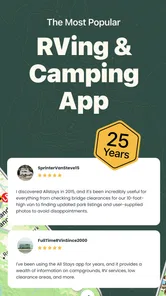
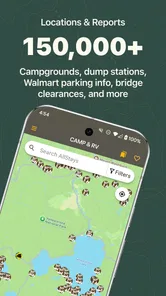
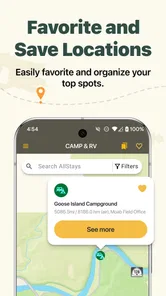
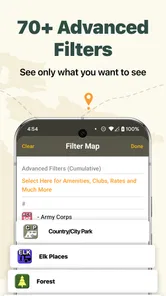
Analysis by Reviewed
Planning a camping or RV trip often starts with a vague idea rather than a fixed destination: I know roughly where I want to go, how far I can travel, and what kind of overnight stop would make the journey easier. AllStays Camp & RV is built for that early, messy stage. It is a Travel & Local app from appexgroup that helps me search and filter campgrounds, RV parks, and other outdoor places, with offline lookup available when a signal becomes unreliable.
My first impression is that this is less about discovering a polished holiday itinerary and more about reducing the amount of map-scrolling and guesswork between “I need somewhere to stay” and “this stop actually suits my vehicle.” That distinction matters. Someone booking a conventional hotel may find a mainstream travel app more comfortable, while a camper or RV driver usually needs a broader field of practical possibilities and a quicker way to narrow them down.
The app is free to download, carries an Everyone content rating, and has reached over 50 thousand installs. Its average rating is 4.6 from more than 600 ratings, which suggests that its focused purpose is resonating with many users. I would still treat those figures as a starting point rather than a substitute for checking each location yourself, especially when a campsite’s current conditions can matter more than its appearance in a directory.
From a rough trip idea to a usable overnight plan
When I’m turning a loose camping idea into an overnight plan, I find it helps to decide first what would make a stop genuinely workable: vehicle fit, route, and how much detour I can manage. I’d use the shortlist to keep a practical backup in view, then move on to the next question: how to make that search useful when the journey gets busy or connectivity becomes uncertain.
Starting with the real problem: finding the right kind of stop
Imagine leaving late in the afternoon with a long drive still ahead. I do not necessarily need the most scenic campground or the cheapest place in the area. I may need somewhere that accepts an RV, sits close enough to my route, and works as a practical overnight break. That is where the app’s search-and-filter approach makes sense: instead of treating every outdoor listing as interchangeable, I can begin by thinking about the conditions that actually affect the trip.
The same applies to a weekend camping plan. If I am travelling with a tent, I may care about access to a particular type of camping area. If I am driving a larger recreational vehicle, a small site that looks perfect on a map may be useless. The value here is not simply the size of the directory; it is the chance to turn a broad search into a more relevant shortlist before I spend time investigating individual places.
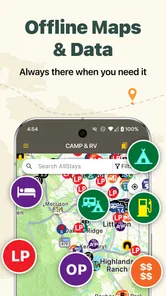
I found the offline angle especially important for this kind of task. Campground searches often happen in areas where coverage is inconsistent, and the moment I need information most may be after I have already left a town or highway. Offline lookup does not remove the need for preparation, but it gives the planning process a second layer: I can review available information before losing reception instead of assuming that a live connection will always be there.
More From Our News Desk

 Weather - By Xiaomi
Weather by Xiaomi Review: Clear at a Glance, Less Clear Up Close
Xiaomi’s weather app makes everyday forecasts quick to scan, but its calm surface can leave useful details and recovery paths harder to find than they should be.

 X
XX Under Pressure: Can It Recover When Posting Goes Wrong?
A resilience-focused review of X, examining setup, mistaken posts, interruptions, weak connections, and the gaps that matter when recovery needs to be dependable.

 Clash of Clans
Clash of Clans Is Won Between the Battles
Its raids are quick; its community is a long-term project of coordination, teaching, rivalry, and shared responsibility—with all the friction that entails.

 Android Auto
Android Auto Makes the Case for Quieter Car Software
The car interface is no longer judged by how much it can do, but by how quietly it helps. Android Auto shows what drivers now expect—and what still gets in the way.

 MobiOffice: Word, Sheets, PDF
MobiOffice: Transforming Mobile Productivity with Seamless Integration
MobiOffice: Word, Sheets, PDF is redefining mobile productivity with a surprising blend of functionality and innovation.

 EA SPORTS FC Soccer Mobile 26
EA SPORTS FC™ Mobile Soccer: Redefining Mobile Sports Gaming
Dive into EA SPORTS FC™ Mobile Soccer, where immersive gameplay and strategic depth transform mobile sports gaming.
Latest News



A practical search workflow
I would use the app in stages rather than trying to choose a campsite immediately. First, I would search around the intended route or destination. Then I would filter the results according to the trip’s actual constraints. Finally, I would compare the remaining places with my driving plan, fuel needs, arrival time, and tolerance for a detour.
That order is useful because it prevents a common mistake: selecting a visually appealing location before checking whether it fits the journey. A place can be close to a destination but still be inconvenient if reaching it requires a large diversion. Conversely, a less glamorous stop may be the better choice if it breaks up a tiring drive and keeps the next day manageable.
My advice is to apply the strictest filters first, then relax them only when the result is too narrow. For example, I would begin with the vehicle or camping requirement that could genuinely make a place unusable. After that, I would widen the search for distance or location. This is more efficient than browsing a huge list and mentally rejecting entries one by one.
The best workflow is to filter for what can disqualify a site, not merely what sounds attractive. That small change makes the app feel more like a planning tool than a directory. It also helps avoid the false confidence that comes from finding many nearby results that do not match the practical details of the trip.
Using offline lookup before the road becomes remote
Offline access is most helpful when treated as a handoff between planning and travelling. Before departure, I would inspect the area where I expect to lose service and make sure the relevant search information is available for lookup. I would not wait until the phone shows no signal, because that is exactly when a last-minute search becomes difficult.
This also changes how I would plan a backup. Rather than saving only one preferred campground, I would identify a small group of alternatives along the route or near the destination. If the first option is unsuitable when I arrive, having nearby candidates already available is much better than pulling over and hoping a live search loads.
There is a trade-off here. Offline lookup can preserve access to information already available in the app, but it should not be treated as proof that a site’s situation has not changed. Opening hours, availability, access conditions, and local restrictions can all be time-sensitive in the real world. I would use the offline material to navigate my choices, then verify the most important details whenever a reliable connection or direct contact is available.
Handing the shortlist over to the rest of the trip
No camping directory can complete the entire journey on its own. Once I have narrowed down possible stops, I still need to connect that information with navigation, vehicle planning, weather awareness, and the people travelling with me. This is where the app’s role becomes clear: it supplies the discovery and filtering stage, while the final decision belongs to the broader travel workflow.
For a solo driver, the handoff might be simple. I can use the app to identify a few plausible places, then use my preferred navigation method to judge the route and arrival timing. For a family or group, the handoff includes a conversation about comfort and expectations. A basic overnight stop may be perfectly acceptable for one person but a poor choice for a group arriving after dark.
I also think it is useful to separate “possible” from “confirmed.” The app can help me build the possible list. Confirmation still depends on the details that matter for that particular night. This distinction prevents me from treating a directory entry as an automatic reservation or as a guarantee that the site will match my needs exactly.
A realistic evening scenario
Suppose I am driving an RV and realise that I will not comfortably reach my planned destination before nightfall. I open the app while I still have a connection, search around the remaining route, and filter for places that make sense for an RV stay. Instead of choosing the first result, I compare several options by how much they would pull me away from the road and whether they create a sensible starting point for the next morning.
I then keep a primary option and at least one fallback in mind before continuing. If the signal disappears later, offline lookup gives me a way to revisit those candidates. When I reach a point where I can verify current details, I check the most important conditions and make the final call. The outcome is not a magical one-tap booking; it is a more controlled decision made with fewer rushed searches.
This scenario shows the app at its strongest. It helps when the problem is geographic and practical: I need to know what is around me, what might fit, and how to preserve that information for a section of the journey where connectivity may be poor.
Where it compares well with ordinary map searches
A normal map app is excellent for directions and broad place discovery, but it can require more manual effort when I am looking specifically for campgrounds, RV parks, and outdoor stops. Search terms may produce inconsistent results, and I may have to inspect many unrelated places before finding a useful candidate. AllStays Camp & RV is more focused on this particular travel question.
That focus is also its limitation. A general navigation app may be better once I have chosen the destination and need traffic-aware routing, turn-by-turn guidance, or a complete journey overview. A hotel-focused booking service may be better when I want room availability, a familiar reservation process, and standard accommodation comparisons. I would use this app to build and refine the outdoor-stop shortlist, not as a replacement for every other travel tool.
Compared with a simple web search, the advantage is continuity. Searching the web can produce useful information, but it may scatter the planning process across pages, map tabs, and changing results. A dedicated campground and RV directory gives the search a clearer centre. The drawback is that I still need to judge the quality and freshness of individual entries rather than assuming that a specialised directory removes all uncertainty.
Small habits that make the app more useful
One useful habit is to search beyond the exact endpoint. If I am travelling to a popular destination, I would check the surrounding area rather than looking only inside the town itself. A slightly longer final drive can sometimes create more workable choices, especially when the closest locations are unsuitable for the vehicle or the trip schedule.
A second is to plan the return journey separately. The best outbound stop may be a poor choice on the way home because the driving hours, direction, and desired arrival time have changed. Repeating the search with the return route in mind prevents me from reusing a convenient answer that no longer fits.
A third is to keep alternatives with different trade-offs. I might choose one option for proximity, another for a more comfortable stop, and a third as an emergency fallback. This is more resilient than ranking every place by a single idea of “best.” It also makes offline lookup more valuable because I am preserving a decision set rather than one fragile plan.
Finally, I would avoid filtering so aggressively that the app appears to have no useful results. Filters are powerful when they remove genuine mismatches, but they can also hide reasonable alternatives if my requirements are more flexible than I first thought. I would loosen one condition at a time and reassess instead of clearing everything and starting from scratch.
Where the flow breaks down
The first point of friction is the gap between finding a listing and knowing whether it is right for tonight. Search and filters can narrow the field, but they do not eliminate the need for judgement. If I need guaranteed availability, a confirmed booking, or highly current operational information, I would look for a service that is specifically designed around live reservations or contact the location directly.
The second issue is that offline lookup can encourage overconfidence. Having information stored for later is reassuring, but it does not mean every detail remains current. I would prepare offline material before leaving coverage and still treat it as a planning aid rather than a final authority.
The third is the app’s fit for different travellers. It is a strong candidate for people who regularly camp, drive RVs, or need outdoor stops along a route. It is less compelling for someone taking a single hotel-based city break, someone who wants a full itinerary in one place, or someone who expects every result to lead directly to an instant reservation.
There can also be a learning curve in deciding which filters matter for a particular vehicle and trip. That is not necessarily a flaw in the concept; camping and RV travel have more variables than ordinary accommodation searches. Still, a first-time user should expect to spend a little time understanding how to translate personal requirements into a useful search rather than tapping through a generic list.
Version, cost, and device fit
The current version is 12.1, and the app runs on Android devices using version 8.0 or later. I appreciate that the entry price is free, because it lets a traveller test the search experience before committing to it as part of a regular planning routine. The app also has in-app purchases ranging from $9.99 to $49.99 per item, so I would check which parts of the experience require payment before depending on them for a major trip.
That pricing structure makes the app worth evaluating against how often I camp. For occasional users, the free starting point may be enough to decide whether the directory fits their habits. Frequent RV travellers may find paid options easier to justify if they save repeated research time, particularly when offline planning is central to their trips. I would base that decision on my own travel frequency and required features rather than assuming that the most expensive option is automatically necessary.
My recommendation after following the whole workflow
After looking at the complete path from a vague travel problem to a workable overnight plan, I see AllStays Camp & RV as a specialised planning companion rather than an all-purpose travel platform. Its strongest contribution is helping me search a large collection of outdoor places, narrow the results around real camping or RV needs, and keep useful lookup access when connectivity becomes uncertain.
I would recommend it to an RV driver planning multi-stop travel, a camper who often explores unfamiliar areas, or anyone who wants backup overnight possibilities before setting off. I would skip it if my trips rarely involve campgrounds, if I mainly need hotel reservations, or if I want one app to handle booking, navigation, live availability, and itinerary management from beginning to end.
The honest result is practical rather than flashy. The app does not remove the final checks, the route decisions, or the responsibility to confirm important details. What it can do is make the search stage more organised and more resilient. For outdoor travel, that is a meaningful advantage: when the original plan changes, I am not starting with an empty map and a weak signal.
AllStays Camp & RV: Camping Frequently Asked Questions
Can I use AllStays Camp & RV to plan a route before setting out?
Yes. AllStays Camp & RV is useful for planning road trips as well as finding stops while you travel. You can search for campgrounds, RV parks, rest areas, fuel stations, and other practical locations, then review the options along your route. Checking likely stops before departure can make it easier to organize a trip, particularly when you need services suited to camping or RV travel.
Which areas does AllStays Camp & RV cover?
AllStays Camp & RV is intended for travelers in the United States and Canada. Its listings cover campgrounds, RV parks, and a range of outdoor and roadside locations, making it relevant for cross-country trips as well as shorter drives. The store summary describes a searchable collection of more than 34,000 campgrounds, RV parks, and outdoor spots, with filters to help narrow down choices.
What is AllStays Camp & RV, and who is it designed for?
AllStays Camp & RV is a travel and camping reference app designed mainly for RV owners, campers, and road-trip travelers in the United States and Canada. It helps users find campgrounds, RV parks, rest areas, truck stops, fuel stations, dump stations, stores, and other useful locations. The app is especially helpful when planning routes or searching for practical stops while traveling.
Does AllStays Camp & RV work without an internet connection?
The app can be useful in areas with limited mobile coverage, but users should not assume that every feature works completely offline. Some information may be stored within the app, while map loading, updates, searches, or certain location details can require an internet connection. Before leaving, it is recommended to review your route, save important locations, and download any available offline information.
What information can I find about campgrounds and RV parks?
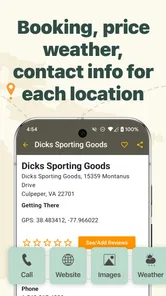
AllStays Camp & RV provides location-based information for many campgrounds and RV parks, including details such as amenities, access notes, site types, road conditions, and suitability for different vehicles. Coverage and accuracy can vary by location, and listings may depend on user contributions or available databases. Travelers should always verify prices, operating dates, reservations, and current restrictions directly with the campground.
Pros
- Extensive campground and RV park database across the United States and Canada.
- Offline access to saved campground details helps when traveling without reliable service.
- Useful filters for RV amenities
- dump stations
- rest areas
- and overnight stops.
- Includes practical information such as road conditions
- fuel prices
- and park restrictions.
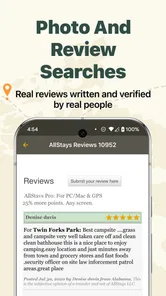
- Community reports can provide current warnings about closures
- hazards
- and site conditions.
Cons
- Coverage is focused mainly on North America
- limiting its value for international travelers.
- Some listings may contain outdated prices
- hours
- or amenity information.
- The interface feels dated compared with newer travel and campground apps.
- Many useful features require a paid download or additional in-app purchases.
- User-submitted reports can vary in detail and accuracy between locations.











