AllianceHCM MyPay
- 382.00
- 4.0
- Installs
- 500.00K
- Price
- Free

Screenshots
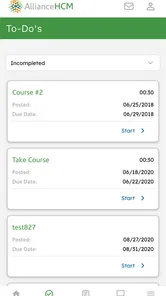
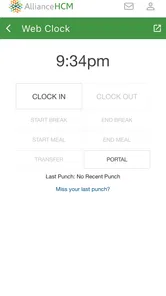
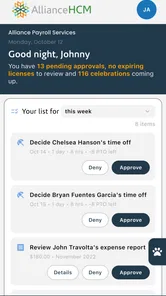
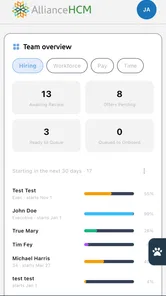
Analysis by Reviewed
Managing payroll information on a phone sounds simple until the moment you need a pay statement quickly, are checking details between tasks, or are trying to use an employee portal in an unfamiliar setting. I spent time looking at AllianceHCM MyPay from that practical point of view: not as a flashy business tool, but as a mobile doorway into payroll and human-resources information. My overall impression is that it is most useful when your employer already relies on AllianceHCM and you want a convenient way to reach your employee account without opening a desktop browser.
This is a free business app from Alliance Payroll Services, LLC, aimed at everyday employees rather than managers shopping for a complete payroll platform. Its store summary presents it as an employee portal for payroll and HR management, and that description is important because the app’s value depends heavily on the organization behind your account. It is not a general-purpose budgeting app, a job-search tool, or a replacement for an employer’s full HR department. It is a focused access point for people whose workplace uses the related service.
How AllianceHCM MyPay feels to use in different situations
I find AllianceHCM MyPay most useful when the need is immediate but modest: checking a payroll detail during a break, or deciding whether a question belongs in the employee portal or with payroll staff. In this section, I’ll look at how that focused role holds up across everyday circumstances, then turn to what makes an employee app worth keeping in a regular routine.
Readability and navigation for routine payroll tasks
When I assess an employee portal, I care less about visual excitement and more about whether I can find the information I need without second-guessing every tap. Payroll apps are often opened for a narrow reason: checking a recent statement, confirming personal employment information, or reviewing a human-resources item. A useful design should make that first decision obvious and avoid turning a quick check into a long search.
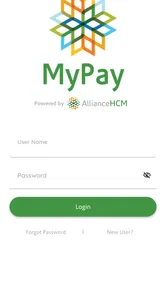
AllianceHCM MyPay is best understood as a companion to an existing employee account. That makes the sign-in step the central starting point. If your workplace has already explained how your account is created and which credentials to use, the app can be a more direct route than remembering a browser address or navigating through a company intranet. If you do not yet have an active employer account, installing it alone will not make it useful.
I also found that the app’s purpose gives it a welcome sense of restraint. It is not trying to mix payroll with social feeds, shopping, news, or unrelated productivity tools. That narrow focus can help people who become overwhelmed by crowded dashboards. You open it with a specific task in mind, and the relevant information should remain connected to your employment record rather than being buried among consumer features.
For users who prefer larger text, the practical test is whether the phone’s own display settings make the screens comfortable without pushing essential controls out of view. I would recommend increasing system text size gradually rather than choosing the largest setting immediately, then checking the main account screens and any forms you use. On a payroll portal, an oversized label can sometimes wrap awkwardly or make a button harder to locate, so comfort and completeness need to be checked together.
More From Our News Desk

Weather by Xiaomi Review: Clear at a Glance, Less Clear Up Close

X Under Pressure: Can It Recover When Posting Goes Wrong?

Clash of Clans Is Won Between the Battles

Android Auto Makes the Case for Quieter Car Software

MobiOffice: Transforming Mobile Productivity with Seamless Integration

EA SPORTS FC™ Mobile Soccer: Redefining Mobile Sports Gaming
People with reading difficulties may benefit from approaching the app in short, predictable sessions. Instead of scanning every item, decide what you need before signing in: a particular pay statement, a personal detail, or an HR-related task. This reduces the amount of visual searching. I also suggest keeping a plain-language note of unfamiliar payroll terms outside the app, because an employee portal may display employer or payroll terminology without explaining it in everyday language.
The app has an average rating of 4.0 from around 1.1 thousand ratings, with several hundred written reviews. That public response suggests a generally workable experience, but it also reflects the reality of employee portals: satisfaction often depends on account setup, employer configuration, and whether a person is trying to solve a routine task or a sign-in problem. I would not treat the rating as a promise that every workplace will present the same screens.
Motor and sensory considerations during account use
Mobile payroll work is usually touch-driven, so people with limited dexterity may want to use the app when they can hold the phone steadily or place it on a table. A rushed login while carrying bags, wearing gloves, or standing on public transport is more likely to produce mistaps. In my view, this is one of those apps where a calm setup matters more than speed: save time by preparing your account access beforehand, not by trying to rush through a sensitive task later.
Users who have difficulty with precise tapping should pay attention to the spacing of controls on their own device and operating-system configuration. I would avoid assuming that every action is easy to complete one-handed. If a screen includes small text fields or requires repeated navigation, using both hands, a stable surface, or an external input method supported by the phone may be more comfortable. The important point is to test the complete task, not just the opening screen.
For people with low vision or light sensitivity, the phone’s contrast, brightness, magnification, and color settings are worth adjusting before relying on the app for an urgent payroll check. A dark room and a bright screen can create unnecessary strain, while a bright outdoor setting can make ordinary text harder to distinguish. I would also take screenshots only when appropriate and store them carefully, because payroll information is private even when the display is easy to read.
Users who are deaf or hard of hearing can approach the app without depending on spoken interaction for the basic idea of an employee portal, but account alerts and support steps still deserve attention. If an important action normally leads to a message, notification, or follow-up from the employer, check the phone’s notification settings and your workplace instructions. I would not rely on a sound alone to tell me that a payroll task was completed; I would look for a visible confirmation and keep the employer’s support route available.
People with cognitive disabilities may find a consistent personal routine more helpful than trying to explore every available area. I would sign in, complete one task, review the result, and sign out rather than opening multiple sections at once. A short checklist can reduce mistakes: confirm the account, open the intended payroll or HR area, review the information, and exit. This is especially sensible when using a shared or borrowed phone.
Situational access: work, travel, and urgent checks
A realistic use case is an employee who receives a question from a landlord or lender and needs to check a recent payroll record during a lunch break. If the AllianceHCM account is already active, a mobile portal can be much more convenient than waiting until the employee reaches a computer. The phone is already nearby, and the task can be handled in a few minutes without opening a separate work system.
Another situation is a worker who does not spend the day at a desk. Someone moving between locations, working in a busy facility, or sharing a computer may prefer private access from a personal device. That convenience is meaningful, but I would still avoid checking sensitive information where other people can see the screen. A phone makes access more portable; it does not automatically make the setting private.
Travel introduces a different trade-off. A mobile employee portal is useful when you need to consult account information away from work, but login reliability becomes more important when you are depending on it outside your normal routine. Before traveling, I would make sure I know my credentials, understand how to contact the employer or payroll administrator, and know whether a task requires a separate approval. I would not wait until an airport, hotel lobby, or weak-signal area to discover that account access needs additional help.
The app is also relevant for employees who share a household device or have limited access to a personal computer. In that case, privacy habits matter as much as navigation. Sign out when finished, avoid leaving payroll screens open, and do not let another person’s account details become mixed with yours. These are simple steps, but they are particularly important when the app is used in family spaces or on a device that several people can reach.
For people with attention-related difficulties, the narrow purpose can be an advantage. There are fewer reasons to linger than in a broad workplace suite, and a quick visit can remain focused. At the same time, if your employer expects you to complete a complex HR process, the phone may not be the best environment. A larger screen can make reviewing long information, entering detailed responses, or comparing records easier. I see the mobile app as a convenient access point, not automatically the best device for every employment task.
Where the usual alternatives may work better
The obvious alternative is the employer’s desktop or web portal. For a quick look at payroll information, the mobile route is more convenient because it is available where the phone is. For extended reading, detailed form completion, or careful comparison of records, a browser on a larger screen may be more comfortable. I would choose the desktop option when the task feels like paperwork rather than a quick check.
Email is another common alternative, but it is not a true substitute for an employee portal. Email may be useful for contacting payroll or receiving instructions, yet it can scatter important information across messages and make it harder to distinguish current records from old attachments. A dedicated account area is usually a cleaner place to look for employment information, provided your employer has configured it properly and you can sign in.
Some workplaces use a broader HR suite that combines scheduling, benefits, time tracking, messaging, and payroll. That kind of system may be better if you need many employment functions in one place. AllianceHCM MyPay makes more sense when your main need is straightforward employee access to payroll and HR information through the AllianceHCM environment. I would not choose it simply because it is free; I would choose it because it matches the system your employer already uses.
Paper documents can still be preferable for a person who needs a physical record, has unreliable phone access, or finds digital navigation tiring. Likewise, direct help from a payroll administrator is better when a record appears incorrect, a personal detail needs official correction, or access fails repeatedly. An app can display account information, but it should not be treated as the final authority for resolving an employment dispute.
Remaining barriers and practical workarounds
The biggest barrier is not necessarily the app interface; it is the dependency on employer setup. If your workplace has not enabled your account, if your credentials are unclear, or if a payroll administrator has not explained the process, the app can feel unhelpful even when the installation itself is straightforward. My advice is to ask the employer for the exact enrollment and support steps before troubleshooting the phone repeatedly.
Another limitation is the sensitivity of the information involved. Accessibility and convenience should not lead to careless sharing. Avoid reading payroll details aloud in public, be cautious with screenshots, and review which account is active before showing anything to another person. Someone assisting with a login may need to guide you, but that does not mean they should receive your password or see more personal information than necessary.
Older-device users should check compatibility before planning to depend on the app. The listed minimum operating-system requirement is version 7.0, while the current release is 3.4.59. That broad compatibility is helpful for people who do not replace phones often, but an older device can still have its own limits involving battery life, screen quality, performance, or system accessibility tools. I would test the app on the actual phone you intend to use, especially if it is an older work or family device.
The app is free and rated for Everyone, which removes two common entry barriers: a purchase decision and an age-restricted store listing. Still, “free” does not mean every employee will have the same experience. Your employer’s account configuration, the quality of the information maintained in the payroll system, and the availability of human support will shape what you can do. That is an important distinction for anyone deciding whether the app can replace a conversation with HR.
People who need advanced accessibility assurance should take a careful, personal approach. I would test text scaling, magnification, contrast, keyboard or switch support where relevant, and notification behavior on the specific device and account. If a particular task is essential and the app does not work comfortably with your setup, ask the employer for a browser-based route, an alternative format, or assistance from payroll. That is a more reliable plan than assuming a mobile portal will meet every access need.
Who should use it and who should skip it
I would recommend AllianceHCM MyPay to employees whose organization already uses AllianceHCM and who want a convenient mobile route to payroll and HR information. It should appeal especially to people who check records occasionally, do not always have access to a work computer, or prefer handling a short account task from a phone. The app’s free availability and Everyone rating make it easy to consider, while its 500 thousand-plus installs show that it is used at a substantial scale.
I would be more cautious about recommending it to someone who expects a complete workplace management suite, needs extensive document editing, or wants an app that works independently of an employer account. It is also not the right first choice for resolving disputed pay, correcting an official record, or completing a long and complicated HR process if a desktop browser or direct administrator support is available.
For a family member or colleague who struggles with small text, I would not simply say “install it and see.” I would help them adjust the phone first, complete a low-pressure sign-in, and identify the one or two areas they actually need. Then I would make sure they know how to protect private information and where to go when the app cannot answer a payroll question. That preparation makes the experience more inclusive than treating accessibility as a single setting.
My inclusive verdict after using it as an employee portal
AllianceHCM MyPay succeeds when its role is kept clear: it gives employees a mobile way to reach payroll and HR information connected to their workplace. I like that it can reduce dependence on a desk, support quick checks during an ordinary day, and provide a focused alternative to searching through email or an employer intranet. For many employees, that convenience is enough to justify keeping it available.
Its weaker side is equally clear. The app cannot remove barriers created by employer enrollment, unclear payroll processes, private information, or tasks that are simply easier on a larger screen. People with motor, visual, hearing, or cognitive access needs should test their complete workflow rather than judge the app from installation alone. System settings and a predictable routine may help, but employer support remains essential when the account or the information itself is the problem.
My final recommendation is conditional but positive: if AllianceHCM is the system your employer uses, this free mobile portal is worth trying for routine account access. I would keep a browser or payroll contact as a backup, use it in a private setting, and choose the device that makes reading and tapping comfortable. The best reason to use it is not that it replaces every HR interaction, but that it makes ordinary employee information easier to reach when a phone is the most practical tool.
AllianceHCM MyPay Frequently Asked Questions
Is AllianceHCM MyPay free, and what devices can I use it on?
AllianceHCM MyPay is a free business app for employees who use an employer’s AllianceHCM system. It is intended for mobile use, and the current release is version 3.4.59. Check that your device meets the app’s minimum operating-system requirement before downloading. Having a compatible device does not by itself create access to payroll information; you will also need an account set up through your employer.
Does AllianceHCM MyPay work for every employer or employee?
AllianceHCM MyPay is an employee portal for payroll and HR management, but access depends on whether your employer uses the AllianceHCM system and has enabled the relevant employee features. It is not a general-purpose payroll app where anyone can create an account and add an employer independently. Before downloading, ask your HR or payroll team whether your organization supports the app and how employees should activate their accounts.
What is AllianceHCM MyPay used for?
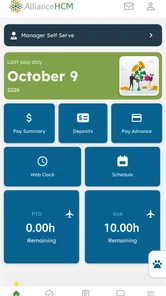
AllianceHCM MyPay is a mobile payroll and employee self-service app designed to give workers convenient access to important employment and pay information. Depending on how an employer has configured the platform, users may be able to review pay statements, check earnings and deductions, view tax details, access year-end documents, and manage selected personal or payroll settings without needing to contact the HR department for every request.
How do I log in to AllianceHCM MyPay?
To use AllianceHCM MyPay, you generally need an account created or activated through your employer’s AllianceHCM system. Your organization may provide login credentials, an employee ID, or an invitation link, and some workplaces may require additional verification such as a security code. If you cannot sign in, your password has expired, or your account is locked, the employer’s HR or payroll administrator is usually the correct point of contact.
Can I view my pay stubs and tax documents in the app?
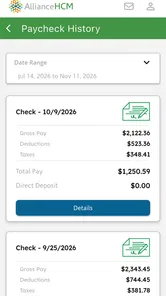
In most configurations, AllianceHCM MyPay allows employees to access electronic pay statements and, when enabled by the employer, tax-related documents such as year-end forms. The exact documents available can depend on your company’s payroll setup, employment status, and document delivery policies. Always check the displayed pay period, deductions, and net amount carefully, and contact payroll directly if any information appears incorrect.
Pros
- Quick access to pay statements and earnings history.
- Secure employee portal with account authentication.
- Useful tax document access when available from the employer.
- Mobile-friendly design for checking payroll details anywhere.
- Reduces paperwork and payroll-related questions for employees.
Cons
- Features depend heavily on the employer’s AllianceHCM configuration.
- Some payroll updates may not appear until the next processing cycle.
- Login or password issues can require help from the HR department.
- Limited usefulness between pay periods for employees with simple needs.
- App performance may vary across devices and operating system versions.











