Allentown - Morning Call
- 149.00
- 3.1
- Installs
- 10.00K
- Price
- Free

Screenshots

Analysis by Reviewed
The Morning Call app is aimed at readers who want Allentown news in a mobile format rather than through a browser. I found it most useful when I wanted a quick local update without opening several unrelated news apps. It belongs to the News & Magazines category, is published by Tribune Publishing Inc., and is free to install, although some reading or account-related actions may lead to in-app purchases. My overall impression is mixed: the app has a clear local purpose, but the experience depends heavily on how smoothly it loads, how the device handles the app, and what kind of access a reader expects.
That distinction matters because this is not a broad national news reader. Its short store description is simply “Allentown,” which tells you more about its focus than a long feature list would. If your main interest is local reporting connected to the Allentown area, the narrow focus is a strength. If you want a single app that combines many cities, international headlines, live television, podcasts, or a large range of independent sources, a general news aggregator will probably suit you better.
What the everyday reading experience is really like
On a normal morning, I would use an app like this in short sessions: check the latest local headlines with coffee, open one or two stories, then return later when something affects traffic, schools, weather, public safety, or community life. That kind of use favors a focused publication app. You are not spending time teaching a recommendation engine what you like, and you are not sorting through a wall of unrelated national stories before reaching local coverage.
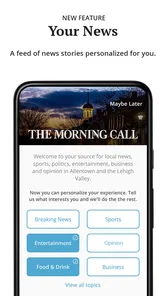
The trade-off is that a publication-centered app can feel less flexible than a news aggregator. The value comes from the source and its local emphasis, not from endless customization. Readers who prefer a personalized feed may find the selection narrower than expected. I would choose this app for local awareness, not as my only source for every part of the news day.
The current version is 10.0.60, and the app supports devices running Android 8.0 or later. It is rated for Everyone, which makes it broadly approachable for households, though the subject matter of news can naturally vary from light community stories to difficult events. The app has been available since Jan 20, 2011, so it is an established publication app rather than a newly launched experiment.
Where readers commonly get stuck
The first point of friction is often not reading itself but access. A person may install the app expecting every article to open immediately, then encounter a sign-in prompt, a purchase screen, or a page that takes longer than expected to appear. That can make the app feel broken even when the underlying issue is the difference between installing a free app and accessing all of its content.
The app costs nothing to download, but its in-app purchases range from $4.99 to $199.99 per item. I would treat the installation as the starting point, not as a promise that every part of the publication is included without charge. Before entering payment details, I would read the wording on the screen carefully and decide whether the offer matches the way I plan to read. A casual visitor and a frequent local-news reader may reasonably make different choices.
More From Our News Desk

Weather by Xiaomi Review: Clear at a Glance, Less Clear Up Close

X Under Pressure: Can It Recover When Posting Goes Wrong?

Clash of Clans Is Won Between the Battles

Android Auto Makes the Case for Quieter Car Software

MobiOffice: Transforming Mobile Productivity with Seamless Integration

EA SPORTS FC™ Mobile Soccer: Redefining Mobile Sports Gaming
Another common sticking point is an empty or incomplete-looking screen. News apps rely on a working connection and on content being retrieved when the app opens. If headlines appear slowly, images remain blank, or a story stops loading, repeatedly tapping the same item usually does not solve the problem. I get better results by waiting briefly, returning to the main feed, and trying again after checking the connection.
It is also easy to mistake a publication’s editorial focus for a technical limitation. Because this app is centered on Allentown, it will not behave like a nationwide breaking-news dashboard. A reader looking for a wide range of unrelated regions may conclude that the app is missing content when it is actually doing what its local purpose suggests.
Setup checks that prevent avoidable trouble
I recommend starting with the simple checks before judging the app. Confirm that the device is running Android 8.0 or newer, install the latest available version, and make sure there is enough free storage for the app and its normal operation. These are ordinary steps, but they eliminate several problems that otherwise get blamed on the publication.
After installation, open the app on a stable Wi-Fi connection first. This gives the initial content load a better chance of completing without interruptions. If you are using mobile data, check whether the phone has restricted background or foreground data for the app. A connection that works for messaging may still be unreliable when an app is loading multiple article elements.
I would also pay attention to the first screen that appears after opening. If the app asks you to sign in, subscribe, or continue in a particular way, read the options rather than dismissing everything quickly. The most useful setup choice depends on whether you want occasional headlines or plan to return regularly. Rushing through this screen can lead to confusion later when an article behaves differently from the first few pages you opened.
Notifications deserve a deliberate decision as well. Local alerts can be useful when you want timely awareness, but they can become distracting if you only intend to read at convenient times. If alerts are enabled and become excessive, adjust them through the device’s app notification settings instead of uninstalling immediately. That small change can make the difference between an app that feels helpful and one that feels intrusive.
For families, the Everyone age rating is reassuring from an access standpoint, but it should not be read as a guarantee that every news story will be comfortable for every reader. News coverage can include serious subjects. I would still use normal household judgment, especially when a younger person is browsing independently.
A practical recovery routine when a story will not open
When a page fails, I use a short recovery sequence rather than changing several settings at once. First, I return to the main news screen and try another article. If other stories load, the problem may be limited to that particular item or momentary content delivery. If nothing loads, I check the connection and try again after switching between Wi-Fi and mobile data when that is practical.
Next, I close the app fully and reopen it. This is more useful than repeatedly pressing a headline while the app is still waiting on a stalled request. If the issue continues, I restart the phone. A restart is especially sensible after a system update or when several other apps have also begun behaving strangely.
Android users can also inspect the app’s storage settings and clear its cache, taking care not to erase information they still need. I would use cache clearing before more disruptive steps because it targets temporary files without treating the entire installation as disposable. If the app still fails, reinstalling may be reasonable, but I would first make sure I know any sign-in details needed afterward.
One useful habit is to note exactly what happened. “The app is broken” is difficult to diagnose, while “the feed opens but one article remains blank after a restart” gives you a clearer next step. It also helps distinguish a loading problem from a content-access prompt. If a purchase or account screen appears consistently for one article, that is a different situation from a feed that cannot load at all.
I would not repeatedly purchase an item simply because a page did not open. First confirm whether the screen is describing access, asking for authentication, or showing a temporary loading failure. The price range is wide enough that an accidental tap could have consequences, so careful reading is worthwhile.
When the app is not the cause
Some problems sit outside the application. A weak home network, an overloaded public hotspot, a device with very little free storage, or a system that is overdue for updates can all create symptoms that look like an app failure. Try another ordinary online service on the same device. If several services are slow, the network or phone deserves attention before the app does.
Battery-saving tools can also interfere with news reading by limiting background activity or putting an app to sleep. I would check the phone’s battery settings if updates appear delayed or the app behaves normally only after being reopened. The exact menu differs between Android devices, so I would avoid changing advanced settings blindly. The goal is simply to see whether the system is restricting the app.
Storage pressure is another overlooked cause. When a phone is nearly full, apps may load slowly, close unexpectedly, or fail to save temporary content. Removing unused downloads or large files can improve the whole device, not just this publication app. This is a better first move than assuming a fresh installation will solve everything.
There is also a difference between an app problem and a story that has changed. News pages can be updated, replaced, or temporarily unavailable as coverage develops. If the main feed works but one older link behaves differently, I would not automatically interpret that as a device fault. Trying a newer headline is a practical way to test whether the problem is general or limited to one piece of content.
Who will get the most from it
I think the strongest audience is the reader who has a direct connection to Allentown and wants a dedicated place to check local coverage. That might be someone living in the area, commuting there, following community developments, or keeping up with a place they used to call home. The app’s value grows when local context matters more than having the widest possible news selection.
It can also work well as a companion to broader sources. I would use a national news app for major international and countrywide events, then open this one when I wanted the local angle. That division of labor is more realistic than expecting one publication app to cover every subject equally well.
I would be more cautious about recommending it to someone who wants a completely free, highly personalized feed with no purchase decisions. The presence of in-app purchases means that readers should understand the access model before settling into a routine. Likewise, people who mainly want video, audio, or a social-style stream may prefer a different format.
The public response is fairly moderate: the app holds a 3.1 average from around 310 ratings, alongside around 149 written reviews. I read that as a sign to keep expectations practical rather than assuming the experience will be perfect on every device. A publication app can be valuable for its local reporting while still receiving criticism for loading, access, or interface friction.
How it compares with ordinary alternatives
Compared with a mobile browser, a dedicated app can be more convenient for repeat visits because the publication has its own place on the phone. The browser is still the better fallback when the app is misbehaving, when you do not want another installation, or when you are checking one article quickly from a search result.
Compared with a general aggregator, this app offers a more specific local destination but less breadth. Aggregators are useful when you want multiple publishers, contrasting viewpoints, or a single stream covering many locations. Their weakness is that local stories can be buried among more prominent national headlines. This app makes the opposite trade-off: less variety, more direct attention to Allentown.
Compared with social media, the app is a better starting point when you want the publication’s organized coverage rather than whatever happens to appear in an algorithmic feed. Social platforms can surface eyewitness discussion quickly, but they also require more effort to separate confirmed reporting from commentary. I would use social media as a supplement, not a replacement, when accuracy and context matter.
Compared with email newsletters, the app is more suitable for browsing several stories at different times, while a newsletter may be calmer and easier for readers who dislike notifications or frequent app visits. The right choice depends on whether you want an active reading destination or a compact summary delivered to you.
Small habits that make the experience smoother
My first practical tip is to open the app before you urgently need information. That lets you complete any initial access steps while you have time to read them, rather than doing so during a commute or a developing local event. It also gives you a chance to see whether your device and connection handle the feed comfortably.
Second, keep the app and the operating system reasonably current, but do not update in the middle of an important reading session if stability matters. After an update, reopen the app on a reliable connection and check the main feed before assuming everything is unchanged. This simple check can reveal whether a restart is needed.
Third, use the browser as a diagnostic comparison. If a story opens in the browser but not in the app, the issue is likely connected to the app session or its local files. If it fails in both places, the network or the content itself becomes more likely. This does not fix the problem by itself, but it prevents random troubleshooting.
Finally, think of the app as a local-news tool rather than a complete information system. I get the best results when I use it for the stories it is designed to surface and rely on other sources for subjects outside that focus. Choosing the app for its local purpose is the main way to avoid disappointment.
My practical verdict
Allentown - Morning Call is worth trying if local coverage is the reason you are installing a news app. It is free to download, carries an Everyone rating, and comes from Tribune Publishing Inc., with a long history of availability and a current Android release. The focused identity is its clearest advantage: it gives Allentown-related reading a dedicated home instead of making you search through a general feed.
My recommendation comes with conditions. Check the Android requirement before installing, use a stable connection during setup, read access and purchase screens carefully, and keep the browser available as a fallback. The in-app purchase range from $4.99 to $199.99 per item means I would never tap through a payment flow casually. If you want broad, heavily personalized news or a purely free-reading experience, another option may be a better match.
For the right reader, though, the app can become a convenient part of a daily routine: open it for local headlines, read the stories that affect your community, and use wider sources when the subject moves beyond Allentown. I would not call it flawless, but I would recommend giving it a fair test with realistic expectations. Its usefulness comes less from flashy extras and more from whether dedicated local reporting is what you actually want on your phone.
Allentown - Morning Call Frequently Asked Questions
Who publishes Allentown - Morning Call, and which devices can run it?
Allentown - Morning Call is published by Tribune Publishing Inc. and is a News & Magazines app for mobile devices. Its listed minimum operating system is version 8.0, so it is worth checking your device’s software before downloading. The app’s description presents it as a remastered experience designed to work across various screen sizes.
What is Allentown - Morning Call?
Allentown - Morning Call is a news app focused on Allentown, the Lehigh Valley, and surrounding Pennsylvania communities. It provides access to local reporting, breaking news, politics, crime, education, sports, entertainment, business, and lifestyle coverage. The app is designed for readers who want to follow regional stories in a convenient mobile format rather than relying only on the newspaper’s website.
Is Allentown - Morning Call free to download and use?
The app is free to download, but access to all articles and premium content may depend on your subscription status. Some stories may be available for free, while other content can be restricted by a digital paywall. In-app purchases range from $4.99 to $199.99 per item, so check the current terms, pricing, trial conditions, and renewal details displayed in the app or through the relevant app store before subscribing.
What type of news and features can I find in the app?
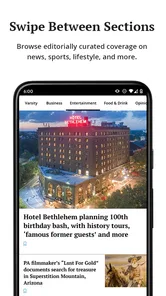
The app typically combines local and regional journalism with sections covering breaking news, community updates, sports, weather, traffic, investigations, business, and cultural events. Depending on the current version, users may also receive breaking-news alerts, save or share articles, browse photo galleries, and personalize notifications. Available features can vary after updates and by subscription level.
Does the Morning Call app require an account or subscription?
You may be able to browse some content without creating an account, but an account is often required to access subscriber-only articles, manage a digital subscription, or synchronize preferences across devices. A subscription may also unlock a larger portion of the publication’s archive and premium reporting. Review the sign-in and subscription screens carefully so you understand what access is included.
Pros
- Covers breaking news and local events across the Lehigh Valley.
- Offers in-depth reporting on Allentown
- Bethlehem
- and Easton communities.
- Includes sports coverage for regional teams and high school athletics.
- Push notifications can keep readers informed about major local updates.
- Digital access makes the newspaper available while traveling or away from print.]
- contras:[
Cons
- Some articles may require a subscription or account to access.
- Frequent notifications can feel excessive unless carefully customized.
- Advertising can make parts of the app feel visually cluttered.
- Coverage is primarily regional and may not suit users seeking national news.
- App performance and loading times may vary with connection quality.













