

Allegiant
- 8.31K
- 3.3
- Installs
- 5.00M
- Price
- Free

Screenshots



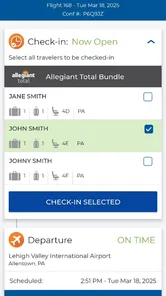
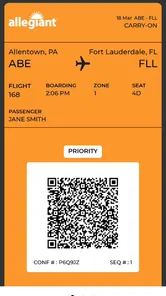

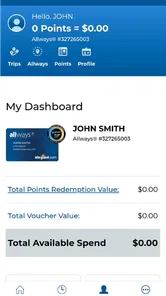
Analysis by Reviewed
I’d judge Allegiant by one practical question: do you fly with Allegiant often enough to want your trip details and airline tasks in one place? This is a travel app from Allegiant Travel Company, not a game or a general-purpose trip planner. Its value is tied to using the airline; if your plans involve several carriers, a broader travel tool may suit you better.
Start with the kind of trip you are taking
Before installing, I’d first ask whether Allegiant is actually operating the flight I need to manage. If it is, the official app is a sensible place to start for airline-related tasks. If I’m comparing itineraries across several carriers, organizing a multi-stop holiday, or keeping lodging and activities together, I’d use a wider travel organizer alongside it rather than expect this airline app to handle the whole trip.
That distinction matters because an airline app and a travel-planning app solve different problems. The former is focused on the relationship between a passenger and one airline; the latter is usually better suited to collecting plans from different sources. I wouldn’t choose Allegiant because I want a universal travel dashboard. I’d choose it when my immediate need is to keep an Allegiant trip easy to revisit.
A useful companion when your trip is on Allegiant
For an Allegiant itinerary, having the airline’s own app on your phone can make trip preparation feel more straightforward than searching through email each time you need to check what you have arranged. I’d use it as a companion for airline-related planning, while keeping important booking details accessible elsewhere too. That small backup habit is useful whenever travel information matters and you don’t want to rely on just one screen.
A realistic use case is a traveler checking plans at home, then opening the app again on the way to the airport to orient themselves around the same trip. I’d make a quick review of the itinerary part of my pre-departure routine rather than waiting until I’m in a hurry. The app’s strongest case is convenience within Allegiant’s own travel experience, not replacing every tool a traveler might need.
What to weigh before you install
The app is free, rated for Everyone, and has more than five million installs. Its average rating is 3.3 from around 17,000 ratings, with roughly 7,800 written reviews. I read that middling score as a reason to keep expectations measured: it may be worthwhile for an Allegiant flyer, but I wouldn’t assume every interaction will feel effortless. The current version is 7.8.13 and supports Android 6.0 or later.
That rating is best treated as context, not a prediction of how a particular trip will go. An airline app can be useful for one passenger and frustrating for another depending on what they need to do and when they open it. I’d install it before travel, sign in while I have a calm moment, and see whether the itinerary is easy for me to locate. If anything feels unclear, that is much easier to sort out at home than while juggling bags or trying to leave for the airport.
More From Our News Desk

 Weather - By Xiaomi
Weather by Xiaomi Review: Clear at a Glance, Less Clear Up Close
Xiaomi’s weather app makes everyday forecasts quick to scan, but its calm surface can leave useful details and recovery paths harder to find than they should be.

 X
X Under Pressure: Can It Recover When Posting Goes Wrong?
A resilience-focused review of X, examining setup, mistaken posts, interruptions, weak connections, and the gaps that matter when recovery needs to be dependable.

 Clash of Clans
 Is Won Between the Battles
Its raids are quick; its community is a long-term project of coordination, teaching, rivalry, and shared responsibility—with all the friction that entails.

 Android Auto
 Makes the Case for Quieter Car Software
The car interface is no longer judged by how much it can do, but by how quietly it helps. Android Auto shows what drivers now expect—and what still gets in the way.

 MobiOffice: Word, Sheets, PDF
MobiOffice: Transforming Mobile Productivity with Seamless Integration
MobiOffice: Word, Sheets, PDF is redefining mobile productivity with a surprising blend of functionality and innovation.

 EA SPORTS FC Soccer Mobile 26
EA SPORTS FC™ Mobile Soccer: Redefining Mobile Sports Gaming
Dive into EA SPORTS FC™ Mobile Soccer, where immersive gameplay and strategic depth transform mobile sports gaming.
Latest News



The app is developed by Allegiant Travel Company, so its natural audience is people already choosing Allegiant for a flight. The free price makes it easy to try without making it a commitment, but I still wouldn’t keep it installed out of habit if I only use the airline once in a long while. For occasional flyers, saving the confirmation email and using the airline’s website when needed may be enough.
Where a broader travel tool has the advantage
Compared with a general airline or travel-organizing app, Allegiant’s official option makes the most sense when the trip itself is with Allegiant. A broader alternative can be more convenient for someone coordinating different airlines, lodging, and plans across one itinerary. On the other hand, a general planner may not be the most direct place to handle airline-specific details. I’d choose based on the trip, not on the idea that one app should manage everything.
For a family trip involving several people, I’d also think about who needs access to the booking information. A shared travel organizer or a clearly shared email thread may be easier for a group to consult than asking everyone to rely on one person’s phone. The airline app can still be useful for the person managing the Allegiant booking, while other travelers keep the key confirmation details available in a format they can reach themselves.
If I were traveling with more than one carrier, I’d avoid treating the Allegiant app as the only place to check the whole journey. I’d keep a separate overview of connections and other bookings, then use the airline app for the Allegiant portion. This split approach can feel less tidy than putting everything in one planner, but it reduces the chance of overlooking a segment simply because it belongs to another company.
Small habits that make the trip easier
Before travel, I’d check that I’m signed into the account associated with the booking and review the trip while I have time to deal with any confusion. I’d also keep confirmation information available outside the app, such as in the original booking email. That isn’t a knock on this particular app; it’s a sensible travel habit that reduces the stress of having to search for details at the last minute.
One useful workflow is to check the itinerary once when plans are settled, then make a second pass before leaving home. The first check is for catching a mismatch between the booking I expect and the trip I can see; the later one is a quick orientation check, not a reason to repeatedly refresh the app. Keeping those checks deliberate helps avoid turning a simple travel tool into another source of last-minute anxiety.
I’d also make sure the phone itself is ready for the trip: charged, accessible, and not buried in a bag when I need to consult travel information. The app cannot solve a dead battery or a forgotten login, so I’d treat it as one part of preparation rather than the entire plan. Keeping the booking email handy gives me a second route to the details if I need it.
Who should keep it, and who can skip it
If you rarely fly Allegiant, the app may not earn a permanent spot on your phone; using the airline’s website or your saved booking information may be enough for an occasional trip. If you fly with Allegiant and prefer keeping airline tasks close at hand, it’s a reasonable free option to try. I’d treat it as a focused travel companion rather than a complete trip manager, and decide after one real itinerary whether it fits your routine.
It is a better fit for someone who likes checking travel details on a phone and expects to use the airline more than once. It is less compelling for a traveler who wants one app to coordinate every carrier, hotel, and activity, or for someone who prefers handling a single booking through a browser and then leaving it alone. Neither preference is wrong; the useful choice is the one that makes your own travel routine simpler.
If you are deciding whether to install it for an upcoming flight, I’d do so before the day of departure rather than waiting until you are already on the move. That gives you time to sign in, find the trip, and decide whether the app’s role is clear. If it serves that purpose, keep it for the journey. If your saved confirmation and the website are enough, there is little reason to add another app to your regular setup.
A focused airline tool, not a travel-game experience
Have you ever found yourself daydreaming about embarking on a thrilling adventure filled with suspense, strategy, and a dash of creativity? Look no further! The Allegiant app is here to transport you into a world where your wits and skills are your best allies. Let me walk you through this fantastic app that has become my new obsession.
Welcome to the World of Allegiant
From the moment I downloaded Allegiant, I was instantly captivated by its rich graphics and immersive gameplay. Imagine stepping into a universe where every decision you make has a ripple effect on the outcome of your journey. The app effortlessly combines stunning visuals with a gripping storyline, making every session feel like you're diving into a blockbuster movie.
Gameplay that Keeps You on Your Toes
What truly sets Allegiant apart is its engaging gameplay mechanics. Whether you're a seasoned gamer or a casual player, there's something for everyone. The app challenges you to strategize, think ahead, and adapt to new situations. I found myself constantly on the edge of my seat, eager to see what twist or turn awaited me next. The game’s AI is impressively intuitive, making every encounter feel refreshing and unexpected.
A Community of Adventurers
One of the aspects I love most about Allegiant is its vibrant community. The developers have done a fantastic job at fostering a space where players can connect, share tips, and form alliances. Whether you're looking to team up for a challenging mission or simply want to share your latest triumph, the community is welcoming and active. It's like having a group of friends who are just as passionate about the game as you are!
Moreover, the app frequently updates with new content, ensuring that players always have something to look forward to. I've been playing for weeks, and I still feel like I've only scratched the surface of what Allegiant has to offer. Each update brings fresh challenges and stories, keeping the experience exhilarating and dynamic.
Final Thoughts: Is Allegiant Worth Your Time?
If you're searching for an app that combines stellar graphics, engaging gameplay, and a strong community, then Allegiant is definitely worth checking out. It's a delightful escape from the mundane, offering a chance to explore, strategize, and connect with others. Trust me, once you start, you won't want to stop!
Download Allegiant today and embark on an adventure like no other. Happy gaming!
My recommendation for an Allegiant itinerary
For someone choosing between the official airline app, email, and a general travel planner, I’d use each for what it does best: keep the airline app available for the Allegiant trip, preserve the booking confirmation separately, and use a broader organizer only if the itinerary spans multiple providers. That division avoids expecting one tool to be both the airline’s direct companion and a complete trip-management system.
The practical question is whether opening the app saves you effort compared with your current routine. If you can find your booking quickly and prefer having the airline-related information close at hand, it earns its place for the trip. If you only need to refer to one confirmation occasionally, the website or email may be simpler. I’d make that decision based on a real booking rather than on promises of a richer travel experience.
My overall view is deliberately modest: Allegiant is worth trying for travelers who have an Allegiant flight and want a dedicated mobile companion, especially when they can test it before departure. It is not the right answer for every itinerary, and I wouldn’t rely on it as the sole home for a complicated journey involving several providers. Used with a backup copy of booking details and a little pre-trip checking, it can be a practical addition without becoming the center of your travel setup.
Allegiant Frequently Asked Questions
Is Allegiant the right app if I only need general travel planning?
Allegiant is built around Allegiant Travel and Allegiant Airlines, so it is most relevant if you are considering or managing travel with the company. Its travel tools cover activities such as booking and organizing trip details, but it is not presented as a general-purpose travel-planning platform. If you use other providers, consider whether an airline-focused app fits the way you plan trips.
What is the Allegiant app’s current version, and how can I keep it up to date?
The current Android version is 7.8.13. Keeping Allegiant updated through your device’s app store is a sensible way to use the latest release and available features. If automatic updates are turned off, you can check the app’s store page periodically. Updates may also help maintain compatibility as your device’s operating system changes.
Can I use Allegiant for travel arrangements beyond flights?
Allegiant is a comprehensive travel app designed to simplify and enhance your travel experience. It offers a range of services including booking flights, hotels, and car rentals, as well as providing travel updates and itinerary management. The app aims to provide a one-stop solution for all travel-related needs, ensuring convenience and efficiency for users.
What should I know about Allegiant before downloading it?
Allegiant is the official app of Allegiant Travel and Allegiant Airlines, with a travel-focused role for people planning or managing trips. It is listed as a free app in the Travel & Local category. The app is published by Allegiant Travel Company, so it is intended to support the company’s travel services rather than serve as a general-purpose booking platform.
What devices can run the Allegiant app?
The Allegiant app requires Android 6.0 or later, so check your device’s operating system before installing it. The app is also available for iOS. On either platform, keep the app updated so you can use its current release and access the latest available app features. It is free to download, though services booked through it may involve separate charges.
Pros
- Intuitive user interface
- Extensive feature set
- Regular updates
- Efficient performance
- Wide device compatibility
Cons
- Occasional bugs
- High battery usage
- Limited offline functionality
- In-app purchase dependency
- Requires strong internet connection











