

All Weather Mode: Weather Home
- 155.00
- 3.9
- Installs
- 500.00K
- Price
- Free

Screenshots
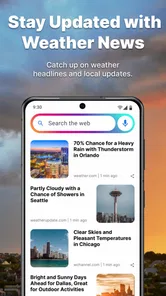
Analysis by Reviewed
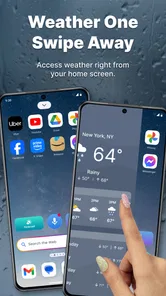
I approached All Weather Mode: Weather Home as a practical personalization tool rather than another weather app to open only when I am already wondering whether to carry an umbrella. Its main idea is simple: put local weather information and forecasts close to the home screen, so checking conditions becomes part of the normal phone routine. That makes it interesting for people who want less friction, especially when the first thing they do in the morning is check the sky before deciding what to wear, how to commute, or whether to change outdoor plans.
The app is free, aimed at everyone, and comes from Clarity App Crafting. It sits in the personalization category, which is important because its value is not only the forecast itself. The real question is whether you prefer weather information to be immediately visible from your home screen, or whether you are happier opening a full weather service whenever you need a more detailed answer. In my experience, that choice matters more than the headline features.
What to consider before making it your weather shortcut
The first decision is how often you need weather information. If you check conditions several times a day, a home-focused weather experience can save small amounts of effort that add up. I found the concept most useful during busy mornings: instead of searching for a weather app, I could make a quick check before leaving the house and then return to whatever I was doing. That is a modest convenience, but it is exactly the kind of convenience personalization apps should provide.
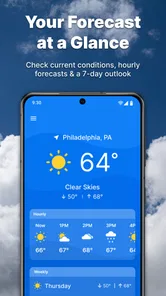
The second decision is how much detail you expect. The app is built around local conditions, hourly forecasting, and a seven-day outlook. That gives it a sensible range for ordinary planning. Hourly information helps with a school run, commute, lunch break, or short walk, while the longer outlook is useful when deciding whether a weekend plan needs a backup. I would not choose it solely because I want a deep meteorological dashboard. I would choose it because the information I use most often is brought nearer to the place where I already start using my phone.
The third consideration is your tolerance for a more focused interface. Traditional weather services often try to cover everything: radar, severe-weather notices, maps, air conditions, extended forecasts, and many layers of technical information. That can be valuable, but it can also make a simple question feel unnecessarily complicated. All Weather Mode: Weather Home makes more sense for someone who wants a quick answer first and does not want a crowded weather center taking over the experience.
I also paid attention to whether the app feels like a sensible everyday choice rather than a novelty. Its current version is 1.3.81, and the app has passed the half-million-install mark, with a 3.8 average from 633 ratings. Those figures suggest a real user base, but they also tell me to keep expectations measured: this is a useful niche within weather and personalization, not a universal replacement for every weather tool.
A realistic morning routine
Imagine a weekday when I need to leave home twice: first for work, then later to collect a child or meet a friend across town. I can glance at the local conditions before getting dressed, use the hourly view to judge whether a light jacket is enough, and check the seven-day view later when planning the next few days. The benefit is not that the forecast becomes magically more accurate. The benefit is that the information is available at the moment a decision appears.
More From Our News Desk

 Gmail
GmailGmail in a Busy Inbox: Who Benefits Most?
From first account to crowded workday, Gmail earns its place through dependable search and flexible sorting—but its best fit depends on how much inbox maintenance you can tolerate.

 Prime Video
Switching to Prime Video: What Changes in Your Viewing Routine
Prime Video can make a compelling second home for streaming, but switching means learning a different catalog, rental layer, and route from browsing to playback.

 Universal TV Remote Control
Universal TV Remote Control Works Best as a Reliable Backup
A phone remote earns its place through quick setup and reliable habits. Here is how to get more from Universal TV Remote Control—and where its limits show.

 Weather - By Xiaomi
Weather by Xiaomi Review: Clear at a Glance, Less Clear Up Close
Xiaomi’s weather app makes everyday forecasts quick to scan, but its calm surface can leave useful details and recovery paths harder to find than they should be.

 X
XX Under Pressure: Can It Recover When Posting Goes Wrong?
A resilience-focused review of X, examining setup, mistaken posts, interruptions, weak connections, and the gaps that matter when recovery needs to be dependable.

 Clash of Clans
Clash of Clans Is Won Between the Battles
Its raids are quick; its community is a long-term project of coordination, teaching, rivalry, and shared responsibility—with all the friction that entails.
Latest News



That workflow is particularly helpful for people who forget to check the forecast until they are already at the door. It also works for anyone who keeps a phone on a desk or bedside table and wants weather to be part of the visual starting point. I would still verify conditions before a long drive, flight, hike, or event where weather could create a safety issue. For ordinary daily choices, though, the quick-access approach feels natural.
Where the home-screen approach wins
The strongest part of this app is its relationship with the home screen. Many people do not need a weather app that they explore; they need a weather glance that interrupts them as little as possible. By placing the forecast experience close to the phone’s starting point, the app turns weather into a background utility instead of another task to remember.
This can be more useful than it sounds. A separate weather app may provide excellent information, but every extra tap creates a chance that I will postpone checking it. A home-oriented tool reduces that hesitation. For users who make frequent small decisions based on weather, that is a genuine advantage over a conventional app that waits in the app drawer.
The hourly forecast is another practical strength. A daily high and low can be too broad for real planning. Knowing that a change may happen later in the day is more relevant when I am deciding whether to walk, cycle, dry clothes outside, or schedule a short outdoor break. I like this kind of time-based view because it supports decisions instead of merely displaying a general label such as sunny or rainy.
The seven-day outlook adds a different layer of usefulness. It is not something I would treat as a promise, especially farther into the future, but it helps me notice broad patterns. If several days look unsettled, I can prepare earlier. If the outlook appears stable, I can tentatively organize outdoor plans while remembering to check again closer to the date.
The practical win is reduced checking friction, not a larger pile of weather data. That distinction helps explain who should install it. Someone who wants a quick local view may appreciate the design more than someone who judges weather apps by the number of advanced panels they include.
Three habits that make it more useful
My first tip is to use the hourly forecast for decisions with a fixed departure time, not for vague curiosity. Before leaving, look at the period covering the journey and the first part of the activity. That is more useful than checking only the current condition, because the weather at the moment you look may not match what you will experience later.
My second tip is to treat the seven-day view as a planning signal rather than a detailed schedule. I would use it to identify which day deserves another check, not to decide today what I will definitely wear several days from now. This is a small but important trade-off: the longer outlook is valuable for orientation, while the hourly view is better for immediate choices.
My third tip is to make the home-screen placement part of a routine. I found the concept works best when I check it at natural transition points, such as before leaving home or before deciding whether to go outside. If I install it but never let it become part of that routine, its main advantage disappears and it becomes just another weather destination.
A fourth use case is shared household planning. Even without turning the app into a family organizer, a quick local forecast can help coordinate errands, outdoor chores, or school activities. The person who normally remembers to check weather does not need to open a detailed service every time. A glance can be enough to start the conversation about changing plans.
When a different weather category may fit better
All Weather Mode: Weather Home is not automatically the best choice for every weather question. If your main concern is severe weather, detailed maps, or technical observation, a dedicated forecasting service may be a better fit. I would also favor a more specialized option when I need to investigate conditions across several locations in depth rather than quickly check the place where I am currently based.
People who travel frequently may prefer an app designed around saved cities and trip planning. A home-centered local experience is most convincing when the local forecast is the thing I check repeatedly. If I am constantly moving between locations, the convenience can become less obvious because I need a broader way to organize destinations and compare conditions.
There is also a difference between personalization and information density. Some weather users enjoy opening charts, maps, layers, and detailed readings. For them, a streamlined home experience may feel too narrow. That is not a flaw in the concept, but it is a reason to compare categories honestly. This app belongs closer to a quick-access weather utility than to a full professional weather workstation.
Another possible limitation is that the app’s value depends on your home-screen habits. If you keep your phone’s home screen minimal, rarely look at it, or prefer launching every service manually, the central idea may not change your routine. In that situation, the usual weather app you already trust could remain the better choice, even if it requires an extra tap.
I would also avoid treating the forecast as a substitute for judgment. Weather information can change, and a seven-day view naturally deserves more caution than an immediate hourly check. For a normal commute, that is a manageable limitation. For safety-sensitive activities, I would compare current information with a source that offers the level of warning and detail I need.
What switching really involves
Because the app is free, the main cost of switching is not money. It is attention and habit. I would need to decide whether the home-screen weather view is useful enough to earn a permanent place in my phone routine. That is a better way to evaluate it than asking whether it contains every feature found in larger weather platforms.
There is also a small mental cost in changing how I check conditions. If I already have a weather app that gives me reliable answers and I open it automatically, moving to a new approach may not provide a dramatic improvement. The strongest reason to switch is not dissatisfaction with weather forecasts in general; it is wanting the check to happen more naturally from the home screen.
The app is suitable for everyone from an age-rating perspective, and it runs on Android 9 or later. That makes it accessible to people using older supported phones, although the actual experience will still depend on how comfortable someone is with changing or using a personalized home-screen setup. I would explain the benefit to a less technical family member as “weather where you begin,” rather than presenting it as a complicated replacement system.
Its release on November 21, 2023, also gives useful context. This is not a long-established weather institution that I would choose purely for history or reputation. I would judge it by whether the current experience fits my routine, while remembering that a relatively newer product may continue to evolve. The developer, Clarity App Crafting, has positioned it as a focused personalization app, and that focus is more important to me than trying to make it compete with every large forecasting platform.
For someone deciding between this and a familiar alternative, I would run a simple test: use the home-screen weather view during a normal week and notice whether it changes any decisions or merely adds another visual element. Check it before leaving, before planning an outdoor task, and when looking ahead to the next few days. If those moments feel faster and more natural, the switch has paid off. If I still open another weather service every time, keeping the existing option is probably more sensible.
My recommendation for different users
I recommend it most readily to people who want local weather to be immediately available and who prefer a clean, routine-based way to check conditions. It is especially suitable for commuters, parents organizing daily activities, people who spend time outdoors, and anyone who often realizes too late that the forecast would have changed a small decision. The combination of local information, hourly planning, and a seven-day view covers the ordinary questions I ask most often.
I am less likely to recommend it as a sole weather solution to travelers, outdoor enthusiasts who need specialized detail, or users who rely heavily on maps and serious alerts. Those people may be better served by a dedicated weather category built around depth rather than home-screen convenience. There is no reason to force one app to perform every role.
The 500K-plus install base shows that the idea has reached a substantial audience, while the 3.8 average indicates a reasonably positive but not flawless reception. I read that combination as a reason to try it with realistic expectations. It is free, so testing the workflow is straightforward, but I would not install it simply because I want the most elaborate forecast available.
After using it as a decision aid, my view is clear: this app succeeds when the problem is forgetting to check the weather or finding the usual process too cumbersome. Its best feature is the way it brings a useful forecast closer to everyday phone behavior. Its main weakness is equally clear: users wanting a deep, travel-oriented, or highly technical weather service may outgrow the focused approach.
I would recommend giving it a try if convenience matters more to you than weather-tool complexity. For my own routine, the local view and hourly planning make it a worthwhile personalization choice, while the seven-day outlook adds enough forward planning to keep it useful beyond the morning glance. It does not need to replace every weather app to be valuable; it simply needs to make the forecast easier to reach at the moments when a small piece of information can improve the day.
All Weather Mode: Weather Home Frequently Asked Questions
Is All Weather Mode: Weather Home free to download, and what devices support it?
All Weather Mode: Weather Home is a free personalization app from Clarity App Crafting. It is available for devices running Android 9 or later, so checking your operating-system version before downloading can help avoid compatibility issues. The app is intended for general audiences, and its home-screen-focused approach may appeal to anyone who wants local weather and forecasts close at hand.
What forecasts and weather information can I check in All Weather Mode: Weather Home?
The app’s summary highlights local weather, hourly forecasts, and a 7-day outlook, with access designed to be one swipe from your home screen. That makes it useful for a quick look at current conditions as well as planning across the coming week. Forecast details can help with everyday decisions, though conditions and predictions should be checked again when plans depend on them.
What is All Weather Mode: Weather Home?
All Weather Mode: Weather Home is a weather-focused app designed to provide current conditions, forecasts, and weather information in a convenient home-screen experience. Depending on your device and selected settings, it may display temperature, precipitation, wind, humidity, and other useful details. It is intended for everyday planning, such as choosing clothing, organizing travel, or checking whether outdoor activities are practical.
Does All Weather Mode: Weather Home require my location?
The app may request location access so it can automatically show weather conditions for your current area. In most cases, you can choose between approximate or precise location permissions, or manually enter a city instead. If privacy is important to you, review the permission prompt carefully and check the app’s settings. Weather accuracy and automatic updates may be reduced when location access is disabled.
Can I use All Weather Mode: Weather Home without an internet connection?
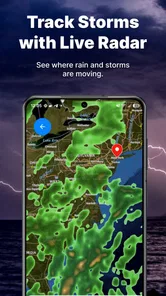
An internet connection is generally needed to retrieve fresh weather data, forecasts, radar information, and location-based updates. Some previously loaded information may remain visible temporarily when you are offline, but it should not be treated as current. For dependable results, open the app while connected to Wi-Fi or mobile data, especially before traveling or relying on severe-weather information.
Pros
- Simple weather overview with key conditions visible at a glance.
- Useful home-screen widget support for checking forecasts quickly.
- Clean interface makes navigation easy for most users.
- Weather updates help with planning commutes and outdoor activities.
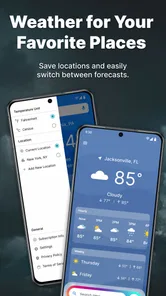
- Supports multiple locations for tracking weather in different areas.
Cons
- Some advanced forecasts or tools may require in-app purchases.
- Accuracy can vary depending on the selected weather data provider.
- Frequent alerts may feel excessive unless notification settings are adjusted.
- Widgets can use additional battery when refreshing weather information.
- The app may display advertisements in the free version.











