All HD Video Downloader&Player
- 20.00
- 3.8
- Installs
- 1.00M
- Price
- Free

Screenshots




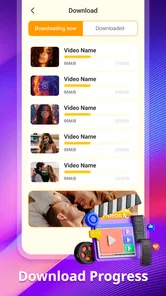
Analysis by Reviewed
I often find that video habits become a household matter: someone spots a recipe, another person wants a clip for a trip, and the phone ends up being passed around. All HD Video Downloader&Player brings saving and watching videos together in one Android app, which can be handy when the same device serves several people. I’d treat it as a practical utility rather than a shared library, though: it doesn’t replace clear decisions about whose files are being saved or where they belong.
Keeping downloads useful on a shared device
A realistic use is saving a cooking demonstration at home over Wi-Fi, then opening it in the app while preparing dinner with the connection put aside. That avoids searching for the clip again when hands are busy or reception is unreliable. I’d check that the video is available to download and that saving it is permitted; a downloader is not a way around a site’s rules or a creator’s rights.
Set expectations before anyone taps download
Because saved videos can accumulate on a device, a little household agreement helps. Decide whether downloads are for one person or for everyone using the phone, and agree on a simple way to distinguish personal files from shared ones. If you are sharing a device, avoid assuming that a video saved for one viewer will stay private from other people who can access that device.
That boundary matters more than it might seem. A useful routine is to save only what someone expects to watch soon, then remove it when it is no longer needed. It keeps a casual collection from becoming a confusing pile and makes it easier for the next person to find their own clips. I would not rely on this app as an account-management or privacy tool; the household should set those expectations outside the downloader.
Coordinate around storage and timing
Before a commute or trip, I’d have each person choose the videos they actually plan to watch, download them while a reliable connection is available, and check that they play before leaving. That quick test can catch a file that did not finish downloading while there is still time to try again. It also prevents the familiar last-minute scramble when someone expects a clip to be ready offline.
On a shared phone, coordinate downloads rather than letting everyone save duplicates. If two people want the same video, one copy may be enough, but only if both know where to find it and are comfortable sharing it. The trade-off is straightforward: combining downloads saves needless clutter, while separate personal collections are easier to manage when people have different tastes or routines.
Age, trust, and responsible use
The app is rated for Everyone, but that age label is not a substitute for an adult’s judgment about what a child watches or downloads. I’d talk through which sources are appropriate and keep an eye on what is saved when a device is shared with younger users. The app’s role is downloading and playback, not setting household rules or deciding which content is suitable.
More From Our News Desk
 Instagram
’s Power Comes From Its Place in Your Phone
A close look at how Instagram turns Meta’s reach, recommendation systems and everyday camera habits into durable platform power—and what that costs users.

 Gmail
Gmail in a Busy Inbox: Who Benefits Most?
From first account to crowded workday, Gmail earns its place through dependable search and flexible sorting—but its best fit depends on how much inbox maintenance you can tolerate.

 Prime Video
Switching to Prime Video: What Changes in Your Viewing Routine
Prime Video can make a compelling second home for streaming, but switching means learning a different catalog, rental layer, and route from browsing to playback.

 Universal TV Remote Control
 Works Best as a Reliable Backup
A phone remote earns its place through quick setup and reliable habits. Here is how to get more from Universal TV Remote Control—and where its limits show.

 Weather - By Xiaomi
Weather by Xiaomi Review: Clear at a Glance, Less Clear Up Close
Xiaomi’s weather app makes everyday forecasts quick to scan, but its calm surface can leave useful details and recovery paths harder to find than they should be.

 X
X Under Pressure: Can It Recover When Posting Goes Wrong?
A resilience-focused review of X, examining setup, mistaken posts, interruptions, weak connections, and the gaps that matter when recovery needs to be dependable.
Latest News



It is also worth teaching children not to treat every online video as something they can keep. Downloading should respect the source’s terms and the creator’s rights. For adults, the same principle applies: save videos for legitimate offline viewing, rather than assuming that a convenient download option grants permission to redistribute or reuse someone else’s work.
As a free video player and downloader from BSS Saham Indonesia, it sits in the Video Players & Editors category. It has a 3.8 average from around 530 ratings, with over one million installs. Version 1.1.8 runs on Android 7.0 or later, and its Everyone rating makes the age context clear without removing the need for sensible supervision.
Downloading Made Simple
Let’s dive right in. With All HD Video Downloader&Player, grabbing your favorite videos off the net is as easy as pie. Whether it's a cooking tutorial that you want to try out or a hilarious cat video that you can't stop watching, this app’s got your back. The interface is clean and intuitive, so even if you’re not the most tech-savvy person, you’ll be navigating through it like a pro in no time.
Compared with using a browser for occasional downloads and a separate gallery or player afterward, having both tasks in one place can make a simple save-and-watch routine feel more direct. A dedicated player may still be a better fit if you need a carefully organized media library or more control over playback. I’d choose this app when convenience matters more than building a sophisticated collection.
Wide Range of Supported Formats
What’s really cool is the app’s capability to handle a wide array of video formats. From MP4 to AVI, and even the elusive MKV, you name it, it’s got it. This means you don’t have to worry about converting your downloads to a compatible format—huge relief, right?
In practice, I’d still test an important video before relying on it away from home. A format being supported does not guarantee that every file will behave identically, since the source and the file itself can affect the result. If a clip is especially important, keep the original source in mind and avoid deleting it until you have confirmed the saved copy works as expected.
Playing Videos Like a Boss
Now, onto the playback feature. Once you’ve got your videos downloaded, the last thing you want is to struggle with playback issues. Thankfully, this app doubles as a powerful video player. It supports high-definition playback, so you’re guaranteed crisp visuals and smooth performance. And the best part? It doesn’t lag or freeze, keeping your viewing experience as enjoyable as possible.
For shared use, the useful question is not only whether a clip plays, but whether the next person can quickly identify it. I’d give saved videos recognizable names where possible and clear out clips that are no longer wanted. That small habit makes a combined downloader-player more manageable, especially when several people use the same phone for different reasons.
Offline Enjoyment
Another aspect I love is the ability to enjoy all your downloaded content offline. Whether you’re on a flight, in the subway, or just saving on data, this feature is a real game-changer. Just download your videos when you have access to Wi-Fi, and you're set for any situation where internet access is spotty or non-existent.
That makes the app a better match for people who regularly plan ahead for commutes, travel, or unreliable reception than for viewers who only stream at home. It is less compelling if you mainly want a streaming service’s managed offline catalogue, or if keeping files organized across several devices is your priority. A sensible workflow is to confirm a download is complete, play it once, and then rely on it offline.
When a one-phone workflow makes sense
The strongest case for this kind of app is a short, practical chain: find a permitted video, save it, then play it later without switching between several tools. I can see that being useful for a student who wants to revisit a public lesson during a ride, or for someone keeping a demonstration handy while doing a repair. The value is not that every video needs saving; it is that a few planned clips can be available at the moment streaming would be inconvenient.
There is a small but useful distinction between “saved” and “ready.” Before leaving home, I would open the file from inside the app rather than judging readiness from a download appearing in a list. That takes only a moment and checks the practical part of the workflow: the saved item can actually be opened in the place I expect to watch it. For a shared device, it also lets the person who requested the video confirm it before handing the phone to someone else.
Choosing between this and familiar alternatives
Against a browser plus a separate video player, the main appeal is having the downloader and playback in one place. That can mean fewer handoffs for someone who only saves occasional clips. A standalone player makes more sense if your videos already come from different sources and you want playback to be the central task. A streaming service’s offline feature is often the cleaner choice when you want a managed catalogue tied to that service, rather than individual files.
Those options solve different problems, so I would not choose solely by the word “HD.” If you rely on a service’s catalogue, its own offline mode may be simpler to revisit and manage. If you need a broad personal collection arranged across devices, a dedicated library tool is a better starting point. This app’s appeal is narrower and more immediate: saving a video and playing it on the same Android device without turning the process into a media-management project.
There is also a rights-related difference worth keeping in view. A site or service may allow viewing but not saving, and an app’s download function does not change that. I’d use it only where the source permits downloading or where I have the right to keep a copy. That makes it a poor workaround for content that is meant to remain inside a service, even if another method seems more convenient.
Small habits that prevent avoidable frustration
For anyone trying it, I’d start with one nonessential clip rather than filling the phone with a large batch. Check that the chosen source offers a legitimate download, let the save finish while connected, and play the result before depending on it. This first-run test helps set realistic expectations for the specific source and file, instead of discovering a problem on a train or at a destination with weak reception.
On a household device, naming and cleanup are more important than they sound. A vague video filename can be hard to recognize later, particularly if several people save similar material. I’d agree on a simple convention, such as including the subject or intended viewer when the system allows it, and periodically remove clips no one needs. This is not a substitute for separate profiles, but it reduces the chance that a useful download gets lost among abandoned ones.
Storage is another reason to be selective. Video files can take meaningful room, so I would not treat offline saving as a reason to keep every clip indefinitely. Choose the few items that solve a real upcoming need, watch them, and clear them if they are no longer useful. That approach is especially sensible when the same Android phone is also used for photos, messages, and other everyday tasks.
Who will appreciate it, and who may not
I think this app suits people who want a straightforward Android downloader-player for occasional, legitimate offline viewing. It can also work for a household that shares one device and is willing to coordinate what gets saved. The combined role is convenient for someone who does not need elaborate sorting and would rather open one app for both the download and the viewing.
I would skip it if the key requirement is privacy between household members, child-specific restrictions, or a carefully curated library that stays synchronized across devices. Those needs call for tools designed around accounts or media organization, not simply a downloader paired with playback. I’d also avoid making it the center of a workflow where every video must be archived permanently or where the source’s rules do not allow saving.
As a free app, it is easy to consider without treating it as a commitment to reorganize how you watch everything. The more modest question is whether you have a recurring situation where a local copy genuinely helps. If the answer is yes, try it with a permitted clip and see whether its basic save-and-watch path fits your routine. If you mostly stream with a strong connection, the extra local files may add more upkeep than value.
Final Thoughts
All in all, All HD Video Downloader&Player is a must-have app for anyone who loves to keep their favorite videos close at hand. It’s incredibly user-friendly and versatile, catering to all your video downloading and playback needs. So go ahead, give it a whirl, and take control of your video library like never before.
For a household, I’d call it a useful shared-device option when everyone agrees on what gets saved and who can see it. It is not the right choice for someone seeking built-in family controls, private individual profiles, or a polished cross-device library. If your needs are modest and you value having downloads and playback together, it is worth trying; if careful separation and advanced media management matter more, a dedicated player or a service with its own offline viewing setup may suit you better.
All HD Video Downloader&Player Frequently Asked Questions
What Android devices can run All HD Video Downloader&Player?
All HD Video Downloader&Player is designed for Android users, and it requires Android 7.0 or later. Before downloading, check your device’s Android version in its settings to make sure it meets that requirement. The app is categorized among video players and editors, so it may suit users looking for video tools alongside a built-in player.
Who develops All HD Video Downloader&Player, and how widely is it used?
All HD Video Downloader&Player is developed by BSS Saham Indonesia. It has more than one million installs and an average rating of 3.8 from around 530 ratings, giving prospective users a general sense of its reach and reception. Ratings are only one part of the picture, so consider whether its video downloading and playback features fit your needs.
What is All HD Video Downloader&Player?
All HD Video Downloader&Player is an app designed for downloading and playing videos in high definition. It supports various video formats, ensuring users can enjoy their favorite content offline. The app boasts a user-friendly interface, making navigation and video management straightforward for all users. With its integrated player, you can watch videos directly within the app.
Is All HD Video Downloader&Player free to use?
Yes, All HD Video Downloader&Player is free to download and use. However, it may offer in-app purchases or contain ads that help support the app's development. Users can enjoy the core functionalities without any cost but might consider premium features for an enhanced experience.
How can I download videos using All HD Video Downloader&Player?
To download videos using All HD Video Downloader&Player, simply search for the desired video within the app or paste the video URL into the search bar. Once you find the video, select the download option, choose your preferred resolution, and the app will start downloading it to your device for offline viewing.
Pros
- Supports multiple video formats
- Fast download speed
- In-app video player included
- User-friendly interface
- No registration required
Cons
- Contains ads
- Limited editing features
- Lacks playlist organization
- No cloud sync option
- Requires manual URL entry