Alight Mobile
- 2.99K
- 3.8
- Installs
- 1.00M
- Price
- Free

Screenshots
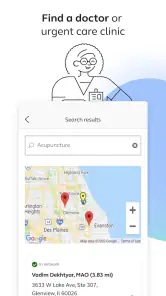
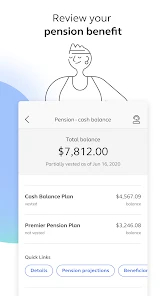
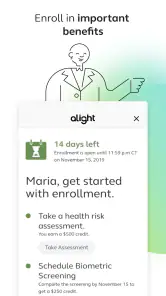
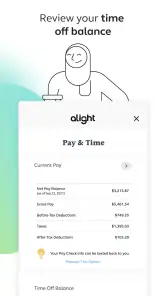
Analysis by Reviewed
For people trying to manage workplace benefits on a phone, Alight Mobile is best understood as a convenient access point, not a general-purpose finance app. I’d consider it when an employer’s benefits are handled through Alight and I want to check them away from a computer. The key trade-off is that its usefulness depends on that connection: if you’re looking for an independent tool to compare plans or manage all your finances, this is not the right fit.
Where a benefits app earns its place
The strongest case for a dedicated benefits app is timing. Benefits questions tend to arise when you are away from a desk: you may want to look up an option before a conversation with HR, or check a detail while organizing paperwork at home. Having a phone-based route can make that kind of quick reference less cumbersome than returning to a work portal on a laptop.
A practical habit is to open the app when you have a specific question in mind rather than browsing without a goal. For example, if you are preparing for an appointment or reviewing a household budget, note what you need to verify, sign in, and check the relevant benefits information. That small bit of preparation can make a mobile session more useful and reduce the chance of confusing a benefits detail with unrelated personal finances.
What to expect from its role
Alight Mobile is a business app from Alight Solutions, LLC, and its focus is employee benefits rather than broad money management. That distinction matters when comparing it with a bank app, a budgeting tool, or an employer’s general HR portal. Those alternatives may be better for transactions, spending plans, or wider workplace tasks; this app makes the most sense when your immediate need is benefits access through Alight.
It is free and rated for everyone, which lowers the barrier to trying it, but access to an app should not be mistaken for access to every benefit program. Before relying on it for a time-sensitive task, make sure you can sign in and locate the information you need. If you are choosing benefits for the first time, a mobile view can help you review details, but it is still worth slowing down and reading the full plan material rather than making a consequential choice from a quick glance.
A realistic day-to-day use
Imagine you are sorting out a family appointment during a lunch break and need to check a benefits detail before calling a provider. A phone app can be more convenient than waiting until you are back at your desk. I would treat it as a quick lookup tool in that moment, then keep any important questions or decisions for a careful review. That approach uses the convenience without assuming a brief screen check tells the whole story.
It can also help to make a simple personal checklist of the benefit topics you revisit, such as information you need when planning an appointment or reviewing household costs. The app is the access route, while the checklist helps you remember what to verify. This is especially useful if you only deal with benefits occasionally and do not want to relearn where to start each time.
More From Our News Desk

Clash of Clans Is Won Between the Battles

Android Auto Makes the Case for Quieter Car Software

MobiOffice: Transforming Mobile Productivity with Seamless Integration

EA SPORTS FC™ Mobile Soccer: Redefining Mobile Sports Gaming

How Microsoft OneDrive Became a Mobile Productivity Giant

How Google Translate Breaks Language Barriers Effortlessly
Who should choose it—and who should not
I’d recommend considering it if your benefits are managed through Alight and you value being able to reach benefit information on the go. It is a more natural choice for someone who wants a mobile companion to an existing workplace benefits relationship than for someone seeking a standalone service. The app’s audience is substantial, with over a million installs and a 3.8 average across around 42,000 ratings, though those figures alone cannot tell you whether it fits your particular employer’s setup.
If your workplace uses another benefits provider, or if you want a single place for banking, budgeting, and benefits from different sources, a provider-neutral finance app or your employer’s main portal may suit you better. The same goes for users who prefer to review dense plan documents on a larger screen. A phone is handy for access, but it is not automatically the best place to compare several complicated choices side by side.
Making a mobile check more useful
One small workflow improvement is to separate “I need to find a fact” from “I need to make a decision.” Those are easy to blur when you are checking benefits quickly. Use a phone session to locate a detail or identify the question you need answered, then move to a longer review if the choice affects coverage or household finances. I find that boundary especially helpful when a short break makes it tempting to settle a complicated issue too quickly.
It is also worth writing down the exact wording of anything you need to ask HR or a provider about. A benefit term can sound familiar without answering the practical question you have, such as whether a particular situation is covered. Keeping the question concrete helps you use the app as a reference point rather than treating a quick glance as a complete explanation.
For households where more than one person helps manage appointments and costs, the app can fit into a shared planning routine without becoming the whole system. One person can check the relevant information, while both keep a separate note of follow-up questions and important dates. That approach avoids relying on memory and makes it easier to distinguish what the app showed from what still needs confirmation through the appropriate workplace or benefits channel.
How it compares with familiar alternatives
Compared with a standard employer HR portal, a mobile benefits app has a narrower advantage: it is designed for checking from a phone when opening a full workplace portal feels like too much friction. A portal may remain the better place for broad employment tasks or reviewing documents in context. I would not assume one replaces the other; they can serve different moments, with the app as a convenient starting point and a larger-screen resource for deeper reading.
A bank or budgeting app solves a different problem. It can help you understand spending and balances, but it is not a substitute for information tied to an employer’s benefits arrangement. Likewise, a general benefits comparison site may be useful for learning concepts, but it cannot necessarily reflect the details of your own workplace setup. Alight Mobile is most compelling when the question is about benefits connected to Alight, not when the goal is to assemble a complete financial picture in one place.
This distinction is useful before installation because it sets a realistic expectation. If you already use Alight through work, trying its mobile access is a sensible low-cost step: the app itself is free. If you want to compare providers, consolidate unrelated accounts, or manage household spending, I would choose a tool built around those needs instead and keep benefits information in its own lane.
Getting Started with Alight Mobile
First off, downloading Alight Mobile was a breeze. Available on both Android and iOS, I had it up and running in no time. The initial interface is sleek and user-friendly, which is always a win in my books. It doesn’t bombard you with too many options right away, which is perfect for beginners or those who might feel overwhelmed by more complex software.
Once you dive in, you’ll find a variety of templates to choose from. Whether you’re looking to create a simple animation or something more detailed, there’s a template for that. I loved how intuitive the app felt, making it easy to navigate through the various features.
Features that Stand Out
One thing that really impressed me was the range of tools available. From basic editing to more advanced options like keyframe animation, masking, and chroma key, Alight Mobile packs a punch. And yes, these features are typically found in desktop software, making it all the more exciting to have them in the palm of your hand.
The app also supports multiple layers of video and audio, which is essential for creating complex animations. I found the layering system particularly useful when I was experimenting with adding background music and sound effects to my projects. It’s these little touches that can elevate a simple animation to something truly spectacular.
Another cool feature is the color adjustment tools. You can tweak the brightness, contrast, and saturation of your clips, allowing you to achieve the perfect look for your animation. It’s like having a mini editing studio right in your pocket!
My Personal Experience
As I spent more time with the app, I began to appreciate its versatility. Whether you’re a seasoned animator or just starting out, there’s something here for everyone. The learning curve isn’t steep, which means you can start creating impressive animations almost immediately.
During my trial, I created a short animation clip for a personal project. The process was smooth, and the results were fantastic. The app’s real-time preview feature allowed me to see my changes instantly, which saved a lot of time and effort.
I also appreciated the community aspect of the app. There’s an option to connect with other users, share your creations, and even get feedback. It’s a great way to learn and grow as an animator.
Wrapping It Up
All in all, Alight Mobile is a gem for anyone interested in animation, whether as a hobby or a profession. It combines powerful features with an easy-to-use interface, making it accessible to a wide range of users. If you’re looking to unleash your creativity and create animations that wow, this app is definitely worth checking out.
So, if you’re ready to take your animation skills to the next level, why not give Alight Mobile a try? You might just find it’s the creative outlet you’ve been searching for.
One important mismatch to keep in mind
There is a real difference between the benefits-focused role suggested by the app’s identity and the animation workflow described in the sections above. I would not use the animation tools, templates, or community claims here as a basis for deciding whether a benefits app will meet your needs. For workplace benefits, judge it by whether your employer’s Alight setup gives you the access you need, and by how easily you can find and understand that information on your own device.
The current version is 6.3.1 and it requires Android 9 or later; the app was released on October 6, 2020. Those details can help you check basic compatibility before installing, particularly if you use an older Android phone. Its average rating is 3.8, based on around 42K ratings, so I would treat the overall reception as a useful signal rather than a promise of a smooth experience for every employer or account.
My recommendation is therefore specific: if your workplace uses Alight for benefits, try the mobile route for convenient access, then confirm that it covers the tasks you actually handle. If you do not have that workplace connection, or need a broader benefits comparison and financial overview, choose a tool designed for those jobs instead. That is the clearest way to decide whether this app belongs on your phone.
Alight Mobile Frequently Asked Questions
Can I use Alight Mobile if I do not already have access to benefits through Alight?
Alight Mobile is a business app from Alight Solutions, LLC, with the store summary “Get your benefits on-the-go.” It is intended for people who want to access benefits through a mobile app. Before downloading, check that this benefits-focused purpose matches what you need and that you have a reason to use Alight’s benefits services. The app is free and rated for Everyone.
Who is Alight Mobile intended for, and what should I check before downloading it?
Alight Mobile is a business app from Alight Solutions, LLC, with the store summary “Get your benefits on-the-go.” It is intended for people who want to access benefits through a mobile app. Before downloading, check that your device meets the app’s operating-system requirement and that this benefits-focused purpose matches what you need. The app is free and rated for Everyone.
What is Alight Mobile, and what features does it offer?
Alight Mobile is a comprehensive mobile application designed to enhance the commuting experience of its users. It provides real-time transit information, personalized alerts, and detailed public transportation schedules. The app supports route planning, fare calculation, and even integrates with local transit services for seamless ticket purchases. Users can enjoy a customizable experience with features like favorite routes, accessibility options, and offline access to schedules. Alight Mobile aims to simplify and improve daily commuting for everyone.
Is Alight Mobile available for both Android and iOS devices?
Yes, Alight Mobile is available for download on both Android and iOS platforms. Users can easily find it on the Google Play Store for Android devices and the Apple App Store for iOS devices. The app is designed to offer a smooth and consistent experience across both operating systems, ensuring that users can access its features regardless of their device preference.
Does Alight Mobile require an internet connection to function?
While Alight Mobile offers offline access to certain features like schedules and saved routes, an active internet connection is required for real-time updates, alerts, and navigation assistance. The app relies on internet connectivity to provide the most accurate and up-to-date information about transit schedules, delays, and route changes, ensuring users have the best commuting experience possible.
Pros
- User-friendly interface for easy navigation.
- Wide range of editing tools available.
- Supports multiple video formats.
- Fast export without quality loss.
- Regular updates with new features.
Cons
- Might be overwhelming for beginners.
- Some features require in-app purchases.
- Occasional crashes reported.
- Can be resource-heavy on older devices.
- Limited cloud storage options.
- Category
- Business
- Version
- 6.3.1











