

Alaska Hawaiian
- 29.61K
- 4.1
- Installs
- 5.00M
- Price
- Free

Screenshots

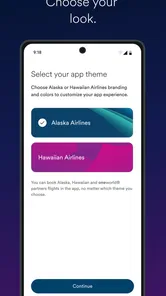



Analysis by Reviewed
Have you ever dreamed of exploring the vast wilderness of Alaska or maybe catching the Northern Lights in action? Well, let me tell you about the Alaska Airlines - Travel app, a trusty companion for anyone eager to dive into the heart of nature's grandeur. I've been fiddling with it for a while, and here's my take on it.
What to Expect from an Airline App
I’d set expectations around the job this app does best: keeping an Alaska Airlines trip easier to follow. It is not the place I’d start if I were still deciding between several airlines, comparing hotel options, or building a general sightseeing itinerary. Its value comes later, when a flight is booked and I want the practical details of that journey together.
That distinction matters for a first-time user. A broad travel search service is useful while comparing destinations, dates, and carriers; an airline’s own app is usually more focused on the airline’s booking and travel process. I’d use each for what it does well rather than expecting one app to plan every part of a holiday. If your trip is entirely with another carrier, this app is unlikely to become part of your daily travel routine.
Seamless Navigation
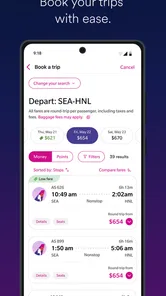
When I first opened the app, I was greeted by an intuitive interface that almost made me feel like I was already on board. Booking a flight was a breeze; all I had to do was select my destination, pick my preferred dates, and voila! The app even suggested some travel tips and must-see locations in Alaska, which is a nice touch for those who are a bit indecisive like me.
Getting Set Up Before Travel
The app is free, comes from Alaska Airlines, and sits in the Travel & Local category. Its current version is 7.6.4, and its age rating is Everyone. Android users need version 8.0 or later. Those details make it easy to judge whether it is a reasonable fit for your phone before you rely on it for a trip.
After installing, I’d open it while I’m at home or otherwise unhurried. Take a moment to find the booking and trip information screens, and check whether the reservation you need is available. If you’re traveling with another person, it is worth agreeing on who will keep the itinerary handy and who will watch for updates; that small bit of coordination can prevent two people from searching for the same detail at the last minute.
Booking and Beyond
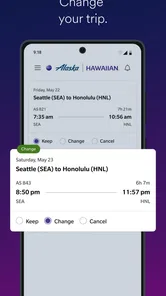
The booking process is straightforward, but what really caught my attention was the array of features beyond just purchasing tickets. The app offers real-time updates on flight status, which is a lifesaver especially when you're juggling multiple travel plans. I also found the in-app check-in feature incredibly convenient, saving me from the hassle of airport queues.
More From Our News Desk

 Weather - By Xiaomi
Weather by Xiaomi Review: Clear at a Glance, Less Clear Up Close
Xiaomi’s weather app makes everyday forecasts quick to scan, but its calm surface can leave useful details and recovery paths harder to find than they should be.

 X
X Under Pressure: Can It Recover When Posting Goes Wrong?
A resilience-focused review of X, examining setup, mistaken posts, interruptions, weak connections, and the gaps that matter when recovery needs to be dependable.

 Clash of Clans
 Is Won Between the Battles
Its raids are quick; its community is a long-term project of coordination, teaching, rivalry, and shared responsibility—with all the friction that entails.

 Android Auto
 Makes the Case for Quieter Car Software
The car interface is no longer judged by how much it can do, but by how quietly it helps. Android Auto shows what drivers now expect—and what still gets in the way.

 MobiOffice: Word, Sheets, PDF
MobiOffice: Transforming Mobile Productivity with Seamless Integration
MobiOffice: Word, Sheets, PDF is redefining mobile productivity with a surprising blend of functionality and innovation.

 EA SPORTS FC Soccer Mobile 26
EA SPORTS FC™ Mobile Soccer: Redefining Mobile Sports Gaming
Dive into EA SPORTS FC™ Mobile Soccer, where immersive gameplay and strategic depth transform mobile sports gaming.
Latest News



For a first-time user, I’d treat the app as a practical companion to a booked Alaska Airlines trip rather than as a general travel guide. It is a free Travel & Local app from Alaska Airlines, and its value is clearest when your booking, check-in, and airport updates are part of the same journey. The current version is 7.6.4, and it is rated for Everyone; on Android, the listed minimum OS is 8.0.
A reassuring first run is simple: install it before travel, open it while you have time, and look for the booking and trip details you’ll need later. Once you have a reservation available in the app, use the flight information as your starting point, then check in when the option is available for your trip. I wouldn’t wait until I’m rushing through the terminal to learn where things are. A calm practice run makes it easier to find the right screen when timing matters.
Making the Trip Easier to Manage
Now, if you're someone who loves a good deal (and who doesn't?), you'll appreciate the app's notifications on exclusive offers and discounts. It's like having a personal travel agent in your pocket, always on the lookout for the best bargains.
There is a useful distinction between planning and managing. I’d compare this with a general travel app or a mobile browser: those can be better for researching a broad range of airlines, routes, and places to stay, while Alaska’s app makes more sense once you’re dealing with an Alaska Airlines itinerary. I would still compare options before booking if flexibility or a different carrier matters more than keeping the trip in one airline’s app.
For an everyday example, imagine that I’m heading to the airport after work and my plans are tight. I can check the flight status before leaving, use in-app check-in when it is available, and keep the travel details together rather than searching through email at each step. That workflow is especially helpful when plans involve more than one leg or I’m coordinating with someone else. My practical tip is to review the itinerary before travel and confirm I’m looking at the correct flight; a phone app helps organize information, but it doesn’t remove the need to pay attention to changes and timing.
Useful Habits for Travel Day
I’d make checking the flight status a deliberate step before leaving home, rather than opening the app only after I reach the airport. That gives me a chance to spot a change while I still have options for adjusting my departure from home. I’d then check again during the journey to the airport, especially if I’m relying on a tight connection or someone else is driving me.
Check-in is another place where a little preparation pays off. I’d look for the check-in option when it becomes available for my trip, then make sure I know where the relevant travel details appear in the app. The key is not to assume every screen will be obvious under pressure. A quick familiarization beforehand turns the airport visit into a simple retrieval task instead of a first-time tour of the interface.
For a multi-part trip, I’d review the itinerary as a whole rather than focusing only on the first flight. That makes it easier to notice which leg I’m checking and to avoid mixing up details when the travel day is busy. If another person is meeting me or helping with transport, sharing the important timing verbally can still be sensible; an app is a convenient reference, not a substitute for clear coordination.
Loyalty Pays Off
One of the standout features of the Alaska Airlines - Travel app is its integration with the Alaska Mileage Plan. If you're a frequent flyer, you'll find it rewarding to accumulate miles and redeem them for future travels. The app keeps track of all your miles, making it easy to know how close you are to your next free trip. I must say, the thrill of watching those miles add up is quite satisfying!
The Mileage Plan connection is most useful if you already fly Alaska Airlines often enough to care about keeping track of your miles. If you rarely use the airline, that part may add little to your routine, and a broader travel organizer could be more useful for trips spread across several carriers. I’d also treat deals and miles as helpful extras, not as a reason by themselves to choose a flight: compare the itinerary and what suits your plans first.
Where the App Fits in a Bigger Trip
For a vacation that includes flights on different airlines, I’d keep this app for the Alaska Airlines portion and use a separate method to track the rest. That could mean a general itinerary organizer or simply keeping confirmation messages easy to find. The advantage of a dedicated airline app is focus; the trade-off is that it does not replace a cross-carrier overview when the trip stretches beyond one airline.
I’d also separate destination research from flight management. The app can be a useful starting point for Alaska-oriented ideas, but I would not rely on it alone to decide what to do in a destination or how to arrange a whole holiday. For that, a travel guide or broad search tool is a better fit. Once I’ve chosen the trip and booked with Alaska Airlines, the airline app becomes more relevant for staying on top of the flight itself.
That makes the app a stronger match for travelers who value a straightforward airline-specific workflow than for people who want one universal dashboard. If you fly Alaska regularly, the combination of trip details and Mileage Plan information gives you a reason to return between journeys. If you rarely fly with the carrier, the app may be useful for a single trip but less important after it ends.
Common Points of Confusion
A flight status screen and a complete travel plan serve different purposes. I’d use the status information to follow the flight, while still checking the itinerary for the broader sequence of my trip. When plans involve connections or several travelers, it is easy to look at the right airline but the wrong flight, so I’d verify the details before acting on an update.
It is also easy to mistake offers for a reason to book. Notifications about discounts can be handy, but I’d compare the actual itinerary against my needs: timing, destination, and whether the airline fits the rest of the journey. A deal is only useful if the trip works. This is especially worth remembering when a travel plan is still flexible and I have not settled on a carrier.
Finally, I would not treat a single app as a guarantee that every airport question is answered. It helps keep airline-related information within reach, but I’d still pay attention to announcements and the instructions relevant to my trip. The useful mindset is to let the app reduce searching and uncertainty, not to hand over every travel decision to it.
Loyalty, Offers, and Realistic Expectations
Frequent flyers are the clearest audience for the Mileage Plan element. Keeping an eye on miles in the same place as trip information can make the airline’s app feel useful even when I am not at the airport. Still, the benefit depends on how often I fly Alaska and whether those miles matter to the way I choose trips. A traveler committed to several airlines may prefer a broader view of travel rewards instead of checking each carrier separately.
Offers can be useful in a different way: they may prompt me to look at a trip I had not considered. I’d treat that as inspiration rather than a decision. Before changing plans, I would compare the timing and practical fit of the flight with the rest of my schedule. The app is most helpful when it supports a choice I already want to make, not when a notification pressures me into making one.
There is a trade-off between keeping everything centralized and keeping everything independent. Using the airline’s own app can make its booking and flight information easier to reach, while a general organizer may be better for trips spanning carriers, lodging, and activities. I’d choose based on the trip in front of me: one Alaska Airlines journey favors this app, while a complicated itinerary across providers calls for a wider organizing tool as well.
Who It Suits, and What to Keep in Mind
Alaska Airlines has a 4.4 average from around 88,000 ratings, with more than 5 million installs. Those figures suggest it has reached plenty of travelers, but they don’t guarantee that every trip will feel effortless. In my view, it’s best for people who have an Alaska Airlines flight and want booking, flight updates, check-in, and loyalty details close at hand. If you mainly want independent destination research or need one place to manage bookings across different airlines, I’d use a broader travel service alongside it instead.
The main trade-off is that an airline app naturally centers on that airline. It can simplify a trip when your plans fit, but it is not a substitute for comparing carriers or keeping an eye on the details of a changing itinerary. I’d also make sure I can access the information I need before heading out, rather than assuming any single app will solve every airport question. Used with that realistic expectation, it can reduce small sources of stress without pretending to control the whole journey.
For a newcomer, I’d judge success by one practical result: being able to find the relevant flight details and understand where to check status or check in when appropriate. There is no need to master every feature on the first day. If the app helps me avoid searching through messages while I’m trying to leave on time, it has already earned its place for that trip.
Final Thoughts
All in all, the Alaska Airlines - Travel app is a gem for anyone looking to explore the Last Frontier. It's user-friendly, packed with features, and designed to make your travel experience as smooth as possible. Whether you're a seasoned traveler or planning your first trip to Alaska, this app has got you covered. So, why wait? Pack your bags, grab your phone, and let Alaska Airlines take you on your next adventure!
Alaska Hawaiian Frequently Asked Questions
Can I use the Alaska Airlines app to look up flights before deciding to travel?
Yes. The Alaska Airlines app is a travel companion for people planning and managing trips with the airline. It supports booking flights, so you can use it to explore travel options and handle a reservation from your phone. The app is free to download, making it possible to install it and see whether its travel tools fit the way you prefer to plan.
Can the app help me keep track of changes to my flight?
The app provides real-time flight status updates and gate change alerts, which can help you stay informed as your travel day unfolds. These tools are useful when you want to check your flight information from your phone rather than rely only on airport displays. For a smoother experience, keep the app available on your device and check it when you need current travel details.
Is the Alaska Airlines app free to download, and what devices can run it?
The Alaska Airlines app is free to download and is available for both Android and iOS devices. On Android, it requires version 8.0 or later, so it is worth checking your device’s software before installing. The app is categorized as Travel & Local and is intended for travelers who want Alaska Airlines tools on their phone.
Who develops the Alaska Airlines app, and when was it released?
The app is developed by Alaska Airlines and first became available on November 1, 2011. It is a travel companion intended to help customers handle parts of their journey through a mobile device. Its current version is 7.6.4, and the app is rated for Everyone, making it suitable for a broad audience.
What features does the Alaska Airlines app offer for managing my travel?
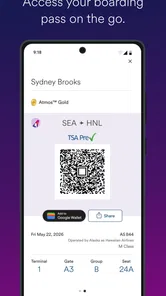
The Alaska Airlines app is designed to enhance your travel experience by offering a range of features. You can book flights, check in, and download your mobile boarding pass for ease of travel. Additionally, the app provides real-time flight status updates and gate change alerts. Mileage Plan members can access their account and track miles directly through the app, ensuring a seamless travel experience.
Pros
- User-friendly interface for easy navigation.
- Seamless flight booking and management.
- Real-time flight status updates.
- Frequent flyer program integration.
- Flight check-in directly from the app.
Cons
- Limited offline functionality.
- Occasional app crashes reported.
- Some features require internet.
- Limited in-app customer support.
- May not support all flight routes.











