

Airclub - Flight Deals
- 78.00
- 4.6
- Installs
- 10.00K
- Price
- Free

Screenshots

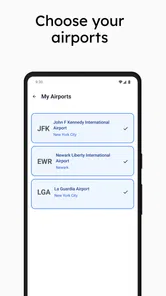

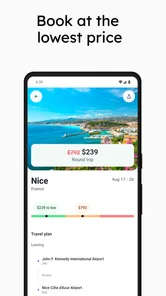


Analysis by Reviewed
Airclub - Flight Deals is the kind of travel app I would keep installed when I am flexible about where and when I fly, but I would not treat it as a complete replacement for a booking service. Its purpose is narrower and, in my experience, more useful when understood that way: it helps surface flight opportunities from airports I choose, then gives me a reason to investigate a trip I may not have considered. That focus makes it appealing for bargain hunters, spontaneous travelers, and anyone who checks fares before committing to a destination.
My overall view is positive, with one important qualification. Airclub works best as an early-warning tool for airfare savings, not as the final step in every travel plan. It can change how I search by putting the airport first and the destination second. That is a meaningful difference from opening a conventional booking site with a fixed city and fixed dates already in mind.
How Airclub fits into the way I plan trips
Airclub comes from Arcadia Labs Inc. and sits in the Travel & Local category. I found the setup easy to understand because the central idea is direct: choose airports that matter to me and watch for attractive flight deals. The app is free to install, and its Everyone age rating makes it suitable for a broad audience. There are in-app purchases ranging from $9.99 to $59.99 per item, so I would pay attention to which parts of the experience are available without spending and which extras are reserved for paying users.
The most useful mental shift is to stop thinking of this as a standard airline search box. A normal flight search usually begins with a question such as “How do I get from one city to another on these dates?” Airclub is better suited to “What interesting trip can I take from the airports I already use if the fare is unusually appealing?” Those are different questions, and the second one is where this app has its strongest identity.
That distinction matters in everyday use. If I have a wedding in a particular city next month, I still need a focused search with exact dates, baggage choices, connections, and booking details. If I have a free weekend and want to see whether my local airport opens up an affordable escape, Airclub feels much more relevant. It can help me notice possibilities before I have invested time in building a full itinerary.
The alert-first approach is the real strength
The app’s strongest value is the way it encourages passive discovery. Instead of repeatedly checking several routes myself, I can use my chosen airports as the starting point and let interesting fare movements come to me. That saves effort, but the bigger benefit is psychological: I am less likely to search only for destinations I already know.
This is particularly useful for travelers who live near more than one airport. I might normally default to the closest terminal, even when another airport within reasonable driving distance offers a much better fare. By treating airports as the anchor, Airclub encourages a broader comparison before I make that assumption. The saving is not automatically real once parking, fuel, tolls, or a longer transfer are included, but the app can prompt the comparison I might otherwise skip.
More From Our News Desk

 Weather - By Xiaomi
Weather by Xiaomi Review: Clear at a Glance, Less Clear Up Close
Xiaomi’s weather app makes everyday forecasts quick to scan, but its calm surface can leave useful details and recovery paths harder to find than they should be.

 X
XX Under Pressure: Can It Recover When Posting Goes Wrong?
A resilience-focused review of X, examining setup, mistaken posts, interruptions, weak connections, and the gaps that matter when recovery needs to be dependable.

 Clash of Clans
Clash of Clans Is Won Between the Battles
Its raids are quick; its community is a long-term project of coordination, teaching, rivalry, and shared responsibility—with all the friction that entails.

 Android Auto
Android Auto Makes the Case for Quieter Car Software
The car interface is no longer judged by how much it can do, but by how quietly it helps. Android Auto shows what drivers now expect—and what still gets in the way.

 MobiOffice: Word, Sheets, PDF
MobiOffice: Transforming Mobile Productivity with Seamless Integration
MobiOffice: Word, Sheets, PDF is redefining mobile productivity with a surprising blend of functionality and innovation.

 EA SPORTS FC Soccer Mobile 26
EA SPORTS FC™ Mobile Soccer: Redefining Mobile Sports Gaming
Dive into EA SPORTS FC™ Mobile Soccer, where immersive gameplay and strategic depth transform mobile sports gaming.
Latest News



A practical workflow is to begin with the airports I can reach comfortably, then decide what kind of trip would justify the fare. For a short break, I would consider the total travel time and ground transportation before reacting to a low headline price. For a longer holiday, a cheaper flight may justify a less convenient departure or arrival. Airclub is most helpful at the beginning of that decision, when I am still weighing possibilities rather than trying to finalize every detail.
Another non-obvious advantage is that alerts can act as a planning trigger rather than an instruction to buy immediately. When one appears, I would check the dates against work, school, local transport, accommodation, and baggage needs. That habit prevents the common mistake of treating an attractive airfare as the whole cost of a trip. The app creates the opportunity; I still need to judge whether the opportunity fits my life.
What I would check before trusting a deal
A flight alert is a starting point, not a guarantee that the entire journey will be inexpensive. I would always inspect the itinerary carefully. A low fare can become less appealing if it requires an awkward connection, an inconvenient airport, a very early departure, or separate transport at either end. Airclub’s usefulness depends on how quickly I move from “that looks cheap” to “does this work for me?”
I would also compare the discovered fare with the airline’s own booking path and at least one familiar flight-search alternative. This is not because the app is necessarily wrong; it is because airfare changes quickly and the final price can depend on details that are easy to overlook. Comparing the same dates, route, and baggage needs gives me a more reliable picture than reacting to an alert in isolation.
For travelers who check luggage, the comparison needs extra care. A fare that looks better before add-ons may no longer be the best choice after baggage, seat selection, and transport are considered. Someone traveling with only a small personal item may benefit more from a low headline fare than a family carrying several bags. Airclub can help both travelers discover options, but the value of the alert is different for each one.
I would also avoid building a complicated holiday around an alert before confirming the booking conditions. Flexible travelers can accept some uncertainty, while people traveling for an appointment, cruise departure, exam, or family event usually need reliability more than novelty. In those cases, the best option may be a direct search with carefully chosen dates, even if Airclub reveals a cheaper-looking alternative.
Where the experience has real friction
The main limitation is built into the concept: airport-based discovery is less useful when my destination and schedule are already fixed. If I must leave on a particular morning, arrive before a specific event, or fly to one exact city, broad deal alerts may add noise rather than save time. I would rather use a conventional search tool for that kind of trip and use Airclub only as an occasional price check.
There is also a discipline problem. Alerts can encourage impulse buying, especially when the destination is appealing and the fare appears temporary. The app may make a deal feel urgent even when the trip itself is not practical. I think users should set a personal rule before they begin: no purchase until the full itinerary, transport, accommodation, and time off have been checked. That small pause protects the savings the app is supposed to help create.
Another trade-off is that airport flexibility can create extra work. Seeing a lower fare from a farther airport is useful only if I calculate the complete door-to-door cost. Driving several hours, paying for parking, or arranging an early transfer can erase the apparent advantage. I appreciate that Airclub can expose the option, but I would not let the app make that final judgment for me.
The free entry point is welcome, although the presence of paid in-app items means the value question will depend on how often I travel and how much I care about additional capabilities. A frequent traveler who regularly checks several departure airports may find a paid option easier to justify than someone who takes one holiday a year. Before paying, I would use the free experience long enough to see whether the alerts match my airports and whether they lead to trips I would genuinely consider.
Who should use it, and who should skip it
I would recommend Airclub to people with flexible dates, flexible destinations, or access to several airports. It is especially suitable for solo travelers, couples planning short breaks, remote workers who can move dates around, and experienced travelers who already understand the difference between a low fare and a low total trip cost. These users can act on a good opportunity without forcing every plan into a rigid structure.
It can also be useful for someone who feels overwhelmed by the number of possible destinations. Rather than browsing endless route combinations, that person can begin with the airports that are realistic and wait for ideas to appear. This reverses the usual planning process in a helpful way. The app does not need to convince me that every deal is worth taking; it only needs to present enough relevant possibilities to make discovery easier.
I would be more cautious recommending it to families with strict school calendars, travelers with non-negotiable appointments, or anyone who needs accessibility, timing, or connection requirements to be satisfied precisely. Those travelers may still enjoy seeing deals, but a focused booking tool is likely to be more efficient. The same applies to people who dislike notifications or who tend to make quick purchases under pressure.
Budget travelers should use it with a calculator, not just enthusiasm. I would write down the fare, baggage costs, airport transfer, accommodation, and any date-change risk before deciding. That workflow is one of the best ways to turn the app from a source of tempting alerts into a genuinely useful planning aid.
How it compares with familiar flight-search habits
Traditional flight-search services are usually stronger when I know the origin, destination, and dates. They are designed for comparison at the point when I am ready to choose an itinerary. Airclub takes a different position earlier in the process. It is closer to a discovery layer: it helps me notice that a trip may be affordable before I have narrowed the search to one route.
That makes the two approaches complementary rather than direct substitutes. I would use Airclub to spot an idea, then use an airline or established search service to verify the schedule, fare conditions, baggage rules, and final booking details. If I already know exactly what I want, I would start with the traditional tool. If I know only where I can depart from and want inspiration, I would start with Airclub.
There is a similar difference between this app and manually checking airline newsletters, airport route pages, or several deal websites. Manual checking can produce useful information, but it demands repeated effort and a willingness to remember which sources to revisit. Airclub’s airport-centered approach is more convenient for someone who wants a single place to watch for possibilities. The trade-off is that no alert system should be assumed to cover every route, airline, or fare condition equally well without independent checking.
In my experience, the best workflow is therefore a three-stage process: use Airclub for discovery, verify the complete itinerary elsewhere, and then decide based on the total trip rather than the flight headline. That gives the app a clear role without asking it to do a job it was not designed to replace.
Practical habits that make the app more useful
First, I would choose airports based on realistic travel radius rather than simply adding every terminal I can find. Too broad a selection may produce opportunities that are technically cheap but inconvenient. A smaller, more practical airport group makes each alert easier to evaluate and keeps the app aligned with how I actually travel.
Second, I would keep a simple note of the dates when I can travel. When an alert arrives, I can quickly compare it with work commitments and other costs instead of trying to remember everything from scratch. This is especially helpful for flexible trips, where the temptation is to decide emotionally before checking the calendar.
Third, I would treat the alert’s timing as a prompt to investigate, not a reason to skip verification. I would open the itinerary, check the arrival airport, look at the connection pattern, and compare the final booking amount. A few minutes of careful checking can reveal whether the saving is meaningful or merely looks impressive at first glance.
Fourth, I would use the app to challenge my usual airport habits. If I normally fly from one terminal automatically, an alert from another airport can be a useful reminder to calculate the full door-to-door journey. Sometimes the farther airport will still win; sometimes the familiar airport will be better once transport is included. Either result is valuable because the decision is based on the complete trip.
Finally, I would review whether the app is earning its place on my phone. Someone who receives relevant alerts and occasionally books a trip because of them may see clear value. Someone who gets mostly unusable suggestions or rarely travels may be better served by checking a conventional search tool only when a trip is already taking shape. The free price makes trying it straightforward, but personal relevance should determine whether it stays installed.
Performance, maturity, and everyday confidence
Airclub is a relatively new app, released on July 8, 2025, and its current version is 1.0.93. It has passed the early discovery stage with over 10 thousand installs, a 4.6 average from around 2.9 thousand ratings, and 78 written reviews. Those figures suggest that many users find the basic idea appealing, while the written feedback is still a smaller window into long-term everyday use.
It supports Android 7.0 and later, which makes it accessible to people using older compatible phones as well as newer devices. I would still keep expectations practical: a travel-alert app is only as useful as the relevance of the opportunities it surfaces and the clarity of the information presented when I investigate them. A polished interface helps, but it cannot remove the need to verify a changing airfare.
The developer, Arcadia Labs Inc., has given the app a focused purpose rather than trying to make it an all-in-one travel platform. I see that as a strength because the experience is easier to understand. The limitation is that I still need other tools for the parts of travel planning that happen after discovery, such as comparing accommodation, arranging ground transport, and confirming detailed booking conditions.
That narrower scope is not a flaw by itself. In fact, it can make Airclub easier to recommend than an overloaded travel app with too many unrelated functions. The important question is whether the user wants flight inspiration from selected airports. If the answer is yes, the app has a clear reason to exist. If the answer is no, its alerts may feel unnecessary.
My final recommendation
After using Airclub as a flight-deal discovery tool, I think its central promise holds up: it can make affordable travel ideas easier to notice from the airports that matter to me. Its best quality is not that it eliminates every step of booking. It is that it changes the first step from searching one fixed route to watching for realistic opportunities.
I would install it if I had flexible travel plans, lived within reach of multiple airports, or enjoyed building trips around a strong fare. I would combine it with a conventional flight search and the airline’s own booking process before paying. I would also keep a close eye on baggage, transfers, timing, and the total cost, because those details decide whether a deal is genuinely good.
For rigid itineraries, time-sensitive journeys, or travelers who prefer to plan every detail in advance, another flight-search option will probably be more efficient. For curious and flexible travelers, however, Airclub offers a useful change of perspective. It is free to start, supported on Android 7.0 and later, and focused enough to earn a place in a bargain hunter’s travel routine. I recommend it as a smart discovery companion, provided you verify the complete trip before turning an alert into a booking.
Airclub - Flight Deals Frequently Asked Questions
Is Airclub - Flight Deals free to download, and are there in-app purchases?
Airclub - Flight Deals is free to download, so you can try its flight-deal discovery features without paying upfront. The app also offers in-app purchases, so check the purchase details and any applicable terms before confirming a payment. A deal shown in the app is separate from any optional app purchase and from the amount charged when booking travel.
Who makes Airclub - Flight Deals, and is it available for my device?
Airclub - Flight Deals is made by Arcadia Labs Inc. and is listed for devices running Android 7.0 or later. Before downloading, check your device’s operating system and available storage, and make sure you are getting the app from a trusted app store. The app is rated for everyone, though parents may still want to review its features and purchase options before a child uses it.
What is Airclub - Flight Deals, and how does it work?
Airclub - Flight Deals is a travel app designed to help users discover discounted airfare and limited-time flight offers. After selecting preferred departure airports, destinations, travel dates, or deal categories, the app presents available opportunities in a searchable format. It is mainly a deal-finding tool, so users should review the final itinerary, airline, baggage rules, and booking conditions before purchasing.
Can I book flights directly through Airclub - Flight Deals?
Airclub - Flight Deals may display flight opportunities and guide users toward the relevant booking process, but the exact booking experience can depend on the offer and the provider behind it. Before confirming a purchase, check whether you are redirected to an airline, travel agency, or external booking website. Always verify the final price, passenger details, cancellation policy, and payment terms on the checkout page.
Are the flight prices shown in Airclub - Flight Deals guaranteed?
Flight deals can change quickly because airlines and travel providers frequently update fares, availability, taxes, and fees. A price shown in the app should therefore be treated as an indication rather than a permanent guarantee. When you find a suitable offer, open it promptly and compare the final checkout amount, including baggage, seat selection, service charges, and other possible extras.
Pros
- Useful for spotting discounted airfare across multiple destinations.
- Simple interface makes browsing flight offers quick and convenient.
- Helpful filters can narrow results by budget
- dates
- and destination.
- Good option for flexible travelers seeking spontaneous getaway ideas.
- Can save time compared with checking several airline websites manually.
Cons
- Deal availability may change quickly or disappear without warning.
- Some offers may include restrictive dates
- baggage rules
- or booking conditions.
- Final prices can differ after taxes
- fees
- or redirection to a provider.
- Limited value for travelers with fixed dates or highly specific routes.
- Users may need to complete bookings through external airline or travel sites.











