

AImoji Keyboard - AI Stickers
- 26.00
- 4.6
- Installs
- 10.00K
- Price
- Free
Screenshots
Analysis by Reviewed
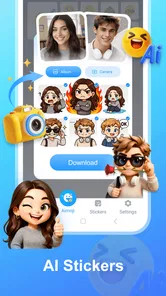
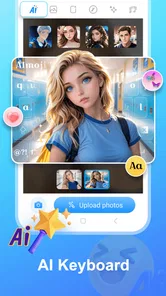
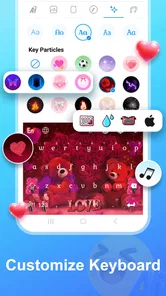
I spent time with AImoji Keyboard - AI Stickers as a personalization app, and its appeal is easy to understand: it brings custom stickers and keyboard themes into the same place, with AI doing much of the creative work. Instead of settling for the keyboard style already installed on your phone, you can use the app to make conversations feel more personal and visually distinctive.
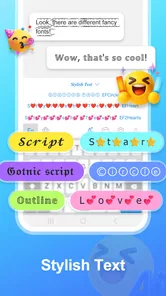
That sounds simple, but the useful question is whether it fits naturally into everyday typing. In my experience, the answer depends on how often you send stickers, how much you enjoy changing your phone’s appearance, and whether you are comfortable with a keyboard that is also a creative tool. It is not merely a wallpaper-style customization app. The keyboard is the center of the experience, while the sticker and theme tools give you reasons to keep returning.
The app is free to install, with optional in-app purchases ranging from $1.49 to $39.99 per item. It is suitable for Everyone, runs on Android 6.0 and later, and is developed by Alef Network. The current release is version 1.2.1, and it has built a 4.6 average from 122 ratings, alongside more than 10K installs. Those figures suggest a small but interested user base rather than a long-established mainstream keyboard.
How the everyday workflow feels
The most practical way to approach the app is to begin with one clear goal instead of trying to redesign everything at once. I would start by choosing a keyboard theme that is comfortable to look at, then test the keyboard in a low-pressure conversation. Once the layout feels familiar, I would move on to stickers. This order matters because a visually attractive keyboard is not automatically pleasant for longer messages.
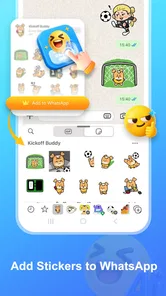
For a normal chat, the workflow is straightforward in concept: open the keyboard, type as usual, and switch to the sticker area when a reaction or image feels more suitable than words. The advantage is that the creative material sits close to the place where you are already composing a message. You do not need to leave the conversation, open a separate image editor, save a file, and then return to paste it.
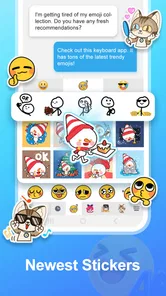
I found that this makes the app more useful for quick emotional responses than for carefully designed artwork. A custom sticker can communicate excitement, embarrassment, sarcasm, or encouragement without requiring a full sentence. That is especially handy in group chats, where a distinctive reaction can be more noticeable than another standard emoji.
The important habit is to create a small personal collection rather than generating something new for every message. A few stickers that match your usual tone are easier to find and more likely to be used. If you make too many variations too quickly, the creative side becomes cluttered and the keyboard loses its speed advantage.
More From Our News Desk

 Gmail
GmailGmail in a Busy Inbox: Who Benefits Most?
From first account to crowded workday, Gmail earns its place through dependable search and flexible sorting—but its best fit depends on how much inbox maintenance you can tolerate.

 Prime Video
Switching to Prime Video: What Changes in Your Viewing Routine
Prime Video can make a compelling second home for streaming, but switching means learning a different catalog, rental layer, and route from browsing to playback.

 Universal TV Remote Control
Universal TV Remote Control Works Best as a Reliable Backup
A phone remote earns its place through quick setup and reliable habits. Here is how to get more from Universal TV Remote Control—and where its limits show.

 Weather - By Xiaomi
Weather by Xiaomi Review: Clear at a Glance, Less Clear Up Close
Xiaomi’s weather app makes everyday forecasts quick to scan, but its calm surface can leave useful details and recovery paths harder to find than they should be.

 X
XX Under Pressure: Can It Recover When Posting Goes Wrong?
A resilience-focused review of X, examining setup, mistaken posts, interruptions, weak connections, and the gaps that matter when recovery needs to be dependable.

 Clash of Clans
Clash of Clans Is Won Between the Battles
Its raids are quick; its community is a long-term project of coordination, teaching, rivalry, and shared responsibility—with all the friction that entails.
Latest News



Where the app fits best
I see the strongest use case in casual messaging. Friends who already use stickers, reaction images, and themed keyboards will understand the appeal immediately. It can also suit someone who wants a more expressive keyboard without learning a separate design application. The AI approach lowers the effort needed to produce something that feels more personal than a stock emoji.
A realistic example would be a family group chat where one person regularly sends reminders, congratulations, and playful reactions. With a consistent theme and a small set of custom stickers, those messages can have a recognizable style. The benefit is not that every message becomes spectacular; it is that repeated conversations feel less generic.
It is less convincing for people who mainly write long emails, work messages, or documents. In those situations, the keyboard’s visual personality adds little, and a conventional keyboard may be faster and less distracting. If your priority is advanced text editing, specialized multilingual controls, or a very restrained interface, this app should not be your automatic first choice.
Getting comfortable before customizing heavily
My advice is to spend a little time typing ordinary sentences before judging the app’s creative tools. A keyboard can look excellent in a preview and still feel awkward when you use it quickly. Pay attention to key spacing, the visual contrast between letters and background, and whether the theme makes punctuation easy to locate.
I would also avoid changing the theme every few minutes. Constant switching makes it difficult to tell whether a problem comes from the keyboard itself or from the design you selected. Use one option for a normal conversation, then try another when you have a clear reason. This simple comparison gives a better sense of which styles are practical rather than merely attractive.
The best starting point is a comfortable keyboard first and a creative sticker collection second. That balance keeps the app useful when the novelty wears off.
Settings and habits that deserve attention
Because this is a keyboard, the settings deserve more attention than they might in a typical personalization app. A theme affects appearance, but the keyboard also becomes part of how you enter text. Before relying on it for important messages, I would check the available keyboard options on the device and make sure the preferred layout is selected consistently.
It is worth checking how easily you can move between regular typing and stickers. If the switch requires too many taps, the feature may be enjoyable in theory but inconvenient during a fast conversation. The most effective setup is one where you can type a sentence normally, open the sticker choices without losing the draft, and return to text without feeling that the conversation has been interrupted.
I would also test the keyboard in more than one messaging app. Different apps can present the keyboard area differently, and a design that looks clear in one conversation may feel cramped in another. This is not a reason to reject the app; it is a reason to judge it in the places where you actually communicate.
Choosing themes for function, not only appearance
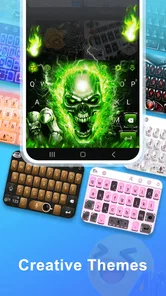
Bright colors and elaborate backgrounds can be fun, but readability should decide which theme stays installed. I prefer a design where letters remain obvious at a glance and the space bar and punctuation do not disappear into the artwork. A theme that looks impressive in a screenshot may slow down typing if the contrast is weak.
This is one of the app’s central trade-offs. Personalization encourages visual expression, while typing rewards simplicity. The right choice depends on the balance you want. For short chats, a bold theme may be perfectly comfortable. For longer messages, a calmer design is usually easier on the eyes.
I would treat themes almost like clothing for different situations: expressive for casual conversations, understated when speed and clarity matter. That approach lets the app remain enjoyable without forcing one style onto every part of your day.
Managing the creative side without losing speed
AI-generated stickers are most useful when you give yourself a repeatable way to evaluate them. I would keep the first versions that are immediately understandable, visually clean, and appropriate for the people I message. If a sticker needs a long explanation before anyone understands the joke, it is probably not earning its place in the collection.
Another useful habit is to build around recurring situations rather than random ideas. Think about the reactions you send often: agreement, thanks, surprise, celebration, apology, or a friendly refusal. Creating around those moments makes the app more practical than producing a large set of unrelated designs.
This is also where the app differs from ordinary emoji keyboards. A standard keyboard gives you a broad, familiar library that is quick to search. AImoji Keyboard gives you a more personal direction, but the quality of that experience depends on the choices you make. You get more ownership over the tone, yet you also take on the work of selecting and organizing what is genuinely useful.
Faster patterns for regular users
After the initial setup, the biggest improvement comes from reducing decisions. Experienced use is not about constantly exploring every creative option. It is about preparing a small set of reliable choices and reaching them quickly. I would keep one main theme for daily use and reserve alternative designs for moments when I specifically want a different mood.
For stickers, I would think in groups. A reaction group might contain a few expressions for surprise or amusement. A social group could cover thanks, congratulations, and encouragement. A personal group might be based on an inside joke or a recurring conversation. Even without assuming special organizational tools, this mental grouping makes it easier to remember what you have created.
When a conversation moves quickly, use text for information and stickers for tone. Sending a sticker after a clear sentence can add warmth, but replacing every answer with an image can make the exchange less precise. The app works best when it supports communication rather than becoming the entire message.
A repeatable routine for daily conversations
My preferred routine would be simple. I would use the keyboard normally during the first part of a conversation, notice moments where a visual reaction would genuinely improve the message, and then choose from a limited personal selection. Later, I would remove or ignore designs that repeatedly fail to fit. This keeps the collection focused and prevents the sticker panel from becoming another place to search.
For a birthday message, a custom celebratory sticker can make a familiar phrase feel more personal. For a work-related chat, I would be more selective and probably use the plain keyboard unless the group already communicates casually. The same feature can be charming in one setting and unprofessional in another, so context matters more than novelty.
If you share a device with other people, remember that a personalized keyboard is a personal preference, not necessarily a universal one. Someone else may prefer a neutral layout or may find a decorative theme harder to read. In that situation, keeping a practical default is more considerate than treating the most colorful design as the permanent choice.
Comparing it with ordinary alternatives
Compared with a standard phone keyboard, this app offers more visual identity and a clearer creative purpose. The usual keyboard is generally the safer option when you want predictable typing and minimal setup. AImoji Keyboard becomes more attractive when stickers and themes are part of how you communicate.
Compared with a dedicated sticker-making app, its advantage is proximity. You can create and use the result within the same general keyboard experience instead of moving between apps. The trade-off is specialization: a full design app may provide more control for someone who wants detailed editing, while this app favors speed and accessibility.
Compared with a conventional emoji keyboard, the difference is personal expression. Familiar emoji are universally understood and require no preparation. Custom stickers can feel more memorable, but they may be less immediately clear to someone who does not share your context. I would use both approaches rather than expecting one to replace the other.
Limits that become clearer with advanced use
The app’s AI focus should not be mistaken for unlimited creative control. AI can help you reach an idea quickly, but the result may not always match the exact mood, composition, or level of subtlety you had in mind. That is normal for this type of tool, and it means selection remains part of the process.
If you want precise branding, carefully controlled typography, or a consistent character across many designs, a dedicated graphics workflow may serve you better. AImoji Keyboard is more appealing when you value quick, playful personalization than when you need production-level control.
There is also a practical cost consideration. The app is free to use at its entry point, but optional purchases are available, with individual items priced from $1.49 up to $39.99. I would begin with the free experience and only pay if the additional material clearly improves the way I use the keyboard. The presence of purchases makes it especially important not to confuse a larger collection with a better one.
Privacy and keyboard comfort deserve personal checking
Any app that becomes a keyboard deserves a more thoughtful setup than a simple theme utility. I would read the permissions and keyboard-related notices shown on the device before making it my everyday input method, then decide whether that level of access fits my comfort. This is not unique to Alef Network’s app; it is a sensible step whenever a third-party keyboard is involved.
I would also keep a backup keyboard available. That gives you an easy escape if the themed layout is uncomfortable, if you need a different language arrangement, or if you are entering something where you prefer your usual typing environment. Keeping an alternative does not undermine the app; it makes switching less stressful.
Another limitation is that visual personalization can become distracting. If you find yourself browsing themes or generating stickers more often than communicating, the creative layer is taking over. The solution is not necessarily to uninstall the app. A simpler theme and a smaller sticker collection can restore the keyboard’s practical role.
Who should skip it
I would skip this app if you rarely use stickers, dislike decorative interfaces, or need a keyboard primarily for fast, formal, and highly accurate text entry. It may also be a poor fit if you expect every AI result to be ready to send without reviewing it. The app rewards a little curation, and users who do not want that step may find the creative promise less valuable.
On the other hand, I would recommend trying it if your conversations are expressive, you enjoy changing the look of your phone, and you want a low-effort way to create more personal reactions. It is particularly suitable for people who like experimenting but do not want to learn complex image-editing software.
My verdict after building a workable routine
AImoji Keyboard - AI Stickers works best when treated as a communication accessory rather than a replacement for every keyboard on your phone. Its strongest idea is the combination of a personalized typing surface and quick access to custom stickers. That combination can make everyday chats feel more individual, especially when you prepare a few useful reactions instead of collecting everything available.
I appreciate that the app has a clear personality. It is not trying to be a silent utility. The themes and AI sticker tools are the reason to install it, and they give casual messaging a playful layer that ordinary keyboards do not emphasize. The free starting point also makes experimentation easy, while the Everyone rating keeps its intended audience broad.
Still, the app needs sensible boundaries. A theme should not reduce readability, a sticker should not replace clarity, and optional purchases should be judged by actual use rather than by the size of a catalog. The keyboard should also be tested in the conversations and languages you rely on most before you make it your default.
My final recommendation is positive for casual communicators, creative phone customizers, and anyone who regularly uses stickers to express tone. I would be more cautious for professional typists, minimalists, and users seeking advanced editing control. If you approach it with a small collection, a readable theme, and a backup keyboard ready, it becomes easier to see its real value.
In short, this is a personalization app with a practical messaging angle: best when your keyboard is part of your personality, not just a place to press letters.
AImoji Keyboard - AI Stickers Frequently Asked Questions
Is AImoji Keyboard - AI Stickers compatible with my device?
AImoji Keyboard - AI Stickers is a personalization app, and its current version is 1.2.1. On Android, it requires Android 6.0 or later, so check your device’s operating system before downloading. If you use an iPhone or iPad, review the app’s availability and compatibility in the relevant store before installing. Compatibility can also affect how the keyboard appears and works in individual messaging apps.
Who makes AImoji Keyboard - AI Stickers, and what do users think of it?
AImoji Keyboard - AI Stickers is made by Alef Network. It has a 4.6 average from 122 ratings, with 26 written reviews, offering an initial sense of how users have responded. Ratings are only one part of the picture, so it is useful to read recent comments for practical impressions of sticker creation, keyboard setup, and day-to-day use before deciding whether it suits you.
What is AImoji Keyboard - AI Stickers and how does it work?
AImoji Keyboard - AI Stickers is a keyboard app designed to help you create and share personalized stickers, emojis, and expressive images while chatting. After installation, you typically access it through your device’s keyboard settings, select it inside a compatible messaging app, and use its AI-powered tools to generate or find visual content. The exact features and generation options may vary by device, app version, and operating system. Its focus is personalization: the app’s store summary invites you to create your own stickers and keyboard themes with AI.
Is AImoji Keyboard - AI Stickers free to download and use?
The application is free to download, but it offers in-app purchases ranging from $1.49 to $39.99 per item. Before using the AI sticker tools extensively, check the pricing details shown in the app store and inside the application. It is also worth confirming which premium content, generation limits, extra sticker packs, or other features are included in a purchase, so you can decide whether the free experience meets your needs.
Does AImoji Keyboard require access to my messages or personal information?
As with most third-party keyboard applications, AImoji Keyboard may request permission to become an enabled keyboard and could process text or images entered through it, depending on the features you use. Read the permission prompts and the developer’s privacy policy carefully before enabling it. Avoid entering passwords, payment details, or highly sensitive information through any third-party keyboard unless you fully understand how that data is handled.
Pros
- Creates personalized AI stickers from simple text prompts
- Offers a playful way to express emotions in chats
- Sticker designs can make ordinary conversations more engaging
- Easy to browse and reuse recently created stickers
- Useful for users who want more than standard emoji options
Cons
- AI-generated results may not always match the requested idea
- Some sticker packs or features may require payment
- Processing can take longer when servers are busy
- Privacy concerns may arise when prompts include personal details
- The keyboard may feel unnecessary if you rarely send stickers











