AI Video Enhancer - Utool
- 722.00
- 4.5
- Installs
- 10.00M
- Price
- Free

Screenshots



Analysis by Reviewed
I often find that a clip can capture a moment perfectly while still looking a little flat on screen. AI Video Enhancer - Utool is aimed at that gap: it offers a way to improve existing footage without asking me to learn a full editing suite. I see its strongest appeal in quick, personal fixes rather than detailed, frame-by-frame production work.
What the free access does—and what costs extra
The app is free to install, with in-app purchases priced from $2.99 to $49.99 per item. That makes it easy to try before spending, but I wouldn’t assume every enhancement or export option is included at no cost. I’d first test a short clip and check which tools are available in the free experience; only then would I decide whether a paid option solves a problem I actually have.
That distinction matters because “free” describes access, not necessarily every possible use. If I only want to improve an occasional family clip, trying the app may be enough. If I plan to use it regularly, I’d weigh the specific paid features against how often I need them rather than treating the highest listed purchase as a recommended upgrade.
Transforming Ordinary Videos into Extraordinary
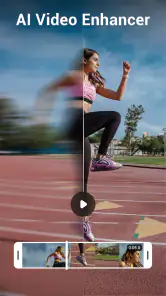
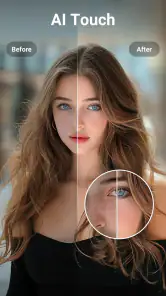
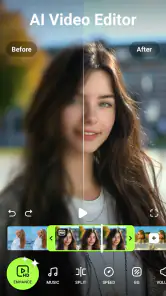
When I first opened the AI Video Enhancer - Utool, I was greeted with a sleek and intuitive interface. It's designed for ease of use, making it accessible for everyone, from the tech-savvy to those who might still struggle with finding the flashlight on their phone. The app uses advanced AI algorithms to enhance video quality, clearing up pixelation and refining details that might have been lost in the original video.
How Does It Work?
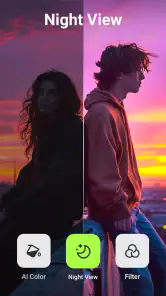
It's pretty straightforward. You simply upload your video into the app, and the AI kicks in to analyze and enhance it. Whether it's a cherished family video that's seen better days or a quick clip you took on a night out, the app works its magic seamlessly. I was particularly impressed with how it handled low-light videos. The AI seemed to pull light out of thin air, making the video look as if it was shot in perfect conditions.
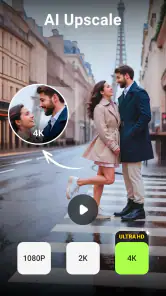
Another neat feature is the app's ability to upscale video resolution. Ever had a video that looked great on your phone but lost its charm on the big screen? The AI Video Enhancer tackles this issue head-on, boosting resolutions and ensuring your videos are ready for any display size.
Getting a result that still looks natural
My practical advice is to compare the processed clip with the original before deciding it is finished. Enhancement can make edges and textures more noticeable, but stronger processing is not automatically better: a dim, soft scene may benefit, while already crisp footage can end up looking overly polished. I’d keep an untouched copy, especially for a memory I don’t want to alter, and use the enhanced version as a separate shareable edit.
More From Our News Desk

Weather by Xiaomi Review: Clear at a Glance, Less Clear Up Close

X Under Pressure: Can It Recover When Posting Goes Wrong?

Clash of Clans Is Won Between the Battles

Android Auto Makes the Case for Quieter Car Software

MobiOffice: Transforming Mobile Productivity with Seamless Integration

EA SPORTS FC™ Mobile Soccer: Redefining Mobile Sports Gaming
For a quick everyday workflow, I’d choose one short clip, apply the improvement, then view it at the size where I plan to share or watch it. A video that looks convincing on a phone may reveal different artifacts on a larger display. This small check helps me judge whether the result genuinely improves the moment instead of simply making it brighter or sharper.
Value for different kinds of editing
Utool sits between a one-tap filter and a traditional video editor. Compared with a general editor, its appeal is the focus on image enhancement rather than building a timeline with lots of manual controls. That can save effort when the footage itself is the problem. But if I need precise trimming, layered titles, careful color grading, or detailed audio work, I’d reach for a full editor instead; enhancement is not a substitute for those tasks.
The app is published by Music Video Editor with Effects & Slideshow and belongs to the video-player and editing space. Its short description emphasizes enhancement, while its broader store summary also mentions photo and video editing, retouching, filters, effects, and slideshows. I would treat those as reasons to explore its creative range, not assume that every tool is equally deep. For a focused repair, I’d start with the video and avoid adding decorative effects until I’m happy with the underlying image.
User Experience and Performance
I must say, I was a bit skeptical about how much processing power this app might require. Surprisingly, the app runs smoothly without hogging your device's resources. It's available for both Android and iOS, ensuring a wide range of users can enhance their videos without a hitch.
The processing time is reasonably quick, though I imagine this might vary depending on the length and quality of the original video. I ran a couple of tests on different types of videos, and the app consistently delivered impressive results without any crashes or glitches.
For a realistic use case, imagine getting home from an evening out and wanting to send a dim clip to friends before the moment goes stale. I’d try enhancement on a copy, inspect faces and moving details, then share only if the brighter result still feels true to the scene. If the original is badly out of focus or motion-blurred, I wouldn’t expect AI to recover information the camera never captured; a retake or a more hands-on edit may be the better answer.
Small workflow choices that make a difference
I’d treat enhancement as a step in a simple workflow, not as a reason to process an entire camera roll. Pick a clip with a clear purpose, such as saving a dim birthday moment or preparing a short travel video for a family chat. Then compare a representative section, especially where faces move or the lighting changes. A single attractive still frame is not enough to judge a video, because processing can look convincing in one moment and less natural a few seconds later.
When a clip contains both bright and shadowed areas, I’d pay attention to whether improving one part makes another look harsh. That is a useful check for night scenes with signs, lamps, or phone screens in the frame. If the brighter areas lose their natural appearance, I’d rather keep the original than chase a dramatic before-and-after. The aim is a watchable memory, not maximum visible alteration.
I’d also decide where the enhanced file is going before spending time on it. For a small screen or a quick message, a subtle improvement may be all that is needed; for a family video shown on a television, I’d inspect it at a larger size first. That habit helps set realistic expectations and avoids judging the result only by the preview on the same phone used to edit it.
Where it fits among editing alternatives
Compared with the built-in editing tools many people already use, a dedicated enhancer is most worthwhile when ordinary trimming and filters have not helped the footage look clearer. Those basic tools are often the quicker choice for cropping, shortening a clip, or making a simple color adjustment. Utool’s appeal is more specific: it gives the improvement of the image itself a central role, so it can be a useful first stop when the clip looks soft or lacks detail.
On the other hand, a timeline editor is the better choice when I’m assembling several shots, matching their color, adding captions, or shaping a soundtrack. Using an enhancer for those jobs would be like reaching for the wrong tool: it might help one ingredient, but it does not replace the full process. I’d also choose a manual editor when consistency matters across a sequence, because carefully controlling each shot can be more important than quickly changing one clip.
For someone who already has a favorite editing app, Utool can make sense as a possible preparation step rather than a replacement. I’d improve a copy, compare it with the untouched source, and bring forward only the version that genuinely looks better. If moving between apps makes the workflow cumbersome, or if the improvement is too subtle to notice, sticking with the editor already in use is perfectly reasonable.
Who is likely to get value?
I’d recommend giving it a try if you regularly revisit older phone videos, have clips that look weaker than you remember, or want a quick improvement without learning a complex editor. It may also suit a casual creator who wants to polish source footage before adding it to a separate editing workflow. The app is rated for Everyone, so it is broadly suitable from an age-rating perspective, though the right choice still depends on the user’s editing needs.
I’d skip it if you need predictable professional color work, exact control over every adjustment, or a complete production workspace. I’d also avoid paying for tools before checking whether the app’s available results meet your standard. A different editor is a better fit when timing, sound, captions, and multiple clips matter more than enhancing the image itself.
It is also not my first choice for footage whose main problem is shaky framing, missed focus, or a moment that is too brief to understand. Making an image look cleaner cannot guarantee that the action becomes clearer or that the shot feels well composed. In those cases, I’d focus on selecting a better moment, trimming carefully, or recording again when possible rather than expecting enhancement to solve a capture problem.
Final Thoughts
In a world where visual content is king, having an app like AI Video Enhancer - Utool at your fingertips is invaluable. It's perfect for content creators, social media enthusiasts, or anyone who just wants their video memories to shine a little brighter. While it's not a magic wand that will turn shaky, blurry footage into a cinematographic masterpiece, it certainly comes close.
So, if you're looking to give your videos a new lease on life, I'd definitely recommend giving this app a try. It's user-friendly, effective, and, most importantly, delivers on its promise to enhance your video content. Whether you're working on a hobby project or just want to relive your favorite moments in higher quality, this app is worth checking out.
The app has a 4.5 average from around 57,000 ratings and more than 10 million installs, which suggests it has reached a broad audience, though popularity alone can’t tell me whether its results will suit a particular clip. It was released on September 18, 2023, and its current version is 1.142.60; it requires Android 7.0 or later. The rating is useful context, but I’d still make my own decision by testing footage that resembles what I actually want to improve.
My verdict is to try it when convenience matters more than granular control. Since there is no upfront price, the sensible approach is to start with a low-stakes video, judge the before-and-after carefully, and spend only if a paid feature proves useful in your routine. For quick rescue attempts and casual sharing, that’s a reasonable trade-off; for exacting edits, I’d choose a dedicated editor and keep Utool as an optional enhancement step.
A sensible way to decide whether to keep using it
I’d make the decision with one representative clip rather than an unusually easy or difficult example. Choose footage that resembles what you normally shoot, keep the original safe, and look at the result in the context where you’ll use it. If the improvement is obvious without making the scene feel artificial, that is a useful sign the app fits your routine. If I have to work hard to find a difference, I would not pay simply because an enhancement tool is available.
The same test can answer a practical question about ongoing value: does the app save me effort often enough to justify any purchase I choose? A free starting point lowers the barrier to trying it, while the range of in-app purchase prices means I’d check the specific option on offer rather than treating paid access as one fixed package. I’d only spend when the result solves a recurring problem, not just because one clip happens to be important.
That leaves me with a straightforward recommendation. Utool is worth a cautious try for people who want a quick image-focused improvement and are comfortable judging the result for themselves. It is less compelling for anyone who needs detailed editing controls, dependable restoration of badly damaged footage, or a complete production setup. Start small, compare honestly, and keep the original; if those checks show a real benefit, the app can earn a place in a casual video workflow.
AI Video Enhancer - Utool Frequently Asked Questions
Does my phone meet the basic requirements to install AI Video Enhancer - Utool?
AI Video Enhancer - Utool requires Android 7.0 or later, so check your device’s operating system before downloading. The current version is 1.142.60. These compatibility details are especially useful if you plan to install the app on an older phone or tablet, or are helping a family member choose an app.
Who develops AI Video Enhancer - Utool, and what is it designed for?
AI Video Enhancer - Utool is a video editing app from Music Video Editor with Effects & Slideshow. It is presented as an AI photo and video editor, with HD and 4K video enhancement, AI retouching, filters, and effects. Its focus is helping users improve or edit visual content from a mobile device.
Is AI Video Enhancer - Utool free to download, and are there optional purchases?
AI Video Enhancer - Utool is free to download, with in-app purchases available for users who want to explore paid options. Those purchases range from $2.99 to $49.99 per item, so it is worth checking the price and terms shown in the app before buying. You can start by downloading it without paying upfront.
What should I know about the app’s age rating and compatibility before installing it?
The app is rated Everyone and requires Android 7.0 or later. Its current version is 1.142.60, so checking your device’s operating system before downloading can help avoid compatibility problems. These details are useful to consider if you are installing it on an older phone or tablet, or choosing an app for a family member.
What is AI Video Enhancer - Utool and how does it work?
AI Video Enhancer - Utool is a powerful application designed to enhance the quality of your videos using artificial intelligence technology. It works by analyzing each frame of your video and applying advanced algorithms to improve resolution, reduce noise, and enhance visual details. This results in a clearer, more professional-looking video output that can be achieved with minimal user input.
Pros
- Enhances video quality effectively.
- User-friendly interface.
- Supports multiple file formats.
- Fast processing speed.
- Regular updates with new features.
Cons
- Limited free version features.
- Requires high processing power.
- Occasional crashes reported.
- Large file sizes post-processing.
- Subscription can be expensive.
- Category
- Video Players & Editors
- Version
- 1.142.60












