AI Video Editor - Vidma Cut AI
- 2.77K
- 4.6
- Installs
- 10.00M
- Price
- Free

Screenshots




Analysis by Reviewed
When I have a handful of everyday clips and want to turn them into something watchable without settling in for a long editing session, a phone editor is often the most sensible place to start. AI Video Editor - Vidma Cut AI is aimed at that kind of quick creative job: trimming footage, shaping its pace, and adding music or visual touches. I’d treat its AI as a starting point rather than a substitute for my own choices; the best result still comes from deciding what the video is meant to say.
A practical first pass
My usual approach with an editor like this is to choose a small set of clips before I begin, rather than import every take from an outing. For a short birthday recap, for example, I’d pick a greeting, a couple of candid moments, and one closing shot. That gives suggested cuts and transitions a clearer job to do, and makes it easier to notice when a transition is distracting instead of helpful. If the first arrangement feels too busy, I’d remove a clip before adding more effects.
Music is most useful when it supports the footage rather than competes with it. I’d listen through the sequence once with the track on, then check whether an important spoken moment gets buried. Text overlays work best when they add context—such as a place or a date—rather than repeat what viewers can already see. These small checks can make a quick edit feel considered without turning it into a complicated project.
A repeatable workflow for ordinary projects
One realistic use is making a short recap after a family gathering. I’d select a few moments that have a clear beginning and end, put them in an order that makes sense to someone who wasn’t there, and only then decide whether music or text adds anything. That order also helps when I’m editing a travel clip or a quick post: first make the story understandable, then use effects to support it. A repeatable routine is more useful than chasing a perfect first draft.
If the footage includes people speaking, I’d make a separate pass focused only on the sound. Music that feels pleasant over scenery can mask a quiet conversation, so I’d lower or remove it around important speech rather than assuming one soundtrack level works throughout. When dialogue is the point of the video, a simpler edit with less music may be more effective than a polished-looking montage.
For a sequence with many similar takes, I’d compare the moments before building the edit. A brief reaction or an imperfect but genuine laugh may carry more feeling than a technically cleaner shot. Keeping only the strongest version also makes later choices easier: there are fewer clips to rearrange and fewer opportunities for the same idea to appear twice.
Getting Started with Vidma Cut
First things first, downloading Vidma Cut AI was a breeze. A quick search on the app store, and boom, I was ready to roll. Upon opening the app, I was greeted with a sleek interface that screamed user-friendly. No clutter, just straightforward options that even my grandma could navigate. I mean, who doesn't love a clean and simple UI, right?
You May Like

Clash of Clans Is Won Between the Battles

Android Auto Makes the Case for Quieter Car Software

MobiOffice: Transforming Mobile Productivity with Seamless Integration

EA SPORTS FC™ Mobile Soccer: Redefining Mobile Sports Gaming

How Microsoft OneDrive Became a Mobile Productivity Giant

How Google Translate Breaks Language Barriers Effortlessly
Intelligent Editing at Your Fingertips
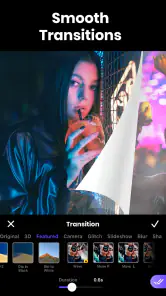
Now, onto the good stuff. What sets Vidma Cut apart is its AI-powered editing. You don't have to be a tech whiz to make your videos look professional. The app’s AI does a lot of the heavy lifting. I threw in a couple of raw clips, and the app suggested cuts and transitions that made my video flow smoothly. It’s like having a mini director in your pocket. And if you’re feeling adventurous, there’s plenty of room to tweak and add your personal touch.
Features That Stand Out
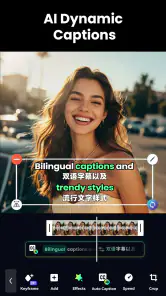
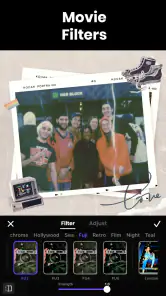
Vidma Cut AI comes packed with features that are both fun and functional. From adding music tracks to incorporating text overlays, the app offers a variety of tools to enhance your video. I particularly enjoyed the filters and effects that could be applied with just a tap. Whether you’re aiming for a dramatic flair or a light-hearted feel, there’s an option for every mood.
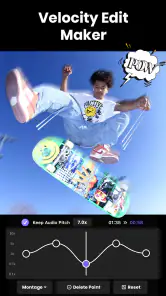
Plus, the speed controls are a game-changer. Ever wanted to create that slow-motion effect or speed things up for a comedic touch? With Vidma Cut, it’s as simple as dragging a slider. And let’s not forget the export options – high-quality renders ensure your masterpiece looks sharp on any platform.
Small habits that make editing smoother
For repeat projects, I find it helpful to settle on a simple rhythm: choose the clips, arrange the story, adjust timing, then add sound and polish. That order keeps filters from distracting me before the sequence works. Speed controls are particularly easy to overuse, so I’d reserve them for a moment that benefits from a clear change in pace—a quick comic beat or a detail worth lingering on—rather than applying them to every shot.
Before sharing, I’d watch the full video from beginning to end and check the opening and ending closely. A strong first image helps viewers understand why they should keep watching; a clean ending feels more deliberate than cutting off mid-action. If the video is for a particular social platform, I’d also consider how it will look on a phone screen and whether text stays readable at that size. A quick preview is a better safeguard than assuming an effect or overlay will suit every screen.
Settings worth checking before you commit
I’d treat any automatic edit as a draft and inspect the joins between clips rather than judging the result only by its overall feel. A transition can make two shots appear connected while still cutting away from a meaningful expression or action. If that happens, shortening the sequence or choosing a different moment is often a better fix than adding another effect.
Text deserves its own final check. A caption that looks neat while editing can become hard to read over a busy background or on a small screen. I’d keep wording short, place it where it doesn’t obscure a face or important detail, and preview the complete video at the size people are likely to watch it. For a private family clip, extra labels may be useful; for a quick social post, one clear line can be enough.
Faster patterns without rushing the edit
The quickest habit I’ve found is deciding the purpose before opening the editing tools. If I’m making a small event recap, I can reject clips that don’t contribute to that story instead of repeatedly trying to make every recording fit. I also try not to audition several effects on every shot. A consistent look across a few chosen moments tends to feel more intentional than a sequence where each clip has a different treatment.
When I have only a few minutes, I’d prioritize the opening, the most important moment, and the ending. Those are the places where an edit most clearly feels unfinished if the timing is awkward. I can leave a decorative filter out and still have a coherent video; a confusing order or an abrupt cutoff is harder to overlook. This is a practical way to keep a quick edit from turning into a long session.
Where a phone editor fits—and where it doesn’t
As a video editing app from Vidma Video Studio, Vidma Cut AI sits in the convenient, approachable part of the category. It is free to install, with optional in-app purchases ranging from $0.49 to $89.99 per item. Its 4.6 average from around 364,000 ratings and more than 10 million installs suggest that many people use it, but popularity alone doesn’t make it the right tool for every project. The app is rated for Everyone, and version 2.24.0 requires Android 9 or later.
Compared with a basic phone gallery editor, it offers more room to shape a sequence with music, effects, and speed changes. Compared with a desktop editor or a more hands-on mobile timeline tool, the trade-off is control: someone who needs precise audio mixing, detailed layer management, or a tightly repeatable professional workflow may prefer an editor designed around those tasks. I’d also keep expectations measured around AI suggestions. They can help get a draft moving, but they cannot know which expression, pause, or reaction matters most to the person who filmed it.
It’s also worth thinking about the kind of footage you have. A few clear clips make a better starting point than a long folder of near-identical takes, and a single purpose—recap, travel moment, or quick social post—helps keep the edit focused. If you routinely make longer projects with lots of separate audio and visual elements, the convenience of a phone-first workflow may stop being an advantage. In that case, moving to a more elaborate editor is a practical choice, not a failure to make this app work.
Who will get the most from it
I’d recommend this approach to someone who wants to make a concise video from personal footage without learning a complex editing setup first. It suits casual creators who value a fast first assembly, then want to make straightforward choices about pace, sound, text, and visual style. It can also be a useful fit for a person who edits occasionally and would rather work through a manageable set of clips than build a detailed production timeline.
I’d look elsewhere if your regular projects depend on finely controlled audio, many stacked visual elements, or precise edits that must be repeated consistently across a large batch of videos. A desktop editor or a mobile tool built around detailed timeline work is more appropriate for that kind of job. The same goes for footage that needs extensive correction: AI suggestions and quick effects are not a replacement for careful manual work when accuracy matters more than speed.
Why You’ll Love It
There's something incredibly satisfying about turning ordinary footage into something extraordinary, and Vidma Cut AI makes it all too easy. It’s perfect for those who want to create engaging content without investing hours into learning complex software. Whether you’re a budding vlogger, a social media enthusiast, or just someone who loves capturing life’s moments, this app is a must-try.
In conclusion, AI Video Editor - Vidma Cut AI is a versatile tool that caters to both beginners and seasoned editors. Its intuitive design, coupled with powerful AI features, ensures you spend less time figuring things out and more time creating. So why not give it a whirl and see how it transforms your video editing game?
My recommendation comes with one qualification: use it for the quick, expressive edits it is suited to, and review the result rather than accepting every automated choice. If you want a manageable way to turn a few clips into a polished little story, it’s an inviting place to start. If your priority is exacting control over a complex production, I’d choose a more advanced editor instead.
What to expect from the finished edit
A useful question before starting is whether this is meant to be a quick personal keepsake or a carefully produced piece for an audience. For the first, a clear sequence and thoughtful music choice may be all it needs. For the second, I’d plan time to check pacing, legibility, and sound on the finished video rather than assuming an attractive preview guarantees the right result everywhere.
The app is free to install, but optional purchases are part of the experience, so I’d check what an upgrade offers before paying for anything. If the basic workflow already covers the edits I make, there may be no reason to spend. If I repeatedly run into a specific limitation, I’d compare the available purchase with the cost and learning curve of another editor instead of upgrading simply because an option is presented.
For someone wondering whether the AI can finish a video without input, I’d say it is more useful as a way to get an initial arrangement than as a final decision-maker. The most personal choices—what moment to keep, where a pause belongs, and whether a song suits the people in the clip—still benefit from a human review. That balance is the app’s practical appeal: it can help me get moving, while leaving room to make the result feel like my own.
AI Video Editor - Vidma Cut AI Frequently Asked Questions
How much space should I leave on my device for AI Video Editor - Vidma Cut AI?
Video editing can involve importing source clips and saving finished projects, so it is sensible to leave some storage free beyond what the app itself requires. The space needed depends on the videos you work with and how many exports you keep. If your phone is already low on storage, clear room before starting a project to avoid interruptions.
Can I use AI Video Editor - Vidma Cut AI without an internet connection?
Whether an editing app can be used fully offline can matter when you are travelling or working away from Wi-Fi. Vidma Cut AI is presented as an AI video editor and video maker, with music and Ghibli-inspired art style images highlighted in its description. Consider your connection when accessing online content or sharing completed work, and check how the tools you want behave on your device.
What devices can run AI Video Editor - Vidma Cut AI?
AI Video Editor - Vidma Cut AI is an app for Android, and its listed minimum operating-system requirement is version 9. Before downloading, check that your device meets that requirement and has enough available storage for the app and the videos you plan to edit. The app is free to download, with in-app purchases available for users who want to explore paid options.
Who develops AI Video Editor - Vidma Cut AI, and is it intended for all ages?
The app is developed by Vidma Video Studio and has an Everyone content rating, so it is presented as suitable for a general audience. Its focus is making and editing videos, with the store summary highlighting music and images in a Ghibli-inspired art style. As with any creative app, younger users may still benefit from an adult’s guidance when choosing purchases or sharing videos.
What features does AI Video Editor - Vidma Cut AI offer?
AI Video Editor - Vidma Cut AI is equipped with a wide range of features including automatic video editing, AI-powered transitions, and effects, as well as music overlay options. It also supports various video formats and resolutions, making it a versatile tool for both amateur and professional video editors. The app's AI capabilities allow for quick and efficient editing, saving users significant time and effort.
Pros
- User-friendly interface for editing
- AI-powered tools enhance video quality
- Wide range of editing features
- Quick export and sharing options
- Supports various video formats
Cons
- Limited free version features
- Occasional app crashes
- Requires high storage space
- In-app purchases can be costly
- Watermark on free version exports

- Category
- Video Players & Editors
- Version
- 2.24.0