AI Play Guitar Songs · Chordie
- 99.00
- 2.6
- Installs
- 100.00K
- Price
- Free

Screenshots

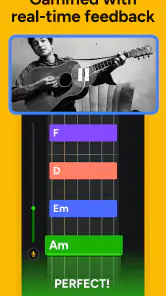

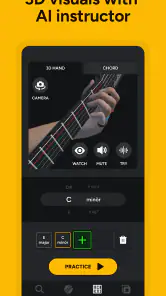
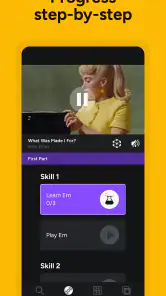
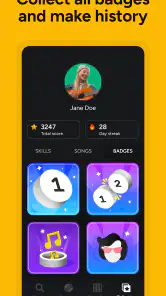


Analysis by Reviewed
I approached AI Play Guitar Songs · Chordie as a pocket practice companion rather than a complete replacement for a guitar teacher. It is a free Education app from Deplike Yazılım Müh. San.ve Tic. Ltd. Şti, aimed at people who want to work through chords, tabs, and songs with help from an AI-led learning approach. My first impression is that it makes the starting point feel less intimidating: instead of opening a thick lesson book and wondering what to study, I can begin with a song-oriented goal and let the app shape the practice around it.
That convenience matters most when I have a guitar nearby but only a small amount of time. I can imagine using it before work, during a quiet evening, or while waiting for a lesson to begin. The experience is not perfect, and the average rating of 2.6 from around 760 ratings suggests that many users have encountered friction. Still, there is a useful idea here for beginners who need direction, especially if they understand that the app works best as one part of a broader practice routine.
How the lesson idea works in everyday practice
The central appeal is simple: I choose the kind of song-based guitar work I want to do, then use the displayed chord or tab material as a guide. That is more motivating than practicing isolated finger exercises indefinitely. A beginner usually wants to play something recognizable, and connecting a chord change to a real song gives the exercise a clear purpose.
I would use the app in three passes. First, I would look through the chord shapes or tab and identify the parts that seem unfamiliar. Second, I would practice those changes slowly without worrying about the full song. Third, I would return to the song and test whether I can keep moving when the changes arrive in sequence. This workflow prevents a common beginner mistake: repeatedly starting from the beginning and stopping at the first difficult transition.
The AI angle is potentially helpful because it suggests a more responsive experience than a static chord chart. However, I would not treat that as a substitute for musical judgement. An automated lesson can point me toward the next task, but it cannot fully understand whether my fingers are tense, whether my instrument is badly tuned, or whether I am rushing the rhythm. I still need to listen carefully and make decisions about tempo and technique.
One practical strength is the connection between song selection and structured practice. Rather than searching separately for a tab, a chord diagram, and a beginner lesson, I can keep those parts closer together. That reduces the amount of switching between apps and browser pages, which is especially useful on a small phone screen.
Why connectivity changes the first few minutes
Because this kind of experience depends on song material and AI-guided interaction, the quality of my connection can shape how smoothly I get started. When the app needs to load a lesson or retrieve song-related content, a weak signal can turn a quick practice session into a waiting session. I would therefore open it before putting on headphones or picking up the guitar, giving the lesson screen time to settle instead of discovering a delay halfway through practice.
More From Our News Desk

Clash of Clans Is Won Between the Battles

Android Auto Makes the Case for Quieter Car Software

MobiOffice: Transforming Mobile Productivity with Seamless Integration

EA SPORTS FC™ Mobile Soccer: Redefining Mobile Sports Gaming

How Microsoft OneDrive Became a Mobile Productivity Giant

How Google Translate Breaks Language Barriers Effortlessly
This is particularly relevant when moving between home Wi-Fi and mobile data. A song that opens normally at home may feel less convenient on a train, in a park, or in a rehearsal room with unreliable reception. I would not plan an important practice session around the assumption that every part of the experience will behave identically without a stable connection. The safest approach is to check the lesson while connected and keep a simple backup exercise ready.
That does not make the app unsuitable for mobile use. It simply changes how I would use it. For a short session at home, connectivity is mostly invisible. For spontaneous practice away from home, it becomes part of the preparation. The distinction is important because the app’s promise is easy to interpret as instant access to any song, while real-world phone use often includes slow networks, crowded public connections, or limited data.
Using it on a phone without losing the guitar
A phone is convenient, but guitar practice exposes the weaknesses of a small display. I need to see the chord or tab while both hands are occupied, and repeatedly touching the screen can interrupt the rhythm. I would place the device where it can be read without bending my neck too far, then spend a few minutes studying the next section before playing it. That small preparation step makes the session feel less like operating a phone and more like playing music.
For beginners, the best mobile workflow is not to scroll constantly. I would choose a short passage, memorize the order of the chord shapes, and only glance back when I lose my place. This also helps reveal whether I am learning the progression or merely following visual prompts. The app is more useful when it supports memory rather than becoming a screen I cannot play without.
In a realistic everyday scenario, I might have fifteen minutes after dinner. I would open a song, inspect the unfamiliar shapes, practice the hardest two changes several times, and then attempt one slow run-through. If the network is busy, I would avoid wasting the whole session waiting for content and instead repeat the shapes I already saw. That makes the app part of a routine rather than the single point of failure for the evening.
The minimum operating system is Android 10, so compatibility should be checked before installing on an older device. On a recent enough phone, the main question is not just whether the app opens, but whether the screen remains readable and responsive while I am holding the guitar. A larger display can make chord work more comfortable, while a smaller phone may be better suited to short sections and memorized patterns.
What happens when loading or guidance goes wrong
Any app that combines song content, interactive guidance, and a network connection can produce awkward moments. A page may take longer to appear, a lesson may not feel as immediate as expected, or I may lose the flow of practice while trying to recover. My advice is to avoid tapping repeatedly when something seems stuck. I would wait briefly, return to the previous screen if possible, and reopen the lesson once rather than creating several duplicate actions.
A sensible recovery routine is to keep the musical goal separate from the app session. Before starting, I would note the chord sequence I am working on or remember the name of the section. If the app becomes inconvenient, I can continue changing between those chords by ear or with the notes I already studied. This is not a claim that the app provides offline access; it is simply a way to keep a technical interruption from ending practice completely.
There is also a learning-related failure to watch for: confusing correct navigation with correct playing. If the app moves smoothly from one lesson step to another, that does not mean my rhythm or fretting is clean. I would record a short attempt with the phone’s normal audio recorder when possible, then listen back. That gives me feedback the visual lesson cannot provide by itself.
Beginners should also expect a little repetition. Automated guidance may make it easier to find a next step, but progress still depends on repeating awkward chord changes until the movement becomes reliable. If I want instant results without slow practice, this will probably feel disappointing. If I accept that the app is a guide rather than a shortcut, its structure becomes more useful.
Making song practice gentler on mobile data
The app is free to install, but it includes in-app purchases ranging from $2.99 to $149.99 per item. I would review any purchase prompt carefully and decide whether the available free experience already fits my needs before spending money. The broad range means the financial commitment can vary considerably, so I would not assume that installing the app tells me the eventual cost of using every part of it.
For data-conscious use, I would begin sessions on Wi-Fi whenever possible, especially when browsing several songs or opening lesson material for the first time. I would also avoid repeatedly closing and reopening the same content while experimenting. A more deliberate approach—choose a song, study one section, practice it, then move on—should reduce unnecessary loading compared with constantly jumping between pages.
I would be cautious about using it as background entertainment on a limited mobile plan. Guitar practice does not require endless browsing, and the app is more valuable when I arrive with a specific target. “Learn the chorus change” is a better mobile-data plan than scrolling through many possibilities without playing any of them.
Another useful habit is to separate discovery from practice. I would browse for a song while connected to a reliable network, then spend the rest of the session repeating the selected material. This keeps the phone from becoming the focus and gives me more playing time. It also makes the app feel more like a lesson tool than a catalog that happens to contain guitar information.
Who will get the most from the app
I think it is best suited to a beginner who already owns a guitar, recognizes a few basic chord names, and needs help choosing what to practice next. It may also suit a returning player who remembers the fundamentals but wants a convenient way to rebuild a song list. The song-first approach can provide motivation when abstract exercises have started to feel dull.
It is less suitable for someone seeking detailed personal correction. If my main problem is buzzing strings, poor posture, picking technique, or inconsistent timing, I would prefer feedback from a teacher or a tool specifically designed around audio analysis. The app can organize learning material, but I would not expect it to diagnose every physical or musical problem.
Experienced guitarists may find the beginner focus limiting if they already read tabs comfortably and know how to build practice plans. In that case, a dedicated tab library, a metronome, or a notation-focused tool may be faster. The advantage here is guidance and accessibility, not necessarily depth for advanced players.
The Everyone age rating makes it approachable for a broad audience, including families introducing a younger player to guitar. Even so, I would still encourage a parent or teacher to help a new learner establish realistic practice habits. The age label describes accessibility, not the amount of supervision or musical explanation each person will need.
How it compares with familiar alternatives
The usual alternative is a static chord website or downloadable songbook. Those resources can be quicker when I already know exactly what I want, and they may be easier to keep beside a music stand. Their weakness is that they leave the learning plan to me. Chordie’s appeal is the attempt to connect song material with guided progression rather than presenting information alone.
A video lesson is another strong competitor. Video can show hand position, strumming movement, and timing in a way text cannot. It is often better when I need to see a technique demonstrated from a particular angle. The trade-off is that videos may move too quickly or bury the useful moment inside a longer presentation. An interactive song-oriented app can be more convenient for returning to a specific chord sequence.
A private teacher remains the better choice for accountability and personalized correction. I would use Chordie between lessons, not necessarily instead of them, if I wanted extra repetition on songs my teacher had already introduced. For someone learning entirely alone, the app can provide structure, but I would still supplement it with careful listening and occasional human feedback.
Dedicated metronome and tuner apps also have a place in the setup. They address timing and tuning directly, while Chordie focuses more on the learning path around songs, chords, and tabs. I would not ask one app to do every job. A simple routine using this app for material, a tuner for pitch, and a metronome for consistency could be more effective than expecting automated guidance to cover all three.
What the current release means for potential users
The current version is 4.1.2608150, and the app has passed the 100K-plus install mark. That gives it a meaningful user base, but popularity alone does not resolve the concerns suggested by the modest average rating. I would install it with realistic expectations, test the basic lesson flow, and decide quickly whether the interaction feels dependable on my device and network.
The developer, Deplike Yazılım Müh. San.ve Tic. Ltd. Şti, has positioned the product in Education rather than treating it simply as a song database. That distinction matches my experience of its intended role: it is trying to help me learn, not merely display guitar information. The quality of that help depends on whether its guidance matches my level and whether I am willing to practice beyond the prompts.
I would also pay attention to how often I need to look at the screen. If the app encourages me to stop playing every few seconds to check the next instruction, I would shorten the section and memorize it before continuing. That adjustment preserves the musical flow and makes the phone less distracting.
My connectivity verdict
For me, the app works best when connectivity is treated as preparation rather than something to ignore. At home on a reliable network, it can make song-based practice feel organized and approachable. Away from home, I would choose a specific lesson before starting, avoid unnecessary browsing, and keep a backup exercise in mind in case loading becomes inconvenient.
I would recommend trying it if you are a beginner who wants an accessible route from “I know a few chords” to “I can attempt a song.” The free entry point makes experimentation easy, although I would examine every in-app purchase before committing, particularly because individual items can range from $2.99 to $149.99. I would skip it if I need deep technique correction, guaranteed uninterrupted access in poor-signal situations, or an advanced notation environment.
My final view is balanced: AI Play Guitar Songs · Chordie is a promising practice organizer with a useful song-centered idea, but it should support—not replace—listening, repetition, and good guitar instruction. If I prepare around the network, keep sessions focused, and judge progress by what I can actually play rather than what the app displays, it can earn a practical place in a beginner’s routine.
AI Play Guitar Songs · Chordie Frequently Asked Questions
What does Chordie need from my phone to help with guitar practice?
The app’s guitar-learning experience is designed around song guidance, chords, tabs, and practice, so a phone that can display the lesson clearly is useful. If you use features that listen to your playing, microphone access may be relevant. Check the permission prompts and review them before allowing access, then choose a quiet place to practice so the phone can pick up your guitar more clearly.
What does AI Play Guitar Songs · Chordie cost, and are there paid features?
AI Play Guitar Songs · Chordie is free to download, with in-app purchases ranging from $2.99 to $149.99 per item. The app may offer paid options alongside features that can be used without payment, so it is worth checking the purchase details before committing to an upgrade. Prices and available options can vary by region or change over time.
What is AI Play Guitar Songs · Chordie?
AI Play Guitar Songs · Chordie is a guitar-learning app designed to help users play songs with chord guidance and interactive practice tools. It uses song information and AI-assisted features to make learning more accessible, whether you are a complete beginner or already know basic chords. The app is mainly focused on following songs, understanding chord changes, and practicing at your own pace.
Do I need previous guitar experience to use Chordie?
No, the app is suitable for beginners, although having a properly tuned guitar and knowing how to hold basic chords can make the first sessions easier. New players can use the chord displays and song guidance to learn gradually, while more experienced guitarists may appreciate having a convenient reference for unfamiliar songs. Progress will still depend on regular practice and accurate chord placement.
Does AI Play Guitar Songs · Chordie include every song for free?
Song availability and access may depend on the app’s current catalog, region, account type, and any premium features offered through in-app purchases or subscriptions. Some functions or song resources may be available without payment, while advanced tools could require an upgrade. Before downloading or subscribing, check the app-store listing and its in-app pricing details to understand exactly what is included.
Pros
- Recognizes many popular songs and displays chords in a simple layout.
- Useful for beginners practicing chord changes and basic song accompaniment.
- Playback tools help you follow the song at your own pace.
- Compact design makes it convenient to use during practice sessions.
- Can inspire practice by giving quick access to a broad song selection.
Cons
- Chord accuracy may vary between songs and can require manual correction.
- Some features or song content may be limited without a subscription.
- The app depends on a stable internet connection for certain functions.
- Advanced players may find the available chord arrangements too basic.
- Ads or promotional prompts can interrupt practice in the free version.
- Category
- Education
- Version
- 4.1.2608150











