AI Photo Editor: BG Remover
- 75.00
- 3.2
- Installs
- 5.00M
- Price
- Free

Screenshots


Analysis by Reviewed
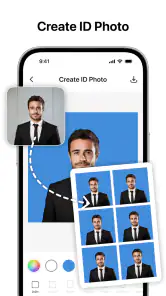
Ever had that picture-perfect moment ruined by a photobombing stranger or an unsightly background? Well, join the club! We've all been there. Luckily, the AI Photo Editor: BG Remover is here to save the day. This app is a nifty little tool that turns your photos into masterpieces by removing unwanted backgrounds with just a few taps.
Transform Your Snaps
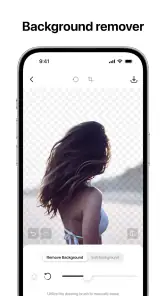
Have you ever wondered how those Instagram influencers get their photos looking so flawless? The secret is often in the editing, and with the AI Photo Editor: BG Remover, you can achieve the same results. The app uses cutting-edge AI technology to seamlessly remove backgrounds, making it look like you were somewhere entirely different. It's like having a personal editing studio right in your pocket!
Easy Peasy Editing
The best part? You don't need to be a tech wizard to use it. The interface is super intuitive, and even if you're new to photo editing, you'll get the hang of it in no time. Just upload your photo, and the app’s AI does the heavy lifting. It identifies the subject and separates it from the background with impressive accuracy.
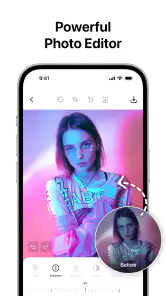
Once the background is gone, you can unleash your creativity. Whether you want to place yourself on a tropical beach or in the heart of a bustling city, the app offers a variety of replacement backgrounds to choose from. And if you're feeling artsy, you can add filters, adjust brightness, and play around with other editing tools to enhance your photos further.
Why It's a Must-Have
This app isn't just for influencers or professional photographers. It's perfect for anyone who wants to spruce up their personal photos or create content for social media. Whether you're making a holiday photo album or crafting the perfect profile picture, the AI Photo Editor: BG Remover has got you covered.
Plus, it's a great way to learn more about photo composition and editing. As you experiment with different settings and styles, you'll start to develop an eye for what looks good and what doesn't. Before you know it, you'll be editing like a pro!
In a world where everyone is sharing their life in pictures, having an app like this at your fingertips is a game-changer. It makes editing fun, accessible, and incredibly rewarding.
You May Like

Clash of Clans Is Won Between the Battles

Android Auto Makes the Case for Quieter Car Software

MobiOffice: Transforming Mobile Productivity with Seamless Integration

EA SPORTS FC™ Mobile Soccer: Redefining Mobile Sports Gaming

How Microsoft OneDrive Became a Mobile Productivity Giant

How Google Translate Breaks Language Barriers Effortlessly
So, if you're looking to up your photo game without breaking the bank or spending hours learning complex software, give the AI Photo Editor: BG Remover a try. It's a small investment that can make a big difference in how you capture and share your world.
AI Photo Editor: BG Remover Frequently Asked Questions
What features does the AI Photo Editor: BG Remover offer?
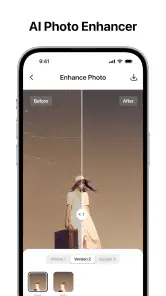
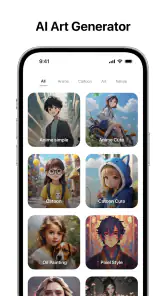
The AI Photo Editor: BG Remover provides advanced features including background removal, automatic enhancement options, and a variety of filters and effects. Users can also enjoy easy photo retouching tools, crop and resize functions, and the ability to add text and stickers to images. The app uses AI technology to ensure precise edits, making it ideal for both personal and professional use.
Is AI Photo Editor: BG Remover user-friendly for beginners?
Yes, AI Photo Editor: BG Remover is designed with a user-friendly interface that caters to both beginners and advanced users. The app provides guided tutorials and easy-to-follow instructions, ensuring that anyone can navigate its features with ease. Even if you're new to photo editing, the intuitive design will help you achieve desired results quickly.
Does the app require an internet connection to function?
While AI Photo Editor: BG Remover offers certain features that can be used offline, some functionalities, especially those involving AI processing and updates, may require an internet connection. Users can perform basic edits without connectivity, but to fully utilize all features, staying connected is recommended.
What are the pros and cons of using AI Photo Editor: BG Remover?
Pros of using AI Photo Editor: BG Remover include its efficient AI-driven background removal, a wide range of editing tools, and an easy-to-use interface. However, some users might find the advanced features require a learning curve. Additionally, while basic features are free, access to premium tools may require in-app purchases.
Is AI Photo Editor: BG Remover available for both Android and iOS?
Yes, AI Photo Editor: BG Remover is available for download on both Android and iOS platforms. Users can find the app on the Google Play Store for Android devices and the Apple App Store for iOS devices. The app ensures compatibility across a wide range of devices, offering a seamless editing experience regardless of the operating system.
Pros
- Easy to use interface
- High-quality background removal
- Fast processing speed
- Variety of editing tools
- Supports multiple image formats
Cons
- Limited free version features
- Occasional app crashes
- Requires internet connection
- High battery consumption
- Ads in the free version

- Category
- Art & Design
- Version
- 1.2.2













