AI Mail Home- Email Homescreen
- 3.21K
- 4.2
- Installs
- 1.00M
- Price
- Free

Screenshots

Analysis by Reviewed
When I need to get through email between other tasks, the biggest problem is rarely writing a long reply; it’s noticing the message that needs attention before the inbox fills up with everything else. AI Mail Home is a personalization app from App Lab Studios that aims to make email easier to reach and handle from a phone. Its home-screen focus makes it worth considering if you want your inbox closer to your everyday routine, though it won’t suit everyone’s idea of email management.
A useful fit for quick checks
I’d look at this app if you check email in short bursts and want a faster route into your messages than opening a conventional mail app and working through its inbox. It is free to install, has a Teen age rating, and has passed one million installs. Its average rating is 4.2 from around 13,000 ratings, which suggests plenty of people have tried it, but the best test is whether its home-screen approach fits the way you already use email.
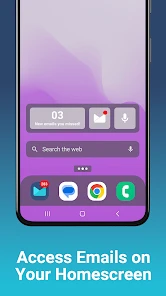
Think of a busy morning: I’m waiting for a delivery update while getting ready, and a work message arrives among routine notices. The appeal here is being able to check email from the phone’s home screen and use a quick reply when a short response is enough. That can make the gap between seeing a message and dealing with it smaller. For anything sensitive, complicated, or easy to misunderstand, I’d still open the full message and write a considered answer rather than treating speed as the goal.
Where it sits beside other mail apps
Compared with the usual approach of opening a standard email client and navigating its inbox, AI Mail Home puts more emphasis on quick access, a home-screen widget, and short responses. That may feel more convenient when you only need to glance at incoming mail or answer a simple question. It is less compelling if you already have a mail app whose notifications, folders, and inbox habits work well for you; changing tools only makes sense if the quicker entry point solves a real daily annoyance.
There is also a practical trade-off in relying on brief previews and replies: convenience can encourage you to respond before checking the whole conversation. I’d use the fast route for low-stakes messages, then switch to the complete email view when context matters. That small pause is especially useful for scheduling, work requests, or anything where a reply could be read as a firm commitment.
Getting Started with AI Mail Home
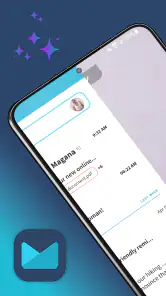
First things first, downloading and installing AI Mail Home was a breeze. It’s available on both Android and iOS, which is super convenient. Once installed, the app’s interface greeted me with a clean, minimalistic design that didn’t overwhelm my senses. The setup process was straightforward; all I had to do was sync my email account, and voila, I was ready to go.
Features That Stand Out
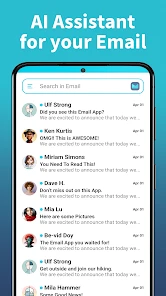
One thing I immediately noticed was the app’s ability to categorize emails. It uses AI algorithms to sort emails into various folders like promotions, social, and primary. This categorization is eerily accurate, saving me the hassle of sifting through unimportant emails. Moreover, the app can even prioritize emails based on my past interactions, ensuring I never miss an important message.
More From Our News Desk

Clash of Clans Is Won Between the Battles

Android Auto Makes the Case for Quieter Car Software

MobiOffice: Transforming Mobile Productivity with Seamless Integration

EA SPORTS FC™ Mobile Soccer: Redefining Mobile Sports Gaming

How Microsoft OneDrive Became a Mobile Productivity Giant

How Google Translate Breaks Language Barriers Effortlessly
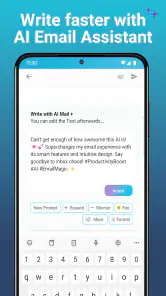
Another standout feature is the app’s capability to draft replies for you. Yes, you heard that right! The AI analyzes the email and suggests responses, which you can either send as is or tweak to your liking. This feature is a real time-saver, especially on busy days.
Making quick replies work for you
I get the most value from suggested replies when a message calls for a simple acknowledgment or a straightforward answer. I still read the original carefully before using a draft, because a plausible-sounding response can miss a detail such as a date, a condition, or the question being asked. A good habit is to treat each suggestion as a first draft, not an automatic send: check that it answers the sender, then adjust the wording so it sounds like me.
The home-screen widget is most useful when I place it where I naturally look during the day, rather than treating it as decoration. It can shorten the path to checking email, but it also makes incoming messages more visible in everyday phone use. If I’m sharing my screen or handing my phone to someone, I’d consider whether email previews are comfortable to have on display. The convenience is real, but so is the choice about how much of my inbox I want visible at a glance.
Using it without letting email take over
For me, the most sensible way to use a home-screen mail tool is to decide what I want the glance to accomplish before I start tapping. If I’m checking whether a delivery has been rescheduled, I can look for that information and leave the rest for later. If I open the inbox without a purpose, a shortcut can just make it easier to get pulled into messages that don’t need an answer right now.
I’d also think about where the widget sits in relation to other things I check. Putting it near a calendar or task app can make it easier to move from a message that needs action to the next step, but it can also encourage a quick reply before I’ve checked my schedule. My practical rule is to use the widget to notice and triage, then open the full conversation whenever an email changes a plan or asks me to commit to something.
My Personal Experience
Using AI Mail Home has genuinely transformed the way I handle emails. Before this app, I’d often miss important emails buried under a pile of newsletters and promotional offers. Now, everything is neatly organized, and I can focus on what truly matters. The AI’s suggested replies are also impressively on point, requiring minimal editing on my part.
One thing I particularly love is the app’s learning ability. The more I use it, the better it gets at understanding my email habits and preferences. It’s like the app evolves with me, becoming more efficient over time.
Who benefits most from the shorter route
This setup makes the most sense for someone whose email day is made up of frequent small checks: a parent coordinating pickup, a freelancer confirming that a file arrived, or a worker who needs to acknowledge routine requests while away from a desk. The value is not that every email becomes effortless; it is that a handful of low-complexity messages may take less effort to notice and answer. If email is only an occasional task for you, a widget may add clutter rather than remove it.
It is also a better fit for people willing to review what the AI sorts and suggests. Categorization can reduce the visual noise of an inbox, but I wouldn’t assume that a message is unimportant just because it lands outside the primary view. I’d occasionally check the other categories, especially when I’m expecting a receipt, sign-up confirmation, or a message from a sender I haven’t dealt with before. That small review habit helps the convenience stay useful instead of turning into a blind spot.
When I’d choose a different approach
If I manage several inboxes through a carefully tuned desktop workflow, or rely on detailed folders, search, and long-form drafting, I’d keep that setup as my main workspace. A phone-first shortcut is not a replacement for the control and screen space of a full mail client. I’d also skip this app if I prefer not to connect an email account to another service or if I simply don’t want AI-generated reply suggestions in my routine.
The version listed is 1.02.32, and in-app purchases range from $9.99 to $59.94 per item. I’d start with the free experience and judge whether the quicker access and drafting help are useful before paying for anything. Since email is personal and often work-related, I’d also take a moment during setup to check the account connection and decide how I want notifications and visible message details to fit into my day.
What to consider before making it a habit
A natural question is whether quick replies can handle every kind of email. I wouldn’t use them that way. They’re best treated as a time-saving starting point for clear, low-stakes exchanges; anything involving a disputed detail, a delicate tone, or several questions deserves a careful read and a response written for that situation. AI can help reduce typing, but it cannot take responsibility for what I mean.
Another question is whether the home-screen widget replaces the usual inbox. I see it as an entry point, not a reason to abandon a full email client. When I need to search old correspondence, compare a long thread, or compose a detailed message, the familiar full-screen workflow is the better tool. The handoff matters: use the quick view to spot what needs attention, then move into the complete conversation when a glance is not enough.
For privacy-conscious users, the practical decision is not simply whether a widget is convenient, but whether its visibility suits the places where they use their phone. I’d check what appears on the screen and keep sensitive messages out of casual view when someone else might be looking. If that trade-off feels uncomfortable, relying on a standard mail app and opening it deliberately may be a better match.
Final Thoughts
In a world where our inboxes are constantly bombarded with emails, AI Mail Home offers a breath of fresh air. Its intuitive design, powerful AI features, and ability to learn from my habits make it an indispensable tool in my daily routine. If you’re someone who struggles with email management, I’d highly recommend giving this app a try. It’s like having a personal assistant right in your pocket!
My recommendation is more specific than that enthusiasm might suggest: I’d try it if the repeated act of opening email is what interrupts your day, and I’d keep it only if the widget and AI-assisted handling genuinely shorten that loop. App Lab Studios’ personalization app is free to start, while optional purchases are available, so I’d judge it by a real week of ordinary messages rather than by the promise of a cleaner inbox. For people who prefer full control, already have a well-organized client, or rarely answer email on a phone, the conventional route may remain simpler. For quick checks and uncomplicated replies, though, this home-screen-first approach can make email feel easier to fit around the rest of the day.
AI Mail Home- Email Homescreen Frequently Asked Questions
Does AI Mail Home require access to my email account?
Because AI Mail Home is built around inbox access and quick replies, you should expect to connect or otherwise provide access to an email account to use its main email features. Before proceeding, review the permissions and account-connection prompts shown during setup, and make sure you are comfortable with the access requested. The home screen widget is designed to bring email within easier reach.
Can I use AI Mail Home as my main way to check email?
AI Mail Home is centered on convenient email access, with swipe access to the inbox, a home screen widget, and quick replies. Those features may suit people who want to check messages and respond without navigating through a full email app each time. Whether it can replace your current email app depends on how well its available functions fit your usual email routine.
What should I check before downloading AI Mail Home?
Check that your phone runs Android 10 or later, as this is the minimum operating system requirement. It is also worth considering that the app is free to download but offers in-app purchases, and its Teen content rating may matter if you are choosing an app for someone younger. These points can help you decide whether it suits your device and household.
What does the AI Mail Home widget let me do from my home screen?
AI Mail Home is designed to make email easier to reach, with a home screen widget and swipe access to the inbox. This can be useful if you like checking messages without first opening a full email app. Its quick-reply feature is also intended to make responding more convenient, while the app’s personalization focus puts email access at the center of the experience.
What is AI Mail Home, and how does it work?
AI Mail Home is an innovative application designed to streamline your email management experience. By leveraging artificial intelligence, it helps categorize, prioritize, and respond to emails efficiently. The app learns from your behavior to better understand which emails are important to you, allowing for a more personalized and organized inbox.
Pros
- Efficient AI-driven email sorting
- Integrates well with multiple email services
- User-friendly interface for all ages
- Customizable notification settings
- Advanced security features
Cons
- Occasional AI sorting errors
- Lacks offline email access
- High battery consumption
- Limited free version features
- No calendar integration
- Category
- Personalization
- Version
- 1.02.32











