AI Invoice & Estimate Maker
- 2.00
- 4.3
- Installs
- 10.00K
- Price
- Free

Screenshots

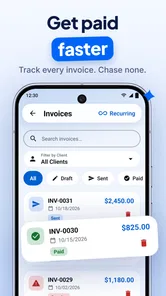
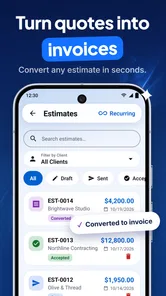
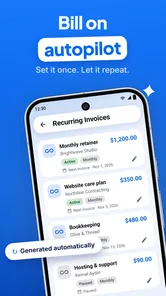
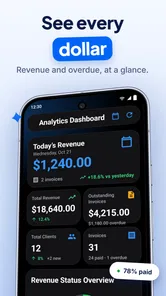
Analysis by Reviewed
Running a small business often means doing the actual work during the day and catching up on paperwork when everything else is quiet. I tested AI Invoice & Estimate Maker with that reality in mind, and my overall impression is clear: it is most useful as a quick, mobile-first tool for preparing professional-looking invoices and estimates without opening a complicated accounting system. It is not a complete replacement for bookkeeping software, but it can remove a surprisingly annoying part of everyday business administration.
The app comes from HorizonSoft and sits in the business category. It is free to install, has an Everyone age rating, and works on Android devices starting with version 7.0. Its current version is 9.2, while the listing shows a 4.3 average from around two hundred ratings and more than ten thousand installs. Those figures suggest a modest but established audience rather than a massive platform, which matches my experience: this feels focused on a practical task instead of trying to become an entire business operating system.
What using the invoice maker feels like in practice
The first thing I noticed is that the app’s value depends less on advanced accounting and more on reducing hesitation. When I need to send an estimate to a customer, I do not want to build a spreadsheet, adjust spacing, check whether the totals look presentable, and then repeat the process for an invoice. A dedicated invoice app gives that job a defined path. I can concentrate on the customer, the work, the quantities, and the amount rather than on document formatting.
That makes it a natural fit for tradespeople, freelancers, consultants, repair services, cleaners, tutors, and other independent workers who may prepare documents from a phone. A person finishing a job away from a desk can create the paperwork while the details are still fresh. Someone visiting a customer can also prepare an estimate before leaving instead of promising to send something later and risking the task being forgotten.
The distinction between an estimate and an invoice is particularly important for small operators. An estimate is part of the sales conversation; an invoice is a request for payment after the work or agreed stage is complete. Keeping those two moments separate helps avoid awkward mistakes, such as sending a payment request before a customer has approved the scope. I found that a focused app like this encourages a cleaner workflow than writing both documents from a blank note or adapting an old file.
Where the AI approach can save time
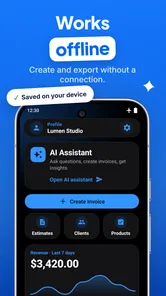
The AI label is most convincing when it helps turn a rough description of work into a more organized document. In real use, the useful question is not whether artificial intelligence sounds impressive, but whether it reduces the number of decisions I must make before sending something. If I can start with plain language and arrive at clearer line items, that is meaningful assistance for a busy owner who knows the work better than the terminology used on a formal invoice.
There is also a subtle benefit in using an assistant for wording. A service professional might know exactly what was done but struggle to describe it in a way that a customer can understand. A vague line such as “repair work” can create questions later. A more specific description gives the customer a better view of what they are paying for and makes the document easier to refer to if there is a dispute. I would still review every generated description, but the starting point can be better than a rushed sentence typed between appointments.
More From Our News Desk

Weather by Xiaomi Review: Clear at a Glance, Less Clear Up Close

X Under Pressure: Can It Recover When Posting Goes Wrong?

Clash of Clans Is Won Between the Battles

Android Auto Makes the Case for Quieter Car Software

MobiOffice: Transforming Mobile Productivity with Seamless Integration

EA SPORTS FC™ Mobile Soccer: Redefining Mobile Sports Gaming
That review step is essential. AI can make wording sound polished while still misunderstanding the scope, quantity, or unit. It may also produce language that is too broad for a particular trade. I would never send an invoice without checking the customer name, service dates, line items, tax treatment, discounts, totals, and payment instructions. The app can help prepare the document, but responsibility for accuracy remains with me.
A realistic workflow for a small service business
Imagine a mobile repair technician who visits a customer in the morning. The technician discovers that the original issue is more involved than expected and needs to explain the additional work before proceeding. With this app, the practical workflow is to create an estimate describing the original service, add the newly identified work as a separate item, and show the customer the revised amount before starting. That is better than relying on a verbal figure that both sides may remember differently.
After the customer approves the work, the technician can use the same information as the basis for an invoice. The important insight is not merely speed; it is continuity. The estimate records what was proposed, while the invoice reflects what was actually completed. Even if the app does not replace a full job-management system, this simple separation can improve conversations and reduce avoidable confusion.
A freelancer can use a similar approach for staged projects. Instead of presenting one large, unclear amount, the estimate can be organized around discovery, production, revisions, and delivery. If the scope changes, the estimate becomes a reference point for discussing the change. This is one of the strongest reasons I would recommend the app to independent workers: it encourages clearer boundaries before work begins.
Small habits that make the app more useful
My first practical tip is to prepare reusable wording before you are under pressure. Even when an AI assistant helps with descriptions, a consistent vocabulary makes your documents easier to recognize and compare. For example, decide whether you describe labor by task, by hour, or by project stage. Mixing styles from one document to the next can make perfectly valid charges look inconsistent.
My second tip is to treat estimates as communication documents, not just price calculators. A low total with unclear wording is not necessarily a good estimate. Add enough detail for the customer to understand what is included and what may change. If a job depends on an inspection or on materials that are not yet known, make that distinction visible in the wording rather than hiding uncertainty inside one broad line.
My third tip is to check the final document on the same screen where you intend to send or show it. Mobile editing encourages quick taps, and a misplaced quantity or an omitted item can be easy to miss when moving rapidly through a form. I would pause before sending, read every line from the customer’s point of view, and confirm that the total matches the conversation.
A fourth useful habit is to keep the app’s role narrow. I would use it to create and organize customer-facing documents, then keep a separate record of whether each invoice was sent, paid, partially paid, or overdue unless the app clearly provides the tracking I need. This prevents a common mistake: assuming that creating an invoice is the same as managing receivables.
What it does better than ordinary alternatives
The usual alternatives are a word processor, a spreadsheet, a paper pad, or a larger accounting package. A word processor offers freedom but makes consistency your responsibility. A spreadsheet is good at calculations but can feel awkward when the goal is a polished customer document. Paper is fast at the moment of writing but weak for sending, revising, and keeping a clean record.
This app’s advantage is the middle ground. It is more purpose-built than a blank document and less intimidating than a broad accounting platform. For a person who only needs estimates and invoices, that focus can be a strength. I would rather use a narrow tool regularly than install a powerful system that takes too much effort to maintain.
The trade-off appears when a business grows. A full accounting service is usually the better choice for bank reconciliation, expense tracking, payroll, tax preparation, inventory, recurring billing, multiple users, or detailed reports. Those needs involve relationships between financial records, not just the creation of a document. A lightweight invoice maker may still be useful alongside such software, but it should not be mistaken for the financial backbone of a larger company.
The friction I would not ignore
The biggest limitation is the risk of overconfidence. A clean invoice can look authoritative even when the underlying information is incomplete. The more polished the document becomes, the easier it is to forget that the user must still verify the commercial details. This is especially relevant when AI assists with descriptions: fluent language is not proof that the service, quantity, or price is correct.
There is also a practical learning curve in deciding how much detail to include. New business owners often swing between invoices that say too little and documents that overwhelm the customer. The app can help structure the page, but it cannot know every expectation in a particular industry. A construction estimate, a design project, and a home lesson may all need different levels of explanation.
Another consideration is the free-to-use model. The app is free, but in-app purchases range from $2.99 to $139.99 per item. That wide range means I would review the available paid options before building my entire workflow around features I might later need. A free starting point is attractive, but the long-term cost should be judged against the number of documents created, the importance of customization, and whether the app replaces another subscription.
I would also be cautious about relying on any mobile tool as the only archive for business records. Keep copies of important invoices and estimates in a place you control and can access when changing phones or reviewing past work. This is not a criticism unique to HorizonSoft’s app; it is simply sensible practice whenever essential business documents live inside a mobile application.
Who should choose it, and who should skip it
I think the best audience is a solo operator who wants to look organized without learning a full accounting suite. If your work involves a manageable number of customers, straightforward services, and occasional estimates or invoices, the app’s focused design should feel more helpful than excessive. It is also a reasonable starting point for someone moving away from handwritten paperwork and informal messages.
It may suit a small team when one person prepares customer documents and the rest of the financial process remains simple. Before adopting it across a company, I would test how easily everyone follows the same naming, pricing, and review habits. Consistency matters more than speed once several people can create documents for the same business.
I would skip it as a primary system if you need deep accounting controls, complex inventory, extensive automation, or formal financial reporting. I would also look elsewhere if your business requires a sophisticated approval chain or a detailed history of changes. In those cases, a dedicated accounting or enterprise invoicing platform is likely worth the added complexity.
The age rating of Everyone makes the app broadly accessible, and the Android requirement starting at version 7.0 means it is not limited to only the newest phones. Still, compatibility is only the first question. The more important question is whether your business process is simple enough for a document-focused tool. A modern phone cannot compensate for a workflow that demands accounting features the app was not designed to replace.
My verdict after using it
AI Invoice & Estimate Maker succeeds because it addresses a real, narrow problem: turning business details into customer-ready estimates and invoices with less friction than a blank document. I especially like it for mobile workers who need to act while they are still with the customer, and for freelancers who want clearer project boundaries before beginning work.
Its weaknesses are equally important. AI-generated wording must be checked, a polished document does not guarantee correct bookkeeping, and the in-app purchase range deserves attention before the app becomes central to a business. Larger companies and financially complex operations should choose a more complete system instead.
For a solo professional who wants a free place to start and values speed over elaborate financial management, I would recommend giving it a careful trial. Use it to create clearer estimates, review every line before sending, keep independent records, and decide early whether its paid options match your needs. Used that way, HorizonSoft’s app is a practical companion for everyday invoicing rather than an overpromised replacement for an accountant or a full business platform.
AI Invoice & Estimate Maker Frequently Asked Questions
What devices and operating systems can run AI Invoice & Estimate Maker?
AI Invoice & Estimate Maker is a business app from HorizonSoft, and it requires Android 7.0 or later. Before downloading, check your device’s operating system version and available storage so installation goes smoothly. The app is listed for everyone, making it suitable for general audiences, including professionals who want to prepare business documents from a compatible mobile device.
Who develops AI Invoice & Estimate Maker, and is it widely used?
The app is developed by HorizonSoft and has more than 10,000 installs. Its average rating is 4.3 from 233 ratings, while the store shows two written reviews, so the numerical rating comes from a relatively small amount of detailed user feedback. If you are considering it for regular business use, try its workflow with a sample document before relying on it for important customer invoices.
What is AI Invoice & Estimate Maker used for?
AI Invoice & Estimate Maker is designed to help freelancers, contractors, small businesses, and independent professionals create invoices, estimates, quotes, and related business documents from a mobile device. During testing, the app’s main appeal was its focus on reducing manual work: users can save customer details, add products or services, calculate totals, and produce professional-looking documents without relying on complicated accounting software.
Can I customize invoices and estimates before sending them?
Yes, the app generally allows users to adjust important document details before sharing them, including business information, customer data, line items, prices, taxes, discounts, payment terms, and notes. Depending on the available version and settings, users may also be able to add branding elements such as a business name or logo. It is worth reviewing the final preview carefully to ensure that calculations and contact information are correct.
Does AI Invoice & Estimate Maker automatically calculate totals, taxes, or discounts?
The application is intended to simplify calculations by adding item prices, quantities, taxes, and discounts within the invoice or estimate form. This can be useful for avoiding basic arithmetic mistakes, especially when a document contains several services or products. However, users should still verify the final amount and confirm that the tax rules, currency, and rounding settings match their local business requirements before sending a document to a customer.
Pros
- Creates professional invoices and estimates quickly from your phone.
- AI assistance can speed up item descriptions and document preparation.
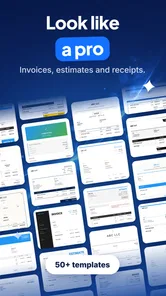
- Useful templates help maintain a consistent business appearance.
- Tracks invoice status
- making unpaid documents easier to identify.
- Cloud-based access can simplify managing documents across multiple devices.
Cons
- Advanced features may require a paid subscription or in-app purchases.
- AI-generated details should be checked for pricing and accuracy.
- Customization options may be limited compared with desktop accounting tools.
- Small businesses may still need separate software for full bookkeeping.
- Handling financial data requires reviewing the app’s privacy and security settings.











