

AI Home Design - Decor
- 8.00
- 4.7
- Installs
- 10.00K
- Price
- Free

Screenshots



Analysis by Reviewed
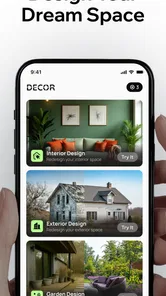
I tried AI Home Design - Decor as a practical way to explore room ideas before moving furniture, repainting walls, or spending money on new pieces. The basic concept is easy to understand: you upload a photo of a space and use the app to preview redesigned versions in different styles. That makes it more useful than a simple inspiration gallery, because the starting point is your own room rather than a generic example.
My overall impression is positive, but cautious. This is a House & Home app from Fenix Mobile, offered free to install for Everyone, with optional purchases ranging from $2.99 to $39.99 per item. It has an average rating of 4.7 from around 989 ratings and has passed 10K+ installs, which suggests that the concept is connecting with people, while still leaving me with the feeling that it is a relatively small product rather than a long-established design platform.
What it feels like to use the app
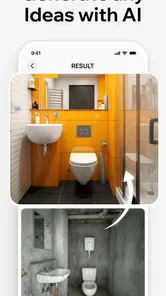
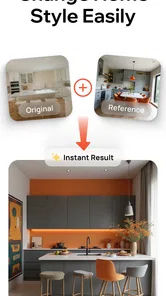
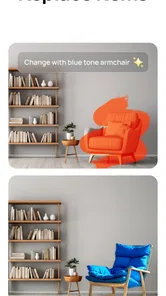
The strongest part of the experience is the immediate visual feedback. Instead of describing a room and trying to imagine the result, I can begin with a photograph and see a possible direction applied to that space. That changes the app from a general mood-board tool into something closer to a quick visual experiment.
I found that the quality of the starting photo matters more than I first expected. A bright, reasonably tidy image gives the redesign a better foundation. If the room is dark, partly blocked by furniture, or photographed at an awkward angle, the result becomes harder to judge. This is not a flaw unique to this app, but it is an important practical limitation: the generated image should be treated as a concept, not as a precise prediction of what a contractor or furniture delivery will create.
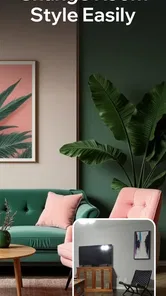
The app is most enjoyable when I use it to compare broad directions. For example, I might look at a living room with a calmer, lighter appearance and then compare it with a warmer, more decorative approach. I would not use one generated image as the final authority on paint, flooring, or furniture dimensions. I would use several versions to discover which visual language feels right before researching real products.
A useful workflow for everyday decisions
One realistic use is preparing for a small weekend refresh. Imagine that I want to improve a tired-looking sitting room but do not yet know whether to replace the rug, change the wall color, or rearrange the seating. I can take a photo before shopping, test different design directions, and use the most convincing result to narrow my search. That can prevent the common mistake of buying attractive items individually that do not work together in the actual room.
A second useful workflow is discussing a shared space. A couple or family can look at several visual alternatives instead of arguing from vague descriptions such as “more modern” or “less cluttered.” The images do not settle the decision, but they give everyone something concrete to react to. In my view, that is where the app has more value than scrolling through unrelated interior photos.
More From Our News Desk

 Gmail
GmailGmail in a Busy Inbox: Who Benefits Most?
From first account to crowded workday, Gmail earns its place through dependable search and flexible sorting—but its best fit depends on how much inbox maintenance you can tolerate.

 Prime Video
Switching to Prime Video: What Changes in Your Viewing Routine
Prime Video can make a compelling second home for streaming, but switching means learning a different catalog, rental layer, and route from browsing to playback.

 Universal TV Remote Control
Universal TV Remote Control Works Best as a Reliable Backup
A phone remote earns its place through quick setup and reliable habits. Here is how to get more from Universal TV Remote Control—and where its limits show.

 Weather - By Xiaomi
Weather by Xiaomi Review: Clear at a Glance, Less Clear Up Close
Xiaomi’s weather app makes everyday forecasts quick to scan, but its calm surface can leave useful details and recovery paths harder to find than they should be.

 X
XX Under Pressure: Can It Recover When Posting Goes Wrong?
A resilience-focused review of X, examining setup, mistaken posts, interruptions, weak connections, and the gaps that matter when recovery needs to be dependable.

 Clash of Clans
Clash of Clans Is Won Between the Battles
Its raids are quick; its community is a long-term project of coordination, teaching, rivalry, and shared responsibility—with all the friction that entails.
Latest News



I also recommend photographing the room from the same position each time when comparing ideas. Keeping the viewpoint consistent makes it easier to notice changes in color, atmosphere, and layout. If every version uses a different angle, the comparison becomes less reliable and the novelty of the image can distract from whether the design actually suits the space.
Where it differs from ordinary design alternatives
Traditional inspiration apps and image boards are better when I want a large collection of finished rooms, product references, or broad style research. They are also less dependent on the quality of one photograph of my home. AI Home Design - Decor is more personal at the starting point: its appeal comes from seeing a familiar room transformed rather than browsing a room that only happens to look attractive.
On the other hand, a dedicated interior-design service is better for decisions involving measurements, construction, lighting plans, electrical work, or a detailed shopping list. A human designer can ask questions about budget, storage, household routines, and structural restrictions. This app is quicker and more accessible, but it does not replace that level of planning.
It also occupies a different space from a manual room-planning tool. A measurement-based planner is preferable when I need to know whether a sofa will physically fit, whether a door can open fully, or how much clearance remains around a table. The visual redesign approach is better for mood and direction; the measured approach is better for avoiding expensive physical mistakes.
Trust starts with visible choices
Because the experience begins with a photo of a private space, I pay attention to the moments where I am asked to provide information and what I can see before continuing. My advice is simple: review the image carefully before uploading it. Remove people, personal documents, valuable objects, children’s faces, visible addresses, and anything else that does not help communicate the room.
The safest image is a deliberately prepared room photo, not an unedited snapshot from daily life. A clean frame gives the design process a better starting point and reduces unnecessary exposure at the same time. I would also avoid uploading a photo that reveals more of my home than the redesign requires, especially if a cropped image can show the relevant wall, floor, or seating area just as well.
I would not assume that a generated room image is suitable for public sharing simply because it looks polished. Before saving or posting anything, I would inspect the result for recognizable personal details and consider whether the original image contains information I would rather keep private. This is a sensible habit with any photo-based design service, and it matters here because the app’s central input is the interior of a real home.
Permissions, accounts, and control points
When installing the app, I would read each permission request in context rather than approving everything automatically. A photo-based workflow may need access to images or a camera, but I still want the operating system to show me the exact choice being requested. If the app offers a picker that lets me select one image instead of granting broad library access, I would prefer the narrower option.
The same principle applies to notifications, purchases, and any account-related screen. I would leave optional notifications off unless I genuinely want them. I would also check the purchase screen before starting repeated experiments, particularly because the app is free to install but includes individual in-app purchases from $2.99 to $39.99. The price range is significant enough that I would never treat a prominent button as a harmless continuation step.
These controls are not just technical details. They determine whether the app feels comfortable in ordinary use. I want to know when I am selecting a photo, when I am generating a design, and when I am moving toward a paid action. Clear user choices make experimentation feel safer; unclear transitions make even a useful design tool feel unnecessarily risky.
Handling personal rooms with care
A bedroom, nursery, home office, or hallway can reveal more about a person than they realize. A photo may show family pictures, mail, work papers, medication, security devices, or the layout of an entrance. I would take thirty seconds to scan the frame before uploading it. That small pause is more valuable than trying to tidy up the image after it has already been selected.
I would also avoid using the app to make decisions that depend on exact technical conditions. A generated image can suggest that a wall is suitable for a particular finish, but it does not establish whether the surface is prepared correctly. It can show a beautiful light fixture, but it does not confirm wiring, ceiling support, or local safety requirements. The app is a visual aid, not a building inspection.
Another data-sensitive moment comes when sharing results with other people. If I send a redesigned image to a contractor, friend, or family group, I would first check whether the image includes the original room’s identifying details. A cropped result may be enough for discussing colors and style, while a full-room image might reveal more of the home than necessary.
How much control the user really has
The app’s main strength is speed, but speed also means I am not directing every design decision manually. I can evaluate the visual outcome, yet the result may introduce elements that are attractive but impractical for my lifestyle. A household with pets, young children, allergies, limited storage, or mobility needs should judge the image against those realities rather than accepting its appearance at face value.
For a better result, I would define the problem before opening the app. Am I trying to make a narrow room feel less crowded? Do I need more storage? Is the issue color, lighting, furniture placement, or simply clutter? If I cannot name the problem, a series of attractive redesigns may create more confusion instead of helping me choose.
I would keep a small note beside me while comparing results: what works, what is unrealistic, and what can be copied affordably. This turns the app into a decision tool rather than a source of endless visual variations. For example, I might keep the color balance from one concept, the open floor area from another, and ignore a decorative feature that would be difficult to maintain.
There is also a useful distinction between inspiration and commitment. I can use a generated room to decide that I like warmer wood tones or a simpler arrangement, then verify those choices with physical samples and actual measurements. That two-step process gives me the creative benefit without allowing an attractive image to dictate a costly purchase.
Version, accessibility, and practical fit
AI Home Design - Decor is currently at version 2.5.0 and works on Android 7.0 or newer. That broad operating-system requirement makes it approachable for people who are not using a recent phone, although the comfort of photo editing and image generation will still depend on the individual device. On a smaller or older handset, I would expect the process to feel less convenient than it does on a modern screen.
The Everyone content rating makes the app suitable for general household use from a content-classification perspective. That does not remove the need for adult supervision when children are using a device connected to purchases, nor does it change the importance of checking image-sharing choices. The rating describes the intended content audience, not the practical privacy habits every household should follow.
Since the app was released on November 19, 2025, I see it as a newer option rather than a mature platform with a long public history. Its current version and user response are encouraging, but I would still approach it with normal care: keep the operating system updated, review permissions, and avoid treating a free installation as a promise that every useful action will remain free.
Who will get the most from it
I think this app suits renters, first-time decorators, homeowners planning a modest refresh, and anyone who struggles to translate an idea from words into a picture. It is especially handy when the main obstacle is uncertainty. Seeing a room move toward different styles can help me decide whether I want a softer palette, a cleaner arrangement, or a more distinctive look before I begin shopping.
It can also help people who are preparing a room for a specific purpose, such as turning an underused corner into a reading area or making a home office feel less temporary. The value is not that the app solves every design problem automatically. The value is that it gives a visual starting point when I might otherwise remain stuck.
I would be less likely to recommend it to someone who needs precise floor plans, verified product dimensions, construction guidance, or a professional plan tied to a fixed budget. It is also not the best choice for a user who wants complete manual control over every object. In those cases, a measurement-focused planner, product catalog, or human designer would be a better match.
My cautious verdict
After using it as a visual planning aid, I see AI Home Design - Decor as a convenient way to explore possibilities in a real room without committing immediately to paint, furniture, or decoration. Its free entry point makes experimentation approachable, and the photo-based workflow is more personally relevant than browsing unrelated interiors. Fenix Mobile has built something that is easy to understand and potentially useful in the early stage of a home project.
My recommendation comes with clear boundaries. I would prepare and crop photos, inspect every permission and purchase screen, and keep private details out of the frame. I would also verify any serious decision with measurements, samples, and practical checks. The app can show me what might look good; it cannot confirm what will fit, last, or meet a technical requirement.
If I wanted a quick visual nudge before redecorating, I would try it. If I needed a complete design plan or wanted to avoid all image-sharing concerns, I would choose a different route. For careful users who understand that the result is inspiration rather than a guarantee, AI Home Design - Decor is worth exploring as a first step, provided the final decision stays in the user’s hands.
AI Home Design - Decor Frequently Asked Questions
Who develops AI Home Design - Decor, and is it suitable for all ages?
AI Home Design - Decor is a House & Home app developed by Fenix Mobile. Its content rating is Everyone, so it is presented as suitable for a general audience. The app is designed around visualizing room makeovers, which may appeal to homeowners, renters, and anyone looking for decorating ideas. As with any app, parents can review its features and payment options before letting children use it.
What devices can run AI Home Design - Decor?
AI Home Design - Decor requires Android 7.0 or later. Before downloading, check your device’s operating system version and make sure you have enough available space for the installation and the room photos you plan to use. The app is listed for Android, so availability and compatibility can depend on the device and app marketplace you use.
What is AI Home Design - Decor and how does it work?
AI Home Design - Decor is an interior design app that uses artificial intelligence to help you visualize changes to rooms and living spaces. After uploading or selecting a room image, you can usually choose a design style, furniture theme, or decoration concept. The app then generates an updated version of the space, giving you inspiration before making real decorating or renovation decisions.
Can AI Home Design - Decor redesign any type of room?
The app is mainly intended for common residential spaces such as bedrooms, living rooms, kitchens, dining areas, offices, and bathrooms. Results can vary depending on the quality, lighting, angle, and clarity of the uploaded photo. Rooms with visible walls, floors, and furniture generally produce more useful results, while heavily cluttered or dark images may lead to less accurate layouts and decorations.
Does AI Home Design - Decor provide realistic and practical design results?
AI Home Design - Decor can create attractive and realistic-looking concepts, but its suggestions should be treated as visual inspiration rather than professional architectural plans. Furniture sizes, room measurements, construction limitations, lighting requirements, and product availability may not always be represented accurately. Before purchasing items or starting renovations, verify dimensions and consult a qualified designer or contractor when necessary.
Pros
- Quickly generates multiple room design concepts from a single photo.
- Useful for testing different furniture layouts before making changes.
- Offers inspiration for matching colors
- styles
- and decorative elements.
- Simple interface makes it accessible to users without design experience.
- Can help visualize improvements for empty or outdated rooms.
Cons
- Results may occasionally ignore room dimensions or existing architectural features.
- Some realistic-looking suggestions may not be practical for everyday use.
- Advanced design options may require a subscription or in-app purchases.
- Image processing quality can vary depending on lighting and photo clarity.
- Generated designs may feel repetitive when using similar room styles.







