AHS: American Home Shield
- 1.00K
- 4.8
- Installs
- 100.00K
- Price
- Free

Screenshots

Analysis by Reviewed
When a home problem appears, the hardest part is often not finding a contractor; it is keeping the request, appointment details, coverage information, and follow-up from becoming a mess of notes and emails. I found that AHS: American Home Shield works best when I treat it as one step in a home-maintenance workflow rather than as a complete replacement for every other tool I use. It gives American Home Shield customers a more direct way to handle service-related tasks from a phone, while the rest of the process still depends on having useful household information ready.
The app is a free business app from frontdoor, designed around America’s Best Home Warranty. It is suitable for Everyone, runs on Android ten and later, and has reached over one hundred thousand installs. Its current version is 2.33.36, and the overall response is strong, with an average rating of 4.8 from around fifteen thousand ratings and roughly one thousand written reviews. Those figures suggest that many people find the basic experience useful, although a high store rating should not be confused with a guarantee that every service situation will be simple.
How AHS fits into a practical home-service routine
I use AHS as a starting point for a home-service task, then rely on a simple routine to keep the details useful after I open the app. Before submitting a request, I gather the appliance’s location, the symptoms, and any model information I can find; afterward, I note what I’m waiting for and what happened. That small handoff between the app and my own records makes it easier to manage the next step without treating a submitted request as a finished repair.
Start with a clear workflow before opening the app
My most useful change was deciding what I wanted to accomplish before launching the app. If an appliance stops working, I first note what happened, when it started, and whether the problem is intermittent or constant. I also check the appliance model information if it is easy to find. That small preparation matters because a service request is more useful when the description is specific instead of being a rushed sentence written while standing beside a leaking machine.
For a household with several people, I would also agree on one simple rule: one person owns the request from start to finish. Otherwise, one family member may report the issue, another may answer a call, and a third may wonder whether the appointment was ever arranged. The app can help centralize the service task, but it cannot prevent duplicated requests or conflicting explanations if the household has no shared routine.
I see the app as the front door to a warranty-related task, not as a general home inventory manager. I would keep appliance receipts, installation dates, serial numbers, and photographs in a separate, clearly named folder. That gives me a backup when a technician needs context or when I need to recall what was already discussed. The practical advantage is not just speed; it is reducing the number of times I have to reconstruct the same story.
Capture the problem while the details are still fresh
When something fails, I prefer to record the symptoms before trying random fixes. A short note such as “dishwasher fills but does not drain” is more useful than “dishwasher broken.” If the issue changes during the day, I write that down too. This habit makes the in-app request more accurate and helps me recognize whether the problem is urgent, recurring, or merely inconvenient.
More From Our News Desk

Weather by Xiaomi Review: Clear at a Glance, Less Clear Up Close

X Under Pressure: Can It Recover When Posting Goes Wrong?

Clash of Clans Is Won Between the Battles

Android Auto Makes the Case for Quieter Car Software

MobiOffice: Transforming Mobile Productivity with Seamless Integration

EA SPORTS FC™ Mobile Soccer: Redefining Mobile Sports Gaming
A realistic example is a refrigerator that begins making an unusual sound on a Friday evening. I would use the app to begin the service process, but I would first check whether the food is still staying cold and whether the sound is constant. I would note the time, take a quick picture of the appliance label, and keep the request focused on observable facts. If the refrigerator later stops cooling, I already have a useful record instead of relying on memory.
That workflow also prevents a common mistake: treating a warranty app like an emergency-response service. A serious water leak, a burning smell, exposed wiring, or a dangerous gas-related problem deserves immediate attention through the appropriate emergency channel. I would not wait for a normal warranty workflow to handle a situation that could damage the home or put someone at risk.
Organize the follow-up instead of assuming the request is finished
Submitting a request is only the beginning. I would keep track of the date I reported the issue, the appliance involved, any appointment information, and what the technician said. Even a simple note on my phone can prevent confusion later. If the issue returns, the earlier description gives me a stronger starting point than a new report that ignores the original visit.
This is where the app becomes more valuable as part of a sustainable productivity system. It reduces the friction of starting a service task, while my own record handles continuity. I do not need an elaborate spreadsheet. A household folder with one note per appliance is enough for many people, especially if the note includes the model, purchase details, previous symptoms, and the date of the last problem.
I would also avoid submitting several versions of the same request simply because I have not received an immediate update. Duplicate reports can make the situation harder to follow. Instead, I would check the existing request first, review any available status information, and use the established support path if clarification is needed. The best workflow is deliberate: capture once, check carefully, then follow up with the original context.
Build a repeatable routine for ordinary maintenance
The app is easiest to use when it is connected to a recurring household routine. I would choose one short time each month to review active service matters, check whether an appointment still fits the household schedule, and update my separate appliance notes. This turns home maintenance from a series of stressful interruptions into a small administrative habit.
For renters or people who share responsibility with a partner, the routine can be even simpler. Decide who submits requests, who is available for appointments, and where supporting details are stored. For a family, I would keep the process visible enough that another adult can understand it without starting over. The app may be installed on more than one device, but a shared habit is more important than the number of devices involved.
I also like separating “needs service” from “keep an eye on it.” A strange noise that has not affected performance may deserve monitoring rather than an immediate request, while a failed heating or cooling system may need prompt action. This distinction keeps the service queue focused and reduces unnecessary back-and-forth. It is a small judgment call, but it makes the app feel more useful because I am bringing better decisions into it.
Another helpful habit is reviewing the request after the appointment, while the details are fresh. I would write down what was inspected, what was repaired or recommended, and whether the original symptom disappeared. That record is valuable if the same appliance develops a related problem. It also helps me compare the convenience of using the app with the actual quality and clarity of the service experience.
Where the experience can become frustrating
The biggest limitation is that the app cannot remove the complexity of warranty service. Coverage questions, service availability, appointment timing, parts, and the condition of the appliance can all affect the outcome. A clean mobile interface may make it easier to report a problem, but it cannot guarantee that the underlying issue will be resolved quickly or in the way I expect.
I would also be cautious about assuming that every household task belongs in this app. It is not the right choice for comparing independent contractors, planning a renovation, creating a detailed home inventory, or diagnosing a technical fault in depth. Someone who wants broad contractor research may prefer a marketplace or local recommendation service. Someone who wants long-term maintenance records may prefer a dedicated home-inventory tool. The value here is narrower and more practical: handling the relationship between a homeowner and American Home Shield.
Another failure point is incomplete information. If I submit a vague description, forget the appliance location, or cannot explain when the problem began, the next step may require more clarification. That is not necessarily a flaw in the app, but it is a real source of delay. I get better results when I spend a minute preparing the request instead of expecting the app to infer the problem from a few words.
Mobile convenience can also create false confidence. Because the process feels quick, I might be tempted to report an issue and mentally mark it as solved. I think of the request as open until I know what happens next. A notification, status change, or appointment detail is useful, but I still want my own note to show what I am waiting for. That simple distinction keeps the app from becoming another place where unfinished tasks disappear.
How it compares with the usual alternatives
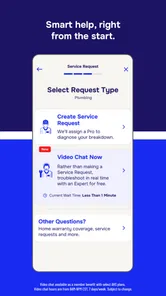
Compared with calling customer support, the app feels better suited to people who want to start a request without explaining the situation aloud immediately. I can prepare the details first and keep the task connected to my phone. Calling may still be preferable when the issue is complicated, urgent, or difficult to describe through a standard digital flow. For a straightforward appliance problem, however, the app offers a calmer starting point.
Compared with email, an app-based process can feel more focused because the task is tied to a service relationship rather than buried among unrelated messages. Email remains useful for keeping a personal written record, especially when I need to search old correspondence. My preference is to use the app for initiating and checking the service task, then preserve important conclusions in my own household notes.
Compared with a general home-maintenance organizer, this app has a more specific purpose. A maintenance organizer may be better for reminders such as changing filters, cleaning gutters, or checking smoke alarms. AHS is more relevant when I need to engage with American Home Shield about a covered home-system or appliance concern. The two approaches can work together, but neither one replaces the other.
Compared with searching for a local repair company, the app is less about shopping around and more about using an existing warranty arrangement. That can be convenient for a customer who values a single service channel. On the other hand, a homeowner who wants to choose a specialist, compare estimates, or control every part of the repair process may find an independent search more flexible. The right choice depends on whether warranty coordination or contractor choice is the priority.
Who should adopt it, and who should skip it
I would recommend trying the app if you already use American Home Shield and want a simpler way to manage service requests from a mobile device. It is especially suitable for busy homeowners who dislike phone calls, households that need a central starting point for appliance problems, and people who want to combine digital requests with their own maintenance notes. The free price also makes trying it low-risk from an app-cost perspective.
It is less compelling for someone who does not have an American Home Shield relationship, expects a universal repair marketplace, or mainly wants preventive-maintenance reminders. It may also disappoint users who expect the app itself to provide detailed diagnosis, instant resolution, or complete control over contractor selection. Those expectations belong to different kinds of products.
The Everyone age rating makes it approachable for a household, but the person using it should still understand the service details being reported. I would not hand the entire process to a child simply because the app is broadly age-appropriate. The important decisions involve the home, the appliance, scheduling, and the description of the fault, so an adult should remain responsible for the request.
For a first-time user, my advice is to prepare one appliance note before submitting anything: the appliance name, its location, the visible symptom, when it began, and any relevant model information. Then open the app, keep the wording factual, and return later to record the outcome. This approach produces more value than repeatedly checking the app without a plan.
My final take after fitting it into daily life
AHS: American Home Shield is most useful when it removes an administrative obstacle, not when it is treated as a magic repair button. I like the idea of having a dedicated mobile route for warranty-related service because it gives the task a clear home and reduces dependence on scattered conversations. The strong 4.8 average and broad adoption indicate that the basic experience resonates with many users, while the real test remains how well it fits each person’s coverage and service expectations.
My honest recommendation is conditional but positive: use it if American Home Shield is already part of your household, and pair it with a small personal record of appliance details and follow-up notes. That combination handles both sides of the problem—the app starts and organizes the service interaction, while your own routine preserves context. If you need contractor comparison, renovation planning, or a full maintenance calendar, choose a complementary tool instead.
After using it this way, I see the app as a practical piece of home administration. It is free, focused, and easier to justify when it replaces a frustrating call or keeps a service request from being forgotten. Its limitations are tied to the wider warranty process rather than something a mobile screen can solve. For the right homeowner, that focused role is enough to make it worth keeping installed.
AHS: American Home Shield Frequently Asked Questions
Is AHS: American Home Shield free to download, and what does the price cover?
AHS: American Home Shield is free to download, but installing it does not provide a home warranty or make repairs free. The app is intended for customers managing an American Home Shield account, and charges or service fees may apply under the terms of an active plan. Review your membership details before submitting a request so you understand any costs that may be involved.
Is AHS: American Home Shield suitable for someone who is not already a customer?
The app is primarily useful to people who have an American Home Shield home warranty account. It offers tools for managing a plan and handling service requests, rather than general home-maintenance guidance for everyone. You can download it without a plan, but you will need an eligible account to make use of customer features such as viewing coverage or following a claim.
What devices can run AHS: American Home Shield?
AHS: American Home Shield is available for Android devices running version 10 or later. Before downloading, check your device’s operating system in its settings to make sure it meets that requirement. The app is free to install and is intended to help American Home Shield customers manage their home warranty accounts from a mobile device.
Who develops AHS: American Home Shield?
The app is developed by frontdoor and is listed in the Business category. It is focused on American Home Shield home warranty services, so its usefulness depends on whether you have an account and need to manage a plan, submit service requests, or follow claims. Its store summary describes the service as “America’s Best Home Warranty.”
What is AHS: American Home Shield?
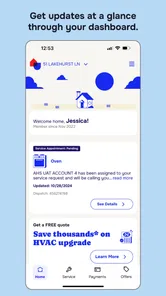
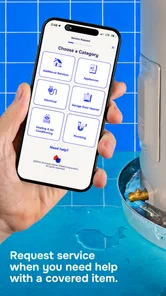
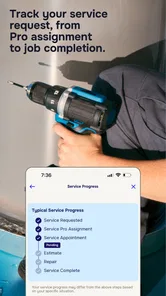
AHS: American Home Shield is a home warranty service app that lets members manage covered home systems and appliances from a mobile device. After signing in, you can review your plan, check coverage information, request service, track existing claims, and access account details. It is designed for American Home Shield customers rather than general home maintenance or emergency repair use.
Pros
- Covers major home systems and appliances under one plan.
- Lets you choose your own service fee level.
- Offers optional coverage for items like pools and electronics.
- Useful for homeowners facing unexpected repair expenses.
- Claims can be submitted online or through the mobile app.
Cons
- Coverage limits may leave you paying for costly repairs.
- Pre-existing conditions and poor maintenance can be excluded.
- Service appointments depend on available local contractors.
- Some repairs require prior approval before work begins.
- Monthly premiums and service fees can add up over time.











