

Aftershock Festival
- 36.00
- 4.2
- Installs
- 10.00K
- Price
- Free
Screenshots
Analysis by Reviewed
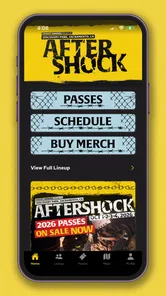
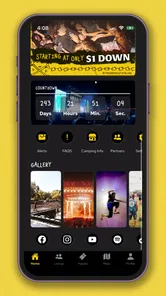
Aftershock Festival is the kind of app I would install before heading to the festival grounds, not because it replaces every other tool on my phone, but because it puts the event experience in one focused place. Developed by Danny Wimmer Presents, this free Events app is built around the official Aftershock Music Festival experience. I found its value strongest when I wanted festival information without sorting through unrelated social posts, old screenshots, or a crowded browser search.
The app has an average rating of 4.2 from around a hundred ratings, with a few dozen written reviews, and it has passed the ten-thousand-install mark. Those figures suggest a useful but fairly specialized companion rather than a universal event platform. Its content rating is Everyone, which makes it suitable for a broad audience, although the festival itself is still a busy, loud, and physically demanding environment that parents and groups should plan for separately.
My main takeaway is simple: this is most useful when it reduces the small decisions that interrupt a festival day. It can help you orient yourself around the event, check information while moving between stages, and keep the festival itself at the center of your attention. The trade-off is that its usefulness depends heavily on having current event information available when you need it and on your phone being able to reach the relevant content.
Where connectivity changes the festival experience
The most important thing to understand about this app is that it belongs to a live event. A normal reference app can be opened at any time and used in a relatively stable way. A festival companion is different: its value rises around the event and falls outside it. That makes connectivity part of the experience, even when the app itself appears straightforward.
Before leaving home, I would open it while connected to reliable Wi-Fi and spend a few minutes getting familiar with the information it presents. This is not just a technical precaution. It changes how confidently I can use the app later. If I already know where to look for the details I care about, I am less likely to stand in a crowded area repeatedly refreshing screens or trying to remember which page contained a particular item.
At the festival, network access can become a practical concern. Large crowds create the sort of environment where many people are using their phones at once, and movement between open spaces, entrances, food areas, and performance zones can affect reception. I would therefore treat the app as a useful live reference, but not as the only place where I keep essential plans. A screenshot of the most important information and a simple meeting arrangement with friends are sensible companions to any festival app.
This is where the official nature of the app matters. Searching the web can produce old pages, fan-made schedules, social posts, or results for other events. The Aftershock app gives me a more direct starting point for the festival rather than making me judge which third-party page is current. That does not remove the need to pay attention to updates, but it reduces the clutter that normally surrounds a large music event.
More From Our News Desk

 Gmail
GmailGmail in a Busy Inbox: Who Benefits Most?
From first account to crowded workday, Gmail earns its place through dependable search and flexible sorting—but its best fit depends on how much inbox maintenance you can tolerate.

 Prime Video
Switching to Prime Video: What Changes in Your Viewing Routine
Prime Video can make a compelling second home for streaming, but switching means learning a different catalog, rental layer, and route from browsing to playback.

 Universal TV Remote Control
Universal TV Remote Control Works Best as a Reliable Backup
A phone remote earns its place through quick setup and reliable habits. Here is how to get more from Universal TV Remote Control—and where its limits show.

 Weather - By Xiaomi
Weather by Xiaomi Review: Clear at a Glance, Less Clear Up Close
Xiaomi’s weather app makes everyday forecasts quick to scan, but its calm surface can leave useful details and recovery paths harder to find than they should be.

 X
XX Under Pressure: Can It Recover When Posting Goes Wrong?
A resilience-focused review of X, examining setup, mistaken posts, interruptions, weak connections, and the gaps that matter when recovery needs to be dependable.

 Clash of Clans
Clash of Clans Is Won Between the Battles
Its raids are quick; its community is a long-term project of coordination, teaching, rivalry, and shared responsibility—with all the friction that entails.
Latest News



Using it before the crowd arrives
I would use the app in three passes. First, I would browse casually at home to understand its layout. Second, I would return shortly before going out and check the information that affects my personal plan. Third, I would open it again when I arrive, while I still have a relatively calm moment to orient myself. This workflow is more dependable than waiting until I am already late, surrounded by noise, and trying to make decisions with one hand while holding a drink or bag.
A useful habit is to separate “must know” information from “nice to know” information. The first group might include anything that determines where I need to be or when I need to move. The second group can be explored when I have spare time. This prevents the app from becoming another source of decision fatigue. I am not trying to read everything; I am trying to make the next part of the day easier.
For groups, I would also compare plans before entering the busiest areas. Friends often have different priorities at a festival, and a quick discussion before the signal becomes unreliable is more effective than sending a series of messages later. The app can support the planning conversation, but it cannot decide whether one person should leave a favorite performance early to meet someone else. That human agreement still matters more than any digital feature.
What it is like on a phone while moving
Festival use is almost always mobile use. I am likely standing, walking, carrying something, dealing with sunlight, and trying not to block the people behind me. That makes short, purposeful sessions better than long browsing sessions. I would open the app to answer one question, close it, and return my attention to the event.
The phone context also changes how I judge the interface. A page that feels perfectly comfortable on a sofa may feel cumbersome in a crowd. Small navigation steps, repeated loading, or information that is difficult to scan can become surprisingly frustrating when I am trying to move between performances. The app’s biggest practical test is therefore not whether it contains information, but whether I can reach the information quickly enough to use it.
I would keep brightness and battery use in mind, especially if I expect to check the app throughout a long day. Connectivity itself can drain patience and battery when I repeatedly reload content, so I would avoid refreshing without a clear reason. If a screen already contains what I need, I would leave it alone rather than chasing a newer version every few minutes.
There is also a social advantage to using a dedicated festival app instead of constantly switching between a browser, messaging service, maps, and social media. Fewer app changes mean fewer distractions. I can check the event-related detail, put the phone away, and get back to the performance. For me, that is a better mobile habit than letting festival planning turn into an endless stream of unrelated notifications.
When the connection fails at the wrong moment
The uncomfortable scenario is easy to imagine: I am moving toward a performance, open the app, and the relevant content takes too long to appear. I would not want to discover at that moment that my entire plan exists only inside a screen that may not load. That is why I recommend preparing before entering the busiest parts of the venue.
I would capture or note the few details that are genuinely critical, then use the app during the day for confirmation and adjustment rather than total dependence. This is a realistic compromise. It respects the app’s role as a live event companion while acknowledging that phones and networks are not perfectly reliable in crowds. I am not claiming that the app provides offline access; I would simply prepare my own backup for information I cannot afford to lose.
If a page appears slow, my first response would be to stop moving, try again from a less crowded position, and avoid repeatedly tapping the same control. Repeated requests can make the experience feel worse and can consume battery without solving the underlying connection problem. If the information is urgent, I would switch to the event’s physical signs, ask staff, or use a prearranged meeting point rather than spending ten minutes staring at a loading screen.
This recovery approach is particularly important for groups. If one person has the app open and another does not, the group should share the key decision verbally instead of assuming everyone can access the same screen. A simple rule such as “if we get separated, meet at the agreed location” is more robust than relying on continuous messaging or live app access.
Using less data without losing the benefit
I would not use the app as something to leave open all day. Open it when I need event information, read what is relevant, and close it. That reduces unnecessary network use and keeps the phone available for calls or messages. It also encourages a healthier rhythm: plan, check, act, and put the phone away.
Wi-Fi is the sensible place to do the heavier preparation, particularly before leaving home. I would review the app then, note the information I expect to revisit, and avoid exploring every section while standing in a weak-signal area. This is not about obsessing over data consumption; it is about making sure the app is available for useful checks instead of wasting time and connection on aimless browsing.
I would also avoid treating constant refreshes as a substitute for planning. Live events can change, so checking for important updates makes sense, but refreshing every few seconds is unlikely to improve the day. A better approach is to check at natural transition points: before leaving, after arriving, when changing areas, and when deciding what to do next.
Battery planning deserves equal attention. The app may be only one part of the phone’s workload, alongside photos, messages, calls, and possibly navigation. I would begin with a full charge and carry an appropriate charging option if I expect to stay for many hours. The app is helpful, but preserving enough battery to contact friends or arrange a safe journey home is more important than keeping the festival screen open continuously.
How it compares with ordinary festival planning
The usual alternative is a mixture of browser searches, social media, screenshots, messages, and memory. That approach can work, but it scatters information across several places. The official Aftershock app is more convenient when I want a single event-focused starting point and do not want to filter through unrelated results.
On the other hand, a browser can be more flexible for general research, and messaging apps remain better for coordinating with friends. A paper note or screenshot can be more dependable for a small amount of essential information when reception is uncertain. I would not replace those tools completely. The strongest setup is a combination: use the official app for event context, use direct communication for people, and keep a lightweight backup for the details that matter most.
This comparison also explains who should skip it. If I am not attending Aftershock, the app has little reason to stay on my phone. If I prefer to plan everything through a general calendar or browser, I may not gain enough from adding another event-specific app. Likewise, people who expect a festival app to handle every aspect of travel, personal safety, group communication, and venue navigation may find its role too narrow.
For an attendee who wants a focused official companion, however, that narrowness is a strength. It keeps the purpose clear. I am not opening it for entertainment unrelated to the festival; I am opening it to make the festival easier to follow.
What the current release means for users
The app was released in September 2021 and is currently at version 16.0.1. On Android, it requires version 10 or later, so anyone using an older phone should check compatibility before relying on it for an event day. That requirement is reasonable for many current devices, but it can matter if I am using an older backup phone or borrowing a device from someone in my group.
Because it is free, the decision to try it is low-risk from a purchase standpoint. I can install it before the trip, see how naturally it fits my planning style, and remove it later if I do not need it. The more important cost is attention: like any event app, it is only worthwhile if it helps me make decisions faster than the alternatives.
I would also install and test it before the event rather than at the entrance. That gives me time to update the app if necessary, become familiar with its navigation, and decide which information I want to keep readily available. A few calm minutes at home can prevent a rushed first interaction in a noisy queue.
Who will get the most from it
I think it suits first-time attendees who want one official place to begin planning, returning attendees who prefer not to search for event information again, and groups that need a shared reference while deciding how to spend the day. It is also a good fit for people who enjoy checking plans on their phone but do not want to build their own system from scattered webpages and messages.
Its value is lower for someone who has a fixed personal plan and does not expect to change it. If I already know exactly where I need to go and when, the app may only receive occasional use. That is not a criticism; it simply reflects the difference between a flexible festival day and a tightly scheduled one.
My practical recommendation is to use it as an orientation and decision tool, not as a substitute for common sense. Keep friends informed, protect your battery, prepare for inconsistent connectivity, and take a moment to look around rather than assuming every answer must come from the screen.
My final view on the connected festival experience
After spending time with Aftershock Festival, I see it as a focused companion for people who want the official event experience organized around their phone. Its strongest quality is not that it makes the festival digital; it is that it can reduce the friction of finding event information when the day is already busy.
The app works best when I prepare with it before arriving, use it in short sessions, and keep a backup for essential details. Connectivity can make the difference between a quick check and an awkward delay, so I would never make it the sole foundation of my plans. Used with that realistic mindset, it earns a place on my phone for the festival period.
For a free Events app from Danny Wimmer Presents, it offers a sensible reason to install: a direct, event-specific reference instead of a scattered collection of searches. I would recommend it to Aftershock attendees who want help organizing their day, while warning them not to confuse convenience with complete reliability in a crowded live environment. The best experience comes when the app supports the outing without taking it over.
In short, install it before you go, learn where the useful information lives, prepare for moments without a dependable connection, and then let the music—not the phone—remain the main event.
Aftershock Festival Frequently Asked Questions
Is Aftershock Festival an app or the music event itself?
Aftershock Festival is the name of both a rock and heavy-metal music event and its official companion app. The app is an Events app developed by Danny Wimmer Presents, intended to help festivalgoers keep event information handy. It is free to download and has an Everyone age rating, making it suitable for a broad audience interested in the festival.
What is Aftershock Festival?
Aftershock Festival is a large rock and heavy-metal music event featuring multiple stages, major international bands, emerging artists, food vendors, merchandise, and festival activities. The official app is designed to help attendees follow the lineup, check performance times, explore the venue, receive event updates, and organize their experience before and during the festival.
What can I do with the Aftershock Festival app?
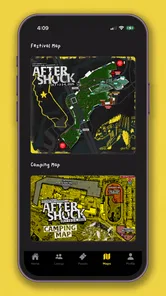
The Aftershock Festival app typically works as a digital event guide. Depending on the current edition, you can browse the artist lineup, view stage schedules, create a personalized timetable, receive announcements, review venue information, and find practical details such as food, merchandise, transportation, and festival policies. Features may change from one year to another.
Does the Aftershock Festival app work offline?
Some information may remain available after it has been loaded, but you should not assume that every feature works without an internet connection. Schedule changes, artist announcements, maps, notifications, and other live updates may require mobile data or Wi-Fi. Before arriving, open the app and save or screenshot important details in case the festival network is busy.
Is the Aftershock Festival app free to download?
The official Aftershock Festival app is generally free to download, although downloading it does not provide admission to the festival. You still need a valid ticket or approved pass to enter the event. Be sure to confirm that you are installing the official application from the correct developer and check your device’s store listing for current compatibility and permissions.
Pros
- Official festival updates
- schedules
- and lineup details are easy to access.
- Useful for discovering new rock and metal artists before the event.
- Helps fans stay informed about announcements and festival changes.
- Can make planning set times and must-see performances more convenient.
- Provides a digital connection to the Aftershock community and event experience.
Cons
- Festival information may become outdated if the app is not refreshed regularly.
- Heavy media content can consume mobile data and storage space.
- Notifications may feel excessive during lineup or schedule announcements.
- Some features may be most useful only near the festival dates.
- The experience offers limited value for users who are not attending Aftershock.











