

Aeromexico
- 1.17K
- 3.2
- Installs
- 5.00M
- Price
- Free

Screenshots





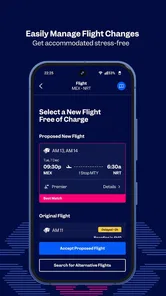

Analysis by Reviewed
I treat an airline app as a practical travel tool, not a reason to book a particular flight. I want to find an itinerary, keep the important details together, and know what to do when the travel day arrives. Aeromexico is built around that journey: it is a free travel app from Aerovías de México S.A. de C.V, with flight search, ticket purchasing, check-in, seat selection, and flight tracking in one place.
Start with the trip you actually need
The app makes the most sense when I already have a reason to consider Aeromexico: perhaps its routes fit where I’m going, or I’ve chosen the airline and want to keep the booking process close to the travel-day tools. If I’m at the earliest stage and comparing many carriers, I’d begin with a broad travel search service instead. That helps me survey alternatives before I commit; Aeromexico’s app is the more focused companion once its flights are in the running.
A useful way to decide is to separate planning from managing. I can compare schedules and destinations elsewhere, then use Aeromexico’s own app to search for a suitable flight and keep track of the reservation. That handoff avoids expecting one airline’s app to show the full market. It also means I can return to the same place for check-in and flight status rather than trying to reconstruct the trip from several browser tabs and email messages.
When it fits into a trip
I’d reach for it when I’ve already decided to fly with Aeromexico, or when I’m comparing its routes as part of planning. The main benefit is keeping booking and day-of-flight tasks close together instead of switching between an airline site, email, and an airport display. If I’m still comparing several airlines, though, a travel search service may be a better starting point: it can help survey options across carriers, while the Aeromexico app is most useful once this airline is part of the plan.
That distinction matters for travelers who are flexible about airlines. A comparison service is designed to help weigh options across carriers; an airline app is naturally centered on its own flights. I wouldn’t expect Aeromexico’s app to replace a general trip planner for mapping local transport, finding unrelated activities, or coordinating every part of a holiday. For someone who wants one place to handle an Aeromexico booking, however, having search and later travel tasks together is a practical advantage.
From searching to getting ready
For an everyday example, imagine I’m arranging a trip during a busy week. I can search for a flight, buy a ticket, and later return to the app to check in and choose a seat. My practical tip is to handle check-in when it becomes available rather than leaving it until I’m rushing out the door. I’d also check the itinerary and seat details after making changes, so I’m working from the current trip information rather than an old message.
I’d treat the booking step as the beginning of a small checklist, not the end of the planning. Once I have an itinerary, I’d make sure the trip details I rely on are easy to retrieve and that I know where to look for the current status. If I’m arranging travel for someone else, I’d be especially careful to confirm that I’m checking the right traveler and itinerary before acting. That is a simple way to avoid a common source of confusion when several people or journeys are involved.
More From Our News Desk

 Weather - By Xiaomi
Weather by Xiaomi Review: Clear at a Glance, Less Clear Up Close
Xiaomi’s weather app makes everyday forecasts quick to scan, but its calm surface can leave useful details and recovery paths harder to find than they should be.

 X
X Under Pressure: Can It Recover When Posting Goes Wrong?
A resilience-focused review of X, examining setup, mistaken posts, interruptions, weak connections, and the gaps that matter when recovery needs to be dependable.

 Clash of Clans
 Is Won Between the Battles
Its raids are quick; its community is a long-term project of coordination, teaching, rivalry, and shared responsibility—with all the friction that entails.

 Android Auto
 Makes the Case for Quieter Car Software
The car interface is no longer judged by how much it can do, but by how quietly it helps. Android Auto shows what drivers now expect—and what still gets in the way.

 MobiOffice: Word, Sheets, PDF
MobiOffice: Transforming Mobile Productivity with Seamless Integration
MobiOffice: Word, Sheets, PDF is redefining mobile productivity with a surprising blend of functionality and innovation.

 EA SPORTS FC Soccer Mobile 26
EA SPORTS FC™ Mobile Soccer: Redefining Mobile Sports Gaming
Dive into EA SPORTS FC™ Mobile Soccer, where immersive gameplay and strategic depth transform mobile sports gaming.
Latest News



Seat selection is useful because preferences are personal: I may want a window, while a companion may value sitting nearby or having a simpler route to the aisle. I’d make that choice with the actual journey in mind rather than assuming a seat preference is guaranteed to remain untouched after every itinerary change. The practical habit is to revisit the reservation after any adjustment and check what the app currently shows.
Following the trip beyond the booking
Flight tracking is useful at a different point in the workflow: it gives me a place to check the trip’s status instead of relying only on a saved screenshot or an earlier plan. I’d still pay attention to airport announcements and the information shown at the airport, especially if plans change close to departure. An airline app can make information easier to find, but it does not remove the need to follow the airport’s instructions.
That app-to-airport handoff is important. I might check the itinerary at home, then use the airport’s displays and staff guidance when I arrive. If the information on my phone and the airport environment seem out of step, I would not assume a saved screen is the final word; I’d refresh the relevant trip information and confirm through the airport’s current instructions. This is a useful safeguard for any traveler, particularly when timing is tight.
For a realistic travel day, imagine I’m heading to the airport after a full workday. I’ve already checked in and chosen a seat, so I can focus on getting there rather than starting the process in a hurry. On the way, I can check the flight status in the app, but I’d keep enough time to respond if the airport information points me toward a different next step. The app can reduce the number of places I need to check; it cannot make late arrival or a last-minute change harmless.
Booking Made Simple
First things first, booking a flight. We've all been there, juggling between different airline websites, trying to find the best deal. With the Aeromexico app, it's like a breath of fresh air. The interface is super intuitive. You enter your details, and voila, a list of flights appears. And if you're like me, always looking for the best bargain, the app's got your back with its price alerts feature. It feels like having a savvy friend who knows all the ins and outs of flight deals.
I’d use the search results as a focused way to explore Aeromexico’s options, then compare the itinerary against what matters to me: timing, connections, and whether the travel plan works in practice. The useful trade-off is convenience versus breadth. Searching within the airline app keeps the path to booking direct and straightforward, while a multi-airline service is better for a broad comparison. I wouldn’t treat either approach as universally superior; it depends on whether I’m choosing an airline or managing a choice I’ve already made.
Before buying, I’d pause long enough to check the dates and the travelers’ details carefully. That sounds obvious, but a quick review before purchase is easier than trying to untangle a mistaken itinerary later. If I’m coordinating with another person, I’d agree on the key travel details first and then complete the booking, rather than letting one person make assumptions for both. The app’s value is strongest when I bring accurate plans to it.
Manage Your Trip with Ease
Once you've snagged that perfect flight, managing your trip is a breeze. The app lets you check your flight status in real-time, so no more frantic dashes through the airport. Plus, you can manage your seat selection, which is a lifesaver if you have a seat preference (window seat lovers, where you at?). And let's not forget the mobile boarding pass feature. Who needs paper when you can just flash your phone and be on your way?
For a smoother handoff from planning to departure, I’d open the app before leaving home and confirm that the trip details I need are available. That gives me time to deal with a sign-in or loading issue before I’m standing in a queue. I’d also avoid relying solely on a single screenshot if the flight status may change; a screenshot can preserve a detail, but it can’t keep itself current. Checking the app again when I’m on the way is a more sensible routine.
The app is most useful when the same person who booked can also keep an eye on the trip. When plans are shared across a family or group, I’d make sure everyone knows who is checking the itinerary and who has the information needed for the airport. Otherwise, two people may be working from different messages or an outdated version of the plan. This is less about a special feature and more about using the app as a single reference point instead of creating several competing ones.
Loyalty Has Its Perks
If you're a frequent flyer, the app's integration with Aeromexico’s loyalty program, Club Premier, is something you'll appreciate. You can easily check your miles balance, redeem rewards, and even get exclusive offers. It’s like having a VIP pass to the skies. And the best part? You can do all this while sipping your morning coffee. Talk about convenience!
For a regular Aeromexico traveler, keeping loyalty activity alongside flight tasks can make the app more worthwhile than it is for someone taking a one-off trip. I’d still think of loyalty tools as a bonus rather than the main reason to install it: the core everyday value is having airline booking and travel-day tasks in the same place. If I rarely fly with the airline, I may not get much out of loyalty-related conveniences, and a broader travel app could better match my habits.
Another feature worth mentioning is the customer service chat. Gone are the days of being put on hold for what feels like an eternity. Now, you can just shoot a message through the app and get the help you need. It's quick, efficient, and honestly, a game-changer for those "I need help now" moments.
When a question comes up, I’d use the app’s support route as one possible handoff, while keeping the booking details close at hand so I can explain the issue clearly. I wouldn’t rely on any single channel as my only plan if the matter is urgent at the airport; in that situation, I’d also follow the instructions of airport staff and use the appropriate in-person help. Digital support is convenient when it fits the problem, but a traveler should still be ready to switch channels when the clock matters.
Where I’d be more cautious
For a traveler who mainly wants to compare fares across airlines, the app is not a substitute for a broader search; I’d compare first, then use Aeromexico’s own tools if I choose one of its flights. I also wouldn’t make the phone my only fallback at the airport. Keep access to your booking details and allow enough time to respond if check-in or a seat choice needs attention. That small bit of preparation matters more when a trip has a tight connection or several people traveling together.
The main limitation is its airline-specific focus. That focus is helpful once Aeromexico is part of my plan, but it makes the app less suitable as a general travel hub. Someone who wants to compare many carriers, organize unrelated bookings, or plan ground transport may be better served by other tools alongside it. I’d also be cautious about treating any app view as a replacement for current airport guidance when a change occurs close to departure.
It is also worth remembering that a convenient digital process does not remove the need to check details. I’d review the itinerary after a booking adjustment, confirm the seat information again, and make sure I’m looking at the right flight before setting off. Those are small steps, but they address the moments when a traveler is most likely to rely on stale information: after a change, while coordinating with someone else, or when leaving home in a rush.
The app is aimed at a broad audience: it has an Everyone content rating, and its current version is 1.31.0, with a minimum OS requirement of 8.1. It has been available since Aug 22, 2017, and its 3.2 average from around 84,000 ratings suggests that experiences are mixed rather than uniformly smooth. With over five million installs and about 1,200 reviews, it is widely used, but I’d still judge it by whether its airline-specific workflow suits my trip. If I only need general destination ideas or transport planning unrelated to an Aeromexico booking, another travel app is likely a better fit.
That mixed reception is a reason to approach it as a useful tool rather than a flawless travel companion. I’d install it if I have an Aeromexico flight to manage, give myself time to learn where the key trip details are, and keep the airport’s own information in the loop on departure day. If I’m only browsing destinations or comparing carriers, I’d start elsewhere and come back to this app when its airline-specific workflow becomes relevant.
Wrapping Up
So, is the Aeromexico app worth a download? In my opinion, absolutely. Whether you're a seasoned traveler or someone who's planning their first getaway, this app simplifies the entire process. From booking to boarding, it covers all the bases. It's user-friendly, efficient, and truly enhances your travel experience. Give it a whirl, and who knows, it might just become your favorite travel companion.
My recommendation is clearest for travelers who have chosen Aeromexico and want a convenient place to search, book, prepare for departure, and follow flight status. It is less compelling for someone who needs a neutral, all-airline comparison tool or a complete organizer for every part of a trip. Used for the job it is designed to do, and paired with sensible checks at the airport, it can make the airline portion of a journey easier to manage.
Aeromexico Frequently Asked Questions
Does the Aeromexico app help me search for and track flights?
Yes. The app includes tools to search for flights and track them, making it useful both while planning a trip and when keeping an eye on flight information. Its focus is on practical airline tasks rather than general travel planning, so it may be a convenient option if you want ticketing, check-in, seat selection, and flight tracking together in one place.
Can I choose a seat when I check in with the Aeromexico app?
Yes, seat selection is included as part of the app’s check-in tools. Having that option on your phone can make the preparation process more convenient, especially if you prefer to handle key trip tasks digitally. The app also supports buying tickets and searching for and tracking flights, giving travelers several core airline functions in a single app.
Is the Aeromexico app suitable for someone who only needs basic airline tools?
It may be a good fit if your main needs are buying tickets, checking in, selecting a seat, and searching for or tracking flights. Those functions make the app relevant to travelers who want airline tasks gathered in one place. It is categorized as a Travel & Local app, so its purpose is centered on travel rather than unrelated everyday activities.
Is the Aeromexico app free to download, and what devices can install it?
The Aeromexico app is free and belongs to the Travel & Local category. It is available for Android and iOS, so travelers can use it on either platform. On Android, the listed minimum operating-system requirement is 8.1, which is worth checking before you download. The app is rated Everyone, making its content suitable for a general audience.
Who develops the Aeromexico app, and is it widely used?
The app is developed by Aerovías de México S.A. de C.V, the airline behind the Aeromexico brand. It has more than 5 million installs, giving it a broad user base among travelers looking for airline-related tools. Its average rating is 3.2 from around 84,000 ratings, so user experiences are mixed; it is sensible to consider whether its travel features match your needs.
Pros
- User-friendly interface for booking flights.
- Multiple payment options available.
- Real-time flight status updates.
- Loyalty program with rewards.
- Easy access to customer support.
Cons
- Limited in-flight entertainment options.
- Occasional app crashes reported.
- Requires internet for full functionality.
- Limited language options.
- Frequent login issues reported.











