

Aer Lingus App
- 437.00
- 4.7
- Installs
- 1.00M
- Price
- Free

Screenshots


Analysis by Reviewed
When I’m planning a trip with Aer Lingus, I want to know whether its app can do more than simply put a flight search on a small screen. It is a free travel app from Aer Lingus, and its main job is to bring flight search, booking and trip management together. I see its clearest value when the airline is already part of my plans; for comparing several carriers, I still prefer a broader flight-search service.
What free access does—and does not—tell you
There is no charge to download the app, which makes it easy to try before deciding whether it suits your routine. That is useful, but it should not be confused with the cost of travel: a flight booked through the app may still cost money, and the app’s free status does not make the fare itself free. I would compare the final booking details with other options before paying, especially if I have flexible dates or am choosing between airlines.
Aer Lingus has built a substantial audience for the app: it has more than a million installs and an average rating of 4.6 from around 29,000 ratings. Those figures suggest it is widely used, but they cannot tell me whether a particular itinerary, device or trip will be trouble-free. The app is rated for Everyone, and its current version is 7.9.1.
Planning and managing an Aer Lingus trip
Ever tried booking a flight and ended up feeling like you were navigating a maze of confusion? Well, let me introduce you to the Aer Lingus App, a travel buddy that aims to make your flight booking experience as smooth as a gentle breeze over the Irish Sea.
Getting Started with the App
From the moment I downloaded the Aer Lingus App, I noticed how clean and intuitive the interface is. I mean, who doesn’t love an app that doesn’t require a PhD to navigate? Signing up was a breeze, and within minutes, I was ready to explore all the features it had to offer.
For a practical first step, I would search for the same route and dates I am considering elsewhere, then check the details before committing. That makes the app useful as a direct channel for an Aer Lingus booking, while a multi-airline comparison service remains the better starting point when the carrier is not yet decided. I would also keep the booking information accessible before travel rather than relying on memory during a busy airport journey.
Booking Flights Made Easy
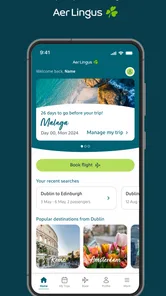
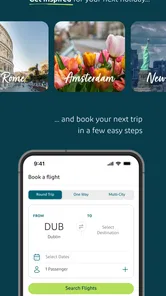
Let’s talk about booking flights, the main event. The app allows you to search for flights quickly by entering your departure, destination, and dates. One of the coolest features is the ability to filter results based on preferences such as flight duration, layovers, and price. It’s like having a personal travel agent at your fingertips! Plus, the app saves your booking details, so you don’t have to scramble for information last minute.
More From Our News Desk

 Weather - By Xiaomi
Weather by Xiaomi Review: Clear at a Glance, Less Clear Up Close
Xiaomi’s weather app makes everyday forecasts quick to scan, but its calm surface can leave useful details and recovery paths harder to find than they should be.

 X
XX Under Pressure: Can It Recover When Posting Goes Wrong?
A resilience-focused review of X, examining setup, mistaken posts, interruptions, weak connections, and the gaps that matter when recovery needs to be dependable.

 Clash of Clans
Clash of Clans Is Won Between the Battles
Its raids are quick; its community is a long-term project of coordination, teaching, rivalry, and shared responsibility—with all the friction that entails.

 Android Auto
Android Auto Makes the Case for Quieter Car Software
The car interface is no longer judged by how much it can do, but by how quietly it helps. Android Auto shows what drivers now expect—and what still gets in the way.

 MobiOffice: Word, Sheets, PDF
MobiOffice: Transforming Mobile Productivity with Seamless Integration
MobiOffice: Word, Sheets, PDF is redefining mobile productivity with a surprising blend of functionality and innovation.

 EA SPORTS FC Soccer Mobile 26
EA SPORTS FC™ Mobile Soccer: Redefining Mobile Sports Gaming
Dive into EA SPORTS FC™ Mobile Soccer, where immersive gameplay and strategic depth transform mobile sports gaming.
Latest News



Those filters are most helpful when I already know my priorities. If the lowest fare matters most, I can focus on price; if a tight connection would make the day stressful, I can give more weight to journey time and stops. A useful habit is to compare a convenient option with a cheaper one before booking, rather than treating the first result as an obvious winner. Fare conditions and trip details deserve a careful read, since a quick search is not a substitute for checking what a ticket includes.
Check-In and Boarding
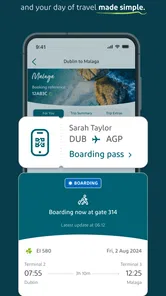
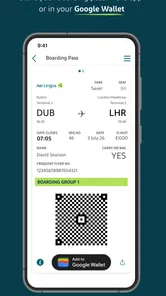
Forget the long queues at the airport counter. With this app, checking in is a matter of a few taps. I loved how I could select my seat and get my boarding pass straight on my phone. At the airport, just a quick scan of the QR code, and voila, I was on my way to the gate. Talk about convenience!
For an ordinary travel day, I would open the trip before leaving home, confirm that the boarding pass is available, and keep the phone charged for the journey. That small check is more useful than waiting until I reach the airport to sort out access. A phone-based pass is convenient, but I would not treat it as a reason to ignore airport screens or staff instructions; plans and gate details can change, and travelers should follow the latest information available at the airport.
In-Flight Entertainment and Services
The app doesn’t stop working once you’re airborne. It offers a plethora of in-flight entertainment options. I could easily browse and select movies, music, and even read magazines directly from my device. Additionally, the app keeps you updated on your flight status, so no need to bug the flight attendants with questions.
I would think of the app as a travel companion rather than a replacement for every source of information during a trip. Checking the status before setting off can help me organize my airport arrival, while checking it again during the journey gives me a reason to stay attentive to changes. For entertainment, I would prepare my device before boarding instead of assuming every item will suit every flight or circumstance.
Customer Support and Notifications
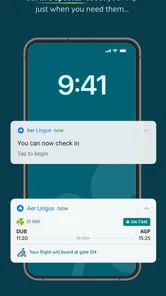
Now, let’s face it, travel plans can sometimes go awry. The Aer Lingus App has a nifty feature that keeps you updated with real-time notifications about your flight status, gate changes, and even baggage claims. Plus, if you need help, the customer support is just a tap away. I found the response time to be quite impressive, and the staff was super helpful.
Notifications are especially valuable when I am juggling a connection, transport to the airport, or plans with someone meeting me on arrival. I would allow the relevant alerts and still check the trip directly when timing matters; a notification is a useful prompt, not a guarantee that I can stop paying attention. If I need help with a booking, having the trip details ready before contacting support should make it easier to explain the issue clearly.
Using the app around a real travel day
Imagine I have an Aer Lingus flight early in the morning and a ride arranged to the airport. I would use the app at home to confirm the itinerary and check in, then make sure the boarding pass is available before I leave. If a change appears while I am on the way, a flight-status alert can help me decide whether to contact the person meeting me or adjust my plans. At the airport, I would still watch the departure screens, since an app alert and the live airport information work best as complements rather than substitutes.
For a return trip, I would treat the same routine as a way to keep both legs organized, not as a reason to stop checking details. Before setting off, it is worth confirming that the right booking is showing, particularly if several trips are planned close together. Keeping the itinerary easy to reach also helps when asking for assistance: I can explain which flight I mean without having to search through old messages while under time pressure.
A small but useful decision point is whether to use the app before or after choosing an airline. If my dates and destination are fixed but I have not decided who to fly with, I would compare broadly first and use the Aer Lingus app once its flight is a serious option. If I already have a booking, opening the carrier’s own app gives me a direct place to review that trip’s details. This avoids the common mistake of expecting one airline’s app to serve as a complete search tool for the whole market.
Where it fits among travel tools
Compared with a general flight-search app, this one has a narrower job. A broad search service is usually more useful when I want to compare carriers, schedules and fare options in one sweep. Aer Lingus’s app makes more sense after I have chosen the airline, when I want to search its flights or keep its booking and trip tasks together. I would use both in sequence rather than expect either one to do everything equally well.
The airline’s own app can also be more convenient than keeping every detail in email, especially on a travel day when I want to find the booking quickly. Email remains useful as a separate record, though, and I would not rely on a single screen as my only way to remember the essentials. My practical approach is to use the app for active trip tasks and keep the booking confirmation available as a backup reference.
It is less of a natural fit for someone who flies many different airlines and wants one place to manage every carrier. In that case, a broader travel organizer may be more convenient for an overview, while the individual airline apps can still handle their own flight information. The trade-off is straightforward: a dedicated app can be focused on its airline, but it cannot replace the wider comparison and organization offered by a multi-carrier tool.
Small checks that make the app more useful
I would avoid leaving check-in and boarding-pass access until the last moment. Opening the trip at home gives me time to spot a missing detail, confirm I am looking at the right itinerary and sort out the phone before travel. It also reduces the chance that I will be trying to remember account details or load a screen in a crowded airport when I am already watching the clock.
When comparing fares, I would use the filters to narrow the choices, then pause over the final itinerary instead of choosing by headline price alone. A low fare may not be the best match if the schedule is awkward or the connection adds stress. The app can help me see the options available through Aer Lingus, but the decision still depends on the full trip and its conditions, not just how quickly I can complete a search.
For a journey involving another person, I would make sure we agree on the itinerary before one of us books. A quick share of the flight details through the channels we already use can prevent confusion about dates or departure times. The app’s value is strongest when I know which booking I am managing; it is not a substitute for coordinating plans among travelers or checking that everyone has the same information.
One limitation worth keeping in mind is that a phone is not always the easiest place to compare complicated options. A larger screen can be more comfortable when I am weighing several dates or reading booking conditions carefully. I would use the app for convenience and trip management, but I would not hesitate to move to a browser or another comparison tool if that makes a complex decision clearer.
The app is a strong fit for travelers who have chosen Aer Lingus and want booking and trip information in one place. It is less compelling if I mainly need to compare many airlines, if I rarely fly with this carrier, or if I prefer handling every travel task through a desktop browser. The developer is Aer Lingus, and the app has been available since February 2, 2016; it requires Android 7.0 or later. Its 388 written reviews offer another perspective, but I would still judge it by how well it handles my own route and routine.
All in all, the Aer Lingus App has transformed my travel experience. It’s user-friendly, efficient, and packed with features that cater to both seasoned travelers and occasional flyers. So next time you’re planning a trip, give this app a whirl and let it take some of the stress out of your travel planning. Safe travels!
My recommendation is straightforward: because the app is free to install, it is worth trying if you are booking or managing an Aer Lingus flight. I would not choose it as my only travel-planning tool when the airline is still undecided, and I would compare fares and read the trip conditions before purchase. For an Aer Lingus passenger who wants a handy way to keep flight tasks together, it offers a practical benefit without a download fee; whether the journey itself is good value depends on the booking, not the app.
Aer Lingus App Frequently Asked Questions
Can I search for flights in the Aer Lingus app before deciding to book?
Yes. Searching for flights is one of the app’s central purposes, alongside booking and managing flights. You can use it to explore options before making a decision, then continue with a booking if you choose. The app is most relevant for travelers considering an Aer Lingus flight or passengers who already need to manage a trip.
Can I use the Aer Lingus app to manage a booking I already made?
Yes, the app is designed to help passengers manage flights as well as search and book them. Having it on your phone can make it easier to return to your travel details when needed. Its booking-management tools sit alongside features such as check-in and boarding passes, so the app can be useful throughout more than just the flight-search stage.
Is the Aer Lingus app free to download, and who is it for?
The Aer Lingus app is free to download and is aimed at people who want to search for, book, or manage flights. It is listed for everyone, so it is suitable for a broad audience. Its focus is travel planning and passenger services, making it most useful if you are considering an Aer Lingus flight or already have a booking to manage.
What features does the Aer Lingus app offer for passengers?
The Aer Lingus app provides a comprehensive suite of features for travelers. It allows users to book flights, check-in, and access boarding passes directly from their mobile devices. Additionally, passengers can manage bookings, select seats, and receive real-time flight updates. The app also offers information on AerClub rewards and provides customer support options, making travel planning seamless and efficient.
Is the Aer Lingus app available for both Android and iOS devices?
Yes, the Aer Lingus app is available for download on both Android and iOS platforms. Users can find the app on the Google Play Store for Android devices and the Apple App Store for iOS devices. The app is designed to be user-friendly on both platforms, ensuring that all passengers can access its features no matter their device preference.
Pros
- User-friendly interface for easy navigation.
- Real-time flight status updates available.
- Easy booking and seat selection process.
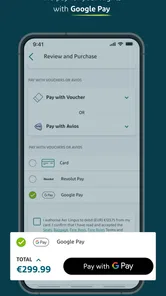
- Secure payment gateway for transactions.
- Frequent flyer program integration.
Cons
- Occasional app crashes reported by users.
- Limited customer support availability.
- Some features need internet access.
- Not all booking options are available.
- Push notifications can be intrusive.











