

Acadia National Park GPS Tour
- 16.00
- 4.1
- Installs
- 10.00K
- Price
- Free

Screenshots
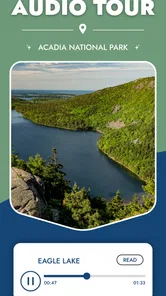
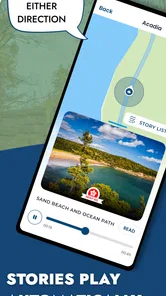
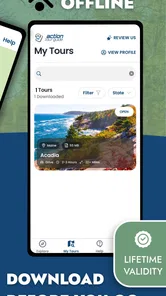
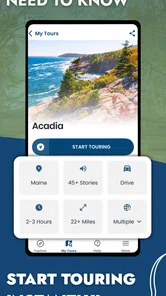

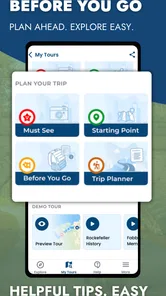
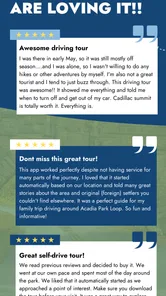

Analysis by Reviewed
Planning a day in Acadia National Park is exciting, but it also creates a practical problem: the best experience is rarely just about reaching a destination. You may want to understand what you are seeing, keep your attention on the road or trail, avoid depending on a signal, and still have enough freedom to change plans when the weather or your energy shifts. Acadia National Park GPS Tour is built for that kind of visit. It is a travel and local app from Action Tour Guide LLC that combines location-aware audio guidance with maps for a self-directed park outing.
I found its main appeal in the way it sits between two familiar choices. It is more informative than simply opening a map and driving from one pin to another, but less rigid than joining a scheduled group tour. The app is free to install, aimed at everyone, and currently carries a 4.1 average from around 68 ratings. That gives a useful first impression, although I would still judge it by whether its style matches the way you like to explore.
The important question is not whether an audio guide sounds interesting; it is whether you want guidance without surrendering control of your day. If that sounds like your ideal balance, this app deserves consideration. If you prefer complete silence, a detailed printed guide, or a live expert who can answer questions, another approach may suit you better.
How I would decide whether it fits an Acadia trip
I’d decide by matching the app to the shape of your day, not by assuming every stop needs commentary. If you want a flexible outing with a little context between viewpoints, I’d test the guide before you go and see whether listening feels like part of the trip rather than another task. I’d also agree with your companions on when to use it, so the narration supports the visit without taking over it.
Start with the kind of visitor you are
I would choose this app first for a visitor who wants context while moving through the park. Acadia is easy to experience as a sequence of scenic stops, but that can make the day feel disconnected. A GPS-triggered audio guide has the potential to turn the drive or walk between viewpoints into part of the visit rather than dead time. You can look at the landscape, listen when the app has something relevant to say, and continue at your own pace.
It is also a sensible match for people who dislike fixed itineraries. A conventional tour often asks everyone to follow the same schedule. A self-guided format gives you room to stop for photographs, pause for food, spend longer at a viewpoint, or leave a section for another day. That flexibility matters in a national park, where traffic, weather, crowds, and personal stamina can change a carefully planned route.
Families may appreciate the independence as well. One person can use the app as the main narrator while the group decides when to stop. That is less disruptive than repeatedly searching online for short explanations at every location. On the other hand, families with very young children may find that any audio narration competes with conversation and patience. In that case, I would treat the app as an optional layer rather than the center of the outing.
More From Our News Desk

 Weather - By Xiaomi
Weather by Xiaomi Review: Clear at a Glance, Less Clear Up Close
Xiaomi’s weather app makes everyday forecasts quick to scan, but its calm surface can leave useful details and recovery paths harder to find than they should be.

 X
XX Under Pressure: Can It Recover When Posting Goes Wrong?
A resilience-focused review of X, examining setup, mistaken posts, interruptions, weak connections, and the gaps that matter when recovery needs to be dependable.

 Clash of Clans
Clash of Clans Is Won Between the Battles
Its raids are quick; its community is a long-term project of coordination, teaching, rivalry, and shared responsibility—with all the friction that entails.

 Android Auto
Android Auto Makes the Case for Quieter Car Software
The car interface is no longer judged by how much it can do, but by how quietly it helps. Android Auto shows what drivers now expect—and what still gets in the way.

 MobiOffice: Word, Sheets, PDF
MobiOffice: Transforming Mobile Productivity with Seamless Integration
MobiOffice: Word, Sheets, PDF is redefining mobile productivity with a surprising blend of functionality and innovation.

 EA SPORTS FC Soccer Mobile 26
EA SPORTS FC™ Mobile Soccer: Redefining Mobile Sports Gaming
Dive into EA SPORTS FC™ Mobile Soccer, where immersive gameplay and strategic depth transform mobile sports gaming.
Latest News



Think about connectivity before leaving
The offline aspect is one of the most useful reasons to consider this particular guide. A park visit is not the moment when I want my entire plan to depend on a strong mobile connection. Offline access can make the experience more dependable in areas where service is inconsistent, and it also reduces the temptation to keep refreshing maps or searching for information while moving around.
There is an important preparation habit here: I would open the app and prepare the tour before setting out, while I still have reliable internet and enough battery. Offline tools are valuable only when their required content has already been made available on the phone. I would also download or carry any other essential information separately, such as reservation details, emergency contacts, weather information, and personal navigation backups. An audio guide should support a park plan, not become the only thing keeping the plan together.
For drivers, I would prepare the route before moving and let a passenger handle the phone whenever possible. For hikers, I would begin playback before entering a section where handling a device becomes inconvenient. This small change makes the app feel much smoother: instead of stopping to troubleshoot at each point, you can let the guide accompany the outing.
Decide how much structure you want
The app’s combination of GPS audio and maps suggests a guided flow, but it remains self-guided rather than instructor-led. That distinction is central. You are not simply reading a list of attractions; you are using your location to connect the commentary with the places around you. At the same time, you remain responsible for deciding where to go and how long to stay.
I like that arrangement for scenic travel because it avoids a common weakness of ordinary travel apps: too much information at the wrong time. A long article about Acadia can be useful before a trip, but it is not always practical to read while standing at a viewpoint. Audio lets you keep your eyes on the surroundings. The map, meanwhile, gives the experience a visual anchor and helps you understand how the stops relate to one another.
Still, I would not mistake this for a replacement for detailed trail planning. A narrated tour and a hiking-navigation tool solve different problems. The former helps explain the experience; the latter is usually better for route decisions, terrain awareness, and managing a serious hike. If your day depends on precise backcountry navigation, use an appropriate navigation resource alongside this app rather than expecting the tour to cover every need.
Where the app is strongest
Its clearest strength is the blend of movement and explanation. The app is not limited to a static collection of destination pages. Its GPS-based approach is designed to make the commentary relevant to where you are, which is especially helpful when driving between popular viewpoints or following a scenic route. That can make an ordinary transfer feel intentional.
I also value the control built into a self-guided experience. You can decide whether the day is focused on major viewpoints, scenic trails, or a relaxed mixture of both. You are not paying for a guide’s time by the hour, and you do not have to keep pace with strangers. For a couple or small group with different interests, that can be more comfortable than a formal tour.
Another strength is the way the app can reduce research friction. Before a trip, it is easy to collect too many tabs, saved posts, and disconnected notes. During the visit, that preparation can become a burden. A focused guide gives you one place to begin, with narration and mapping working together. I would still research the park beforehand, but I would use this app to make the actual day less dependent on constant phone searching.
There is also a useful psychological benefit. When I visit a scenic place without context, I sometimes rush from one famous stop to the next because I do not know what deserves attention. A well-timed audio explanation can encourage slower observation. You may notice the shape of the coastline, the relationship between a road and a viewpoint, or a detail that would otherwise blend into the background. That is a subtle advantage over using a map alone.
Three practical ways I would use it
For a first-time visitor with one main sightseeing day, I would use the app as the day’s narrative spine. Before leaving, I would review the map, identify the sections that matter most to the group, and decide where pauses are likely. During the trip, I would allow the audio to provide context while resisting the urge to treat every stop as mandatory. This keeps the guide useful without turning it into a checklist.
For a return visit, I would use it differently. Rather than replaying the entire experience as if it were my first time, I would select portions that add background to areas I previously rushed through. The self-guided format is well suited to that selective approach: a repeat visitor can use it for depth, while a newcomer can use it for orientation.
For a mixed-interest group, I would make one person the audio coordinator. That person can prepare the guide, start narration at appropriate moments, and put the phone away between segments. This avoids the familiar problem of several people independently checking screens while standing in a beautiful place. It also makes the app less intrusive for companions who are more interested in photography or quiet than in continuous commentary.
Where another type of travel tool may be better
A standard map app may be the better choice when your only goal is getting from one place to another. If you already know Acadia well, or if you have a tightly planned schedule and no interest in narration, the added layer may not justify the attention it requires. A general map is also more natural for combining the park with errands, restaurants, lodging, and unrelated stops.
A printed guide or downloaded written guide may suit travelers who prefer to scan information quickly. Audio is convenient when your eyes are occupied, but it is less convenient when you want to jump directly to one fact, compare several places, or read at your own speed. Written material also works better for some groups because everyone can browse independently instead of listening to one shared device.
A live guided tour remains the stronger option for visitors who want conversation, local interaction, and immediate answers. A self-guided app cannot adjust its explanation because someone in your group is curious about a particular detail. It also cannot notice that your children are tired, recommend a spontaneous pause based on the group’s mood, or reshape the day through human judgment. The trade-off is that a live tour normally gives you less independence.
Dedicated hiking and navigation apps may be preferable for users whose priority is trail management rather than sightseeing narration. If you are choosing a route based on distance, elevation, difficulty, or changing conditions, you need tools designed around those decisions. I would use Acadia National Park GPS Tour for interpretation and orientation, not as my sole safety system for demanding outdoor travel.
What the price really means
The app itself is free, which makes trying it before a trip relatively low-risk. The presence of in-app purchases, ranging from $1.99 to $69.99 per item, means I would check the specific tour or content option shown inside the app before relying on it. The free entry point is useful, but it should not be confused with every possible part of the experience being included at no cost.
This pricing structure changes how I would evaluate it. I would install it early, inspect the available content, and decide whether the relevant Acadia material fits my budget before arriving. That is better than making a rushed purchase in a parking area with limited battery and a group waiting. It also lets you compare the likely cost with alternatives such as a book, a live tour, or using existing map and park resources.
For a solo traveler, paid tour content may feel easier to justify because one purchase serves the whole day. For a larger group, the value can be stronger if everyone listens together, but the group should agree on the format first. If half the party wants a quiet drive and the other half wants narration, the purchase will not solve the disagreement. The real value lies in whether the guide improves the shared experience, not simply in how much information it contains.
Small frictions worth preparing for
Audio creates its own practical demands. Wind, road noise, conversation, and a phone’s speaker quality can all affect how enjoyable the narration is. I would bring headphones only if they are safe and appropriate for the setting, especially when walking or moving near vehicles. Otherwise, a shared speaker at a comfortable volume may work better for a group, provided it does not disturb other visitors.
Battery management is another overlooked issue. GPS use, screen time, and audio playback can consume power over a long day. I would begin with a full charge, reduce unnecessary screen use, and carry a power bank if the outing is expected to last. The app may be offline, but offline does not mean independent of the phone’s battery.
I would also keep expectations realistic about pacing. GPS-triggered content can be most helpful when you are near the relevant location, but real travel is messy. You may stop early, take a detour, miss a turn, or move through an area faster than expected. The best approach is to treat the narration as a companion rather than a strict sequence. If you try to force the day to match the app perfectly, the guide can become a source of stress instead of a convenience.
The app is listed as compatible with operating systems from version 9 onward, and its current version is 1.66. That makes it accessible to many older devices, but I would still update it before traveling and test the audio, map, and offline behavior at home. A short rehearsal is particularly worthwhile if the app will be used by someone who is not comfortable with travel technology.
Who should skip it
I would skip this app if I wanted a completely unmediated visit. Some people go to Acadia specifically to disconnect, listen to natural sounds, and avoid narration. For them, even a well-designed audio guide may feel like another layer between the visitor and the landscape.
I would also choose another solution if my plans centered on technical hiking, detailed route analysis, or changing conditions. The app’s travel-guide role is different from the role of a dedicated outdoor navigation system. Using the wrong tool for that job could create false confidence, which is a poor trade-off in a large natural area.
Finally, visitors who want a deeply personalized history conversation may be happier with a human guide or a carefully researched book. This app is attractive because it is convenient and independent, not because it can replace every form of expertise. Knowing that boundary is part of using it well.
My recommendation for a first visit
For most independent visitors, I would recommend trying Acadia National Park GPS Tour before the trip and deciding whether its narration style feels natural. The combination of offline guidance, GPS-linked audio, maps, scenic trails, and popular viewpoints gives it a clear purpose: helping you experience Acadia as a connected journey rather than a collection of isolated stops.
My strongest advice is to use it selectively. Prepare the tour in advance, make sure the relevant content is ready for offline use, plan around battery life, and let the group choose when to listen. Keep a separate backup for essential navigation and safety decisions. Those habits preserve the app’s strengths while avoiding the most common frustrations of relying too heavily on a phone outdoors.
Action Tour Guide LLC has made a useful middle-ground product for travelers who want more than directions but less commitment than a live tour. It is free to start, rated for everyone, and belongs naturally in the Travel & Local category. With over 10K installs, it has found an audience, though the modest review volume means I would still make my own trial run before building an entire vacation around it.
In the end, I see Acadia National Park GPS Tour as a good companion for curious, self-directed visitors. It is not a complete park-planning system, a replacement for safety tools, or a substitute for a personal guide. But if you want to keep your schedule flexible while adding meaning to the roads, trails, and viewpoints you encounter, it offers a practical and enjoyable way to do that.
Acadia National Park GPS Tour Frequently Asked Questions
Can I use the tour while exploring Acadia on foot, or is it mainly for driving?
The app is a self-guided way to explore Acadia, with GPS audio, maps, scenic trails, and popular viewpoints. It can be useful for planning stops beyond a simple drive, but keep your phone safely put away while walking on trails and pay attention to signs, terrain, and other visitors. Treat the narration as a companion to your outing, not as a substitute for trail directions or safety information.
Who makes Acadia National Park GPS Tour, and what kind of app is it?
Acadia National Park GPS Tour is a Travel & Local app from Action Tour Guide LLC. It is intended for visitors who want a self-guided experience, with location-based audio and information to help make stops around the park more informative. The app is free to download, and it offers in-app purchases; check the purchase options shown on your device before choosing what to access.
What is Acadia National Park GPS Tour?
Acadia National Park GPS Tour is a self-guided travel app designed to help visitors explore Acadia National Park in Maine. It combines GPS-based location tracking with narrated information about scenic viewpoints, historic landmarks, trails, wildlife, and park history. Instead of following a fixed group tour, you can drive at your own pace and stop whenever you want.
Does the Acadia National Park GPS Tour work without an internet connection?
The tour is generally intended to remain useful in areas with limited or unreliable cellular service, provided that the tour content and required maps are downloaded before entering the park. This is especially important in remote sections of Acadia, where reception can be inconsistent. Before starting, open the app, download the tour, allow location access, and bring a charged phone.
How does the GPS narration work during the tour?
After starting the tour, the app uses your phone’s GPS location to identify nearby points of interest and play relevant narration automatically or guide you toward the next stop, depending on the tour design. You can usually pause, replay, or skip content. For the best experience, keep location services enabled and use a vehicle mount so you can listen safely.
Pros
- Offline GPS maps help maintain guidance in areas with limited cell service.
- Self-guided narration lets visitors explore at their own pace.
- Useful route information can help plan drives between park highlights.
- Audio content adds context about Acadia’s history
- wildlife
- and scenery.
- Can reduce dependence on scheduled tours or a live guide.
Cons
- Some features may require an additional purchase or in-app payment.
- GPS accuracy can vary near cliffs
- dense forests
- or poor-signal areas.
- Audio tours may become repetitive on crowded or frequently visited routes.
- Phone battery use can increase during continuous GPS and audio playback.
- Content may not replace current alerts about closures
- traffic
- or weather.











