9Weather: Weather forecast
- 480.00
- 4.6
- Installs
- 1.00M
- Price
- Free
Screenshots
Analysis by Reviewed
When I try a weather app for everyday planning, the first test is simple: can I get a useful answer quickly, and can I tell whether a change in the forecast should alter my plans? 9Weather: Weather forecast is a free weather app from Amobi Lab, built around local conditions, forecast views and storm information. I find that combination appealing for someone who wants more than a temperature on a phone screen, but it works best when treated as a planning aid rather than a guarantee about what will happen at a particular street corner.
Where setup and first checks matter
Weather forecasts are only useful when the location being shown is the one you care about. When opening any local weather app, I check the displayed place before relying on its outlook, especially after travelling or switching between home and a destination. If the location looks wrong, I would first select or search for the intended place in the app rather than assume the forecast itself is inaccurate. That small check can prevent a misleading start to the day.
It also helps to decide how much detail you actually need. A quick glance at current conditions may be enough for choosing a jacket, while an hourly view is more useful when deciding whether to walk, cycle or move an outdoor errand. I’d use the daily outlook for broad planning, then revisit the nearer-term information before leaving. Forecasts change, so checking once in the morning is not always enough when the weather is unsettled.
Picking the right view for the decision
One useful habit is to make the question specific before opening the app. If I’m choosing clothes, current conditions and the day’s general outlook are usually enough; if I’m deciding whether to leave home on foot, I care more about the forecast close to my departure and return. That keeps a screen full of weather information from turning into a search for certainty no forecast can provide.
For errands with flexible timing, I’d use the hourly outlook to compare a couple of possible departure windows, then choose the one that looks less exposed to rain. It’s a small adjustment, but it makes the app more practical than checking a daily icon and treating it as the whole story. I would still carry a light layer if being caught in a shower would be inconvenient.
Unpacking the Features
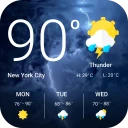
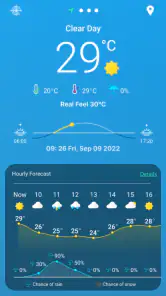
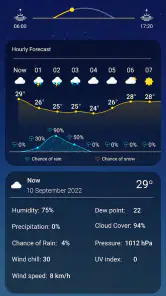
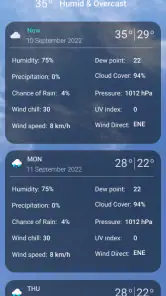
At first glance, 9Weather: Weather forecast is like a trusty weather companion that's easy on the eyes. The app greets you with a clean and intuitive interface, which is a breath of fresh air in the sometimes cluttered world of weather apps. The home screen offers a succinct overview of the current weather conditions, including temperature, humidity, and wind speed. It's all presented in a way that makes you feel like a meteorologist without needing a degree in atmospheric science.
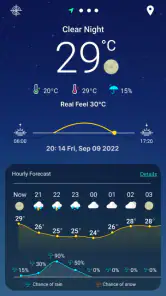
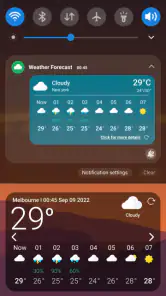
One of the standout features is the hourly forecast, perfect for planning your day down to the minute. Whether you're scheduling a morning jog or a late-night outing, this app has got your back. The daily forecast isn't just about numbers; it gives you a detailed breakdown with charming little icons that depict the weather mood – sunny, rainy, cloudy, you name it.
More From Our News Desk

Clash of Clans Is Won Between the Battles

Android Auto Makes the Case for Quieter Car Software

MobiOffice: Transforming Mobile Productivity with Seamless Integration

EA SPORTS FC™ Mobile Soccer: Redefining Mobile Sports Gaming

How Microsoft OneDrive Became a Mobile Productivity Giant

How Google Translate Breaks Language Barriers Effortlessly
Making the forecast useful in a real day
For a practical routine, I’d compare the hourly outlook with the time I actually need to be outdoors, not just the day’s high and low. If I’m walking to an appointment, for example, a rain chance around the departure or return time matters more than a rainy symbol covering the entire day. The same thinking helps with a picnic or a dog walk: check before committing, then take another look close to leaving if conditions seem changeable.
The radar is most valuable as a second opinion about nearby precipitation, rather than a promise that a storm will miss you. I’d use it to decide whether to wait before starting a short trip or to bring a waterproof layer, while still leaving room for conditions to shift. For a long drive or a serious outdoor activity, I’d combine a quick radar check with the broader forecast and local safety guidance instead of relying on a single screen.
A realistic routine for changing conditions
Imagine I’m due to walk across town for an appointment and clouds are gathering. I’d check the hourly outlook for the period I’ll be outside, glance at the radar to see whether precipitation appears to be nearby, and decide whether to leave earlier or take a raincoat. If the map looks uncertain, I would not keep refreshing it until it seems to agree with what I want; I’d choose the more cautious option if getting wet would cause a real problem.
That workflow also helps separate planning from monitoring. I can make an initial decision at home, then do one quick check before leaving rather than watching the screen continuously. For a flexible outing, a short delay may be reasonable; for a work shift or appointment, it may be more useful to prepare for the weather than to chase a perfect window.
Why You'll Love It
I have to say, the accuracy of 9Weather is pretty impressive. It uses data from multiple sources to ensure you're getting the most up-to-date information. We've all used those apps that seem to report weather from another planet, but this one feels like it's genuinely in tune with your local climate. Plus, it updates frequently, which is great for those unpredictable days.
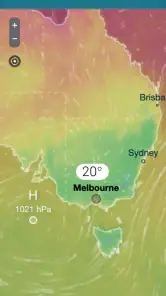
Another cool feature is the radar map. It’s like having a weather station right in your pocket. You can zoom in and see real-time precipitation, which can be a lifesaver when you're trying to dodge a thunderstorm. It’s also quite handy for road trips or outdoor events where weather can play a party pooper.
What radar can and cannot settle
I find radar most helpful when the choice is immediate and modest: leave now, wait a little, or pack protection. It gives a visual way to think about precipitation nearby, but it should not be read as a precise guarantee for one particular block or a promise that conditions will remain the same by the time I arrive. If a map seems hard to interpret, the simpler forecast view may be the better tool for that moment.
There is a trade-off between detail and confidence. Zooming in can make a map feel more exact than the underlying weather really is, especially when showers are scattered. I’d use the radar to add context to the hourly outlook, not to overrule it automatically. For severe weather or a safety-sensitive decision, I’d check relevant local advisories as well.
When comparisons and expectations matter
Compared with the basic weather panel many phones provide, this app puts more emphasis on looking beyond a single current-condition reading: the hourly and daily views, alongside radar, give me more context for a decision. That extra detail can be worthwhile if I routinely plan around showers. If I only want a quick temperature and do not expect to open a forecast map, my phone’s built-in option may be less effort.
I would also avoid treating any one forecast as exact. A shower can be brief or localized, and an alert that feels unnecessary from one person’s doorstep may be useful a few streets away. For that reason, I’d read the notification as a prompt to check conditions, not as a command to cancel plans. People who want highly tailored alert thresholds or a very minimal screen may find the experience less suited to them.
How it fits beside other weather options
The main alternative for many people is the weather information already built into a phone. That is convenient when all I need is a glance at the temperature, and it avoids adding another app to my routine. I’d choose 9Weather when I want to move from that quick glance to a closer look at the day or nearby rain, rather than because every user needs a separate forecast app.
It also suits a different habit from manually checking a general forecast website. A website can be useful when I want to compare information or read a broader outlook, while a phone app is easier to revisit between tasks. The practical question is whether I’ll actually use the extra views: if I rarely check hourly conditions or radar, the simpler option is probably enough. If I regularly plan walks, commutes or outdoor errands around showers, the additional context earns its place.
Room for Improvement
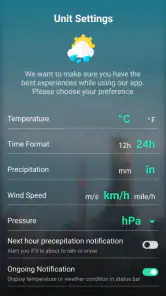
No app is perfect, and while 9Weather does a fantastic job, there are a few areas that could use a little polish. The app's notifications could be more customizable. Sometimes, you might get an alert about rain when it's just a light drizzle. It would be great if the app allowed you to set thresholds for notifications based on your personal preferences.
Additionally, while the app does support ads, they can occasionally be a bit intrusive. A premium version with an ad-free experience would definitely be a welcome addition for those who prefer a cleaner interface.
Keeping alerts and purchases in perspective
Weather alerts are most useful to me when they prompt a quick decision, but frequent or overly broad notifications can become background noise. If an alert feels irrelevant, I’d check whether the selected place is still the one I care about and consider whether I want notifications from the app at all. I wouldn’t assume that every alert can be tuned to a personal threshold; someone who needs very specific warning rules should compare options before relying on this app alone.
The app is free to install, with optional in-app purchases priced from about $2.49 to $26.99 per item. I’d treat those purchases as something to evaluate only after using the free experience and identifying a particular need. If ads are the main irritation, check what an available purchase actually changes before spending; the price alone does not tell me whether it solves that problem.
Recovering a useful view
If something seems off, I’d work through a few simple checks before blaming the forecast: confirm the selected location, reopen the relevant hourly or daily view, and check again after a little time if the weather is changing. If the map does not help with a decision, switch back to the forecast summary rather than repeatedly zooming in and expecting greater certainty. This is a practical way to use the tools without letting a temporary mismatch derail a plan.
There are also times when the app is not the cause of a disappointing prediction. Local showers can vary over a short distance, and conditions can change between checking the screen and stepping outside. When travel or safety is involved, I would use official local advisories as well as a consumer forecast. A weather app can help me prepare, but it cannot remove the uncertainty built into changing weather.
When a forecast seems wrong
If the displayed conditions do not match what I see outside, I would first make sure I’m looking at the intended place and the relevant time period. A forecast for a nearby area may differ from the conditions on my street, and rain can pass over one part of town without reaching another. Checking again later can help when the weather is moving or unsettled, but I would not interpret a mismatch as proof that every other part of the forecast is useless.
For a trip that crosses several areas, the forecast at the starting point may not represent the whole route. I’d use the app as one planning input and seek local guidance where conditions could affect safety. That distinction matters: 9Weather can help with ordinary choices such as carrying a coat, but it should not replace official warnings or sound judgment when severe weather is possible.
Who will get the most from it
9Weather has a 4.6 average from around 19,000 ratings, and it has been installed over a million times. It is rated for Everyone, is free to install, and has optional in-app purchases ranging from about $2.49 to $26.99 per item. It first appeared on August 10, 2023; version 1.154.3 supports Android 6.0 and later. Those details make it accessible to a broad range of Android users, though anyone considering a purchase should check the current in-app options and decide whether they solve a need they actually have.
I’d recommend trying it if you like having both a day-level overview and a closer look at rain before heading out. It is particularly useful for people whose routines involve walking, commuting or arranging casual outdoor plans. Someone who wants only a bare-bones temperature display, dislikes ads, or needs tightly controlled alert rules may be happier with a simpler alternative or another service that better matches those preferences.
Who may prefer something simpler
I would skip a dedicated weather app if my routine is limited to checking the temperature once in a while and my phone already answers that question clearly. I’d also look elsewhere if intrusive ads would make me avoid opening the app, or if carefully controlled alert settings are essential to how I manage weather risks. Those are not small preferences: they determine whether a feature-rich forecast becomes genuinely useful or just another source of interruption.
For people who enjoy checking more than one view, the balance is different. An hourly outlook and radar can help turn a vague “maybe rain” into a concrete choice about timing or clothing. I’d recommend starting with the free version and a familiar routine, then judging whether those views change a decision often enough to justify keeping it installed.
Final Thoughts
All in all, 9Weather: Weather forecast is a solid app that delivers on its promises. It's user-friendly, accurate, and packed with features that genuinely make life easier. Whether you're a weather enthusiast or just someone who likes to be prepared, this app is worth a spot on your home screen. Just remember to keep that umbrella handy, because even with the best forecasts, sometimes you just can't predict a splash of spontaneity from the skies!
9Weather: Weather forecast Frequently Asked Questions
How much storage space should I leave for 9Weather?
It is sensible to check the available space on your Android device before installing any weather app, especially if you keep many apps or photos. 9Weather is free to download, though optional in-app purchases are available. After installation, you can decide whether its weather updates, forecasts, alerts, and radar tools fit the way you want to use your device.
Can I check weather for places other than my current location?
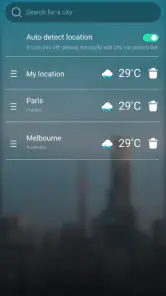
Yes. 9Weather is designed to provide weather information for locations around the world, so you can check conditions in places beyond where you are now. That can be useful when planning a trip or keeping up with weather elsewhere. Forecast coverage and accuracy can vary by region, so consider local sources too when conditions are important.
Is 9Weather: Weather Forecast available for my Android device?
9Weather: Weather Forecast is a weather app for Android devices running Android 6.0 or later. It is free to download, and its age rating is Everyone, so it is intended for a broad audience. Before installing, check your device’s Android version and make sure you are downloading the app from a trusted source.
Who makes 9Weather, and is it widely used?
9Weather is developed by Amobi Lab. It has more than 1 million installs and an average rating of 4.6 from around 19,000 ratings, giving prospective users a useful sense of its reach and reception. Those figures do not guarantee that every feature will suit your needs, so it is still worth considering how you plan to use a weather app.
What features does 9Weather: Weather Forecast offer?
9Weather: Weather Forecast provides users with real-time weather updates, detailed forecasts, and weather alerts. The app includes features such as hourly and weekly weather predictions, radar maps, and customizable notifications. Users can also access information about humidity, wind speed, and UV index, making it a comprehensive tool for weather monitoring.
Pros
- Accurate weather predictions
- User-friendly interface
- Detailed daily forecasts
- Customizable alerts
- Supports multiple locations
Cons
- Ads in free version
- Limited customization options
- Requires internet connection
- Occasional slow updates
- No radar map feature
- Category
- Weather
- Version
- 1.154.3











