

5 Calls: Contact Your Congress
- 2.05K
- 4.9
- Installs
- 100.00K
- Price
- Free

Screenshots
Analysis by Reviewed
I think of 5 Calls: Contact Your Congress as a practical tool for turning a news headline into a deliberate conversation with an elected representative. It is a free civic-engagement app from 5 Calls in the Books & Reference category, and its central idea is straightforward: help me understand an issue, find the relevant offices, and make contact without starting from scratch. That makes it most useful when I want to act on something specific, rather than simply browse political news.
From a headline to a clear reason to call
A realistic moment for using it is seeing a story during a lunch break and deciding I want to respond before the day gets away from me. Instead of searching through general news coverage and then trying to work out which representative handles the issue, I can use the app’s issue material as a starting point. The background gives me a quick orientation, while the suggested script helps turn a vague reaction into a focused message. I would still read the wording before calling: a script is a prompt, not a substitute for deciding what I personally want my representative to hear.
That distinction is one of the app’s less obvious strengths. The most useful workflow is not necessarily to repeat the script verbatim, but to use it to identify the point I want to make, then adjust the language so it sounds like me. A short personal reason can make the call feel more genuine and helps me remember what I actually said. If I am pressed for time, I can stick close to the prepared wording; if I have more to contribute, I can treat it as an outline.
Keeping the handoff manageable
The app’s value is in connecting several small tasks that otherwise tend to get in each other’s way: choosing an issue, understanding the context, locating the appropriate representative, and preparing what to say. I find that especially helpful for someone who cares about public policy but does not already have office numbers and talking points saved. The app reduces the setup work, though the actual call remains a separate step. I still have to make time, place the call, and speak for myself.
For a more organized routine, I would pick one issue at a time and finish the contact step before moving on to another topic. That keeps the background and script tied to a specific action rather than leaving me with a long list of causes I meant to pursue. If I want to follow up later, a simple personal note about the date, office contacted, and main point raised can help me keep track outside the app. This is a useful habit when civic engagement is an occasional practice rather than a daily routine.
Who gets the most from it
I would recommend it to people who want a low-friction first step into contacting Congress, especially if they find a blank page or an unfamiliar phone call intimidating. It is also a good fit for busy readers who want political context tied to a concrete next action. With a 4.9 average from around 9,200 ratings and more than 100,000 installs, it has clearly found an audience, though popularity alone cannot tell you whether its approach fits your habits.
It is less suitable if what you want is a broad, customizable news reader, an in-depth policy research library, or a place to debate issues with other users. A general news app is better for following a wide range of stories, while official government resources are a stronger choice when you need to verify legislative details directly. I see 5 Calls as a bridge from awareness to outreach, not a replacement for those sources or for forming your own view.
More From Our News Desk

 Gmail
GmailGmail in a Busy Inbox: Who Benefits Most?
From first account to crowded workday, Gmail earns its place through dependable search and flexible sorting—but its best fit depends on how much inbox maintenance you can tolerate.

 Prime Video
Switching to Prime Video: What Changes in Your Viewing Routine
Prime Video can make a compelling second home for streaming, but switching means learning a different catalog, rental layer, and route from browsing to playback.

 Universal TV Remote Control
Universal TV Remote Control Works Best as a Reliable Backup
A phone remote earns its place through quick setup and reliable habits. Here is how to get more from Universal TV Remote Control—and where its limits show.

 Weather - By Xiaomi
Weather by Xiaomi Review: Clear at a Glance, Less Clear Up Close
Xiaomi’s weather app makes everyday forecasts quick to scan, but its calm surface can leave useful details and recovery paths harder to find than they should be.

 X
XX Under Pressure: Can It Recover When Posting Goes Wrong?
A resilience-focused review of X, examining setup, mistaken posts, interruptions, weak connections, and the gaps that matter when recovery needs to be dependable.

 Clash of Clans
Clash of Clans Is Won Between the Battles
Its raids are quick; its community is a long-term project of coordination, teaching, rivalry, and shared responsibility—with all the friction that entails.
Latest News



Getting Started with 5 Calls
First things first, downloading and setting up 5 Calls: Contact Your Congress is a breeze. Available for both Android and iOS, the app is lightweight and installs quickly. Upon launching it, you're greeted with a clean and intuitive interface that guides you through the initial setup. The app asks for your location to connect you with your local representatives. Don’t worry; it’s all about making sure your voice reaches the right people!
Features That Empower
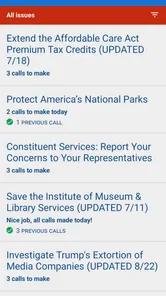
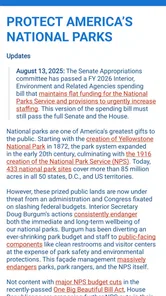
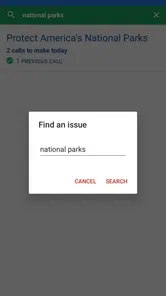
One of the standout features of 5 Calls is its curated list of issues. Whether you’re passionate about healthcare, environmental policies, or social justice, the app presents you with key topics currently being discussed in Congress. Each issue comes with background information, enabling you to make informed calls. This feature is super handy for those of us who want to stay updated but don’t have the time to scour through endless news articles.
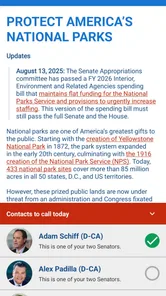
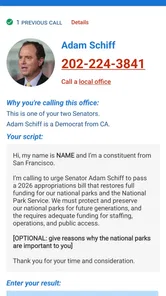
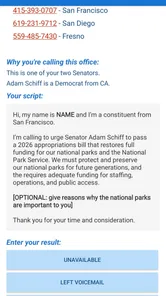
Once you select an issue, the app provides you with the contact details of the relevant representatives. Here’s where it gets even better: 5 Calls supplies you with a script! Yep, no more fretting over what to say. The app offers a script that you can follow or modify to suit your tone, making the whole process less intimidating and more efficient.
User Experience
Using 5 Calls feels like having a political assistant in your pocket. The developers have done a fantastic job ensuring the app is user-friendly. The navigation is straightforward, and the instructions are clear. Plus, the design is minimalistic, which means you won’t be distracted by unnecessary graphics or ads. It’s all about getting you to take action as quickly and easily as possible.
One practical limitation is that the easiest route depends on having the right location information available during setup. I would check that the representatives shown match the area I intend to contact before relying on a prepared script. If I am travelling, using a different address, or trying to reach an office for a specific district, that extra check matters; a smooth interface cannot make a mismatched contact useful. For a reader who prefers not to share location, this initial step may also feel like more friction than looking up an office independently.
The app is best when I already know the general issue I care about and need help moving from concern to action. It is not a shortcut to understanding every side of a complicated debate. I treat its brief issue background as an entry point, then consult other reporting or primary sources when I need to judge competing claims. That keeps the convenience without asking a short in-app summary to do the work of deeper research.
Where the routine can stall
The suggested call is still a phone call, and that is a meaningful barrier for anyone who dislikes speaking spontaneously or cannot make calls during office hours. The script can lower the pressure, but it cannot remove the need to call or guarantee a particular response. If I am not ready to speak, I would use the script to prepare my thoughts first and choose another appropriate contact route through an official source rather than assume the app handles every kind of outreach.
Another trade-off is focus. A curated set of current issues is more actionable than an unfiltered feed, but it may not match every local concern or personal priority at the moment I open the app. I would not take the topics presented as a complete map of public policy. The better approach is to use them when they align with what I want to act on, and look elsewhere when my concern is outside that selection.
A useful tool, not the whole civic toolkit
For practical use, I would keep the process small: choose one issue, read enough context to explain my concern, adapt the script, confirm the representative, and make the call. Afterward, I can note what I asked for and decide whether I want to revisit the issue. That simple sequence makes the app more useful than opening it just to skim, and it avoids confusing activity with impact.
The app is free, rated for Everyone, and its current version is 2.3.16, with Android support starting at version 6.0. Those details make it accessible to many people, but the best reason to install it is more specific: it reduces the awkward preparation between caring about a congressional issue and contacting an office. If you prefer to research broadly or avoid calls altogether, another route may fit better. If you want a guided, focused nudge to speak up, I find 5 Calls a sensible place to begin.
Making the workflow work on a busy day
For someone trying this between other responsibilities, I would separate choosing an issue from making the call rather than expect one quick session to do everything. I can read the context and shape a personal version of the script when I have a quiet moment, then call when I can give the conversation my attention. That small split is useful if I feel rushed: it prevents the convenience of a prepared prompt from turning into a call made without knowing what I want to say.
It also helps to decide what a successful session means before opening the app. My goal might simply be to understand the issue well enough to explain my concern, or to complete one call. Keeping the target modest makes the app’s focused approach an advantage. If I want to compare several policy proposals or follow a story as it develops, I would move to broader reporting and return to 5 Calls when I am ready to contact an office.
Choosing the right route for the message
People sometimes ask whether a prepared script makes a call sound artificial. In my view, it only does if I treat it as a speech I must perform. I would keep its main request, replace wording that does not sound natural to me, and add a brief reason the issue matters personally. If I would rather not improvise, reading a concise prompt is still a reasonable way to get the point across; the important trade-off is that the app helps me prepare, while the actual exchange is mine to handle.
And if a phone call is not practical, I would not assume that the app can complete the outreach another way. I would use its background to clarify my point, then check an official source for another contact method. This makes 5 Calls a better fit for someone willing to call than for someone looking for a fully asynchronous civic inbox. The distinction matters before installing: it is a focused path to a particular kind of participation, not a universal contact manager.
How it differs from other political tools
Compared with a conventional news reader, the app asks for a narrower kind of attention. News apps are built for following many stories and perspectives; 5 Calls is more useful when I have already found an issue and want to move toward contacting a representative. Compared with searching the web for an office number and writing my own notes, it brings the issue context, contact details, and script into one guided workflow. That convenience is real, but it does not replace independent checking when accuracy or nuance is especially important.
That makes it a particularly good fit for a first-time caller, a busy person who wants a clear next step, or someone who tends to read political coverage and then leave it there. It is a weaker fit for readers who need exhaustive policy analysis, want to explore local issues beyond the topics presented, or prefer to engage through discussion rather than direct outreach. I would use it alongside other sources, not ask it to be both my news desk and my research library.
Why It Matters
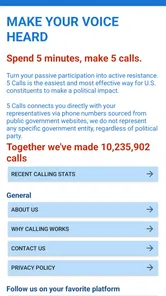
In a world where political decisions impact our daily lives, tools like 5 Calls are invaluable. They lower the barriers to political engagement, making it accessible to everyone, regardless of how busy life gets. The app not only encourages civic involvement but also educates users on the importance of their participation in democratic processes.
What truly sets 5 Calls apart is its focus on action. It's not just about providing information; it’s about empowering users to make a tangible impact with their voices. Whether you’re a seasoned activist or new to the political scene, this app offers a straightforward way to get involved and effect change.
In conclusion, 5 Calls is more than just an app; it’s a tool for empowerment and change. By simplifying the process of contacting representatives and staying informed about key issues, it ensures that every voice can be heard. Whether you’re at home or on the go, making a difference is just a few taps away.
5 Calls: Contact Your Congress Frequently Asked Questions
Is 5 Calls free to download and use?
Yes. 5 Calls is a free app in the Books & Reference category, so you can download it without paying an upfront purchase price. Its purpose is to help people follow political issues and contact representatives, rather than to sell a reading or entertainment subscription. If you are considering installing it, the main decision is whether its civic-engagement tools suit the way you want to take part.
What Android version do I need to run 5 Calls?
On Android, 5 Calls requires version 6.0 or later. Checking your device’s software version before downloading is a simple way to avoid compatibility problems. If your phone or tablet meets that requirement, you can use the app to browse political issues and find ways to contact representatives. The app is also available for iOS, giving users another way to access its civic-engagement features.
What is the main purpose of the 5 Calls app?
The 5 Calls app is designed to make civic engagement easy and effective by helping users contact their local, state, and federal representatives. The app provides a list of current issues, scripts for phone calls, and the contact information of relevant officials, empowering users to voice their opinions and take action on political matters that are important to them.
How does 5 Calls ensure my personal information is kept private?
5 Calls values user privacy and does not require you to create an account or provide personal information to use the app. It only requests location access to determine your representatives and does not store or share any personal data. The app is designed to maintain user privacy while facilitating political activism.
Is 5 Calls available for both Android and iOS devices?
Yes, 5 Calls is available for download on both Android and iOS platforms. Users can access the app through the Google Play Store for Android devices and the Apple App Store for iOS devices, making it accessible to a wide audience who want to engage in political activism through their smartphones.
Pros
- Direct contact with representatives.
- Easy-to-navigate interface.
- Allows call scripting.
- Provides representative information.
- Encourages civic engagement.
Cons
- Limited to U.S. Congress contacts.
- No email option available.
- Requires phone number.
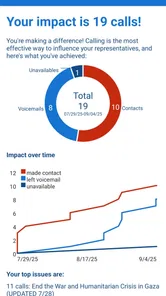
- No tracking of call outcomes.
- Limited to English language.











