

3e Encore
- 9.00
- 3.1
- Installs
- 10.00K
- Price
- Free

Screenshots

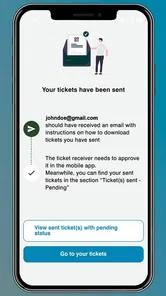
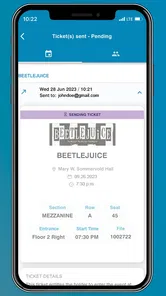
Analysis by Reviewed
3e Encore is the kind of app I would install when an event is already on my calendar and I want the ticket experience to stay on my phone. It is a free events app from SECUTIX SA, presented as a modern mobile ticketing tool rather than a general event-discovery service. That distinction matters: its usefulness depends less on opening it every day and more on whether it makes the moments before entering an event calmer and easier.
My first impression is practical rather than exciting. The short store label, “3e Encore,” gives very little away, while the fuller description points toward mobile ticketing. In use, I would judge it by a simple question: can I find the right event access quickly when I am standing outside a venue, possibly with a low battery, a crowded screen, and little patience? That is the standard a ticket app has to meet.
From first-week appeal to lasting usefulness
I find the lasting usefulness of a ticket app depends less on how often I open it than on whether it stays easy to use when an event day gets hectic. In this section, I look beyond the initial convenience and consider how different reading, navigation, and phone-use needs can shape that experience. That perspective also helps clarify when a separate ticketing app is a practical choice—and when a simpler option may work better.
The first week is about removing ticket friction
The strongest appeal comes during the first event cycle. After installing the app, a user generally wants to move from “I have a ticket somewhere” to “I am ready to enter” without searching through email threads, screenshots, or a browser history. A dedicated mobile ticketing app can give that process a clearer home, especially for someone who attends events often enough to dislike repeatedly hunting for confirmation messages.
I find this particularly useful in a realistic everyday situation: I am leaving work for an event, my inbox is full, and I do not want to open several messages to identify the correct ticket. Having a ticket-focused app available can reduce that last-minute mental load. The benefit is not entertainment; it is confidence. The app earns its place when it turns preparation into a short routine instead of a small investigation.
That first-week appeal is also helped by the fact that it is free and suitable for everyone. There is no purchase price creating a second decision before trying it. Its minimum operating requirement is Android 7.0, which keeps it accessible to many older Android phones. On the other hand, compatibility alone does not guarantee a smooth venue experience. I would still install it before the day of an event, sign in or complete any required setup early, and open the relevant ticket while I have a reliable connection.
That last step is one of my most important practical recommendations. I would not make the entrance queue the first place where I test a ticket app. A ticketing workflow has more points of failure than a casual app: an expired session, an unread message, a weak signal, or a phone that suddenly needs an update can all become stressful at exactly the wrong time. The app is more useful when it is treated as part of event preparation, not as an emergency tool discovered five minutes before doors open.
More From Our News Desk

 Gmail
GmailGmail in a Busy Inbox: Who Benefits Most?
From first account to crowded workday, Gmail earns its place through dependable search and flexible sorting—but its best fit depends on how much inbox maintenance you can tolerate.

 Prime Video
Switching to Prime Video: What Changes in Your Viewing Routine
Prime Video can make a compelling second home for streaming, but switching means learning a different catalog, rental layer, and route from browsing to playback.

 Universal TV Remote Control
Universal TV Remote Control Works Best as a Reliable Backup
A phone remote earns its place through quick setup and reliable habits. Here is how to get more from Universal TV Remote Control—and where its limits show.

 Weather - By Xiaomi
Weather by Xiaomi Review: Clear at a Glance, Less Clear Up Close
Xiaomi’s weather app makes everyday forecasts quick to scan, but its calm surface can leave useful details and recovery paths harder to find than they should be.

 X
XX Under Pressure: Can It Recover When Posting Goes Wrong?
A resilience-focused review of X, examining setup, mistaken posts, interruptions, weak connections, and the gaps that matter when recovery needs to be dependable.

 Clash of Clans
Clash of Clans Is Won Between the Battles
Its raids are quick; its community is a long-term project of coordination, teaching, rivalry, and shared responsibility—with all the friction that entails.
Latest News



What makes it different from ordinary ticket storage
Compared with keeping a ticket in email, a screenshot, or a mobile browser, a dedicated app can offer a more focused path to event access. Email is excellent for receipts and order history, but it is not designed around the moment of entry. Screenshots are fast, yet they can become confusing when several events look alike, and they may not reflect a changed ticket state. A browser is flexible, but it adds the burden of remembering where the ticket was purchased and whether the session is still active.
3e Encore makes the most sense for people who prefer one event-oriented place instead of relying on these scattered alternatives. I would especially consider it for a regular attendee who wants a repeatable habit: check the app before leaving, locate the correct event, and keep the phone ready. That habit is more valuable than any novelty the interface may offer.
There is a trade-off, though. A general wallet or the original ticket provider’s website may be more convenient if the user already has a dependable system that works. If all tickets arrive neatly in one wallet and entry has never caused trouble, adding another app can feel like duplication. The dedicated option becomes worthwhile when organization and quick retrieval matter more than minimizing the number of installed apps.
Month-to-month value depends on your event rhythm
The long-term value is not evenly distributed. Someone attending one event every few years may gain little from keeping a ticketing app installed after the event has passed. For that person, email or a browser may be enough, and removing the app afterward could be the cleaner choice. I would not recommend maintaining it simply because it was useful once.
For a person with recurring event plans, the calculation changes. The app can become a small piece of a monthly routine: check upcoming access, confirm that the right event is ready, and avoid last-minute searching. Its value grows through repetition rather than constant discovery. That is why I see it as a utility with recurring situational value, not as an app that needs daily attention.
The current release is version 4.2616.3, and the app was released on July 18, 2023. Those details suggest a product that should be evaluated as an actively maintained mobile experience rather than an old static ticket viewer. Still, version numbers do not remove the need for personal testing. I would update it before an important event, but I would also avoid updating minutes before entry unless necessary. A stable, prepared setup is more reassuring than making several changes while already travelling.
One useful habit is to separate “ticket readiness” from “event excitement.” The day before an event, I would open the app, identify the correct booking, check that I can reach the access screen, and charge the phone. On the day itself, I would avoid logging out, clearing app data, or experimenting with settings. This sounds basic, but it is exactly the kind of maintenance that prevents a simple ticket app from becoming a source of anxiety.
The maintenance burden is low, but not zero
A ticket app should not demand a complicated routine, and 3e Encore generally makes sense only if the upkeep stays light. The main burden is remembering that digital access still needs preparation. The phone must be available, the app must remain installed, and the user should know where to look when the ticket is needed. Those are small responsibilities, but they are easy to ignore until the queue is moving.
I would also keep the app in a predictable place on the phone rather than burying it in a folder. That is a small organizational improvement, yet it matters when arriving at a busy venue. I would label or mentally separate different event entries as well, particularly if several tickets are active at once. The practical danger is not necessarily that the app cannot hold event information; it is that a rushed user may select the wrong item or waste time identifying it.
Battery planning is another overlooked part of mobile ticketing. I would not rely on a nearly empty phone simply because the ticket is digital. A power bank, a charged device, and an early app check are more useful than hoping the entrance area has good connectivity or charging access. This is not a criticism unique to 3e Encore; it is the unavoidable trade-off of replacing paper with a phone.
For an occasional user, the best maintenance strategy may be temporary installation. Install it ahead of the event, complete the setup while relaxed, use it for entry, and decide afterward whether another event is likely soon. For a frequent attendee, keeping it installed is more sensible because the repeated setup cost would become annoying. That difference between user types is central to whether the app earns permanent space.
Where fatigue can appear after the novelty fades
The first-use experience of a ticketing app can feel satisfying simply because it is new and focused. After that novelty fades, the app has to justify itself through reliability and speed. If I only open it when I already know exactly which event I am attending, there may be little reason to browse around. Its role is narrow, and that narrowness is both its strength and its limitation.
Some users may become tired of maintaining separate event accounts or apps when different organizers use different ticket systems. A dedicated app cannot automatically eliminate the broader fragmentation of event purchasing. If my tickets come from several unrelated providers, I may still end up switching between services. In that situation, a general wallet, a carefully organized email folder, or the original provider’s website might be easier to manage as a single overall system.
The modest average rating of 3.1 from 17 ratings is a reason I would approach it with realistic expectations rather than assuming universal smoothness. The rating is based on a small public sample, so I would not treat it as a definitive judgment. I would use the app for a low-stakes event first if possible, then decide whether I trust it for something especially important. That is a sensible approach whenever the cost of an entry problem would be high.
There can also be fatigue from opening an app for a task that happens only occasionally. If the app does not become part of a clear pre-event checklist, I may forget how it works between visits. The solution is not to use it constantly; it is to make the few uses predictable. A consistent routine—open, locate, verify, charge, and leave—keeps the learning burden low.
Privacy and phone housekeeping can influence the decision too. Some people prefer not to install a separate app for every event because they want fewer services on their device. Others value a dedicated ticket location enough to accept that extra footprint. I would skip 3e Encore if my existing wallet or browser workflow is already effortless, especially when I attend events rarely. I would favor it when repeated ticket retrieval is a genuine nuisance.
Who will get the most from it?
The best match is a person who attends events often enough to benefit from a repeatable mobile entry routine, but who does not want to depend on an overloaded inbox. It is also a reasonable choice for someone who prefers a focused event tool and is comfortable preparing the phone before leaving home. The free price removes one barrier, and the Everyone age rating makes it broadly approachable.
I would be more cautious recommending it to someone who regularly loses access to their phone, travels with unreliable connectivity, or dislikes handling tickets through separate services. A paper backup, a wallet-based method, or the event organizer’s established alternative may be better in those cases. The right choice is the one that remains usable under pressure, not the one with the most modern presentation.
It is also worth remembering that SECUTIX SA is the developer behind the app, so users who already encounter this name in their event arrangements may have a clearer reason to try it. For everyone else, the decision should be based on workflow rather than recognition. I would not install it merely because it describes itself as state-of-the-art; I would install it if it solves a recurring ticket-access problem.
My long-term verdict after the practical test
3e Encore earns lasting space on my phone only when I have a continuing reason to use its event-ticketing workflow. It is not the sort of app I would keep for endless browsing, social interaction, or daily entertainment. Its lasting value is quieter: it can make event preparation more orderly, reduce dependence on scattered messages, and give regular attendees a dedicated place to start.
I like the idea of building a small pre-event habit around it, but I would not confuse that habit with guaranteed convenience. The app still depends on a charged phone, sensible preparation, and a user who knows which ticket they need. Occasional attendees may find the maintenance unnecessary, while frequent attendees can reasonably see it as a useful part of their event routine.
My recommendation is therefore conditional but positive. Try it before an ordinary upcoming event, prepare the ticket in advance, and judge how quickly you can reach the correct access point when you are not under pressure. If that test feels simpler than email, screenshots, or a browser, keep it installed. If it merely adds another place to search, return to the method that already works. For me, that practical test—not the novelty of a mobile ticketing app—is what determines whether 3e Encore deserves a permanent place.
With over 10 thousand installs, it has found a real audience, although its small review base and 3.1 average make a personal trial sensible. Because it is free and supports Android 7.0 or later, the barrier to that trial is low. I would describe it as a focused utility: worthwhile for repeat event-goers who value a prepared, phone-based entry routine, but unnecessary for people whose existing ticket system is already quick and dependable.
3e Encore Frequently Asked Questions
What is 3e Encore used for?
3e Encore is an Events app from SECUTIX SA, described as a state-of-the-art mobile ticketing application. It is intended for people using services or events supported by the 3e Encore platform. Its usefulness depends on whether the event organizer or service you are dealing with uses it, so check your ticketing or event instructions before downloading.
Does 3e Encore work on my phone?
3e Encore requires Android 7.0 or later, so check your device’s operating system before installing it. Keeping your phone’s software up to date can also help avoid compatibility problems. The app is free to download, and its content rating is Everyone, making it suitable for a broad audience, subject to the event or service’s own requirements.
What is 3e Encore, and who is it designed for?
3e Encore is a mobile application focused on supporting users with the 3e Encore platform and its associated services. Its usefulness depends on the organization, program, or account connected to it, so the available tools may vary. Before downloading, check whether your school, workplace, event, or service provider specifically uses 3e Encore and whether you have the login details or invitation required to access its features.
Is an account or invitation required to use 3e Encore?
In most cases, access to 3e Encore is connected to an existing organization, membership, or service account rather than being completely open to everyone. You may need credentials supplied by an administrator or provider, and some features could remain unavailable until your account is activated. If you cannot sign in after installation, confirm your email, password, invitation status, and access permissions with the organization managing the platform.
What features can users expect from 3e Encore?
The exact feature set can differ depending on how 3e Encore has been configured for your organization. Users may receive access to account-related information, program content, communication tools, schedules, resources, or other services provided through the platform. Because features can be role-based, two users may see different screens. It is best to review the app description and your provider’s instructions before assuming every function is included.
Pros
- Simple interface makes core features easy to find.
- Runs well on many older Android devices.
- Useful for quick
- casual sessions on the go.
- Lightweight installation uses minimal storage space.
- Clear visual feedback helps beginners learn quickly.
Cons
- Limited advanced options may disappoint experienced users.
- Some screens feel dated compared with newer alternatives.
- Performance can vary on newer devices and operating systems.
- The app may offer little replay value after extended use.
- Support and update frequency may be inconsistent.











