

3D Anatomy
- 349.00
- 4.3
- Installs
- 100.00K
- Price
- $2.99
Screenshots
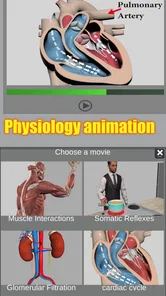
Analysis by Reviewed
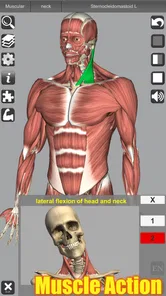
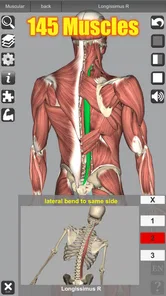
I find a 3D anatomy model most useful when I’m trying to understand how a structure sits in relation to its neighbors, rather than memorizing a flat diagram. That spatial focus is what makes 3D Anatomy interesting: it gives you a body model to turn and inspect, with muscle action included as part of the learning experience. For a Medical app, that makes it easier to connect names and locations with the shape and movement of the body.
Why movement matters when learning anatomy
A label on a diagram can tell me what a muscle is called, but it does not always make its role intuitive. Seeing muscle action alongside a three-dimensional body model gives me another way to think about function: where a structure is positioned, what it is near, and how its action relates to movement. That connection is especially useful when a lesson introduces several muscles in one region and the names start to blur together.
I would not treat a moving model as proof that I understand the underlying mechanics. Anatomy study still involves learning terminology and checking how a concept is described in a course or trusted reference. The model is strongest as a bridge between words and mental pictures, not as a replacement for explanations that spell out the details.
Learning by changing your viewpoint
In practice, I’d use the rotation and zoom to study one area at a time. Start with a broad view, locate the structure you’re learning, then zoom in and rotate the model to see how its position changes from another angle. A useful habit is to pause before moving the model and try to describe what you expect to see on the far side; checking that guess turns browsing into a small self-test instead of passive viewing.
The 3D view also helps when a textbook image feels confusing because it can only show one perspective. It is not a replacement for a course, a clinician, or a detailed reference, but it can make spatial relationships easier to picture. I’d treat it as a visual study aid and check technical terminology against the materials used in your class when precision matters.
One workflow I find more effective than simply spinning the model is to begin with a question. For example: “What lies next to this structure?” or “Which way would I need to turn the view to see its other side?” I’d inspect the model only long enough to answer that question, then look away and explain the relationship in my own words. That extra recall step makes a short study session more deliberate and helps expose when a shape looks familiar but its position is still unclear.
Exploring the Human Body in 3D
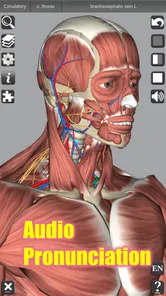
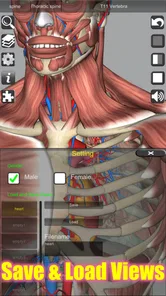
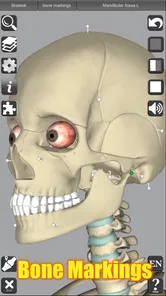
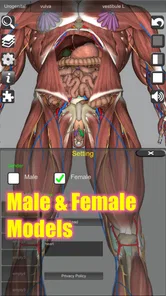
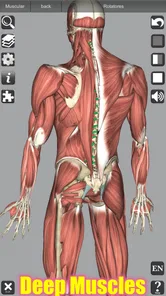
The first thing that struck me about 3D Anatomy is its stunning visuals. Imagine being able to see every muscle, bone, and organ in three dimensions! The app lets you zoom in, rotate, and explore the human anatomy as if you were holding it in your hands. It’s like having an X-ray vision, but way cooler.
More From Our News Desk

 Gmail
GmailGmail in a Busy Inbox: Who Benefits Most?
From first account to crowded workday, Gmail earns its place through dependable search and flexible sorting—but its best fit depends on how much inbox maintenance you can tolerate.

 Prime Video
Switching to Prime Video: What Changes in Your Viewing Routine
Prime Video can make a compelling second home for streaming, but switching means learning a different catalog, rental layer, and route from browsing to playback.

 Universal TV Remote Control
Universal TV Remote Control Works Best as a Reliable Backup
A phone remote earns its place through quick setup and reliable habits. Here is how to get more from Universal TV Remote Control—and where its limits show.

 Weather - By Xiaomi
Weather by Xiaomi Review: Clear at a Glance, Less Clear Up Close
Xiaomi’s weather app makes everyday forecasts quick to scan, but its calm surface can leave useful details and recovery paths harder to find than they should be.

 X
XX Under Pressure: Can It Recover When Posting Goes Wrong?
A resilience-focused review of X, examining setup, mistaken posts, interruptions, weak connections, and the gaps that matter when recovery needs to be dependable.

 Clash of Clans
Clash of Clans Is Won Between the Battles
Its raids are quick; its community is a long-term project of coordination, teaching, rivalry, and shared responsibility—with all the friction that entails.
Latest News



Features That Stand Out
Now, let’s talk about what makes this app a must-have. First off, the detailed models are incredibly accurate, crafted with precision to ensure every little detail is spot on. Whether you're a med student cramming for exams or just someone curious about what’s beneath the skin, this app has got you covered.
Another feature I loved is the interactive quizzes. It’s one thing to look at a model, but testing your knowledge makes the learning process way more engaging. Plus, with regular updates, there’s always something new to learn!
For a realistic study routine, I’d use a quiz after exploring a region, then return to the model to revisit any answer I missed. That sequence is more useful than taking quizzes cold: the model helps you build a mental map first, while the questions reveal which names or locations still need work. Short sessions between classes can be enough to identify a weak spot to review later in a textbook.
I’d also use a missed quiz answer as a prompt, rather than immediately repeating the question until it feels familiar. First, I’d locate the relevant area in the model and describe its position relative to nearby structures. Then I’d try the question again. This is a practical way to separate two different problems: not recognizing a name and not understanding where the named structure sits. The distinction matters because rereading a list of terms may help with the first but do little for the second.
Ease of Use
Getting around the app is a breeze. The user interface is super intuitive, making it easy for anyone to navigate through the complex layers of the human body. You can easily switch between different systems, like the skeletal or muscular systems, with just a tap!
There is a trade-off with any three-dimensional anatomy tool: a movable model can be more revealing than a static illustration, but it may also take longer to orient yourself if you are looking for one specific structure. I’d keep a class diagram or a written list of terms nearby, then use the model to resolve questions about position and perspective. For a quick definition or a simple labeled overview, a conventional reference may be faster.
That makes it less suited to frantic last-minute lookup than a searchable glossary. If I have a few seconds to check a definition, a text reference gets me to the wording immediately. If I have a few minutes to work out how a muscle sits in a region, the model has a clearer advantage. I’d decide which kind of question I’m trying to answer before opening it, so exploration stays purposeful instead of turning into aimless rotation.
For studying on a phone, I’d keep each session focused on a small area rather than trying to inspect the whole body at once. A broad tour can be enjoyable, but it is easy to lose track of what you meant to learn. Picking one structure, making a prediction about its position, and checking that prediction gives the interaction a useful endpoint. It also makes it easier to return to class notes with a concrete question instead of a vague impression of having looked around.
Choosing it for the right kind of study
This app is a strong fit for students who learn visually, people reviewing muscle action, and curious users who want to explore anatomy outside a classroom. It may be less suitable if you need a full medical curriculum, clinical guidance, or a substitute for supervised instruction. Its age rating is Everyone, but the content is still most rewarding when you are willing to spend time looking carefully rather than expecting a short explanation to teach a whole topic.
Education Mobile developed the app, which costs $2.99. It has a 4.4 average from around 3,000 ratings, with over 100,000 installs. It first appeared on September 1, 2013, and version 7.0 requires Android 5.1 or later. Those details put it in the paid-reference-app category rather than the try-before-you-buy route, so I’d weigh the value of repeated study against whether you already have a 3D anatomy resource through school.
A practical everyday use would be a student checking a muscle’s position after a lecture, then rotating the model to connect its location with its action before revising notes. If you’re deciding whether the purchase makes sense, ask yourself whether seeing anatomy from several angles will solve a real learning problem for you. If you mostly need quick facts, a free diagram or textbook may be enough; if spatial understanding is the sticking point, this offers a more hands-on way to study.
In that post-lecture situation, I’d avoid trying to review every muscle mentioned in class. I’d pick the one that was hardest to picture, make a quick sketch or write down its neighboring structures, then use the model to check the relationship. Afterward, I’d close the app and explain the muscle’s position and action without looking. That routine keeps the model in a supporting role and gives me a clearer sense of whether I can recall the material away from the screen.
For a beginner, the same approach can make a first look less overwhelming: start with a familiar question about where a body part is, then follow its position into the surrounding region. A curious reader can explore without needing to commit to a full course, while a student can use the same visual check alongside lecture notes. The app is less compelling for someone who prefers learning through long written explanations, since a three-dimensional view shows spatial relationships but does not by itself supply a complete lesson.
The paid price is worth considering in context. I would compare it with the resources I already use, not just with the cost of a single reference book: if a school or course already provides a 3D model that serves the same purpose, there may be little reason to add another. If the available materials are mostly flat images and I repeatedly struggle to picture the depth or orientation of a region, paying for an interactive model could be a more practical choice than collecting extra diagrams that all show the same angle.
Where it fits among anatomy study tools
Compared with a textbook, 3D Anatomy is better for turning a structure around and building a sense of depth, while a textbook is usually better for a carefully ordered explanation, context, and concise definitions. A labeled diagram can be quicker when I need a fast overview; this app makes more sense when the question is about how parts relate from different viewpoints. I would use the two together rather than expect either one to cover every kind of study need.
It also occupies a different role from a general medical reference. A reference is the better choice when I need precise wording or broader context, and a clinician is the right person for concerns about symptoms or treatment. This app is for visual learning, not self-diagnosis. Keeping that boundary clear lets me enjoy exploring anatomy without mistaking a model for personalized medical advice.
One useful trade-off is that three-dimensional exploration asks me to do more of the organizing. A textbook chapter often guides the reader through a planned sequence, whereas a movable model invites me to choose where to look. I find that freedom useful when I already have a question from class, but it can be distracting when I open the app without a goal. A short written list of two or three questions before studying gives the exploration direction without turning it into a rigid lesson plan.
For revision, I would keep the app open beside notes rather than use it as the only source. When a term is difficult to remember, I can check its visual location and then return to the notes for the formal wording. When an exam requires a particular level of detail, the course materials should set that level; a 3D view can clarify what the words describe but cannot tell me which facts an instructor expects me to know.
Who gets the most from the model
I’d recommend it most to learners who often ask, “Where is that in relation to the other parts?” and to students trying to connect muscle names with action. It can also suit a curious adult who wants to make sense of a diagram encountered in a book or class. The people who gain least are those looking for diagnosis, a structured medical course, or a rapid dictionary-style answer. In those cases, a qualified professional, a course resource, or a searchable reference is a better fit.
A useful test before paying is to think of one recent moment when a flat image left you confused. If the missing piece was depth, orientation, or how one structure relates to another, the app’s central strength addresses that problem. If the missing piece was an explanation of terminology or a reliable answer about a health concern, I would choose a different resource first. That distinction is more helpful than buying it simply because anatomy is interesting in general.
I also think it works best for someone comfortable with learning actively. The model rewards looking, turning, comparing, and checking an idea; it is not the kind of tool I would open expecting a long guided lecture to do the work for me. A learner who enjoys building a mental picture can get real value from that freedom. Someone who needs step-by-step teaching should pair it with a class or structured text rather than rely on it alone.
Why You’ll Love It
If you’re anything like me, you’ll appreciate how 3D Anatomy makes learning not just informative but fun. It transforms what could be a dry subject into an interactive experience. Whether you’re studying for a big test or just trying to figure out where exactly your liver sits, this app turns learning into an adventure.
So, if you’re ready to dive into the depths of the human body and explore every nook and cranny in a way textbooks just can’t offer, give this app a try. It’s not just an educational tool; it’s a whole new way of seeing ourselves.
3D Anatomy Frequently Asked Questions
What is 3D Anatomy, and who makes it?
3D Anatomy is a medical learning app by Education Mobile, built around an interactive three-dimensional view of the human body. Its focus includes muscle action, which makes it useful for people who want to explore how anatomy works rather than rely only on flat diagrams. It has an Everyone content rating, so its intended audience is broad.
What does the app help you learn about the human body?
The app centers on learning human anatomy through 3D models and muscle action. Being able to explore anatomy in three dimensions can make it easier to connect structures and movements than studying a static image alone. It may suit independent learners as well as people studying medical subjects, though it is best treated as a learning aid rather than a substitute for formal instruction.
What devices are compatible with the 3D Anatomy app?
The 3D Anatomy app is designed to be compatible with both Android and iOS devices. It's optimized for smartphones and tablets, providing a seamless experience on both platforms. Ensure your device runs on Android 8.0 (Oreo) or later, or iOS 11.0 or later, to enjoy the full features of the app.
How accurate is the anatomical information provided by the 3D Anatomy app?
The 3D Anatomy app provides highly accurate and detailed anatomical information. It is developed in collaboration with medical professionals and institutions to ensure reliability. The app includes detailed 3D models that are verified for educational use, making it a valuable tool for students and healthcare professionals alike.
Is the 3D Anatomy app suitable for educational purposes?
Yes, the 3D Anatomy app is highly suitable for educational purposes. It offers interactive 3D models and detailed anatomical descriptions that aid in learning and understanding human anatomy. Whether you are a medical student, a healthcare professional, or someone interested in anatomy, the app provides a comprehensive educational experience.
Pros
- Interactive 3D models enhance learning
- Detailed anatomical structures available
- User-friendly interface for easy navigation
- Regular updates with new features
- Supports multiple languages for wider reach
Cons
- Requires high storage space
- Occasional app crashes
- Some features require in-app purchases
- Limited offline functionality
- May not cover all anatomical details











