Word Garden : Crosswords
- 15.11K
- 4.9
- Installs
- 10.00M
- Price
- Free
Screenshots
Analysis by Reviewed
The first few sessions with Word Garden: Crosswords are easy to enjoy: I can open it for a quick word challenge, make a little progress, and put my phone away without needing to plan a long session. That low-effort start is the game’s strongest hook. Whether it earns space on my phone after the novelty wears off depends on whether I still enjoy the rhythm of solving anagrams and returning to a familiar puzzle routine.
A friendly first week, with a useful learning curve
As a free word puzzle game from IsCool Entertainment, Word Garden: Crosswords suits people who like finding words from a set of letters more than tackling a newspaper-style grid full of obscure clues. Its Everyone age rating also makes it an approachable choice to share with family, though younger players may still need a little help with unfamiliar vocabulary. The game’s appeal is immediate: I can try a few combinations, spot a word I had overlooked, and feel progress without needing a lengthy tutorial.
For a realistic everyday use, I’d keep it as a short break between errands or while waiting for a coffee, rather than opening it when I need a completely hands-free activity. The small-screen format makes it convenient, but solving still asks for attention; it is not a good fit while walking, working, or trying to follow a conversation. If you enjoy crossword books because of their layered clues and broad range of formats, this is a lighter alternative, not a replacement for that deeper style of puzzle.
Who will settle into its rhythm
I think its strongest audience is someone who enjoys spotting familiar words in a scrambled set of letters and likes seeing small progress accumulate. It can work well for a parent and child taking turns, too, as long as an adult is comfortable explaining less common words. Because each round is easy to approach in short bursts, there is no need to reserve a quiet evening or remember a complicated story between visits. That makes it more practical for spare moments than a long-form puzzle app that expects sustained concentration.
There is a useful distinction between wanting a crossword and wanting a word-finding game. In a traditional crossword, clues lead you toward answers, and crossing entries can help resolve uncertainty. Here, the pleasure comes more from trying letter arrangements and recognizing words. If you want cryptic clues, broad subject knowledge, or a sense of solving one interconnected grid, I’d choose a dedicated crossword app or a paper puzzle instead. If you like the immediate “I can see the word now” moment, this format is a better match.
What keeps the routine worthwhile
The daily puzzles give the game a reason to return to it, while hints can help when a letter combination has stopped making sense. I find it more satisfying to pause and try another arrangement before spending a hint: that little delay often reveals a word I was mentally skipping over. This is a practical way to keep assistance from turning every tricky moment into an instant answer, and it makes the game feel more like a steady mental warm-up than a race through prompts.
At 4.9 on average from around 459,000 ratings, with more than 10 million installs, it has clearly found a broad audience. Those figures are useful context, but they do not tell me whether its particular puzzle style will suit you. The game is a stronger match for players who like short, repeatable word challenges than for people seeking a single long, difficult crossword to work through over an evening.
More From Our News Desk

Weather by Xiaomi Review: Clear at a Glance, Less Clear Up Close

X Under Pressure: Can It Recover When Posting Goes Wrong?

Clash of Clans Is Won Between the Battles

Android Auto Makes the Case for Quieter Car Software

MobiOffice: Transforming Mobile Productivity with Seamless Integration

EA SPORTS FC™ Mobile Soccer: Redefining Mobile Sports Gaming
Making a small session feel satisfying
A practical way to play is to give yourself a modest stopping point before you begin: a quiet coffee break, a wait at an appointment, or a few minutes after lunch. That boundary helps the game stay a pleasant pause instead of becoming something I keep reopening out of habit. If I’m stuck, I’d first scan the letters from a different starting point, then set the phone down briefly and come back. This costs nothing and often helps me notice combinations that feel invisible when I keep staring at the same arrangement.
Hints are most useful when I reserve them for a genuine block rather than using them to keep every session moving at full speed. That choice trades faster progress for more of the satisfaction that comes from solving independently. The reverse is reasonable if I’m tired or only have a moment: using help can make a short break feel smooth, but leaning on it too quickly may weaken the puzzle’s main appeal. The right balance depends on whether I’m playing to stretch my vocabulary or simply to relax.
Small frictions to consider
The familiar format is also where fatigue can set in. If you prefer new mechanics, elaborate stories, or a wide variety of puzzle types, repeating anagram-based rounds may start to feel samey once the initial satisfaction of uncovering words fades. The social competition and themed puzzles can add reasons to return, but they will not change the basic appeal for someone who simply does not enjoy this kind of word search.
The social layer is best treated as a bonus, not a requirement for enjoying the core activity. A leaderboard can give friends a light reason to compare progress, but players who dislike competition may find that it adds little. I’d also be cautious about treating themed events as a complete change of pace: they can refresh the presentation, while the underlying pleasure still depends on finding words from letters. If you need every return to introduce a distinctly new mechanic, that recurring structure may eventually feel limiting.
Cost, device fit, and the commitment involved
The game is free to download, with in-app purchases ranging from $1.49 to $64.99 per item. I’d treat purchases as optional rather than part of the basic decision to try it: first see whether the daily rhythm and hint system work for you, then decide if spending makes sense. The current version is 3.5.4 and requires Android 5.1 or later, details worth checking against your device before installing. It was released on February 14, 2018, so this is an established game rather than a brand-new experiment.
That price range is a reason to set your own boundary before buying anything, especially if you are only testing whether the routine suits you. I would start with the free experience and avoid making a purchase just because a particular puzzle has slowed me down. If you are comfortable with optional spending and already enjoy this style, the choice is yours; if you want a word game with no purchase decisions at all, a paper puzzle or another app with a simpler payment model may feel more straightforward.
How it holds up beyond the first burst
So, what makes Word Garden: Crosswords special? For starters, it’s like having a whole crossword puzzle book right in your pocket. The app is packed with tons of puzzles that range from the easy-peasy to the downright brain-busting. Seriously, it’s like a gym for your brain, and it's super addictive. I found myself sneaking in a few puzzles during my coffee breaks, and before I knew it, I was hooked!
Features that Keep You Hooked
Let’s dive into the nitty-gritty of what the app offers. First off, the interface is clean and user-friendly. You don’t have to be a tech wizard to navigate through the app. Everything is laid out in a way that even your grandma could figure out, which I absolutely love. It’s super intuitive, and the design is easy on the eyes—perfect for those long puzzle sessions.
Another cool feature is the daily puzzles. Every day, there’s a new challenge waiting for you, and trust me, it’s like a little gift each morning. Plus, if you're stuck, there are helpful hints to give you that gentle nudge without outright giving you the answer. It's a great balance of challenge and assistance, keeping the game fun and engaging.
The Social Side of Word Puzzling
One of the standout features of Word Garden: Crosswords is the social aspect. You can connect with friends or even make new ones within the app. There's a leaderboard where you can see how you stack up against other players. It adds a competitive edge that I didn’t know I needed until I started playing. There's nothing quite like nudging ahead of your pals and claiming the top spot!
Oh, and did I mention the themed puzzles? The app regularly updates with seasonal and themed puzzles, which adds a fun twist to the usual gameplay. Whether it's a spooky Halloween theme or a cozy winter puzzle, there's always something fresh to keep you entertained.
Where another word game may suit you better
Compared with word searches, which ask me to scan a fixed grid, this game makes me actively rearrange letters and test what I can recognize. That makes it a more hands-on choice for a short pause, but it can also feel less relaxing if I’m not in the mood to concentrate. Compared with a word-guessing game built around one answer, its appeal is the repeated discovery of different possible words rather than narrowing toward a single solution.
For a player who wants a quiet solo habit, that focused loop is a strength. For a group looking to talk while playing, it may be less suitable than a party word game, since attention stays on the letters and the screen. I’d choose this when I want a small, self-contained challenge; I’d pick a crossword app when I want clue variety, and a social word game when conversation matters more than solitary concentration.
Why You Should Download It Now
In conclusion, if you're a fan of word games, Word Garden: Crosswords is a must-have on your device. It's fun, challenging, and a great way to keep your mind sharp. Plus, it’s free to download, and who doesn’t love a good freebie? Whether you're a crossword pro or a beginner looking to dip your toes into the world of word puzzles, this app has something for everyone.
So, what are you waiting for? Grab your phone, download Word Garden: Crosswords, and start flexing those brain muscles. Happy puzzling!
Does it earn a lasting place?
For me, the best long-term approach is to make it a modest habit rather than a daily obligation. A puzzle during a quiet break can be a pleasant reset; forcing a session when the letter combinations feel repetitive is more likely to turn a relaxing game into a chore. The daily challenge provides a simple anchor, while the social leaderboard is useful mainly if friendly comparison motivates you. If you prefer playing privately, you can focus on the puzzles and treat the competitive layer as optional.
One small strategy I’d use is to avoid spending hints as soon as I hesitate. Try rearranging the letters, take a short pause, then return with fresh eyes. That keeps the challenge intact and makes hints more valuable when I genuinely hit a wall. Conversely, if you mostly want a quick, frictionless distraction and dislike being asked to think through word combinations, another casual game may be a better fit.
My overall recommendation is measured: I’d keep it installed if I genuinely enjoy anagram solving and find myself choosing it during spare moments, rather than keeping it because I feel obliged to protect a streak or climb a ranking. It is a comfortable fit for brief, repeatable play, and the daily puzzle and optional social comparison can give the routine a little shape. The limitation is just as clear: neither a theme nor a leaderboard changes the central task. If that task still feels satisfying after the first week, the game can become a pleasant small habit; if it already feels repetitive, there is no need to force it into a permanent place on your phone.
Word Garden : Crosswords Frequently Asked Questions
What kind of game is Word Garden: Crosswords?
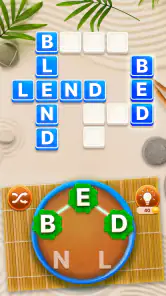
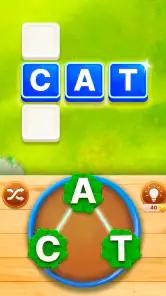
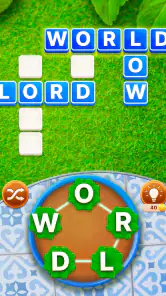
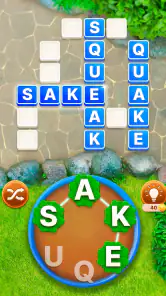
Word Garden: Crosswords is a word puzzle game centered on anagrams and crossword-style challenges. Its basic idea is to use a set of letters to discover words that fit into a puzzle, making it a straightforward option if you enjoy spotting letter combinations and solving word grids. The store describes it as a word puzzle game with anagrams, so expect word-finding to be the main activity.
Is Word Garden: Crosswords free to try?
Yes. Word Garden: Crosswords is free to download, so you can start playing without paying upfront. Optional in-app purchases are available, with prices ranging from $1.49 to $64.99 per item. Those purchases are separate from the free download and may be relevant if you want to spend money while playing. The game is categorized as a word game and is designed around anagrams and crossword-style puzzles.
Who makes Word Garden: Crosswords, and when was it released?
Word Garden: Crosswords is developed by IsCool Entertainment, and it was released on February 14, 2018. It is a word game built around anagrams and crossword-style puzzles, so its central appeal is finding words from a set of letters. Knowing the developer and release date can help you identify the game when browsing app stores or comparing it with other word puzzles.
What is Word Garden: Crosswords and how does it work?
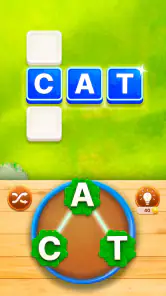
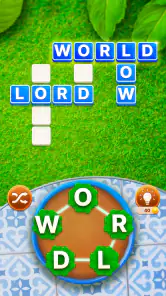
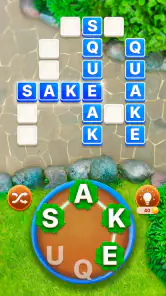
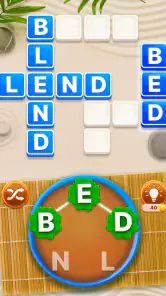
Word Garden: Crosswords is a word puzzle game that challenges players to find hidden words within a crossword-style grid. The game provides a series of letters, and users must swipe to connect them in order to form valid words. As players progress, the puzzles become increasingly difficult, offering a fun and engaging way to enhance vocabulary and spelling skills.
Can Word Garden: Crosswords be played offline?
Yes, Word Garden: Crosswords can be played offline. This is particularly useful for players who wish to enjoy the game without needing an internet connection, such as while traveling or in areas with limited connectivity. However, some features, such as leaderboard updates or in-app purchases, may require an online connection.
Pros
- Engaging crossword puzzles.
- Easy-to-use interface.
- Challenging levels for all ages.
- Offline mode available.
- Visually appealing design.
Cons
- Contains in-app purchases.
- Ads can be intrusive.
- Limited free hints.
- No multiplayer mode.
- Occasional lag on older devices.
- Category
- Word
- Version
- 3.5.4












