Wood Quiz Blast: Trivia Blocks
- 212.00
- 4.8
- Installs
- 500.00K
- Price
- Free
Screenshots




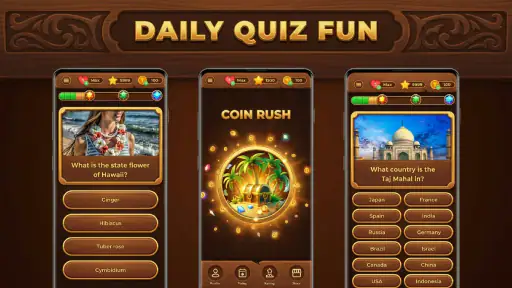
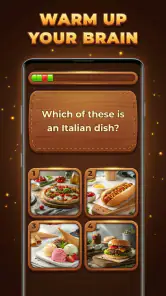
Analysis by Reviewed
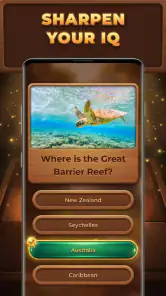
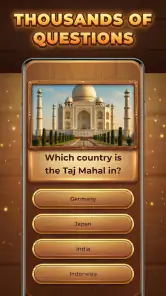
I would try Wood Quiz Blast: Trivia Blocks when I want a quiz that feels more relaxed than a head-to-head trivia contest. Its wood-themed presentation gives it a distinct, cozy identity, while the basic appeal is mental challenge: answer quiz questions, work through puzzles, and take a short break that still asks me to think. That makes it an easy game to consider for a quiet moment between other tasks, rather than something that demands a long session or a competitive mood.
My main advice is to approach it as a casual trivia game, not as a guaranteed IQ workout or a comprehensive learning course. The questions can make a spare few minutes more engaging, but a puzzle game cannot measure intelligence in any serious sense. I would recommend it to people who enjoy general-knowledge quizzes and like a softer visual style; players looking for detailed explanations, a specific subject curriculum, or elaborate strategy should look elsewhere.
Getting past the first-session friction
When I first try a casual quiz game, I pay attention to what makes the opening session feel awkward: unclear expectations, a phone that is not ready, or simply a style that does not suit me. I find it helpful to separate those issues before deciding whether to keep playing. That makes the first few minutes a fair test of the experience rather than a rushed verdict.
Keep expectations simple when starting
With a game built around quizzes and puzzles, the first useful check is whether its style suits you. If you enjoy answering questions for their own sake, the wood-inspired look is a pleasant change from the bright, fast-moving presentation common in many trivia titles. If you mainly want a score chase, live opponents, or a clearly structured course, this may feel less focused than the alternatives you have in mind.
I would also start with a short session rather than trying to make the game into a daily routine immediately. That gives you a chance to see whether the question style and puzzle rhythm are enjoyable without turning a casual download into a commitment. For a quick test, play when you have a few uninterrupted minutes and notice whether you are enjoying the questions themselves, not just tapping through to finish.
The game is listed as free, with optional in-app purchases priced from 59 cents to $19.49 per item. That is worth keeping in mind if you are installing it for a child or prefer to avoid unexpected spending. I’d check the purchase controls on the device before handing it over, and treat any paid item as optional rather than assuming it is necessary to enjoy the core quiz experience.
It is rated for Everyone, which makes the age guidance broadly welcoming, but that does not tell a parent whether every question or interaction is a perfect fit for a particular child. I’d sit nearby for the first session if the game is for a younger player. That is a practical way to see how they respond to the questions and to help with any device or purchase prompts they encounter.
More From Our News Desk

Weather by Xiaomi Review: Clear at a Glance, Less Clear Up Close

X Under Pressure: Can It Recover When Posting Goes Wrong?

Clash of Clans Is Won Between the Battles

Android Auto Makes the Case for Quieter Car Software

MobiOffice: Transforming Mobile Productivity with Seamless Integration

EA SPORTS FC™ Mobile Soccer: Redefining Mobile Sports Gaming
What to check before troubleshooting
If something seems wrong during setup, begin with the ordinary checks that solve many mobile-game snags: confirm the device has a stable connection if the game needs one at that moment, close and reopen the app, and make sure the device has enough free space to run normally. These are general steps, not claims about a special Wood Quiz Blast setting. They help distinguish a temporary phone issue from a problem that keeps happening inside the game.
The minimum operating-system requirement is Android 6.0. If the game will not install or update, check the device’s software version and whether the app store shows it as compatible. The current version is 2.11.008, but the number alone does not tell me whether a particular device has received an update or whether an installation is stuck. Checking the store’s update status is more useful than repeatedly tapping install.
For an older phone, I would also close apps running in the background before deciding that the game itself is at fault. A device under strain can make almost any game feel unresponsive. If the issue persists after a restart and a fresh launch, note exactly what happens—whether the app fails to open, freezes during play, or simply behaves inconsistently. That makes any later support request clearer and avoids changing several settings without knowing which one mattered.
One small but useful habit is to avoid troubleshooting several things at once. Try a restart, test the game, and only then move to the next reasonable step. If you clear data or reinstall without checking whether progress is stored, you could lose local state in some games. I would not assume how this title handles progress; I would first look for any in-game account or save guidance that is actually presented on the device.
Recovering a disrupted session
If a quiz session is interrupted by a call, a low battery, or switching to another app, reopen the game and see what state it returns to before tapping quickly. In puzzle games, impatient taps can make it harder to tell whether a session resumed or restarted. I find it helpful to pause for a moment, read the screen, and then continue only once I know what the game is asking me to do.
That approach is especially useful when playing in short gaps during the day. For example, if I open the game while waiting for a bus and have to put my phone away, I would treat that round as disposable unless the game clearly preserves it. A quick, low-pressure session is a better fit than beginning a long run just before a meeting or appointment. It keeps an interruption from turning into frustration.
If a question or puzzle appears confusing, slow down and reread it rather than repeatedly guessing. That sounds obvious, but quiz wording can matter, and tapping in a hurry is a poor way to judge whether a question was unclear or whether I simply missed a detail. When I want the game to be relaxing, I would rather accept a slower pace than turn every answer into a reflex test.
If the screen appears stuck, try leaving the game and reopening it once. If the same point repeatedly causes trouble, record the device model, operating-system version, and what you were doing immediately before the issue. Those details are more useful than a vague report that the game “doesn’t work.” Avoid reinstalling as the first response if you care about progress, because the way a particular game stores a session should be checked rather than guessed.
When the phone, connection, or expectations are the real issue
Not every hiccup points to a defect in the game. A weak connection can affect apps that rely on online services, while limited storage or an overloaded device can interfere with installation and performance. If other apps are also slow, I would look at the phone first. If everything else works normally and the same Wood Quiz Blast problem is repeatable, then it makes sense to treat it as a game-specific issue.
It is also easy to mistake a mismatch in expectations for a technical problem. Someone expecting a head-to-head contest may find a more solitary quiz format less exciting, while a player hoping to study a subject systematically may want more context than a casual puzzle provides. Before changing settings or reinstalling, ask whether the experience itself is what you wanted. Sometimes the best fix is choosing a different kind of trivia game.
The wood aesthetic is part of the game’s appeal, but a comfortable presentation cannot make every question personally interesting. General trivia naturally varies in relevance from one player to another. If you prefer quizzes tightly centered on history, science, sport, or another topic, a specialist app is likely to offer a more consistent experience. Wood Quiz Blast makes more sense when variety and a laid-back mood matter more than a narrow syllabus.
How it fits into a real routine
I get the most from a quick trivia game when I choose a moment that can tolerate interruptions and keep the session low-pressure. Thinking about when I would actually open it—during a quiet wait, for example—also helps me tell whether its puzzle format fits my habits better than a competitive quiz or a study-focused app.
A useful alternative to competitive trivia
Compared with live quiz games, this is the kind of title I would choose when I do not want pressure from an opponent or a timer-driven social contest. Compared with quiz apps designed as study aids, I would expect less emphasis on a lesson plan and more on quick puzzle enjoyment. Those distinctions matter: neither style is automatically better, but they serve different needs. If you want to revise for an exam, choose a tool built around that subject and its explanations.
For an everyday scenario, imagine having ten minutes before dinner while someone else finishes cooking. I could open the game, answer a few questions, then put the phone down without needing to coordinate with friends or plan a full gaming session. The same short-burst use can suit a waiting room or a quiet break, provided you are comfortable stopping whenever real life interrupts. I would avoid playing while walking, driving, or doing anything that needs attention.
A less obvious way to get more from a casual trivia game is to treat missed answers as prompts for curiosity rather than as a score failure. If a question exposes a gap in what I know, I can make a mental note to look it up later instead of expecting the game to teach the whole topic. That keeps the session enjoyable while avoiding the mistaken impression that a handful of quiz answers amounts to thorough learning.
Another practical trade-off is session length. A short burst makes this a convenient filler, but frequent interruptions can make any puzzle feel disjointed. I would choose a moment when I can focus on the screen for a few minutes, rather than opening it during a conversation or while juggling several tasks. That small adjustment helps me judge the game fairly and makes the questions feel less like another notification competing for attention.
Who should give it a try—and who should pass
Wood Quiz Blast is a reasonable fit for casual players who like general knowledge, want a gentler alternative to competitive quiz apps, and appreciate a warm visual theme. It has a broad audience: it is a free trivia game from Quiz & Trivia Games by Mno Go Apps, has an average rating of 4.8 from around 35,000 ratings, and has been installed over 500,000 times. Those figures suggest that many players have tried it, but they cannot tell you whether its particular question style will suit you.
I would skip it if I wanted a demanding multiplayer ladder, detailed explanations after every response, a carefully sequenced learning program, or a game built around one specialist subject. I would also choose another option if I dislike short quiz puzzles or find wood-themed presentation less appealing than a cleaner, faster interface. A high rating does not remove those personal differences, so the best test is whether the first few sessions leave you curious to continue.
The release date is June 29, 2026, and the game is available for devices running Android 6.0 or later. That date is useful context if you are comparing it with older trivia titles, but I would still judge compatibility by the store page on your own device and the version currently offered there. On iOS, check the relevant store’s compatibility details rather than assuming Android requirements apply.
My practical verdict
I see Wood Quiz Blast: Trivia Blocks as a low-pressure choice for people who want questions and puzzles in a cozy-looking package. Its strongest use case is not replacing a study tool or a competitive quiz community; it is making an idle few minutes feel more mentally engaging. The free entry point makes it easy to try, while the optional purchases are a reason to keep spending controls in mind, especially on a shared family device.
My recommendation is to install it if you enjoy varied trivia, prefer a relaxed pace, and are happy to judge it by the questions rather than by claims about improving intelligence. Start with a short session, check that your phone meets the operating-system requirement, and avoid making purchases until you know whether the game earns a place in your routine. If you want structured learning or live competition, another category of quiz app will serve you better. For a casual puzzle break, though, Wood Quiz Blast: Trivia Blocks is an approachable option worth trying.
Wood Quiz Blast: Trivia Blocks Frequently Asked Questions
What is Wood Quiz Blast: Trivia Blocks?
Wood Quiz Blast: Trivia Blocks is a casual puzzle game that combines block placement with quiz-style challenges. Players fit wooden shapes onto a board while working through questions or objectives that encourage both logical thinking and general knowledge. The exact mix of trivia and block puzzles can vary by mode or update, so check the in-game instructions before starting. It is designed for quick sessions as well as longer attempts to improve your score.
How do you play Wood Quiz Blast: Trivia Blocks?
The game centers on placing available wooden blocks into empty spaces on a grid, typically aiming to complete rows or columns and clear space for new pieces. Trivia prompts or related objectives add another layer to the puzzle, so success may depend on both choosing sensible placements and responding carefully. Read each level’s directions, since controls, scoring, and challenge rules may differ. If a move seems unclear, use the tutorial or practice rounds to learn the mechanics.
Is Wood Quiz Blast: Trivia Blocks free to download and play?
The app may be available to download without an upfront purchase, but free-to-play games can include advertisements, optional in-app purchases, or other features that affect progression. Availability and pricing can also differ between the Google Play Store and Apple App Store, as well as by region. Review the store listing and purchase details before installing, and check device settings if you want to restrict accidental purchases, especially when children use the device.
Can I play Wood Quiz Blast: Trivia Blocks offline?
Offline access depends on how the current version handles game data, advertisements, events, and account features. Basic puzzle play may be available without a connection, while daily challenges, rankings, rewards, or other online services may require internet access. If you need to play while traveling, open the game once while connected and test its available modes before relying on offline play. The app’s store listing or in-game support can clarify current requirements.
Is Wood Quiz Blast: Trivia Blocks suitable for children, and what should I check before installing?
The block-puzzle format may be approachable for a wide range of ages, but suitability also depends on the trivia content, advertisements, data practices, and any optional purchases. Check the age rating and privacy information on the relevant app store, and supervise younger players if the game offers ads, external links, or spending options. You should also confirm that your device meets the listed requirements and that the app is available in your region.
Pros
- Combines trivia questions with block-puzzle gameplay for a change of pace.
- Short rounds make it easy to play in spare moments.
- A simple interface is approachable for casual players.
- Trivia offers a light way to test general knowledge.
- Block placement adds a strategic element beyond answering questions.
Cons
- Question difficulty and topic variety may not suit every player.
- Repeated questions can make longer sessions feel predictable.
- Puzzle space can become limiting when blocks do not fit.
- Progress may depend on both trivia knowledge and puzzle skill.
- Ads or optional purchases may interrupt play or affect progression.
- Category
- Trivia
- Version
- 2.11.008